
Community listing page, reviews here may not be monitored by the author.
NetherPortalHelper

No reviews yet
Precise coordinate calculator and navigation HUD for Nether portal linking.
Community voices
Reviews
No reviews yet. Be the first to review this project!
Get it on
Available Platforms
Compatibility
Supported Environments
Runs entirely on the client. Works on vanilla servers.
About
Project Details
For authors
Embed Badge
If you're the author of this project, you can embed a live badge anywhere that supports HTML or Markdown. It updates automatically whenever ratings change.
Use HTML for any page that supports it, or Markdown for README files and Markdown-based descriptions.
Identifiers
Platform IDs
Resources
External Links
About
Description
🔮 Nether Portal Helper
Stop doing math. Start linking portals perfectly.
We've all been there: You build a portal in the Nether, step through, and end up inside a stone wall—hundreds of blocks away from your base. Nether Portal Helper is the simple, client-side utility that solves this problem forever.
No more calculators, no more F3 debug screens, and no more guessing.
✨ Features
- 🧠 Zero Mental Math: The moment you stand still, the mod instantly calculates the exact coordinate conversion between Overworld (x8) and Nether (/8).
- 🔒 Target Locking System: Found the perfect spot? Press [P] to "freeze" the target coordinates. The mod remembers them for you, so you don't have to write them down.
- 🧭 3D Navigation Compass: Once locked, a large, intuitive 3D arrow appears on your screen. It guides you to the exact block you need to place your portal on.
- Green Arrow: You are on the right path.
- Red Arrow: You are going the wrong way (turn around!).
- Checkmark (✔): You have reached the perfect spot. Build here!
- 📏 Precision Mode: The mod checks if you are on the exact block grid (X and Z) to ensure a 1:1 perfect link.
- 👀 Stay Immersed: The UI is designed to be minimal. Toggle the entire overlay on or off instantly with [F6].
🎮 How it works
- Scout: Stand where you want your portal in the Overworld.
- Lock: Look at the HUD (Top Left) and press [P] to lock the destination coordinates.
- Travel: Enter the Nether.
- Navigate: Follow the large navigation arrow in the center of your screen.
- Build: When the arrow turns into a green Checkmark (✔) and says "BUILD HERE", place your obsidian.
- Done: Light it up! Your portals are now perfectly linked.
🌍 Global Support
The mod automatically adapts to your language settings. Fully translated into:
- 🇺🇸 English
- 🇩🇪 German
- 🇪🇸 Spanish
- 🇫🇷 French
- 🇷🇺 Russian
- 🇨🇳 Chinese (Simplified)
- 🇵🇱 Polish
⚙️ Installation & Config
- Client-Side Only: You can use this on any server (Vanilla, Spigot, Paper, Modded) without the server needing to install it.
- Default Keys:
P: Freeze/Unfreeze CoordinatesF6: Toggle Overlay Visibility- (Keys can be changed in the standard Minecraft Controls menu)
🐞 Issues & Feedback
Found a bug or have a suggestion? Please report it on the Issues Page.
Screenshots
Gallery
-
 How to use the mod
 -
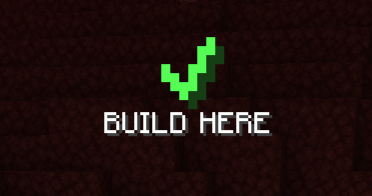 BUILD HERE
 -
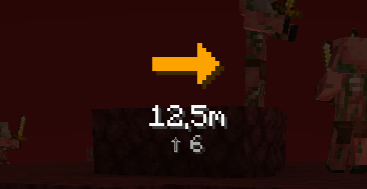 Direction Arrow
 -
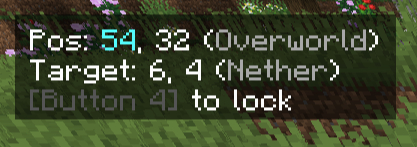 Chords
 -
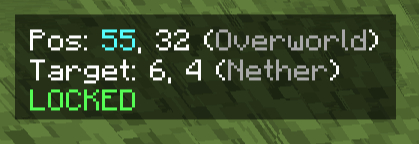 Locked Cords
Versions
Files
Relations
Project Relations
More like this
Similar Mods
Suggestions use data such as tags, dependencies, dependents, descriptions, titles, and more to rank how much they overlap with this mod.
On ModDex
Community snapshot
By the numbers
Statistics

Want to reach Minecraft players?
We're looking for a server hosting partner to feature here and other parts of the site. Interested? Send us a message!
Get in touchGet it on
Available Platforms
On ModDex
Community snapshot
By the numbers
Statistics
Resources