
Community listing page, reviews here may not be monitored by the author.
NPC Plugin

No reviews yet
Customizable NPCs via GUI and API
Community voices
Reviews
No reviews yet. Be the first to review this project!
Get it on
Available Platforms
About
Project Details
For authors
Embed Badge
If you're the author of this project, you can embed a live badge anywhere that supports HTML or Markdown. It updates automatically whenever ratings change.
Use HTML for any page that supports it, or Markdown for README files and Markdown-based descriptions.
Identifiers
Platform IDs
About
Description





If you have any suggestions, would like a feature to be added, or encounter any issues, you can use the issue page or contact me on Discord @eisi05
NpcPlugin
Create, customize, and manage player-like NPCs with an in-game editor GUI, click actions, AI goals, and a built-in path system.
⚠️ Paper is currently in an alpha/beta build for 26.3, so the plugin may break in a later Paper build! This is why versions 3.4.x are tagged with
-SNAPSHOT!
⚠️ Important: If you're upgrading from a version earlier than 2.1.0, you must first update to a version between 2.1.0 and 2.4.2 before installing 3.x.x.
🌍 Translations & Localization:
If you want to add a new language to the project, please reach out to me so I can set it up on Crowdin for you! Or you can send me a translated .zip file directly
If you want to make a tutorial video about it, feel free to do so
Supported Versions
Spigot: 1.20.6 - 26.2
Paper: 1.21 - 26.2
Overview
- In-game editor: create and configure NPCs directly on your server.
- Click Actions: build action chains for left/right/both clicks.
- Path system: create and reuse paths (including visualization + testing).
Getting Started
/npc create/npc edit- Right-click an NPC to open its editor.
Links
- Plugin docs: https://github.com/Eisi05/NpcApi-Spigot/wiki/PLUGIN-Home
- API / Developer docs:
Highlights
- In-game NPC editor
- Toggle edit-mode and configure NPCs directly by interacting with them.
- Edit common properties like name, skin, equipment, glow, visibility, tab-list, pose, and more.
- Click Actions (Left / Right / Both)
- Build action chains that run when players click an NPC.
- Built-in action types include:
Command(run commands with placeholders + variables)Server(send players to a BungeeCord server)Wait(wait by time or by command trigger)Animation(play an animation)Path(make the NPC walk along a saved path)SetVariable(set local/instance/global numeric variables)Condition(run a sub-chain if an expression is true)Loop(repeat a sub-chain; while-loop or for-loop)Npc(apply NPC options per-player or globally as an action)Stop(stop the chain)
- Path system
- Create paths using points, visualize them, test them with a temporary NPC, and reuse them in NPC actions.
- AI Goals
- Configure NPC behavior with built-in goals: Walk to Location, Walk Path, Follow Entity, Attack Entity, Look Around, Wait, and Wander.
- Set target predicates using expressions for dynamic entity selection.
- Expression Parser
- Use mathematical expressions with variables, functions, and boolean logic.
- Support for local, instance, and global variables.
- Execute commands within expressions and use their results.
- Localization + PlaceholderAPI
- Ships with language files (default
en_US). - PlaceholderAPI is supported (soft-depend): placeholders can be used in plugin messages where applicable.
- Ships with language files (default
Guides
Getting Started (Installation + Quick Start)
Installation
- Download the jar and place it into your server’s
plugins/folder. - Start the server once.
- Configure (optional):
plugins/NpcPlugin/config.ymlplugins/NpcPlugin/lang/<language>/*.json
- Restart or run
/npc reload.
Quick Start
1) Create an NPC
/npc create
2) Enable edit-mode
/npc edit
While edit-mode is enabled:
- Interact with an NPC to open its editor GUI.
If the NPC is not editable, you’ll get a message like This NPC is not editable!.
3) Configure NPC options in the GUI
The GUI lets you change things like:
- Name
- Skin (player name / UUID / local
.png/ URL /.ymlfile / PlaceholderAPI) - “Use Player Skin” (per-player skin)
- Equipment slots
- Visibility / enabled state
- Tab list visibility
- Hide nametag
- Pose
- Skin parts
- Glowing + color
- Look-at-player radius / interval
- Scale
- Teleport to NPC / teleport NPC to you
- Delete NPC
- Goals
For detailed information on setting skins, see the Skins guide.
Click Actions
Click Actions (Left / Right / Both)
In the NPC GUI go to Click Action.
You can configure actions separately for:
- Left click
- Right click
- Both (combined)
You can create an action chain by adding multiple actions.
Action editing tips
- Remove an action: middle-click an existing action.
- Add actions quickly: shift-click an action type to append it.
- Reorder / insert: pick up an action type onto your cursor and click a slot.
Common action types
Command
Executes a command.
- Input can be with or without leading
/(the plugin stores it as/<command>). - Placeholders supported:
{player}/%player%/<player>{player_name}/%player_name%/<player_name>
- Supports variables/expressions via the plugin action system.
- There is optional syntax validation.
Example:
warp spawnserver hubmsg {player} Welcome!
Server (BungeeCord)
Sends the player to another BungeeCord server.
Example server name:
hub
Wait
Pauses the chain before continuing.
You can switch between two modes in the editor:
Time mode
- Left/Right click to adjust the time
- Shift+Left/Shift+Right for bigger steps
- Range is clamped (min
0.05s, max600s)
Command mode
Instead of waiting for time, the chain waits until an admin triggers it:
Waitstores a name (string)- The chain continues only after:
/npc wait <player> <name> [values...]
If [values...] are provided, they are exposed to the next actions as local variables:
<name>-0,<name>-1, ... (numeric values; invalid numbers become0.0)
This is useful to wait for external systems (minigames, scripted events, etc.).
Note (Path)
The Path action also uses the same wait mechanism internally: the chain continues when the NPC finishes walking.
Path
Makes the NPC walk along a saved path.
- You pick a path name (must exist; same world) + a speed (
0.01–1.0). - Optional flags:
- For all (everyone sees the NPC walking)
- Change real location (updates the NPC's real location while walking)
Animation
Plays an animation on the NPC for the clicking player.
- Left click: next animation
- Right click: previous animation
SetVariable
Sets a numeric variable.
- Type:
- Local (stored per-player)
- Instance (stored on the NPC)
- Global (stored server-wide; persisted in
global-variables.yml)
- Name must match
^[a-zA-Z_][a-zA-Z0-9_-]*$ - Value is an expression
If the value is missing, the action does nothing (admins get a warning).
Condition
Runs a sub-chain only if its expression is true.
- You edit the sub-chain like a normal action list
- The condition expression is edited via the "value" item
Loop
Repeats a sub-chain.
There are two loop types:
While-loop
- Repeats while the expression is
true
For-loop
- Repeats with an integer loop index
- Configurable values:
- Start (optional; default
0) - End (required)
- Step (optional; default
1)
- Start (optional; default
You can change the loop type by Shift-clicking the action.
Npc
Opens a special editor that lets you apply NPC options as an action.
This is mainly used to change how the NPC looks/behaves for:
- Only the clicking player (per-player override)
- Everyone (global)
Two flags exist:
- Change globally: applies the configured options to the NPC’s global options
- Reset to default: removes per-player overrides and resets to the NPC’s defaults
Stop
Stops the current chain immediately (and stops nested chains too).
Run-on-show
In the action editor you can enable Run on show.
If enabled, the chain triggers when the NPC is shown to a player (not only when clicked).
Path System Guide
Path System Guide
Paths are shared and stored in:
plugins/NpcPlugin/paths.yml
Create a path from points
-
Add points at your current location:
/npc path point add
Or add at a specific index:
/npc path point add <index>
-
List points:
/npc path point list [page]
-
Visualize / toggle visualization of current points:
/npc path visualize points
-
Create the path:
/npc path create <name> [maxIterations] [allowDiagonalMovement]
After creation you can visualize it:
/npc path visualize <name>
Record a path by walking
-
Start recording:
/npc path record start
-
Walk the route.
-
Stop recording:
/npc path record stop
-
Create the path:
/npc path create <name>
Edit an existing path
/npc path edit <name>
This loads the saved path’s waypoints into the point list so you can remove/add points and re-create it.
List / delete / test paths
/npc path list [page]/npc path delete <name>/npc path test <name> [speed]
Goals Guide
Goals Guide
Goals give NPCs autonomous behavior. Configure them via the NPC editor GUI.
Available Goals
- Walk to Location: NPC walks to a specific location using pathfinding
- Walk Path: NPC walks along a saved path
- Follow Entity: NPC follows a target entity by UUID
- Attack Entity: NPC attacks nearby matching entities
- Look Around: NPC looks around randomly (idle behavior)
- Wait: NPC waits for a specified duration
- Wander: NPC wanders randomly within a radius
Attack Entity Predicates
Target entities using expressions with variables:
$distance- Distance to NPC$entity.x,$entity.y,$entity.z- Entity position$entity.health- Entity health$npc.x,$npc.y,$npc.z- NPC position[if entity @s[type=zombie]]- Command-based entity type check
Example predicates:
$distance < 5- Only attack within 5 blocks$entity.health < 10- Attack low health entities$distance < 10 && $entity.health > 5- Combined conditions
For more details, see the full Goals documentation.
Expression Parser Guide
Expression Parser Guide
Use mathematical expressions in click actions, goal conditions, and variable calculations.
Supported Elements
Operators: +, -, *, /, ^ (power), &&, ||, !, ==, !=, <, >, <=, >=
Math Functions: sin(), cos(), tan(), sqrt(), log(), exp(), ceil(), floor(), round(), trunc(), abs()
Constants: PI, E
Variables
$varName- Auto-resolve (local → instance → global)$global.varName- Server-wide variable$instance.varName- NPC-specific variable$local.varName- Player-specific variable
Special Variables:
$self.rightClick/$self.leftClick- Click type (1 or 0)$self.sneaking,$self.flying,$self.op- Player state$loop.index- Loop iteration index
Command Execution
(/command)- Execute command inside expression/command- Standalone command execution
Examples:
2 + (/count players)- Use command result in calculation$global.score + 1- Increment variable($entity.health < 10) * 5- Conditional value
For the full syntax reference, see the Expression Parser documentation.
Commands
Commands
Core
/npc create [options](options are defined in key-value pairs like--name "Test")/npc copy <npc>/npc edit(toggle edit-mode)/npc edit <npc>(edit specific NPC)/npc edit <npc> <options>(edit specific NPC option, which are defined in key-value pairs like--name "Test")/npc delete <npc> [force](delete specific NPC)/npc list(opens NPC list GUI)/npc tp <npc> [location] [rotation]/npc tphere <npc>/npc reload [npc]/npc version/npc update(checks for a new plugin version)/npc cancel <npc>(cancels NPC click action)/npc cancel all(cancels all NPC click actions)/npc load <npc>(loads NPC from storage)/npc load <npc> <location>(loads NPC at specific location)/npc load <npc> <location> <rotation>(loads NPC at specific location with rotation)/npc click <npc>(executes NPC click action on self)/npc click <npc> <target>(executes NPC click action on target)/npc move <npc> turn <degree>(rotates NPC by relative degrees)/npc move <npc> <flag> [steps] [speed](moves NPC using direction flags)/npc help(shows help message)/npc issue(shows issue tracker link)/npc wiki(shows wiki link)/npc message <player> <message>(Can be used in command actions to send a message which also allows '&' color codes)/npc tag <npc> add <tag>(adds a tag to an NPC)/npc tag <npc> remove <tag>(removes a tag from an NPC)/npc tag <npc> list(lists all tags of an NPC)/npc animation <animation> [targets](plays an animation on the specified targets)/npc languages reload(reloads all language files from disk)/npc languages restore [language](restores default language files from resources, overwrites all 'official' language files)
Config
/npc config reload/npc config debug [true|false]/npc config avoid-command-check [true|false]/npc config look-at-update-interval [ticks]/npc config input-time [seconds]/npc config auto-update [true|false]/npc config placeholder-timer [ticks]/npc config check-valid-path [true|false]/npc config walking-viewer-distance [distance]/npc config precise-sleeping-hitbox [true|false]/npc config load-chunks-on-path [true|false]/npc config pathfinding-factory [a_star|bounding_box] [gridStep]/npc config name-display/npc config list
Exceptions (startup load failures)
/npc exceptions [page]/npc exceptions show <name>/npc exceptions delete <name>
Paths
All path commands are under:
/npc path ...
Main subcommands:
point add [index] [location] [rotation]point remove [index|location]point list [page]point clearcreate [name] [pathfinder] [maxIterations] [allowDiagonalMovement]delete <name>list [page]visualize [name]visualize pointsrecord start|stoptest <name> [speed]edit <name>
Movement
All movement commands are under:
/npc movement ...
Main subcommands:
record start [player](starts recording movement)record stop [player] <name> [overwrite](stops recording and saves)record stop <name> [overwrite](stops recording and saves for self)record(gives recording item)list [page](lists all movement recordings with pagination)details <name>(shows detailed information about a recording)delete <name>(deletes a movement recording)play <name> [speed](plays a recording on self)play <name> <target> [speed](plays a recording on target)
Execute Context
Execution modifiers allowing dynamic target selection and context redirection for NPC subcommands:
/npc execute as <selector> do <command>(executes targeted NPC command as the selected NPC context)/npc execute at <selector> do <command>(executes targeting location and orientation of selected NPC)/npc execute positioned as <selector> do <command>(executes at the position of selected NPC)/npc execute rotated as <selector> do <command>(executes with the rotation angles of selected NPC)
NPC Selector System
The target selector system (NpcSelector) parses entity target syntax matching standard Minecraft target selectors to query registered NPCs:
- Target Specifiers:
@a– Matches all loaded/registered NPCs.@s– Matches the self-referential NPC currently targeted inside an active/npc executecontext.@n/@p– Targets the single nearest NPC relative to the command source origin.@r– Selects a random NPC candidate.<name|uuid>– Directly queries an NPC by display name or unique ID.
- Filter Arguments (
[...]):tag=<value>/tag=!<value>– Filters NPCs possessing (or missing) specific assigned tags.nbt={<key>:<value>}– Evaluates target options against specific internalNpcOptionstates or custom stored data.distance=<min>..<max>– Constrains candidates based on Euclidean distance boundaries from the execution origin.limit=<count>– Restricts maximum return results.
Wait trigger
Used with the Wait click action (command mode):
/npc wait <player> <name> [values...]
Variables
Manage server-wide global variables via commands:
/npc variable list- List all global variables/npc variable get <name>- Get a variable's value/npc variable set <name> <expression>- Set a variable (supports expressions)/npc variable delete <name>- Delete a variable
Variables can also be managed via the SetVariable click action and used in expressions throughout the plugin.
Configuration
Configuration (config.yml)
look-at-update-interval:- Time in ticks between “look at player” updates.
avoid-command-check:- If
true, commands added to NPC actions will not be strictly validated.
- If
debug:- Enables extra debug logging.
input-time:- Conversation timeout in seconds (if
< 0, no timeout).
- Conversation timeout in seconds (if
auto-update:- Automatically updates NPCs after option changes.
placeholder-timer:- Time in ticks between placeholder refreshes.
check-path:- Checks if a path is valid (solid block beneath the path)
walking-viewer-distance:- Distance in blocks at which players can see NPCs walking
precise-sleeping-hitbox:- If true, uses precise hitbox detection for sleeping NPCs
load-chunks-on-path:- If true, loads chunks on the path of the NPCs
pathfinding-factory:- Pathfinder factory to use. Options are ASTAR and BOUNDING_BOX <gridStep> (e.g. "BOUNDING_BOX 0.5"). <gridStep> must be between 0.01 and 1.0.
- BOUNDING_BOX is based on Theta* and provides more precise collision detection, e.g. for blocks that are solid but can still be walked through (like a shelf).
pathfinding-passable-override:- List of block types that should be considered passable for pathfinding even though they are normally solid (like a shelf).
- This is only editable via the config.yml file and not via the
/npc configcommand!
Troubleshooting
Troubleshooting
- “This plugin does not support Paper servers!”
- You are running the Spigot build on a Paper server. Install the Paper build instead.
- Server action does nothing
- Ensure BungeeCord is set up and the server names match your proxy configuration.
- Can’t open the editor GUI
- Make sure you:
- Have
npc.admin - Enabled edit-mode via
/npc edit - The NPC is marked as editable
- Have
- Make sure you:
Skript Support
To use this plugin’s events in Skript, you need Skript-Reflect
Basic usage
import:
  de.eisi05.npc.api.events.<EventName>

on <EventName>:
    # your code here
Replace <EventName> with one of the events listed below.
Available Events
NpcHideEvent
Triggered after an NPC is hidden from a player.
Available values:
event.getNpc()→ NPCevent.getPlayer()→ Player
NpcInteractEvent
Triggered when a player interacts with an NPC.
Available values:
event.getNpc()→ NPCevent.getPlayer()→ Playerevent.getAction()→ ClickActionType (LEFT / RIGHT)event.isCancelled()→ boolean
NpcPostShowEvent
Called after an NPC is fully visible to a player.
Note: This event cannot be cancelled.
Available values:
event.getNpc()→ NPCevent.getPlayer()→ Playerevent.wasViewer()→ boolean (true if the player already saw this NPC before)
NpcPreShowEvent
Called before an NPC is shown to a player.
Note: This event can be cancelled.
Available values:
event.getNpc()→ NPCevent.getPlayer()→ Playerevent.wasViewer()→ booleanevent.isCancelled()→ boolean
NpcStartWalkingEvent
Called before an NPC starts walking along a path.
Available values:
event.getNpc()→ NPCevent.getPath()→ Pathevent.getWalkSpeed()→ doubleevent.isChangeRealLocation()→ boolean (whether real NPC location will update)event.isCancelled()→ boolean
NpcStopWalkingEvent
Called after an NPC stops walking.
Available values:
event.getNpc()→ NPCevent.getWalkingResult()→ WalkingResult (SUCCESS / CANCELLED)event.changeRealLocation()→ boolean (whether final position should be applied)
Example
You can also directly access Java methods inside Skript like this:
import:
  de.eisi05.npc.api.events.NpcInteractEvent

on NpcInteractEvent:
    set {_player} to event.getPlayer()
    send "Triggered!" to {_player}
Additional Resources
For more information about Skript-Reflect syntax and features, visit:
https://tpgamesnl.gitbook.io/skript-reflect/basics
bStats

Screenshots
Gallery
-
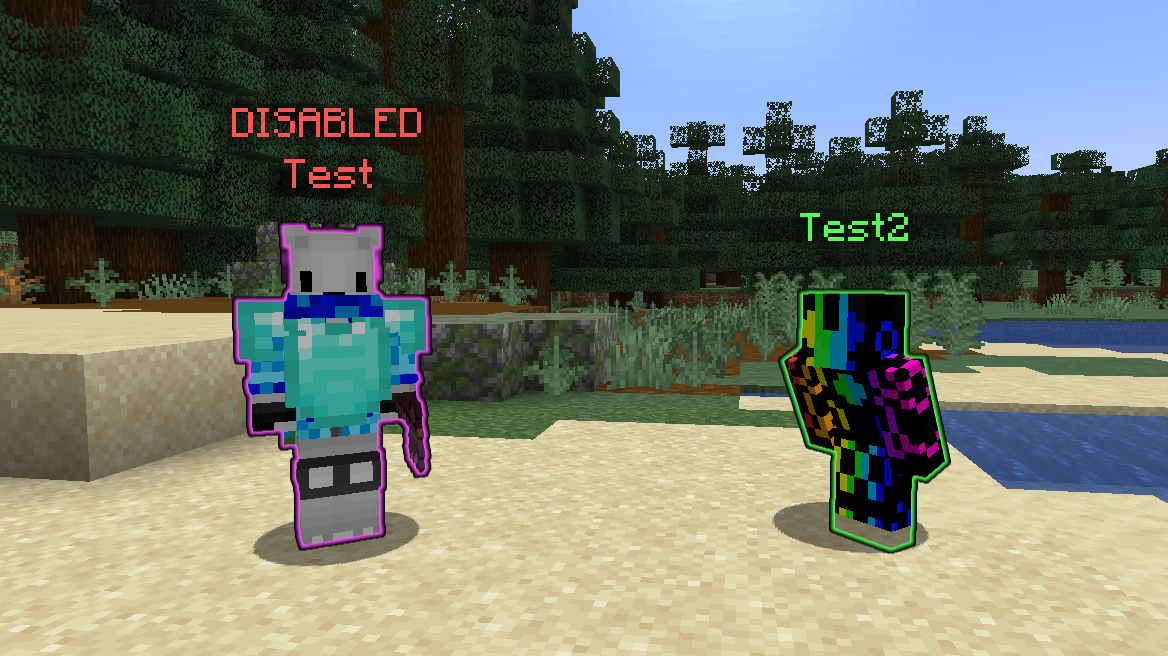 Npc Preview
 -
 Npc GUI Image showing configurable NPC settings
Versions
Files
Relations
Project Relations
More like this
Similar Mods
Suggestions use data such as tags, dependencies, dependents, descriptions, titles, and more to rank how much they overlap with this mod.
On ModDex
Community snapshot
By the numbers
Statistics

Want to reach Minecraft players?
We're looking for a server hosting partner to feature here and other parts of the site. Interested? Send us a message!
Get in touchGet it on
Available Platforms
On ModDex
Community snapshot
By the numbers