
Community listing page, reviews here may not be monitored by the author.
NsTut Endless

No reviews yet
Allows customization or removes build height limits, enabling construction beyond vanilla restrictions.
Community voices
Reviews
No reviews yet. Be the first to review this project!
Get it on
Available Platforms
About
Project Details
For authors
Embed Badge
If you're the author of this project, you can embed a live badge anywhere that supports HTML or Markdown. It updates automatically whenever ratings change.
Use HTML for any page that supports it, or Markdown for README files and Markdown-based descriptions.
Identifiers
Platform IDs
Resources
External Links
About
Description
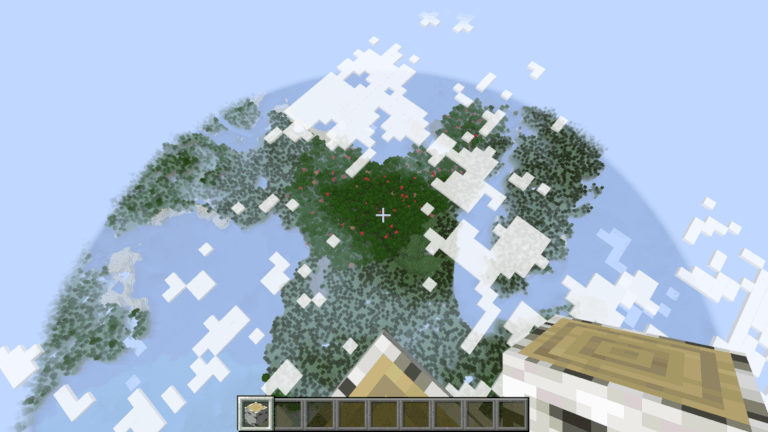
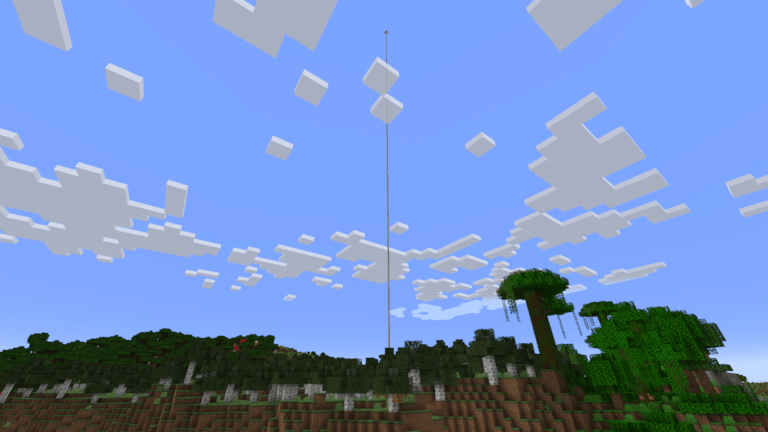
Endless lets you build higher and dig deeper than ever before. Tired of hitting the build limit? With Endless, you control how tall your world can be — up to Y=8192 and down to Y=-4096.
Features
- Extend Build Height — Set your own minimum and maximum build heights. Build towering skyscrapers reaching thousands of blocks into the sky, or dig deeper than the vanilla limit allows.
- All Dimensions Supported — Works in the Overworld, Nether, and End simultaneously.
- Compatible with Existing Worlds — Apply expanded build limits to worlds you already have.
- Works with Forge and Fabric — Pick your loader, the mod works the same on both.
- Waystones Compatible — Place waystone blocks anywhere within your expanded build range.
- Void Damage at Boundary — Void damage triggers 64 blocks below your configured minimum, giving you safe space to build at the bottom of the world.
Configuration
After launching the game once with Endless installed, a config file is created at config/endless.json. Open it with any text editor to customize:
{
  "buildHeight": {
    "minBuildHeight": -64,
    "maxBuildHeight": 320
  }
}- minBuildHeight — Lowest Y-level you can place blocks (default: -64, minimum: -4096)
- maxBuildHeight — Highest Y-level you can place blocks (default: 320, maximum: 8192)
Change the values to whatever range you want, save the file, and restart the game.
Example: Full Height
Want to unlock the full height range? Set both values to their extremes:
{
  "buildHeight": {
    "minBuildHeight": -4096,
    "maxBuildHeight": 8192
  }
}
Recommended Balanced Range
For a good balance of freedom and performance:
{
  "buildHeight": {
    "minBuildHeight": -512,
    "maxBuildHeight": 1024
  }
}
Limitations
- Lighting range: Dynamic lighting updates (block light and sky light) are limited to y=-1024 to y=1024 to keep the game running smoothly. Blocks placed far outside this range may appear incorrectly lit. Natural light from the sky still reaches all heights.
- Memory usage: Expanding the build height significantly increases memory usage. At maximum settings (Y=-4096 to 8192), each chunk allocates 768 sections instead of vanilla's 24. Allocate more RAM to Minecraft if using extreme settings.
- World generation: Terrain generation respects vanilla height rules. Expanded build height gives you more buildable space, but world generation patterns remain unchanged below Y=-64 and above Y=320. Use tools like WorldEdit or datapacks for custom terrain.
Suggestions & Bug Reports
Discord: Join the community
Github Issues: Report issues
Screenshots
Gallery
Versions
Files
Relations
Project Relations
More like this
Similar Mods
Suggestions use data such as tags, dependencies, dependents, descriptions, titles, and more to rank how much they overlap with this mod.
On ModDex
Community snapshot
By the numbers
Statistics
Want to reach Minecraft players?
We're looking for a server hosting partner to feature here and other parts of the site. Interested? Send us a message!
Get in touchGet it on
Available Platforms
On ModDex
Community snapshot
By the numbers
Statistics
Resources