
Community listing page, reviews may not be monitored by the author.



Community voices
Reviews
No reviews yet. Be the first to review this project!
Get it on
Available Platforms
Compatibility
Supported Environments
Runs entirely on the client. Works on vanilla servers.
About
Project Details
For authors
Embed Badge
If you're the author of this project, you can embed a live badge anywhere that supports HTML or Markdown. It updates automatically whenever ratings change.
Use HTML for any page that supports it, or Markdown for README files and Markdown-based descriptions.
Identifiers
Platform IDs
About
Description

Installation
This mod is client-only.
At the moment only Windows is supported.
Dependencies
- Cloth Config API
- Architectury API
- Fabric API (Fabric only)
- Mod Menu (Optional, Fabric only)
Features
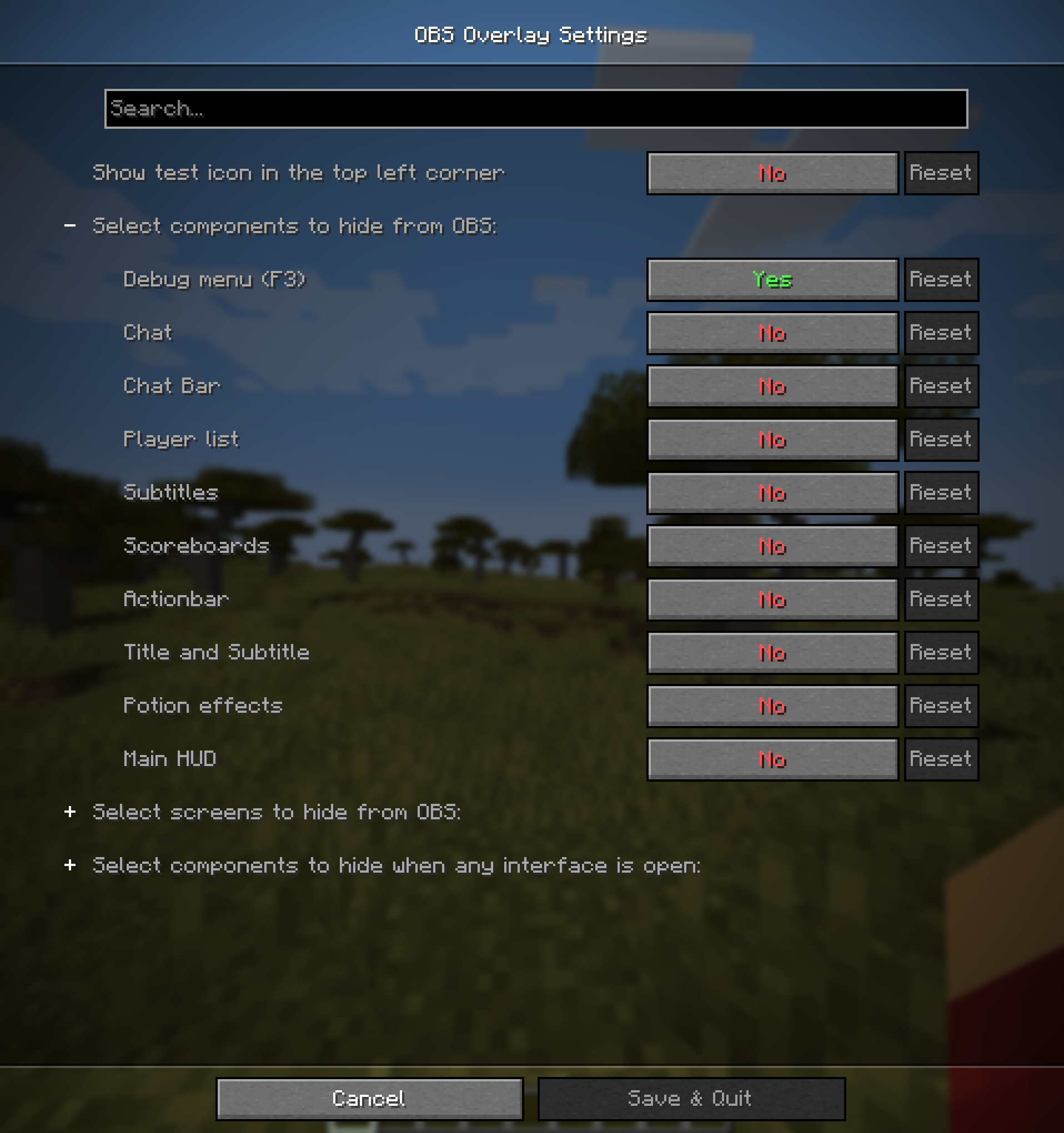
This mod lets you hide any combination of the following components:
- Debug menu (F3)
- Chat (without input bar)
- Chat input bar
- Player list (TAB)
- Subtitles (accessibility)
- Scoreboard
- Title and Subtitle from /title
- Actionbar from /title
- Effect display
- Main HUD (health, hunger, armor, experience, hotbar)
Additionally this mod lets you hide any combination of the following screens:
- Survival inventory
- Creative inventory
- Pause menu
- Command block screen
- Any HandledScreen by it's ID (e.g.
minecraft:anvil,minecraft:furnace) - All ingame screens
By default only Debug menu (F3) is hidden.
Warning! There is a possibility OBS might capture the HUD if started before game. If you hide any confidential information, make sure to double-check that it's not visible in the stream.
For additional safety you can enable test icon, which is displayed all the time and should not be visible on stream. It should let you check if the mod is working correctly.
I am not responsible for any confidential information accidentally shown on stream.
Usage
Mod settings can be accessed by:
- Clicking
Settings->Video Settings->OBS Overlay settings - Opening mod settings through ModMenu (Fabric only)
- Opening mod settings through Mods menu (Forge only)

API
If you want to add support for your own HUD components you can use API provided by this mod.
Check API documentation for more information.
Installation
This mod is client-only.
At the moment only Windows is supported.
Dependencies
- Cloth Config API
- Architectury API
- Fabric API (Fabric only)
- Mod Menu (Optional, Fabric only)
Features
This mod lets you hide any combination of the following components:
- Debug menu (F3)
- Chat (without input bar)
- Chat input bar
- Player list (TAB)
- Subtitles (accessibility)
- Scoreboard
- Title and Subtitle from /title
- Actionbar from /title
- Effect display
- Main HUD (health, hunger, armor, experience, hotbar)
Additionally this mod lets you hide any combination of the following screens:
- Survival inventory
- Creative inventory
- Pause menu
- Command block screen
- Any HandledScreen by it's ID (e.g.
minecraft:anvil,minecraft:furnace) - All ingame screens
By default only Debug menu (F3) is hidden.
Warning! There is a possibility OBS might capture the HUD if started before game. If you hide any confidential information, make sure to double-check that it's not visible in the stream.
For additional safety you can enable test icon, which is displayed all the time and should not be visible on stream. It should let you check if the mod is working correctly.
I am not responsible for any confidential information accidentally shown on stream.
Usage
Mod settings can be accessed by:
- Clicking
Settings->Video Settings->OBS Overlay settings - Opening mod settings through ModMenu (Fabric only)
- Opening mod settings through Mods menu (Forge only)
API
If you want to add support for your own HUD components you can use API provided by this mod.
Check API documentation for more information.
Screenshots
Gallery
-
 Preview
 -
 Settings
Versions
Files
Relations
Project Relations
More like this
Similar Mods
Suggestions use data such as tags, dependencies, dependents, descriptions, titles, and more to rank how much they overlap with this mod.
On ModDex
Community snapshot
By the numbers
Statistics
 (opens in a new tab)
Get it on
Available Platforms
On ModDex
Community snapshot
By the numbers