
Community listing page, reviews may not be monitored by the author.
ODMT Clicker

No reviews yet
A lightweight client-side autoclicker for Fabric 1.21.11 with randomized CPS, an AUTO mode that kicks in when you click fast, a clean HUD indicator and a built-in auto-tool.

Community voices
Reviews
No reviews yet. Be the first to review this project!
Get it on
Available Platforms
About
Project Details
For authors
Embed Badge
If you're the author of this project, you can embed a live badge anywhere that supports HTML or Markdown. It updates automatically whenever ratings change.
Use HTML for any page that supports it, or Markdown for README files and Markdown-based descriptions.
Identifiers
Platform IDs
Resources
External Links
About
Description
The Problem
Some things in Minecraft just need a lot of clicking. Mob farms, breaking through piles of blocks, long grinding sessions. After a while your finger hurts more than the game is fun. Most autoclickers are either external programs running outside the game, or clunky mods with confusing settings and no feedback on whether they're even on.
The Solution
ODMT Clicker is a lightweight autoclicker built directly into Minecraft. Everything is set up in one menu that looks and feels like vanilla, a small HUD shows you exactly when it's active, and an auto-tool picks the right tool for you while you mine. Install it, press the Down Arrow, done.
How It Works
Press Down Arrow in game to open the settings menu. Every option has a tooltip, so you can hover over it to see what it does.
Two Modes
Key mode - bind any key in the menu and use it to turn the autoclicker ON and OFF. With Hold LMB enabled, it only clicks while you hold the left mouse button. Turn it off and it clicks nonstop while enabled.
AUTO mode - no keybind needed (the key option is greyed out). Start clicking fast and the autoclicker turns on by itself. Stop clicking and it turns off. You decide how many fast clicks start it, how fast they need to be, and how long it waits before stopping.
Randomized CPS
Set a Min and Max CPS (1-20). Every single click gets a random speed from that range, so the rhythm is never perfectly flat. For example, set 10-14 and each click lands somewhere in between.
HUD Indicator
A small Auto: ON in green appears above your hearts and armor while the autoclicker is active. In Key mode, turning it off briefly shows Auto: OFF in red, which then fades away. In AUTO mode, the indicator disappears as soon as you stop clicking. The HUD can be turned off in the settings.
Auto-Tool
While you hold the left mouse button on a block, ODMT Clicker switches to the best tool from your hotbar. It first picks tools that will actually make the block drop, then the fastest one.
- Return slot - after mining, it switches back to the slot you had before
- Protect tools - it won't use a tool that's about to break
- Auto-tool pauses while the autoclicker is clicking, so it won't swap your sword for a shovel mid-fight
Keybinds
ODMT Clicker adds two keybinds:
| Key | Action | Default |
|---|---|---|
| Down Arrow | Open settings | Down Arrow |
| Toggle key | Turn autoclicker ON/OFF (Key mode) | Not bound |
Both can also be changed in Options > Controls > Key Binds > ODMT Clicker.

Settings
All settings are available in the in-game menu:
| Setting | What it does | Default |
|---|---|---|
| Mode | Key or AUTO | Key |
| Min / Max CPS | Random click speed range | 10 / 14 |
| Hold LMB | Click only while holding LMB (Key mode) | ON |
| HUD | Show Auto: ON / OFF indicator | ON |
| Start clicks | Fast clicks needed to start (AUTO) | 2 |
| Window | Time the start clicks must fit in (AUTO) | 300 ms |
| Stop after | Turns off after this long without clicking (AUTO) | 500 ms |
| Auto-tool | Switch to the best tool while mining | ON |
| Return slot | Go back to your previous slot after mining | ON |
| Protect tools | Skip tools that are about to break | ON |

Settings are saved automatically when you close the menu.
Multiplayer Warning
Using an autoclicker on multiplayer servers may get you banned. Many servers do not allow autoclickers or macros. Only use ODMT Clicker on servers where it is allowed, or after checking with the server administrator. You use it at your own risk.
Additional Info
Everything else worth knowing:
- Language: English and Polish - the mod follows your game language automatically
- Client-side only: install it in your own mods folder, nothing is needed on the server
- Requires Fabric API
- Minecraft 1.21.11 - built and tested on Fabric
- Saved settings: stored in
config/odmt-clicker.jsonand kept between sessions
Planned for Future Updates
More is on the way:
- More configuration options
- More quality of life improvements
Part of the ODMT Gaming collection.
Screenshots
Gallery
-
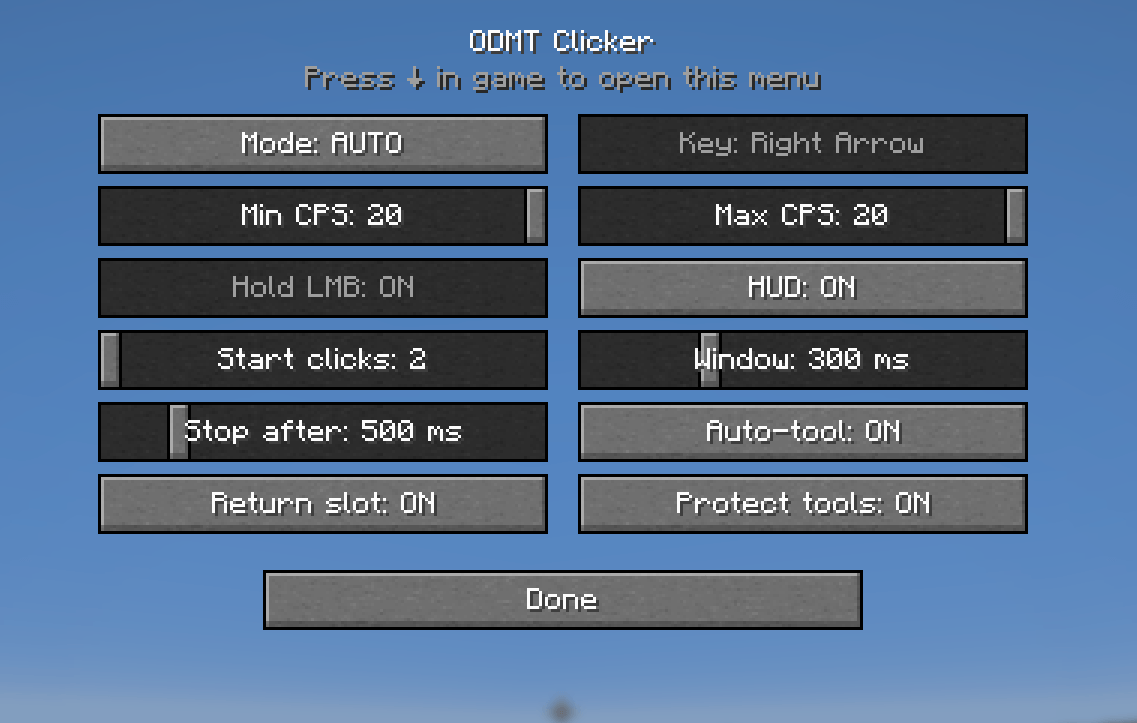 HUD Mod menu which can be open by clicking arrow-down in game.
 -
 Keybinds Keybinds can be changed in Minecraft Settings
Versions
Files
Relations
Project Relations
More like this
Similar Mods
Suggestions use data such as tags, dependencies, dependents, descriptions, titles, and more to rank how much they overlap with this mod.
On ModDex
Community snapshot
By the numbers
Statistics

Get it on
Available Platforms
On ModDex
Community snapshot
By the numbers
Statistics
Resources