
Community listing page, reviews may not be monitored by the author.
OfflineSkins Reloaded


No reviews yet
This is an unofficial continuation of OfflineSkins originally created by zlainsama (LainMI), ported and maintained by VoreZ

Community voices
Reviews
No reviews yet. Be the first to review this project!
Get it on
Available Platforms
Compatibility
Supported Environments
Runs entirely on the client. Works on vanilla servers.
About
Project Details
For authors
Embed Badge
If you're the author of this project, you can embed a live badge anywhere that supports HTML or Markdown. It updates automatically whenever ratings change.
Use HTML for any page that supports it, or Markdown for README files and Markdown-based descriptions.
Identifiers
Platform IDs
About
Description
OfflineSkins Reloaded — a quality-of-life mod that lets you cache and load custom skins and capes in Minecraft, even when you're offline.
The mod offers a wide range of settings to customize, manage, and optimize how skins and capes appear in your game.
THE 1.2.0 🧣 UPDATE
This update takes OfflineSkins Reloaded to the next level, bringing new features and an even better experience.
Key Features
-
Dressing Room — Added a fully functional Dressing Room where you can select your cached skins and capes.
-
OfflineSkins Reloaded Network 🛜 — Added full support for a third-party skins and capes system.
-
Mod Compatibility — Support for 3D skin layers, waving capes, and other mods.
-
17 Languages 🌍 — The mod is now translated into 17 languages.
🌍 Supported languages: English, Russian, Spanish, German, French, Italian, Japanese, Korean, Polish, Portuguese (Brazil), Simplified Chinese, Ukrainian, Azerbaijani, Turkish, Czech, Dutch, and Swedish.
🛠️ How to Use the Mod
OfflineSkins Reloaded lets you load your custom skins and capes in any situations, such as when you have no internet connection or are playing on offline-mode servers.
To get started, open the OfflineSkins Reloaded menu by clicking the button in Minecraft's main menu or pause menu. You can also press U or use the /offlineskins menu command.
-
Click Open Cached Images to open the folder containing your cached images.
-
Open the appropriate directory:
-
cachedImages/skins— Put your skin files here. -
cachedImages/capes— Put your cape files here.
-
Just like in the original OfflineSkins, you can name your files after Minecraft player usernames.
Once your files are in place, return to Minecraft and click Update Menu in OfflineSkins Reloaded. Enable Remember Skin if need to, then select the skin or cape you want to use.
Still have questions? Check out the in-game FAQ! ❓📖
🐞 Bug Fixes
-
Skull block rendering
-
OfflineSkins Reloaded Network
-
Player list HUD
-
Incorrect HD player detection
-
Excessive network logging
-
Slow recaching
-
URL validation issues
Credits
Special thanks to zlainsama (LainMI), the original creator of OfflineSkins.
Original project: https://www.curseforge.com/minecraft/mc-mods/offlineskins
This CurseForge page is a mirror of the main OfflineSkins Reloaded project on Modrinth. The latest builds are published exclusively on Modrinth.
OfflineSkins Reloaded
Offline skins & capes for Minecraft


OfflineSkins Reloaded is a life better mod which can easily cache any skins and any capes in your game, no matter where you are. ✨
The mod gives you a large number of settings to control, select, and optimize how your skins and capes will appear in the game. 🎮
THE 1.2.0 🧣 UPDATE
This update is the next step for the mod and your comfort.
Key features of the update
-
Dressing Room — added a fully functional Dressing Room to select your skins and capes.
-
OfflineSkins Reloaded Network 🛜 — added fully functional support for a third-party skins/capes system.
-
Support for 3D skin layers, wavey capes, and other mods.
-
The mod has translations for 17 languages. 🌍
🌍 Supported languages: English, Russian, Spanish, German, French, Italian, Japanese, Korean, Polish, Portuguese (Brazil), Simplified Chinese, Ukrainian, Azerbaijani, Turkish, Czech, Dutch, and Swedish.
🛠️ How does the mod work?
Here is an instruction on how to use the mod.
The main function of the mod is to load your custom skins and capes in any situation, such as when you are without an internet connection or on pirate servers.
First, open the OfflineSkins Reloaded menu by clicking the button in the Minecraft main menu or in the pause menu. You can also press 'U' to open the menu (or type /offlineskins menu).
-
Click the Open Cached Images button. This will open the folder containing your skins.
-
Look for the directories 📂
cachedImages/skins

cachedImages/capes
As in the original OfflineSkins, you can name the file after your Minecraft nickname.
The skins folder is where you need to put your skins, and the capes folder is where you need to put your capes.
After this, open Minecraft. Click the 'Update Menu' button in OfflineSkins Reloaded. Toggle 'Remember Skin' or 'Remember Cape' if you need to, and select your skin or cape.
If you still have any questions, you can read the FAQ ❓📖 in the game.
Fixed bugs 🐞
- Skull block rendering
- OfflineSkins Reloaded Network
- Player list HUD
- Everyone being targeted as an HD player
- Network spam
- Slow recache
- URL validation issues
— 1.2.1
- Directory handling fix
— 1.2.2
- URL saving fix
Credits
Special thanks to zlainsama (LainMI), who created the OfflineSkins mod.
Original project: https://www.curseforge.com/minecraft/mc-mods/offlineskins
Screenshots
Gallery
-
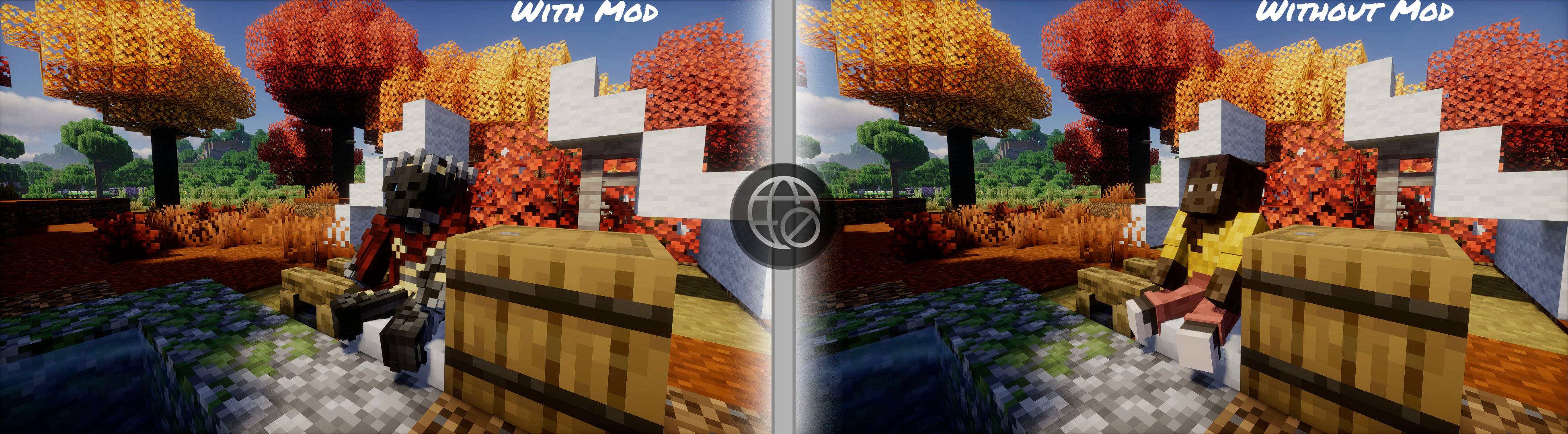 OfflineSkins Reloaded skins (26.3) The showcase how OfflineSkins Reloaded mod shows skins without an internet connection
-
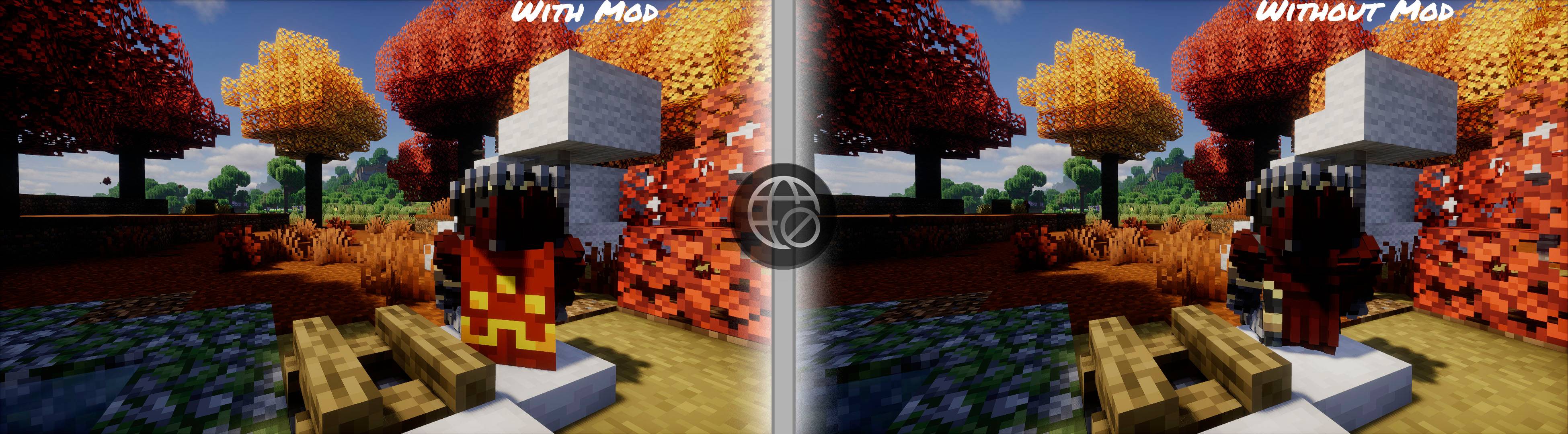 OfflineSkins Reloaded capes (26.3) The showcase how OfflineSkins Reloaded mod shows capes without an internet connection
-
 OfflineSkins Reloaded Skins (26.3)
-
 OfflineSkins Reloaded Capes (26.3)
-
 OfflineSkins Reloaded Skins The showcase how OfflineSkins Reloaded shows a skin without an internet connection
-
 OfflineSkins Reloaded Capes The showcase how OfflineSkins Reloaded shows a cape without an internet connection
Versions
Files
Relations
Project Relations
More like this
Similar Mods
Suggestions use data such as tags, dependencies, dependents, descriptions, titles, and more to rank how much they overlap with this mod.
On ModDex
Community snapshot
By the numbers
Statistics

Get it on
Available Platforms
On ModDex
Community snapshot
By the numbers