
Community listing page, reviews may not be monitored by the author.
Omni Wheel


No reviews yet
Client-side radial quick-action menu with configurable wheels, profiles, shortcuts, and multiplayer-safe command and keybind access.

Community voices
Reviews
No reviews yet. Be the first to review this project!
Get it on
Available Platforms
Compatibility
Supported Environments
Runs entirely on the client. Works on vanilla servers.
About
Project Details
For authors
Embed Badge
If you're the author of this project, you can embed a live badge anywhere that supports HTML or Markdown. It updates automatically whenever ratings change.
Use HTML for any page that supports it, or Markdown for README files and Markdown-based descriptions.
Identifiers
Platform IDs
About
Description
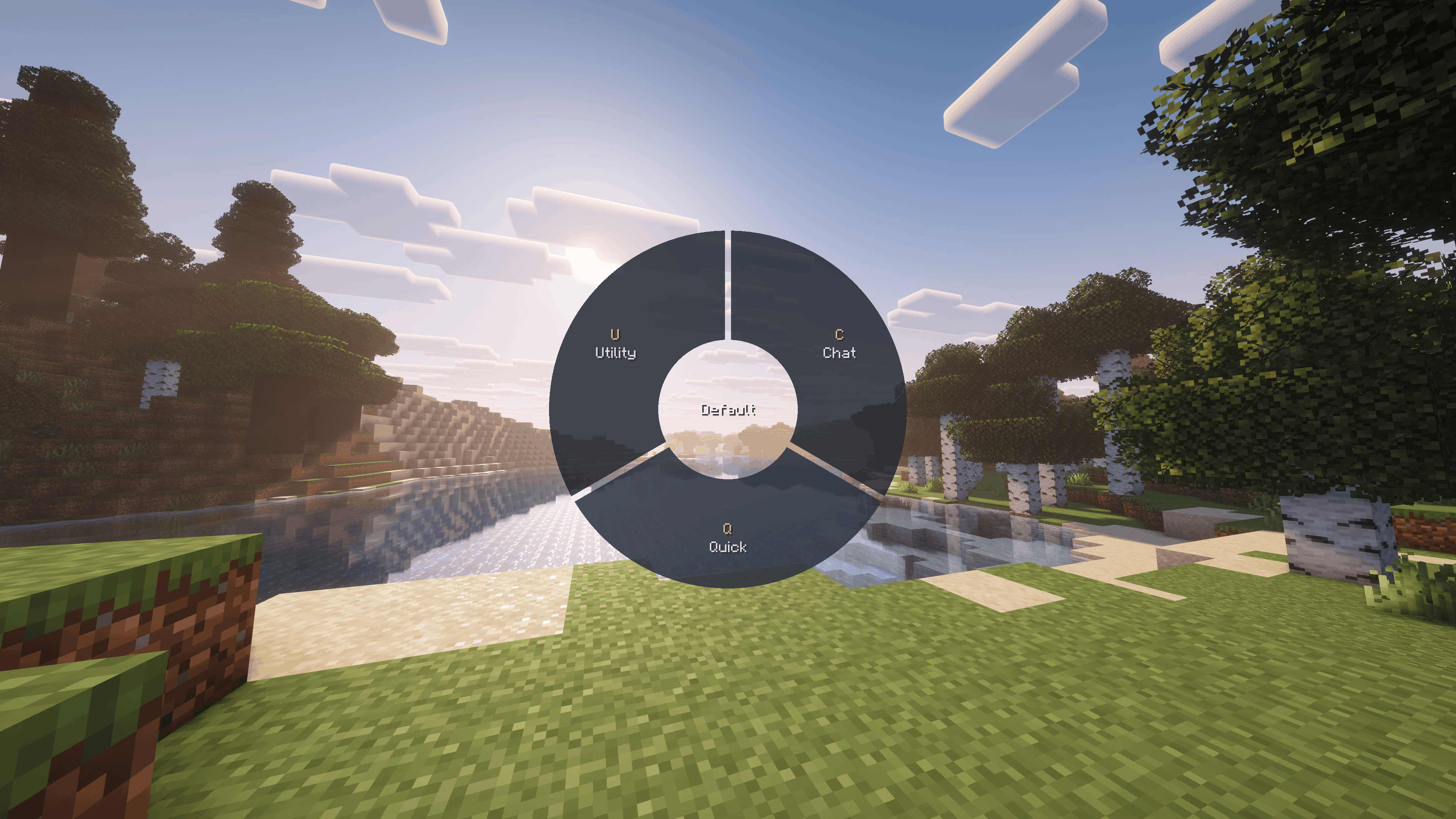
Omni Wheel is centered around fast, configurable radial shortcuts for Minecraft.
It gives you a fully client-side quick-action wheel for commands, chat, keybindings, utility tools, and gameplay functions without requiring anything on the server.

Fast Radial Access
Omni Wheel adds a hold-to-open radial menu to Minecraft.
Open the wheel, flick toward an entry, and trigger actions quickly without digging through chat, menus, controls, or hotbar slots. It supports mouse selection, click selection, and numpad position bindings for fast repeated use.
Smooth opening, selection, submenu, and page transitions keep the wheel responsive while still making complex layouts easy to follow.
Profiles, Pages, and Nested Wheels
Omni Wheel lets you build multiple local profiles and organize them into pages and nested submenus.
You can create separate setups for survival, multiplayer servers, building, utility tasks, moderation, or anything else you want, then switch between profiles directly inside the wheel.
Wheel positions are managed independently from the Entries list, allowing you to organize your configuration without changing the actual radial layout.
Interactive Wheel Preview
The built-in Preview lets you arrange your wheel directly as it will appear in-game.
Entries can be moved between positions and pages, dragged into or out of submenus, and reorganized visually without having to guess where they will appear.
Commands, Chat, Keybinds, and Utility Actions
Omni Wheel supports a wide range of action types for different workflows.
You can create entries that send commands, post chat messages, open chat with editable preset text, trigger Minecraft and mod keybindings directly, copy useful values to the clipboard, show local client-side messages, or trigger built-in gameplay functions such as inventory access, perspective changes, screenshots, hotbar selection, and movement toggles.
Keybindings can be triggered even when the original keybinding is unassigned in Minecraft Controls, and can be browsed through searchable, collapsible categories by name, category, or keybinding ID.
Live Insert Data
Commands, messages, and clipboard actions can include live information from the game without requiring you to memorize placeholders.
The Insert Data browser can insert information such as player coordinates, dimension, biome, targeted blocks and entities, entity UUIDs, held-item data, and other contextual game values.
Custom Icons and Colors
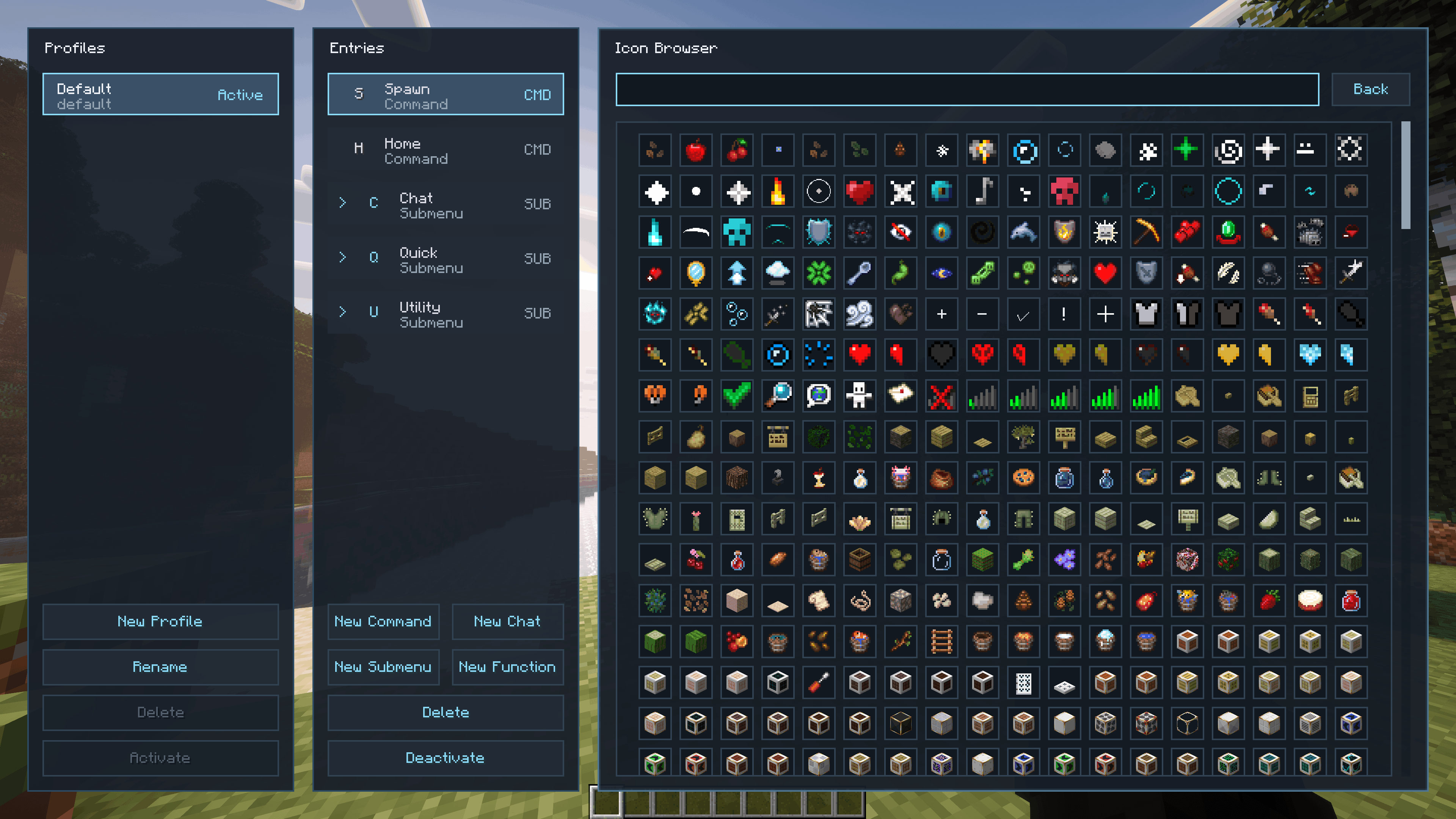
Entries can use Minecraft blocks and items, built-in extras, automatically generated mod categories, or your own custom icons.
Items can be captured directly from your inventory or an open container while preserving item-specific data such as enchantments, armor trims, dyes, and other components.
You can also import custom PNG images with transparency. Empty transparent edges are cropped automatically, and imported images and captured items appear in the Custom category.
Text and wheel tint colors can be selected with a color picker or entered directly as hex values.
Built-In Manager and Local Persistence
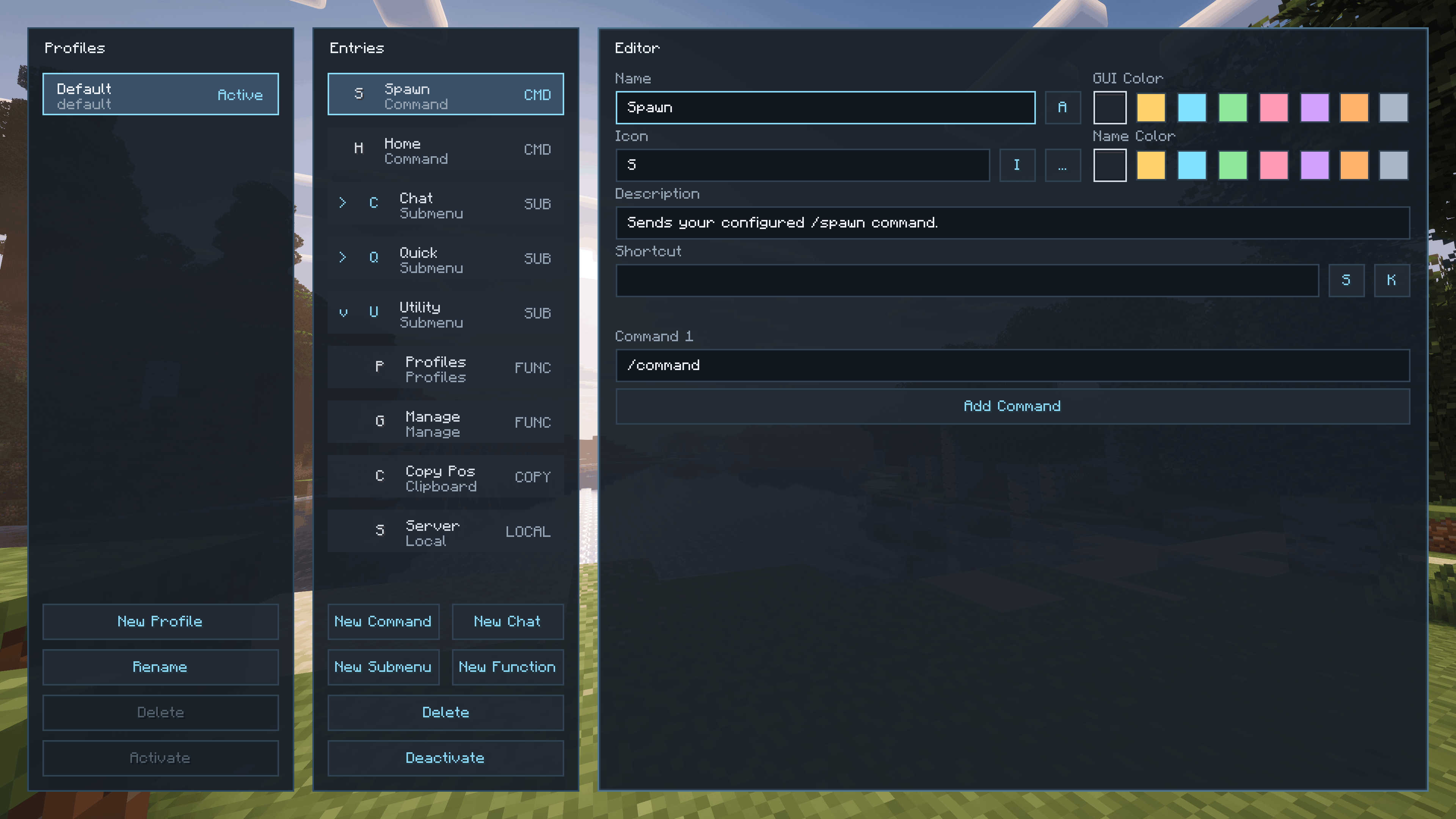
Omni Wheel includes a complete built-in manager for creating and editing your wheel layouts.
You can create, rename, reorder, and delete profiles and entries, configure actions and shortcuts, change visibility, choose icons and colors, organize nested submenus, and build specialized wheels with up to 8 segments per page.
Profiles and entries support drag-and-drop throughout the interface, including live placement previews when reorganizing content.
Everything is stored locally on the client, so Omni Wheel works in both singleplayer and multiplayer without requiring the mod to be installed on the server.
Flexible Shortcut Support
Omni Wheel supports more than standard keyboard shortcuts.
Entries and wheel controls can use additional mouse buttons, extra keyboard keys, and supported macro keys that Minecraft receives as normal key or scan-code input.

There is also a community Discord, a YouTube channel, and a public GitHub organization.
Feel free to join the "Intelligence" community, watch our YouTube content, and explore our public GitHub projects.

Omni Wheel is centered around fast, configurable radial shortcuts for Minecraft.
It gives you a fully client-side quick-action wheel for commands, chat, keybindings, utility tools and gameplay functions without requiring anything on the server.
Fast Radial Access
Omni Wheel adds a hold-to-open radial menu to Minecraft.
Open the wheel, flick toward an entry, and trigger actions quickly without digging through chat, menus, controls, or hotbar slots. It supports mouse selection, click selection, and numpad position bindings for fast repeated use.
Smooth opening, selection, submenu, and page transitions keep the wheel responsive while still making complex layouts easy to follow.
Profiles, Pages, and Nested Wheels
Omni Wheel lets you build multiple local profiles and organize them into pages and nested submenus.
You can create separate setups for survival, multiplayer servers, building, utility tasks, moderation, or anything else you want, then switch between profiles directly inside the wheel.
Wheel positions are managed independently from the Entries list, allowing you to organize your configuration without changing the actual radial layout.
Interactive Wheel Preview
The built-in Preview lets you arrange your wheel directly as it will appear in-game.
Entries can be moved between positions and pages, dragged into or out of submenus, and reorganized visually without having to guess where they will appear.
Commands, Chat, Keybinds, and Utility Actions
Omni Wheel supports a wide range of action types for different workflows.
You can create entries that:
• Send single or multi-part commands
• Post chat messages
• Open chat with editable preset text already filled in
• Trigger Minecraft and mod keybindings directly, even when the original keybind is unassigned in Minecraft Controls
• Copy text or live game information to the clipboard
• Show local client-side messages
• Trigger built-in gameplay functions such as inventory access, perspective changes, screenshots, hotbar selection, movement toggles, and more
Keybindings can be browsed through searchable, collapsible categories and found by name, category, or keybinding ID.
Live Insert Data
Commands, messages, and clipboard actions can include live information from the game without requiring you to memorize placeholders.
The Insert Data browser can insert values such as:
• Player coordinates
• Current dimension
• Current biome
• Targeted blocks
• Targeted entities
• Entity UUIDs
• Held-item information
• Other contextual game data
This makes it possible to build dynamic shortcuts that automatically use information from your current game state.
Custom Icons and Colors
Entries can use Minecraft blocks and items, built-in extras, automatically grouped mod content, or your own custom icons.
Items can be captured directly from your inventory or an open container, preserving item-specific data such as enchantments, armor trims, dyes, and other components.
You can also import custom PNG images with transparency. Empty transparent edges are cropped automatically, and imported images and captured items are stored in the Custom category.
Text and wheel tint colors can be selected with a color picker or entered directly as hex values.
Built-In Manager and Local Persistence
Omni Wheel includes a complete built-in manager for creating and editing your wheel layouts.
You can create, rename, reorder, and delete profiles and entries, configure actions and shortcuts, change visibility, choose icons and colors, organize nested submenus, and build specialized wheels with up to 8 segments per page.
Profiles and entries support drag-and-drop throughout the interface, including live placement previews when reorganizing content.
Everything is stored locally on the client, so Omni Wheel works in both singleplayer and multiplayer without requiring the mod to be installed on the server.
Flexible Shortcut Support
Omni Wheel supports more than standard keyboard shortcuts.
Entries and wheel controls can use additional mouse buttons, extra keyboard keys, and supported macro keys that Minecraft receives as normal key or scan-code input.
There is also a community Discord, a YouTube channel, and a public GitHub organization.
Feel free to join the "Intelligence" community, watch our YouTube content, and explore our public GitHub projects.


Screenshots
Gallery
-
 4.png 4.png
 -
 2.png 2.png
 -
 3.png 3.png
 -
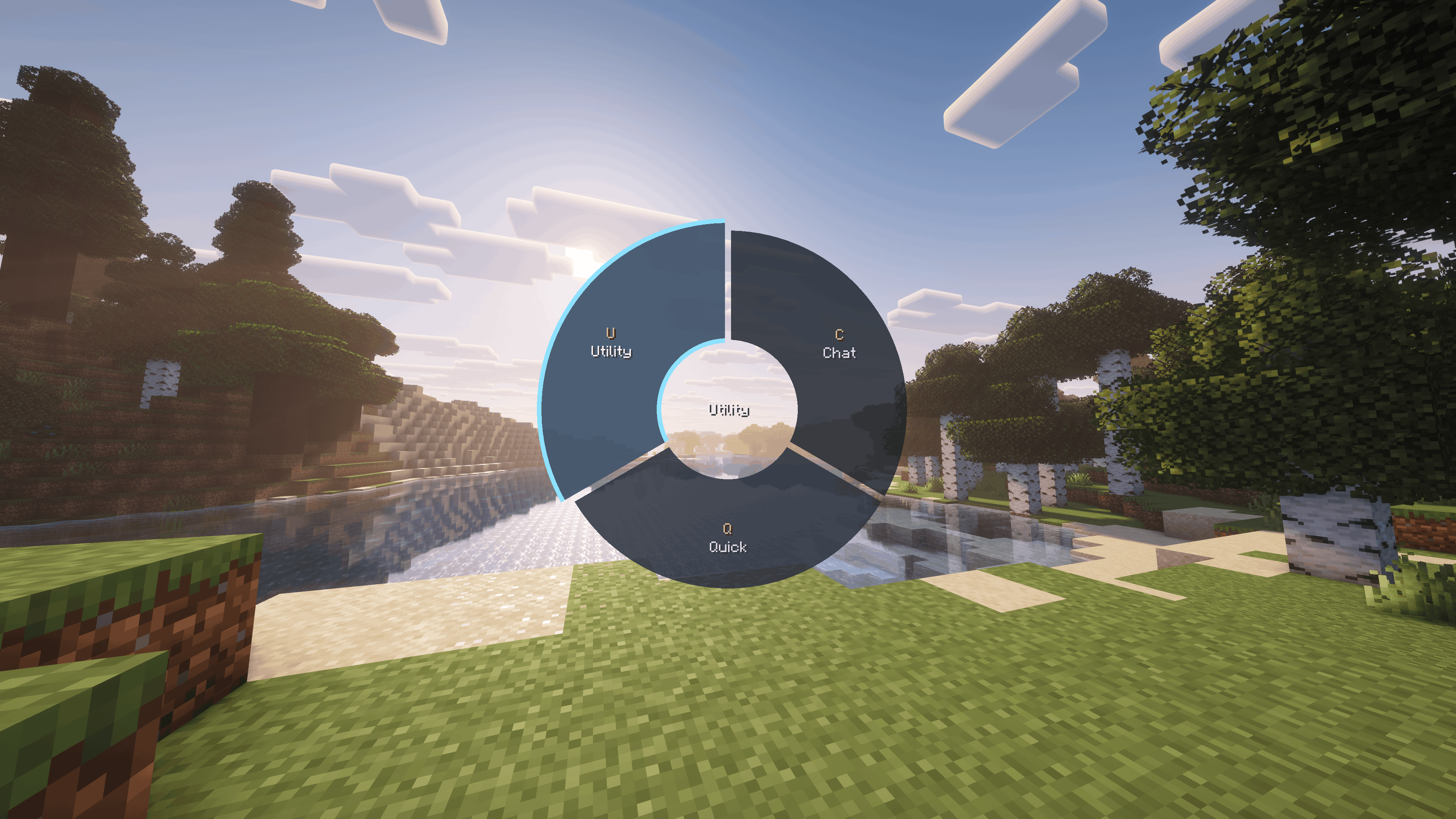 1.png 1.png


Versions
Files
Relations
Project Relations
More like this
Similar Mods
Suggestions use data such as tags, dependencies, dependents, descriptions, titles, and more to rank how much they overlap with this mod.
On ModDex
Community snapshot
By the numbers
Statistics
 (opens in a new tab)
Get it on
Available Platforms
On ModDex
Community snapshot
By the numbers