
Community listing page, reviews may not be monitored by the author.
OmniUtils

No reviews yet
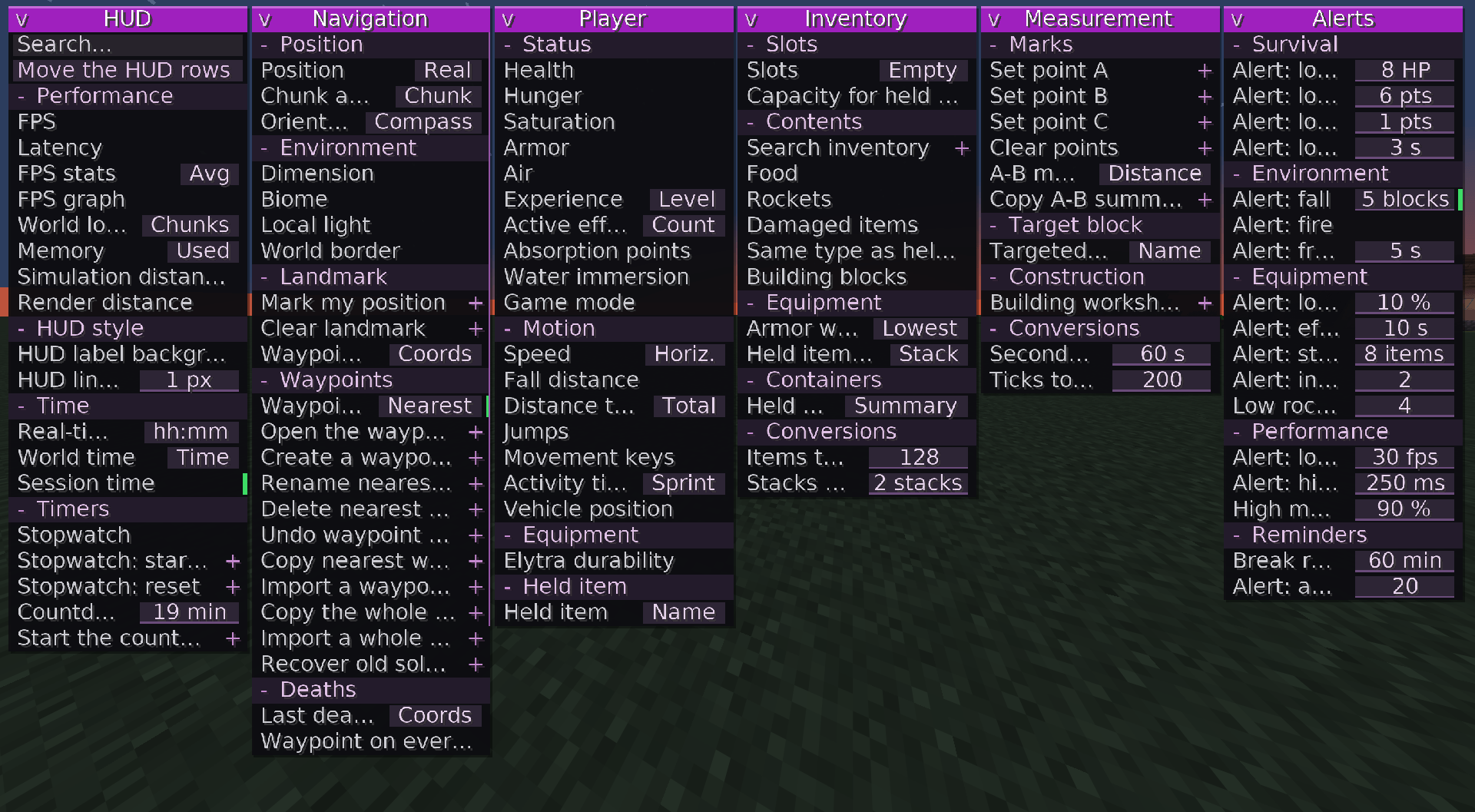
This mod allows you to access a collection of useful features through a single, clean interface (not a cheat), without having to install dozens of different mods.

Community voices
Reviews
No reviews yet. Be the first to review this project!
Get it on
Available Platforms
About
Project Details
For authors
Embed Badge
If you're the author of this project, you can embed a live badge anywhere that supports HTML or Markdown. It updates automatically whenever ratings change.
Use HTML for any page that supports it, or Markdown for README files and Markdown-based descriptions.
Identifiers
Platform IDs
Resources
External Links
About
Description
OMNIUTILS: 105 UTILITIES
Complete reference, organized by category and group, following the menu order.
“Modes” refers to the readings or variants grouped inside a selector button.
“Action” utilities run when clicked in the menu (or by using their shortcut); “screen” utilities open a dedicated window.
HUD (18 utilities)
Performance group
FPS
Modes: None
Purpose: Frames per second measured live by the game.
Latency
Modes: None
Purpose: Network latency to the current server, in milliseconds (multiplayer).
FPS statistics
Modes: Average · Minimum · ms/frame · Maximum · Average ms
Purpose: Minimum, average, and maximum FPS during the current session.
FPS graph
Modes: None
Purpose: Graph showing the last thirty seconds of frames per second.
World load
Modes: Chunks · Entities
Purpose: Chunks and entities loaded around the player.
Memory
Modes: Used · % · Maximum
Purpose: Java memory used by the game, shown in MB or as a percentage.
Simulation distance
Modes: None
Purpose: Chunk distance within which the game continues simulating entities.
Render distance
Modes: None
Purpose: Number of chunks the game renders around the player.
HUD style group
Label backgrounds
Modes: None
Purpose: Draws a dark rectangle behind each HUD line to improve readability.
Line spacing
Modes: Numeric field (px, 0–12)
Purpose: Vertical spacing, in pixels, between automatically displayed HUD lines.
Time group
Real-world time
Modes: hh:mm · hh:mm:ss
Purpose: Your computer’s clock.
World time
Modes: Time · Day
Purpose: Minecraft time of day or the current day number.
Session duration
Modes: None
Purpose: Time spent in the current world since the last time you joined.
Timers group
Stopwatch
Modes: None
Purpose: Stopwatch that can be started and stopped using its own shortcut.
Stopwatch: Start / stop
Type: Action
Purpose: Starts or pauses the stopwatch.
Stopwatch: Reset
Type: Action
Purpose: Resets the stopwatch.
Countdown
Modes: Numeric field (minutes, 1–600)
Purpose: Displays the remaining time after the countdown is started.
Start countdown
Type: Action
Purpose: Starts the countdown configured in the module.
NAVIGATION (28 utilities)
Position group
Position
Modes: Floating · Block · Eyes · Altitude · Y limit · Nether
Purpose: Shows where the player is, including Y-level limits and the Nether portal position.
Chunk and region
Modes: Chunk · Local · Center · Region · Borders · In region
Purpose: Shows chunk coordinates, local position, region information, and its borders.
Environment group
Facing direction
Modes: Word · 8-point compass · Angles
Purpose: Shows where the player is looking, as a compass direction, one of eight directions, or an angle.
Dimension
Modes: None
Purpose: Identifier of the dimension you are playing in.
Biome
Modes: None
Purpose: Identifier of the biome where the player is located.
Local light level
Modes: None
Purpose: Light level at the player’s position, from 0 to 15.
World border
Modes: None
Purpose: Distance between you and the nearest world border.
Marker group
Mark my position
Type: Action
Purpose: Places a temporary marker at your current location. It remains until cleared.
Clear marker
Type: Action
Purpose: Removes the marker placed with “Mark my position”.
Marker information
Modes: Coordinates · Distance · Horizontal · Height · Direction · Guide
Purpose: Displays information about the temporary marker.
Waypoints group (notebook)
Waypoints
Modes: Nearby · Coordinates · Count · Guide · Dimension · Estimate
Purpose: Statistics for the nearest waypoint in the current dimension.
Open waypoint notebook
Type: Screen
Purpose: Searchable list of all waypoints in this world, with search, sorting, renaming, deletion, undo, sharing, and importing.
Create waypoint here
Type: Action
Purpose: Saves a waypoint at the block where you are standing.
Rename nearest waypoint
Type: Screen
Purpose: Small editor for renaming the nearest waypoint.
Delete nearest waypoint
Type: Action
Purpose: Removes the nearest waypoint in the current dimension from the notebook.
Undo waypoint deletion
Type: Action
Purpose: Restores the last waypoint deleted from this notebook.
Copy nearest waypoint
Type: Action
Purpose: Copies shareable text for the nearest waypoint to the clipboard.
Import waypoint from clipboard
Type: Action
Purpose: Converts text from the clipboard into a waypoint in the notebook.
Copy entire notebook
Type: Action
Purpose: Copies all waypoints in this world to the clipboard.
Import entire notebook
Type: Action
Purpose: Merges all waypoints found in the clipboard into the notebook.
Recover old single-player points
Type: Action
Purpose: Imports waypoints saved before the introduction of per-world notebooks.
Deaths group
Last death
Modes: Coordinates · Distance · Direction · Time ago · Count
Purpose: Shows where you died most recently.
Waypoint on every death
Type: Action
Purpose: Automatically saves a waypoint every time you die.
Copy death location
Type: Action
Purpose: Copies the coordinates of your last death to the clipboard.
Copy death history
Type: Action
Purpose: Copies a list of the eight most recent deaths in the session.
Copy group
Copy my coordinates
Type: Action
Purpose: Copies the coordinates of the block you are standing on.
Copy targeted block
Type: Action
Purpose: Copies the position of the block you are looking at.
Copy converted coordinates
Type: Action
Purpose: Converts your position between the Nether and the Overworld, then copies it.
PLAYER (19 utilities)
Status group
Health
Modes: None
Purpose: Current health compared with maximum health.
Hunger
Modes: None
Purpose: Hunger level, from 0 to 20.
Saturation
Modes: None
Purpose: Hidden saturation level maintained by food.
Armor
Modes: None
Purpose: Total armor points currently equipped.
Oxygen
Modes: None
Purpose: Remaining oxygen bubbles while underwater.
Experience
Modes: Level · Progress
Purpose: Experience level or experience bar progress.
Active effects
Modes: Count · Shortest
Purpose: Number of active potion effects or the shortest remaining duration.
Absorption points
Modes: None
Purpose: Golden health points added above the red health bar.
Submersion
Modes: None
Purpose: Shows whether you are underwater, at the surface, or in the air.
Game mode
Modes: None
Purpose: Game mode for the session, as reported by the game.
Movement group
Speed
Modes: Horizontal · Vertical · Total · Maximum · Average
Purpose: Player speed in blocks per second.
Fall distance
Modes: None
Purpose: Height of the current fall, useful before landing.
Distance traveled
Modes: Total · Horizontal · Vertical · On ground · Flying
Purpose: Blocks traveled during this session, overall or along each axis.
Jumps
Modes: None
Purpose: Number of jumps since the start of the session.
Movement keys
Modes: None
Purpose: Keys currently pressed, such as forward, jump, and sprint.
Activity time
Modes: Sprinting · Swimming · Sneaking · Flying
Purpose: Time spent on each activity during this session.
Vehicle position
Modes: None
Purpose: Position, in blocks, of the creature or minecart you are riding.
Equipment and held item group
Elytra durability
Modes: None
Purpose: Remaining durability of the equipped elytra.
Held item
Modes: Name · Count · Durability · Wear · Off-hand
Purpose: Information about the item in your main hand.
INVENTORY (13 utilities)
Slots group
Slots
Modes: Empty · Occupied
Purpose: Empty or occupied slots among the main thirty-six inventory slots.
Space for held item
Modes: None
Purpose: Number of additional items of the currently held item that can still fit.
Contents group
Inventory search
Type: Screen
Purpose: Filters the main inventory by name or type (damaged, block, food, tool, portable, renamed, enchanted). No item stacks are moved.
Food
Modes: None
Purpose: Number of edible items in the inventory.
Rockets
Modes: None
Purpose: Number of rockets available for the elytra.
Damaged items
Modes: None
Purpose: Slots containing an item that has taken damage.
Same type as held item
Modes: None
Purpose: Slots containing the same item as the one currently held.
Building blocks
Modes: None
Purpose: Slots containing stacks of placeable blocks.
Armor wear
Modes: Worst · Average
Purpose: Lowest remaining durability or average durability across all equipped armor pieces.
Held item details
Modes: Stack · Repair · Enchantments
Purpose: Stack size, repair cost, or enchantments of the held item.
Held container
Modes: Summary · Contents
Purpose: Fill level or actual contents of a bundle or barrel held in your hand.
Conversions group
Items → stacks
Modes: Numeric field (items, 0–9999)
Purpose: Converts a number of items into full stacks of the currently held item.
Stacks → items
Modes: Numeric field (stacks, 0–9999)
Purpose: Converts a number of stacks into a total item count.
MEASUREMENTS (10 utilities)
Points and readings group
Set point A
Type: Action
Purpose: Saves the targeted block as point A.
Set point B
Type: Action
Purpose: Saves the targeted block as point B.
Set point C
Type: Action
Purpose: Saves the targeted block as point C (angle measurement).
Clear points
Type: Action
Purpose: Clears all points A, B, and C at once.
A–B measurement
Modes: Distance · Horizontal · Vertical · Manhattan · Size · Center · Perimeter · Area · Volume · Slope · Heading · Inclination · Azimuth · Points A/B/C · Angle · Layers · Stacks · Chunks · Estimate
Purpose: Distance, size, area, angles, and many other readings between points A and B.
Copy A–B summary
Type: Action
Purpose: Copies a complete text summary of the measurement to the clipboard.
Targeted block and workshop group
Targeted block
Modes: Name · Coordinates · Distance
Purpose: Shows the name, coordinates, or distance of the block under the crosshair.
Building workshop
Type: Screen
Purpose: Counts the blocks required to build cylinders, spheres, cones, or pyramids.
Conversions group
Seconds → ticks
Modes: Numeric field (seconds, 0–9999)
Purpose: Converts the entered number of seconds into ticks.
Ticks → seconds
Modes: Numeric field (ticks, 0–9999)
Purpose: Converts the entered number of ticks into seconds.
ALERTS (17 utilities)
Each alert triggers a warning when its condition is met. The threshold is configured in the module’s numeric field.
Low health alert
Default threshold: 8 HP
Condition: Health drops to the selected number of health points.
Low hunger alert
Default threshold: 6 points
Condition: Hunger drops below the selected level.
Low saturation alert
Default threshold: 1 point
Condition: Hidden saturation drops to zero.
Low oxygen alert
Default threshold: 3 seconds
Condition: Oxygen drops below the selected number of seconds while diving.
Fall alert
Default threshold: 5 blocks
Condition: The fall exceeds the selected number of blocks.
Fire alert
Default threshold: None
Condition: Your character catches fire.
Freezing alert
Default threshold: 5 seconds
Condition: Freezing lasts longer than the selected number of seconds (powder snow).
Low durability alert
Default threshold: 10%
Condition: Wear on the held item exceeds the threshold.
Effect expiring alert
Default threshold: 10 seconds
Condition: A potion effect is about to expire.
Nearly empty stack alert
Default threshold: 8 items
Condition: The held stack drops below the selected size.
Nearly full inventory alert
Default threshold: 2 slots
Condition: The number of empty slots drops below the selected number.
Remaining rockets alert
Default threshold: 4 rockets
Condition: The number of rockets drops below the threshold while flying.
Low FPS alert
Default threshold: 30 FPS
Condition: Frames per second drop below the selected value.
High latency alert
Default threshold: 250 ms
Condition: Latency exceeds the selected number of milliseconds.
High memory usage
Default threshold: 90%
Condition: Memory usage exceeds the selected percentage.
Break reminder
Default threshold: 60 minutes
Condition: Reminds you to take a break after the selected amount of play time.
Approaching waypoint alert
Default threshold: 20 blocks
Condition: A waypoint is within the selected distance.
TOTAL: 105 utilities (18 HUD + 28 Navigation + 19 Player + 13 Inventory + 10 Measurements + 17 Alerts), translated into 5 languages and covered by an automatic catalog test on every build.
Screenshots
Gallery
-
 2026-11-08_12.38.23.png 2026-11-08_12.38.23.png
Versions
Files
Relations
Project Relations
More like this
Similar Mods
Suggestions use data such as tags, dependencies, dependents, descriptions, titles, and more to rank how much they overlap with this mod.
On ModDex
Community snapshot
By the numbers
Statistics

Get it on
Available Platforms
On ModDex
Community snapshot
By the numbers
Statistics
Resources