Community listing page, reviews may not be monitored by the author.
One Dimension


No reviews yet
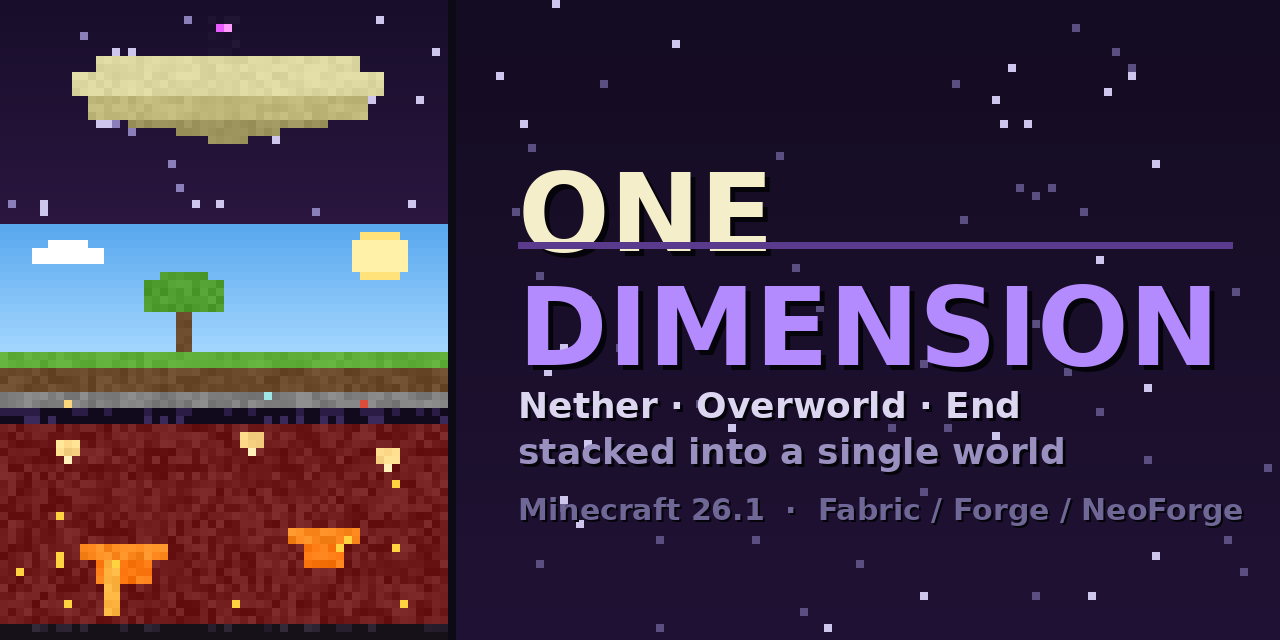
A vertical overhaul mod that merges all three vanilla dimensions into a single continuous world. Instead of separate Nether, Overworld, and End dimensions, the world is stacked by height inside one seamless dimension

Community voices
Reviews
No reviews yet. Be the first to review this project!
Get it on
Available Platforms
Compatibility
Supported Environments
Runs entirely on the server. Also works in singleplayer.
About
Project Details
For authors
Embed Badge
If you're the author of this project, you can embed a live badge anywhere that supports HTML or Markdown. It updates automatically whenever ratings change.
Use HTML for any page that supports it, or Markdown for README files and Markdown-based descriptions.
Identifiers
Platform IDs
About
Description

One Dimension
All dimensions in one world, stacked on top of each other. The End floats above the Overworld and the Nether sits underneath it. Dig down far enough and you break into the Nether roof. Build up high enough and you reach the End islands.
There are no portals needed and no loading screens, because it really is one world. You can stand in a Nether cave and tunnel straight up to your base.
Making a world
When you press Create New World you get one extra screen. It lists every dimension your world will have, including the ones added by mods and datapacks, with the top of the world first. The default order is:
The End
Overworld
The Nether
anything your mods add
You can move them around, leave some out so they stay normal dimensions, or turn the whole thing off for that world and get a regular one.
The other options on that screen:
- Bottom joins top makes the world loop. Fall out of the bottom and you come back in at the top.
- Space below sets how many empty blocks sit between two worlds.
- Remove empty space above roofs cuts the unused part of a world, like the 128 blocks above the Nether roof.
- Separate skies gives every world its own sky, so the Overworld does not cast a shadow on the Nether and the Nether stays dark.
- Replace bedrock turns the bedrock between worlds into another block so you can dig through. It is obsidian by default, so you still need a diamond pickaxe.
- Spawn in picks the world you start in.
- Nether portals can keep the normal 8 to 1 travel or go 1 to 1, which puts you at the same spot as if you had dug down.
The loop
With the loop on you can look down through the bottom of the world and see the top of it far below you, and the other way around. Mobs, items, water and lava can go through as well.
If you turn the loop on you get a second screen where you choose how far away you can still see through it, how sharp that view is, and whether mobs and fluids are allowed to cross. Those settings only apply to the loop. Normal portals are not touched.
Servers
A dedicated server has no create world screen, so it uses the defaults in config/one-dimension.json. The file is written the first time the server starts and every option in it has a line explaining what it does.
Worlds that were made before you installed the mod stay the way they are.
OneDimension
The Nether, the Overworld and the End — stacked into a single dimension.
OneDimension adds one new world type. Select "One Dimension" when creating a world and you get all three vanilla realms fused into one literal dimension, stacked by height. No portals to separate dimensions — dig down far enough and you punch through into the Nether; build up high enough and you reach the End. It's all one continuous world.
How it's stacked
From bottom to top, in a single 1536-block-tall dimension:
| Band | Where | What |
|---|---|---|
| The End | near the world ceiling | Floating islands, the dragon fight, End cities |
| The Void Gate | high above the surface | A dark, damaging stretch you must cross to reach the End (lifted once the dragon falls) |
| Overworld | normal Y (−64…319) | Your familiar world — unchanged coordinates |
| Obsidian floor | beneath the surface | The one mineable barrier; the Nether ceiling sits flush right under it |
| Nether | far below | Native Nether terrain, biomes, fortresses, fast-flowing lava — on a solid bedrock world floor |
The Overworld keeps its exact vanilla coordinates, so everything you know still works at the heights you expect.
What you get
- A real stacked world — genuine Nether, Overworld and End terrain, each generated by vanilla worldgen, in one dimension.
- Per-band biomes, mobs, features and structures — End cities and Nether
fortresses generate in their bands and
/locatefinds them. Nether basalt/fire/ fungus and End chorus all grow where they should. - The full dragon fight — the bedrock fountain and all ten spikes build high in the End band, the dragon spawns, fights and dies as normal, and the end credits roll when you enter the exit portal.
- In-world portals — End and Nether portals warp you within the stacked dimension (up to the End platform, down to the Nether) instead of to a separate one.
- The Void Gate — an escalating-damage band (with a hard death zone) between the surface and the End, so reaching the top is a real journey — lifted for good once you defeat the dragon, opening a walk-up route to the End.
- Real Nether lava — flows fast and far in the Nether band, just like a normal Nether; Overworld lava stays slow.
- Vanilla-accurate dimension quirks — beds explode in the Nether and End bands (but work in the Overworld), and the Overworld band has a normal day/night cycle and working clocks.
- A dig path to the Nether — break through the mineable obsidian floor to descend.
- Correct atmospherics per band — Overworld lighting, sky, fog and rain; the End has its proper dark sky and fog with a full view distance; an ominous near-black fog in the Void Gate between; no clouds up top; a brighter Nether. The dragon only shows once you're up in the void zone or the End.
Admin controls
OPs can tune the Void Gate's hazards on the fly:
/onedimension menu— a chest-menu panel (works on a vanilla client) with toggles for the void damage and the instant-death band./onedimension voidgate damage|deathband <true|false>— toggle each hazard independently from the command line. Both are also editable in the config file.
Known issues
- It's a tall dimension, so it's heavier than a normal world. Allocating more RAM (4 GB+) is recommended, especially at high render distances.
Starting a server
Make sure to set the level-type to onedimension:one_dimension and delete the existing world, start the server and it should generate a one dimension world.
Screenshots
Gallery
Versions
Files
Relations
Project Relations
More like this
Similar Mods
Suggestions use data such as tags, dependencies, dependents, descriptions, titles, and more to rank how much they overlap with this mod.
On ModDex
Community snapshot
By the numbers
Statistics

Get it on
Available Platforms
On ModDex
Community snapshot
By the numbers