

Mod

OpenBlocks Elevator
Rank 384
Rank 268 among mods

Quick rating

OpenBlocks Elevator

Overall rating distribution
0.5★ (no ratings)
1.0★ (no ratings)
1.5★ (no ratings)
2.0★ (no ratings)
2.5★ (no ratings)
1 rating (50%) · 3.0★
3.5★ (no ratings)
4.0★ (no ratings)
4.5★ (no ratings)
1 rating (50%) · 5.0★
0.5★ 5★
Gameplay rating distribution
0.5★ (no reviews)
1.0★ (no reviews)
1.5★ (no reviews)
2.0★ (no reviews)
2.5★ (no reviews)
3.0★ (no reviews)
3.5★ (no reviews)
4.0★ (no reviews)
4.5★ (no reviews)
1 review (100%) · 5.0★
0.5★ 5★
Aesthetics rating distribution
0.5★ (no reviews)
1.0★ (no reviews)
1.5★ (no reviews)
2.0★ (no reviews)
2.5★ (no reviews)
3.0★ (no reviews)
3.5★ (no reviews)
4.0★ (no reviews)
4.5★ (no reviews)
1 review (100%) · 5.0★
0.5★ 5★
Performance rating distribution
0.5★ (no reviews)
1.0★ (no reviews)
1.5★ (no reviews)
2.0★ (no reviews)
2.5★ (no reviews)
3.0★ (no reviews)
3.5★ (no reviews)
4.0★ (no reviews)
4.5★ (no reviews)
1 review (100%) · 5.0★
0.5★ 5★

Port of OpenBlocks Elevator.

No Theme
No Genre
Redstone Improvements
Player Transport
Mod Fork/Port
Mod Loaders
Forge
NeoForge
Fabric
Minecraft
26.2

Community voices

Reviews

Versions
Loading versions…
Match includes

Click once to include, again to exclude, again to clear

Rating Any
Any 0.5 1.0 1.5 2.0 2.5 3.0 3.5 4.0 4.5 5.0
Min
Max
Play Status
Reviews
Time Played
hrs+
Verified developers only
Has developer response
List view
Grid view
Compact view
Sort by
Date
Rating
Helpful
Unhelpful
Edited
Sort ascending
Delete this review?

This removes your review from the project. You can write a new review after.

Review submitted for moderation

Your review has been sent to moderators, who will check that it meets our guidelines before it appears publicly.

5.0
Precise-ModPacker

Reputation ranks

Explorer 0 pts
Contributor 100 pts
Guide 500 pts
Veteran 1,500 pts
Luminary 4,000 pts

Ranks only ever go up; points can drop but your rank stays.

About reputation ranks
Posted: December 30, 2023 at 11:44:20 AM UTC
MC 1.16, 1.1… MC 1.16, 1.19
The version(s) the reviewer played
Gameplay
5.0
Aesthetics
5.0
Performance
5.0

An amazing love for building purposes, you will not have to create any kind of structure with soul sand and magma block anymore.

It's very simple to use, just place one elevator block in some place, and another one on top of him.


0
0
5.0
Precise-ModPacker

Reputation ranks

Explorer 0 pts
Contributor 100 pts
Guide 500 pts
Veteran 1,500 pts
Luminary 4,000 pts

Ranks only ever go up; points can drop but your rank stays.

About reputation ranks
Posted: December 30, 2023 at 11:44:20 AM UTC
MC 1.16, 1.1… MC 1.16, 1.19
The version(s) the reviewer played
Gameplay
5.0
Aesthetics
5.0
Performance
5.0

An amazing love for building purposes, you will not have to create any kind of structure with soul sand and magma block anymore.

It's very simple to use, just place one elevator block in some place, and another one on top of him.

0
0
5.0
Precise-ModPacker

Reputation ranks

Explorer 0 pts
Contributor 100 pts
Guide 500 pts
Veteran 1,500 pts
Luminary 4,000 pts

Ranks only ever go up; points can drop but your rank stays.

About reputation ranks
Posted: December 30, 2023 at 11:44:20 AM UTC
MC 1.16, 1.1… MC 1.16, 1.19
The version(s) the reviewer played
0
0

Get it on

Available Platforms

Compatibility

Supported Environments

Dev Environment
Client Required
Server Required

About

Project Details

Type
Mod
License
MIT License
Latest Version
[Neo] ElevatorMod 26.2-1.16.4
Authors
CurseForge
Modrinth

For authors

Embed Badge

If you're the author of this project, you can embed a live badge anywhere that supports HTML or Markdown. It updates automatically whenever ratings change.

Custom banner text
ModDex rating badge preview

Use HTML for any page that supports it, or Markdown for README files and Markdown-based descriptions.

Identifiers

Platform IDs

CurseForge ID
Modrinth ID

Resources

External Links

Source Issues Wiki Discord

About

Description

GitHub CurseForge Modrinth

Port of the elevator from OpenBlocks to Minecraft 1.8+.

Crafting

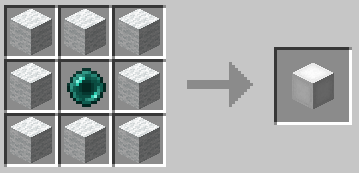
The default recipe is the same as in OpenBlocks.

Example of the white elevator recipe:

Elevator recipe

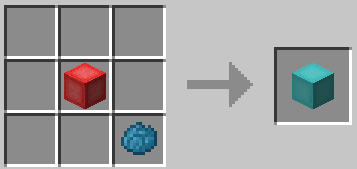
You can also re-dye any elevator:

Dyeing

Usage

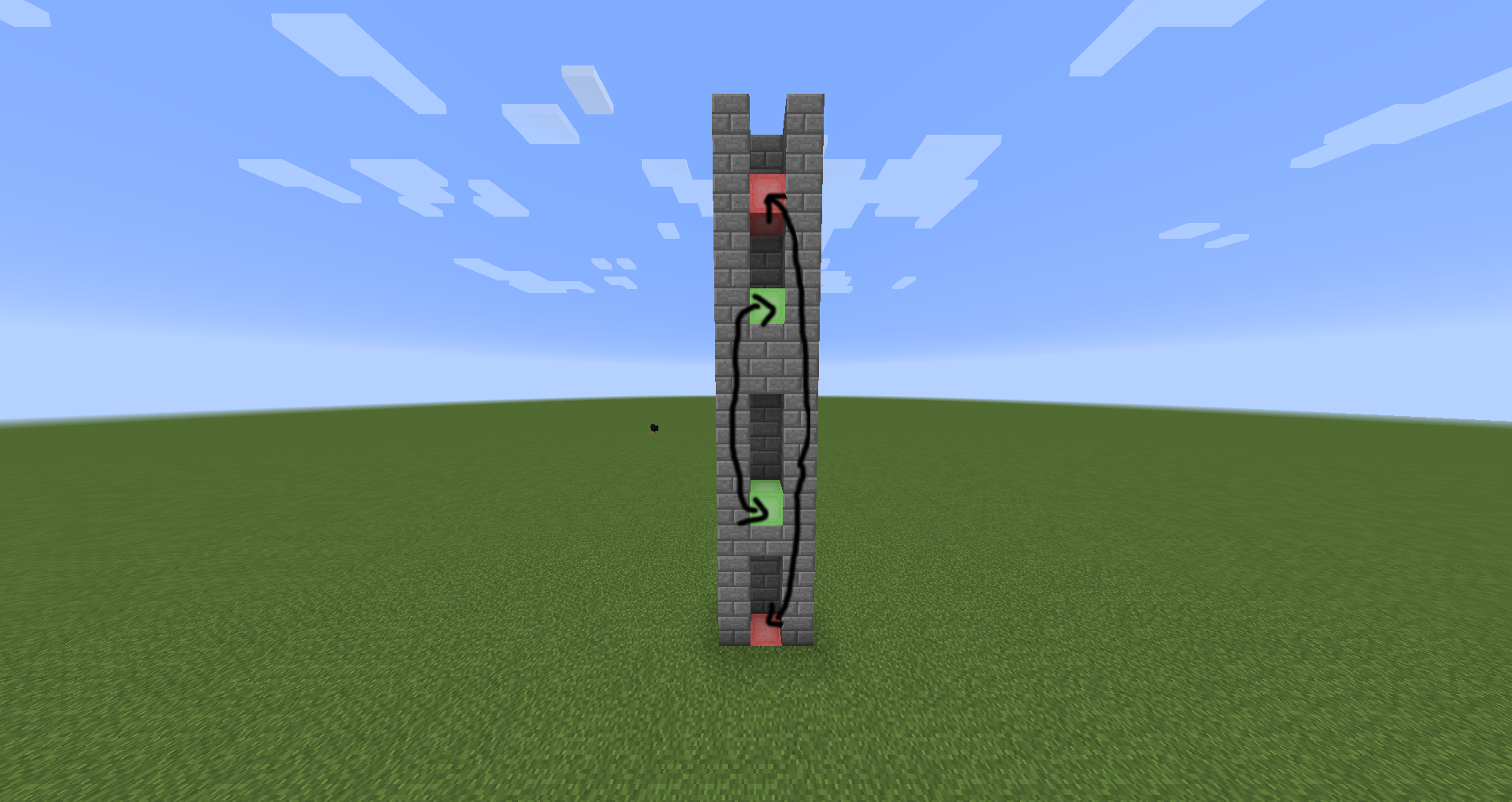
To use them place two or more elevators in the same X and Z coordinates, to move between them simply jump to go to the
elevator above or sneak to go to the one below.

You can configure the range of the elevators and if they should require XP to teleport in
the configuration file.

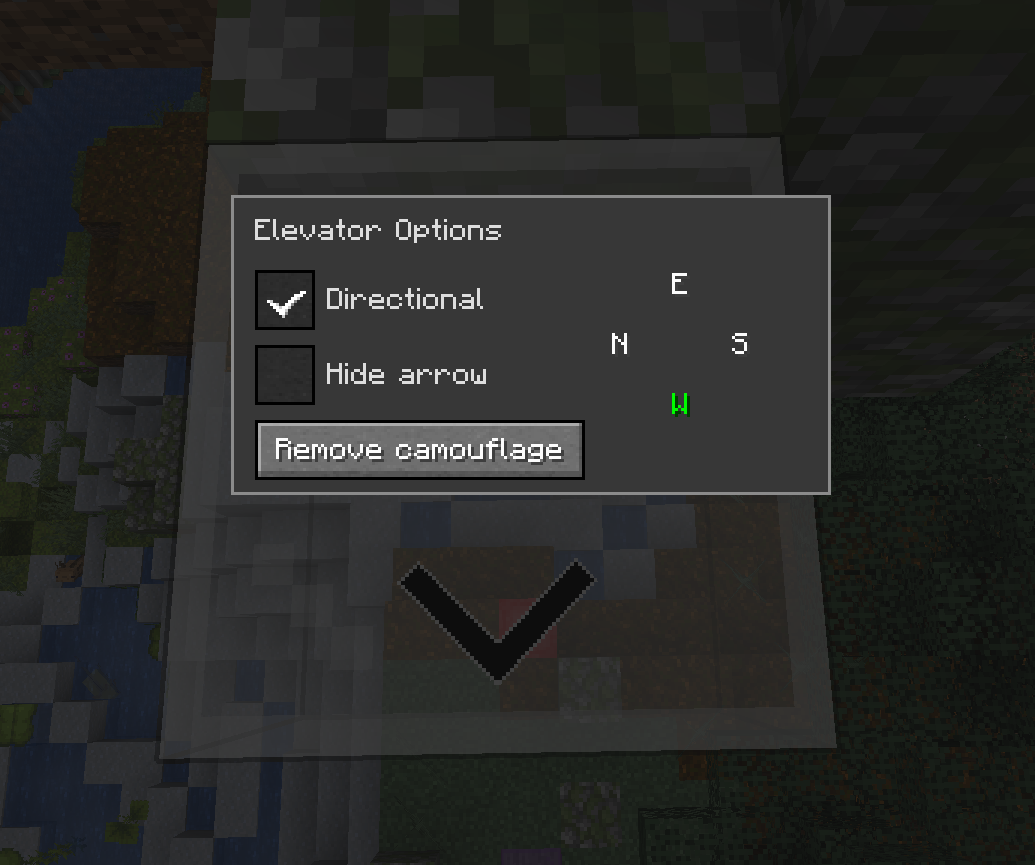
Options Interface

You can access the options interface by right-clicking on the elevator with an empty hand.

Options

Directional

When the `Directional` checkbox is enabled, the elevator will adjust the yaw rotation of players who teleport to it
based on the configured direction.

You can change the direction by clicking on the desired direction button. The display order of the buttons will match
the current direction the player is facing.

It will also show an arrow on the elevator to indicate the direction it is facing. You can hide it by selecting
the `Hide arrow` checkbox.

Note: This has nothing to do with horizontal movement, it only changes the direction the player is facing.

Camouflage

You can use any solid block to camouflage the elevator, just right-click on the elevator with the desired block on your
hand.

Most blocks can be used as camouflage with some exceptions. For example, you can't use a chest because it uses a
different rendering method.

Configuration

The configuration file is per-world and is located at `<world-directory>/serverconfig/elevatorid-server.toml`.
Here are the default values:

[General]
#Should elevators have the same color in order to teleport ?
sameColor = false

#Elevator range
#Range: 3 ~ 4064
range = 384

#Realign players to the center of elevator ?
precisionTarget = true

#Can mobs spawn on elevators ?
mobSpawn = false

#Reset pitch to 0 when teleporting to normal elevators ?
resetPitchNormal = false

#Reset pitch to 0 when teleporting to directional elevators ?
resetPitchDirectional = true

#Should teleporting require XP ?
useXP = false

#Amount of XP points to use when useXP is enabled
#Note this is NOT experience levels
#Range: > 1
XPPointsAmount = 1

Thanks

- OpenBlocks Team
- All contributors on GitHub

Modpacks

Feel free to use this in any modpack.

DatHost

ElevatorMod

GitHub CurseForge Modrinth

Port of the elevator from OpenBlocks to Minecraft 1.8+.

Crafting

The default recipe is the same as in OpenBlocks.

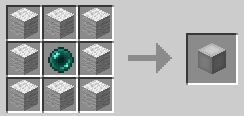
Example of the white elevator recipe:

Elevator recipe

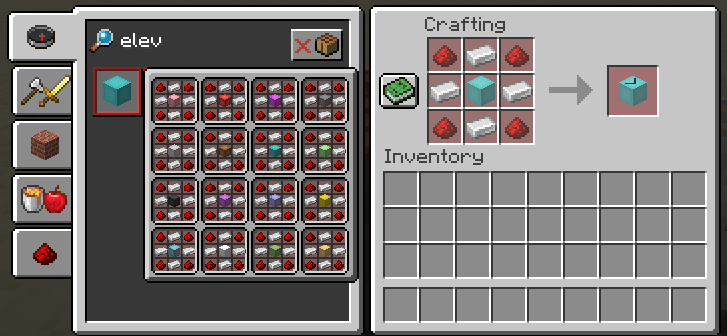
You can also re-dye any elevator:

Dyeing

Usage

To use them place two or more elevators in the same X and Z coordinates, to move between them simply jump to go to the elevator above or sneak to go to the one below.

You can configure the range of the elevators and if they should require XP to teleport in the configuration file.

Options Interface

You can access the options interface by right-clicking on the elevator with an empty hand.

Options

Directional

When the Directional checkbox is enabled, the elevator will adjust the yaw rotation of players who teleport to it based on the configured direction.

You can change the direction by clicking on the desired direction button. The display order of the buttons will match the current direction the player is facing.

It will also show an arrow on the elevator to indicate the direction it is facing. You can hide it by selecting the Hide arrow checkbox.

Note: This has nothing to do with horizontal movement, it only changes the direction the player is facing.

Camouflage

You can use any solid block to camouflage the elevator, just right-click on the elevator with the desired block on your hand.

Most blocks can be used as camouflage with some exceptions. For example, you can't use a chest because it uses a different rendering method.

Configuration

The configuration file is per-world and is located at <world-directory>/serverconfig/elevatorid-server.toml.

Here are the default values:
[General]
#Should elevators have the same color in order to teleport ?
sameColor = false

#Elevator range
#Range: 3 ~ 4064
range = 384

#Realign players to the center of elevator ?
precisionTarget = true

#Can mobs spawn on elevators ?
mobSpawn = false

#Reset pitch to 0 when teleporting to normal elevators ?
resetPitchNormal = false

#Reset pitch to 0 when teleporting to directional elevators ?
resetPitchDirectional = true

#Should teleporting require XP ?
useXP = false

#Amount of XP points to use when useXP is enabled
#Note this is NOT experience levels
#Range: > 1
XPPointsAmount = 1

Thanks

  • OpenBlocks Team
  • All contributors on GitHub

Modpacks

Feel free to use this in any modpack.

Screenshots

Gallery

  • Directional elevators recipe (Old)
    Directional elevators recipe (Old) Any elevator color
  • Colors (config option)
    Colors (config option) You can only teleport between elevators with the same color.
  • Floors
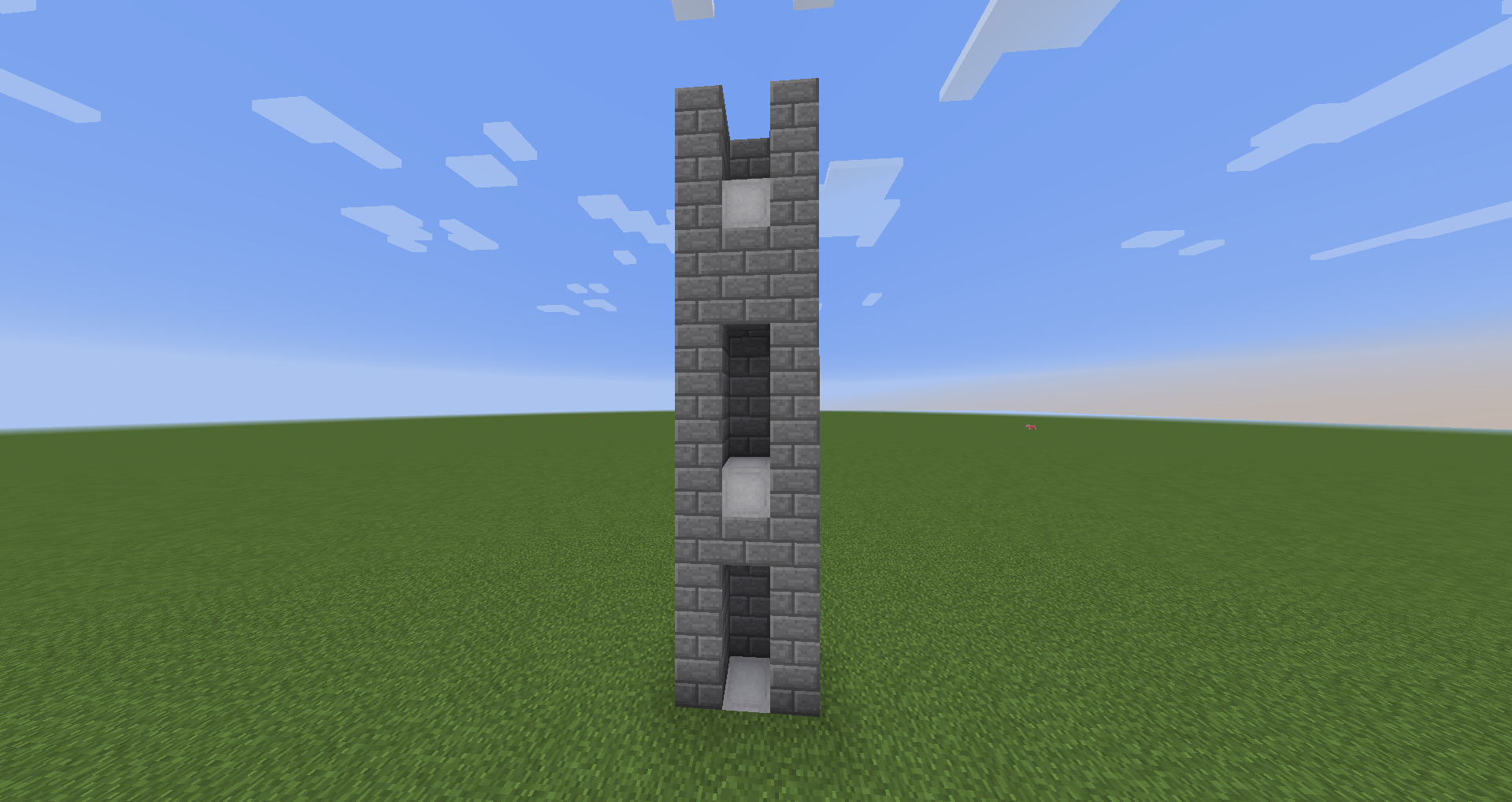
    Floors As Many Floors as you want
  • Crafting
    Crafting
  • Elevator options
    Elevator options
  • Re-dye crafting
    Re-dye crafting You can re-dye any elevator
  • Default crafting
    Default crafting Color depends on the wool used

Versions

Files

Relations

Project Relations

More like this

Similar Mods

Suggestions use data such as tags, dependencies, dependents, descriptions, titles, and more to rank how much they overlap with this mod.

On ModDex

Community snapshot

2
Ratings
0
Followers
0
In stacks

By the numbers

Statistics

173.6m
Total Downloads
CurseForge
171.7m
Modrinth
1.8m
Last Updated
CurseForge
Created
CurseForge
Modrinth
Last synced
When ModDex last fetched and imported data for this project from CurseForge or Modrinth. High-traffic and active projects are checked more often.
Next pipeline sync