OpMe Mod

Quick rating

OpMe Mod

No reviews yet

I like to play as a normal player but be easily opped when needed. A command to toggle operator status and creative game mode for players you preauthorize in a config file. For security, nothing can add anyone to the list from in-game.

No Theme
No Genre
Server Utility
Mod Loaders
Forge
Minecraft

Community voices

Reviews

Versions
Loading versions…
Match includes

Click once to include, again to exclude, again to clear

Rating Any
Any 0.5 1.0 1.5 2.0 2.5 3.0 3.5 4.0 4.5 5.0
Min
Max
Play Status
Reviews
Time Played
hrs+
Verified developers only
Has developer response
List view
Grid view
Compact view
Sort by
Date
Rating
Helpful
Unhelpful
Edited
Sort ascending
Delete this review?

This removes your review from the project. You can write a new review after.

Review submitted for moderation

Your review has been sent to moderators, who will check that it meets our guidelines before it appears publicly.

No reviews yet. Be the first to review this project!

Get it on

Available Platforms

About

Project Details

Type
Mod
Latest Version
OpMe-1.0.4-mc1.12-forge.jar
Authors

For authors

Embed Badge

If you're the author of this project, you can embed a live badge anywhere that supports HTML or Markdown. It updates automatically whenever ratings change.

Custom banner text
ModDex rating badge preview

Use HTML for any page that supports it, or Markdown for README files and Markdown-based descriptions.

Identifiers

Platform IDs

CurseForge ID

Resources

External Links

Source Issues Wiki Discord

About

Description


I prefer to play on my Minecraft servers as a regular player but from time to time I need to be opped.
in chat type...
/opme
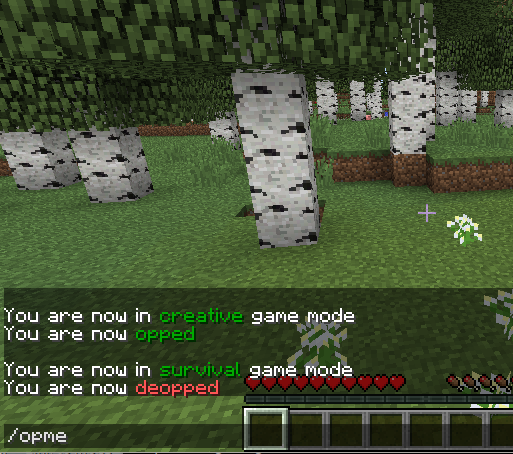
Entering /opme in chat Instantly toggles my operator status and my creative mode on or off. I can then fix or deal with any operator things I need to do, then I just enter /opme again and I am back as a normal player.
Only preauthorized player names may use /opme. The configuration file for this mod is a comma separated list of operator names. It is located in the folder "config" under your server's main folder.  For security, the list of names cannot be added to or changed from in-game. You will need to add the names of trusted operators and/or your name to this list.  Changes take effect immediately without a server restart. It starts with an empty list.
When you do /opme the second time it returns you to the game mode you were in, such as survival or adventure. The only exception is that if you were previously in creative it sets you to the server default gamemode instead of going back to creative.
I recommend that just before you return to normal play mode, that you 1: dispose of items from creative mode that may be in your inventory or toolbar, then 2: that you move to a safe location where you won't fall or be attacked.
I have also found this useful for modding development and testing mods.

INSTALLATION
Just drop this jar file into your mods folder with your other mods and restart your server as usual for any Forge mod.
You do need to add operator names to the config file.
This is only needed on the server side. The game clients do NOT need this to use it.

PERMISSIONS
This is under Creative Commons Attribution license. (free with credit where it is due)
YES you may use this in modpacks.
You may also redistribute this.

NOTES
Source code is included.
This is a Forge mod. No Bukkit is needed.
 

Screenshots

Gallery

  • OpMe Mod header pic
    OpMe Mod header pic An example of the /entitycount command.

Versions

Files

Relations

Project Relations

More like this

Similar Mods

Suggestions use data such as tags, dependencies, dependents, descriptions, titles, and more to rank how much they overlap with this mod.

On ModDex

Community snapshot

0
Ratings
0
Followers
0
In stacks

By the numbers

Statistics

~60,000
Downloads
Last Updated
Created
Last synced
When ModDex last fetched this project from CurseForge or Modrinth. Every project is re-checked on a schedule, and any project that ships a new file is synced automatically within hours of the release.
New file updates sync automatically
How syncing works