
Community listing page, reviews may not be monitored by the author.
Options Enforcer


No reviews yet
Modify values in options.txt and other top-level config files, and copy files from a subfolder into the mods folder

Community voices
Reviews
No reviews yet. Be the first to review this project!
Get it on
Available Platforms
Compatibility
Supported Environments
Runs entirely on the client. Works on vanilla servers.
About
Project Details
For authors
Embed Badge
If you're the author of this project, you can embed a live badge anywhere that supports HTML or Markdown. It updates automatically whenever ratings change.
Use HTML for any page that supports it, or Markdown for README files and Markdown-based descriptions.
Identifiers
Platform IDs
About
Description
NOTE: This mod will not be updating past 1.19.
This is due to Minecraft's draconic and overbearing report system, which can be tricked and exploited, and can result in the user being unable to play on their own private servers.
I am against this awful system on principle, and so long as I never run my game past 1.19, I will taint my account with the possibility.
Luckily, Option Enforcer's code is open source, and so you can port it forward yourself!
Sorry for any inconvenience.
Options Enforcer (OE) is a client-side only mod, and is designed primarily with modpacks in mind. It does two things.
Thing 1—config/options enforcement (primarily for the modpack owner)
Note: This functionality is very similar to Default Options and More Default Options. It may be identical, depending on what you're trying to do—I haven't looked into those mods in detail. By the time I discovered that they existed, I was already well along on this project. OE does its configuration differently so all other things equal, you may prefer OE's config syntax.
OE allows you to overwrite values in options.txt and other configuration files so that you don't have to bundle those files with every pack update. Why does that matter?
Problem 1.1: If you include the full options.txt in your modpack, then it overwrites the user's copy, resetting all of their values (keybinds, sound, rendering, etc.) to the modpack defaults.
Problem 1.2: If you include an options.txt with only some values, then it overwrites the user's copy, resetting all non-included values to the Minecraft defaults.
Problem 1.3: If you do not include options.txt in your modpack, then the user's values will never be overwritten, but it will be up to them to resolve keybind conflicts and apply resourcepacks and set important values, etc.
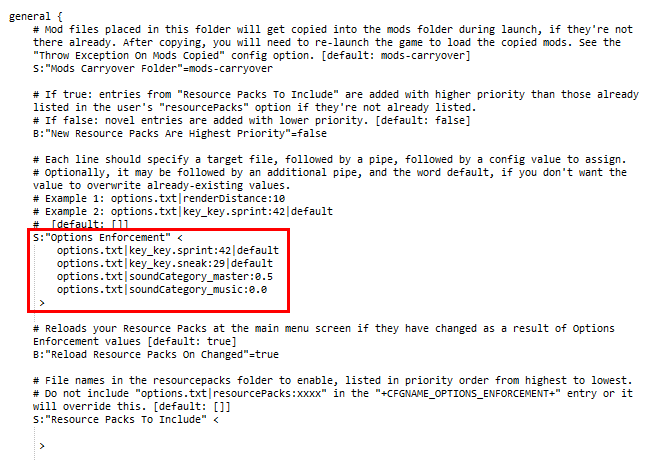
With Options Enforcer, first, the modpack owner simply adds values he wishes to enforce to the optionsenforcer.cfg file such as:
options.txt|renderDistance:10
Second, the owner simply does not include options.txt in the modpack.
Now, every time the user updates or launches the pack, the value renderDistance:10 will be inserted into file options.txt, leaving all other values exactly as the user last left them.
Alternately, as of OE version 1.4, you can append |default to the end of the enforcement entry: doing so will ONLY set that value on first launch, but never when there is already a value!
OE is designed for use with options.txt, optionsof.txt, smart_moving_options.txt, etc. located in the root minecraft directory, but can even modify other mod config files such as, e.g. config/VillageNames4/general.cfg
Important: make sure not to bundle the config file you're enforcing values into, such e.g. options.txt, or else that defeats the purpose!
This mod was created with the Technic version of my modpack, Galaxy Odyssey in mind, but may be useful for multiple pack platforms.
Thing 2—mods carryover (primarily for the modpack user)
Note: This functionality is similar to Mod Director, which actually does this job better by downloading and loading the mods during startup; and MCInstance Loader. However, these mods rely on the download link being accessible on launch, and will crash on launch if it's not.
Perhaps you, the modpack user, would like to use mods such as OptiFine, WAILA, Fullscreen Windowed, Real First Person 2 etc. which aren't included in the modpack. However, every time you update the modpack, it wipes and replaces all the mods in the mods folder, forcing you to download those ancillary mods again.
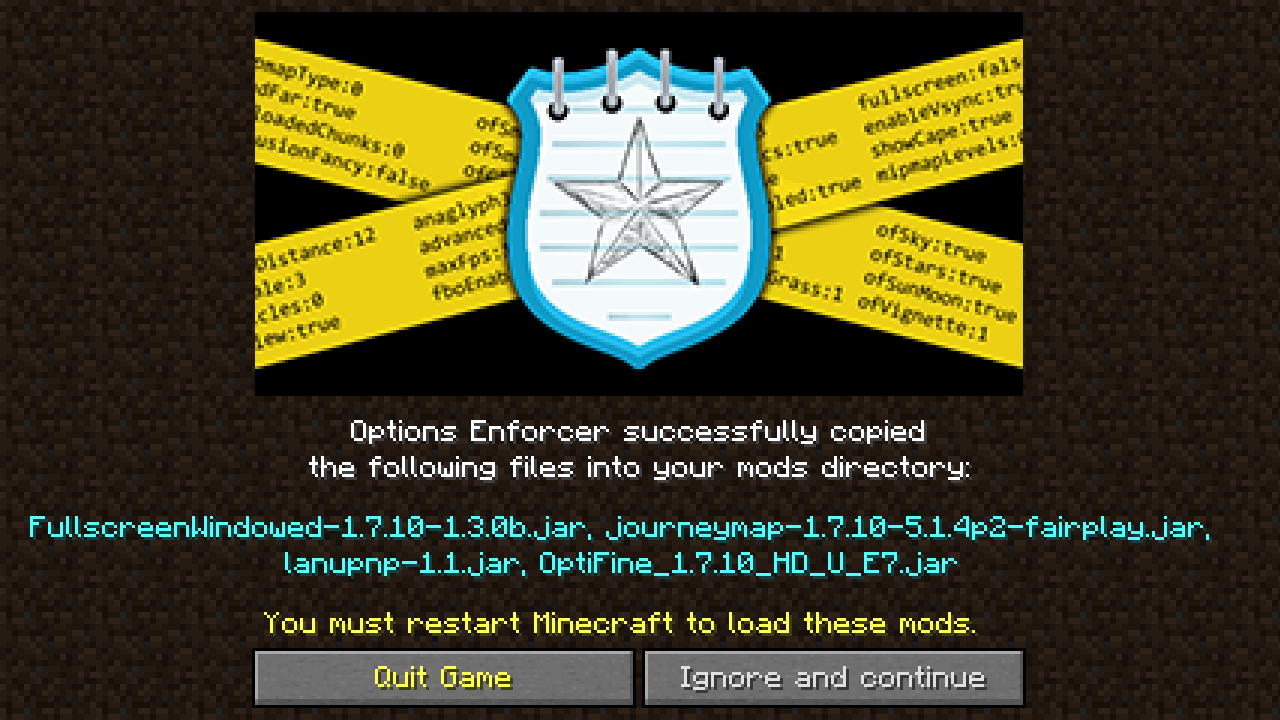
On launch, OE will copy all .jar and .zip files from the mods-carryover folder (will be created by OE if it's not there) into the regular mods folder, if they're not present there already.
Generally, the modpack owner does not need to do anything with this config value, apart from renaming it to another folder name. It will be up to the user to manage the mods they'd like copied over between pack updates. Unless the modpack platform or launcher is especially strict and deletes all folder names it doesn't recognize, then the mods-carryover folder and its contents should survive between pack updates.
The modpack owner should not blank the config value for this added folder name, because that would prevent mods from being copied over, essentially nullifying this feature and causing the user to have to obtain or copy the mods again after a pack update. At that point you might as well just use Default Options or More Default Options instead of OE.
Notes:
1. This mod was inspired to solve the two above limitations when updating my technic pack, Galaxy Odyssey. Go check it out!
2. You may use this in modpacks. That is the point, after all!
3. You can come by my Discord server if you have questions or want to hang out and chat.
NOTE: This mod will not be updating past 1.19.
This is due to Minecraft's draconic and overbearing report system, which can be tricked and exploited, and can result in the user being unable to play on their own private servers.
I am against this awful system on principle, and so long as I never run my game past 1.19, I will taint my account with the possibility.
Luckily, Option Enforcer's code is https://gitgud.io/AstroTibs/options-enforcer, and so you can port it forward yourself!
Sorry for any inconvenience.
Options Enforcer (OE) is a client-side only mod, and is designed primarily with modpacks in mind. It does two things.
Thing 1—config/options enforcement (primarily for the modpack owner)
Note: This functionality is very similar to Default Options and More Default Options. It may be identical, depending on what you're trying to do—I haven't looked into those mods in detail. By the time I discovered that they existed, I was already well along on this project. OE does its configuration differently so all other things equal, you may prefer OE's config syntax.
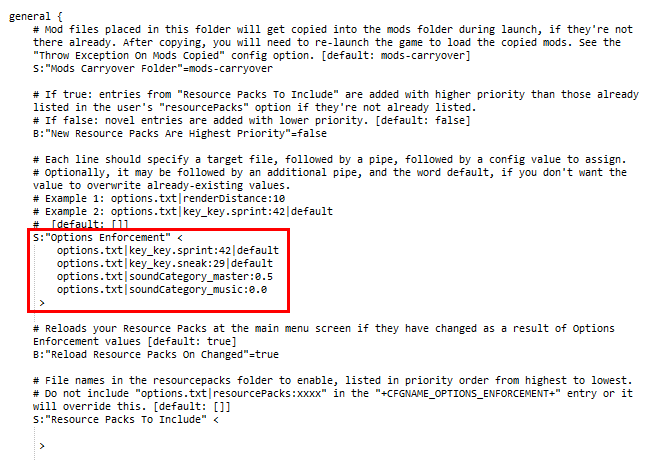
OE allows you to overwrite values in options.txt and other configuration files so that you don't have to bundle those files with every pack update. Why does that matter?
Problem 1.1: If you include the full options.txt in your modpack, then it overwrites the user's copy, resetting all of their values (keybinds, sound, rendering, etc.) to the modpack defaults.
Problem 1.2: If you include an **options.txt*8 with only some values, then it overwrites the user's copy, resetting all non-included values to the Minecraft defaults.
Problem 1.3: If you do not include options.txt in your modpack, then the user's values will never be overwritten, but it will be up to them to resolve keybind conflicts and apply resourcepacks and set important values, etc.
With Options Enforcer, first, the modpack owner simply adds values he wishes to enforce to the optionsenforcer.cfg file such as:
options.txt|renderDistance:10
Second, the owner simply does not include options.txt in the modpack.
Now, every time the user updates or launches the pack, the value renderDistance:10 will be inserted into file options.txt, leaving all other values exactly as the user last left them.
Alternately, as of OE version 1.4, you can append |default to the end of the enforcement entry: doing so will ONLY set that value on first launch, but never when there is already a value!
OE is designed for use with options.txt, optionsof.txt, smart_moving_options.txt, etc. located in the root minecraft directory, but can even modify other mod config files such as, e.g. config/VillageNames4/general.cfg
Important: Make sure not to bundle the config file you're enforcing values into, such e.g. options.txt, or else that defeats the purpose!
This mod was created with the Technic version of my modpack, Galaxy Odyssey in mind, but may be useful for multiple pack platforms.
Thing 2—mods carryover (primarily for the modpack user)
Note: This functionality is similar to Mod Director, which actually does this job better by downloading and loading the mods during startup; and MCInstance Loader. However, these mods rely on the download link being accessible on launch, and will crash on launch if it's not.
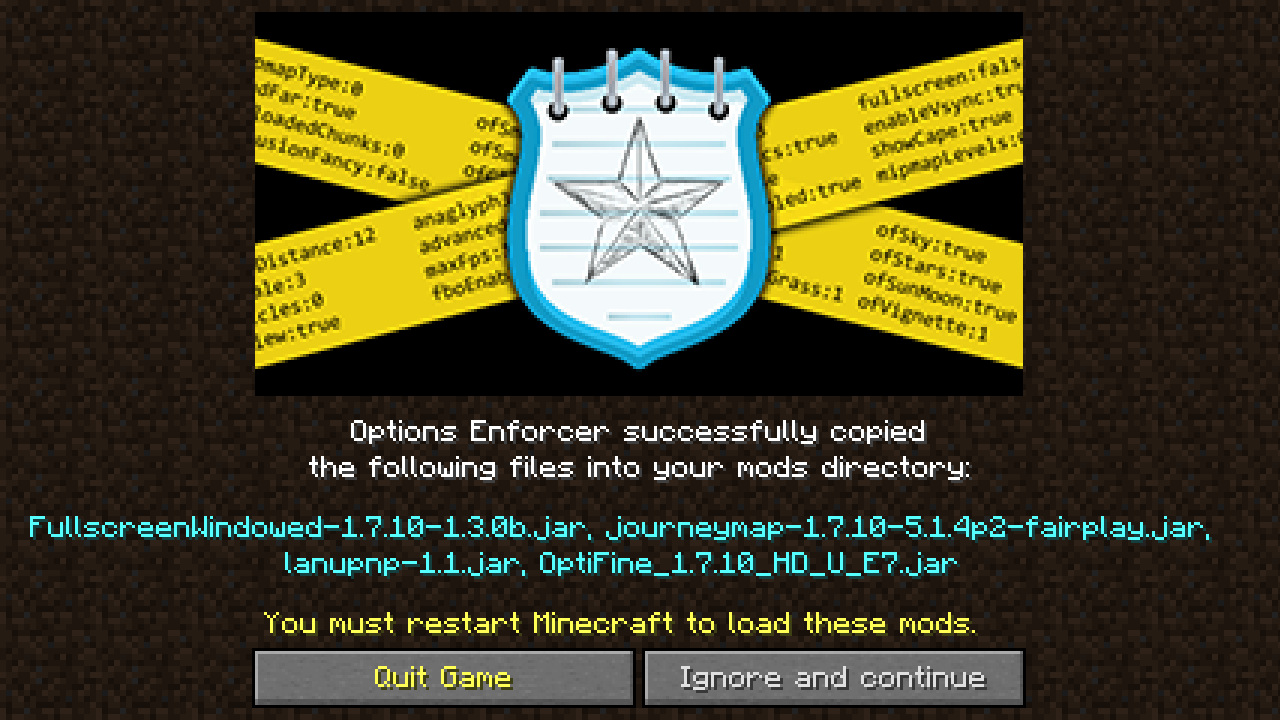
Perhaps you, the modpack user, would like to use mods such as OptiFine, WAILA, Fullscreen Windowed, Real First Person 2 etc. which aren't included in the modpack. However, every time you update the modpack, it wipes and replaces all the mods in the mods folder, forcing you to download those ancillary mods again.
On launch, OE will copy all .jar and .zip files from the mods-carryover folder (will be created by OE if it's not there) into the regular mods folder, if they're not present there already.
Generally, the modpack owner does not need to do anything with this config value, apart from renaming it to another folder name. It will be up to the user to manage the mods they'd like copied over between pack updates. Unless the modpack platform or launcher is especially strict and deletes all folder names it doesn't recognize, then the mods-carryover folder and its contents should survive between pack updates.
The modpack owner should not blank the config value for this added folder name, because that would prevent mods from being copied over, essentially nullifying this feature and causing the user to have to obtain or copy the mods again after a pack update. At that point you might as well just use Default Options or More Default Options instead of OE.
Notes:
- This mod was inspired to solve the two above limitations when updating my technic pack, Galaxy Odyssey. Go check it out!
- You may use this in modpacks. That is the point, after all!
- You can come by my Discord server if you have questions or want to hang out and chat.
Screenshots
Gallery
-
Options Enforcement (v1.4+) During startup, these files will have the listed parameters forcibly applied. Modifications to options.txt do not require a second launch. You can also modify files in /config/..etc, and these modifications usually do not require a second launch.
-
Mods Copied warning screen This screen will display before the Main Menu if any mods were copied into your mods folder during startup. If Throw Exception On Mods Copied is true, the game crashes instead, which is faster than going to the Main Menu.
-
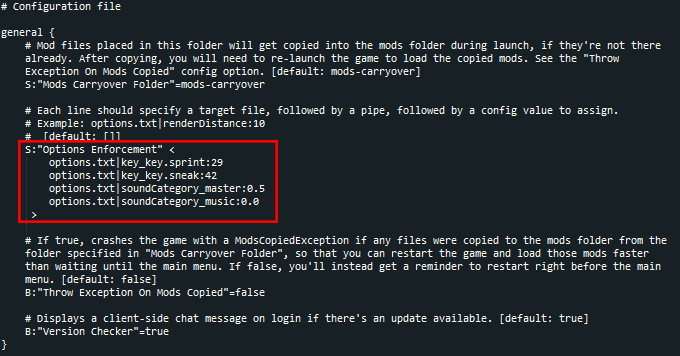 Options Enforcement (through v1.3) During startup, these files will have the listed parameters forcibly applied. Modifications to options.txt do not require a second launch. You can also modify files in /config/..etc, and these modifications usually do not require a second launch.
 -
Options Enforcer Banner
-
Mods copied warning screen This screen will display before the Main Menu if any mods were copied into your mods folder during startup. If Throw Exception On Mods Copied is true, the game crashes instead, which is faster than going to the Main Menu.
-
Options Enforcement (v1.4 ) During startup, these files will have the listed parameters forcibly applied. Modifications to options.txt do not require a second launch. You can also modify files in /config/..etc, and these modifications usually do not require a second launch.
-
Options Enforcer BAnner
Versions
Files
Relations
Project Relations
More like this
Similar Mods
Suggestions use data such as tags, dependencies, dependents, descriptions, titles, and more to rank how much they overlap with this mod.
On ModDex
Community snapshot
By the numbers
Statistics

Get it on
Available Platforms
On ModDex
Community snapshot
By the numbers