Community listing page, reviews here may not be monitored by the author.
Overlay Stats (Original)


No reviews yet
Client-side Fabric mod that lets you build a custom in-game HUD with editable overlay elements.
Community voices
Reviews
No reviews yet. Be the first to review this project!
Get it on
Available Platforms
Compatibility
Supported Environments
Runs entirely on the client. Works on vanilla servers.
About
Project Details
For authors
Embed Badge
If you're the author of this project, you can embed a live badge anywhere that supports HTML or Markdown. It updates automatically whenever ratings change.
Use HTML for any page that supports it, or Markdown for README files and Markdown-based descriptions.
Identifiers
Platform IDs
Resources
External Links
About
Description
Overlay Stats
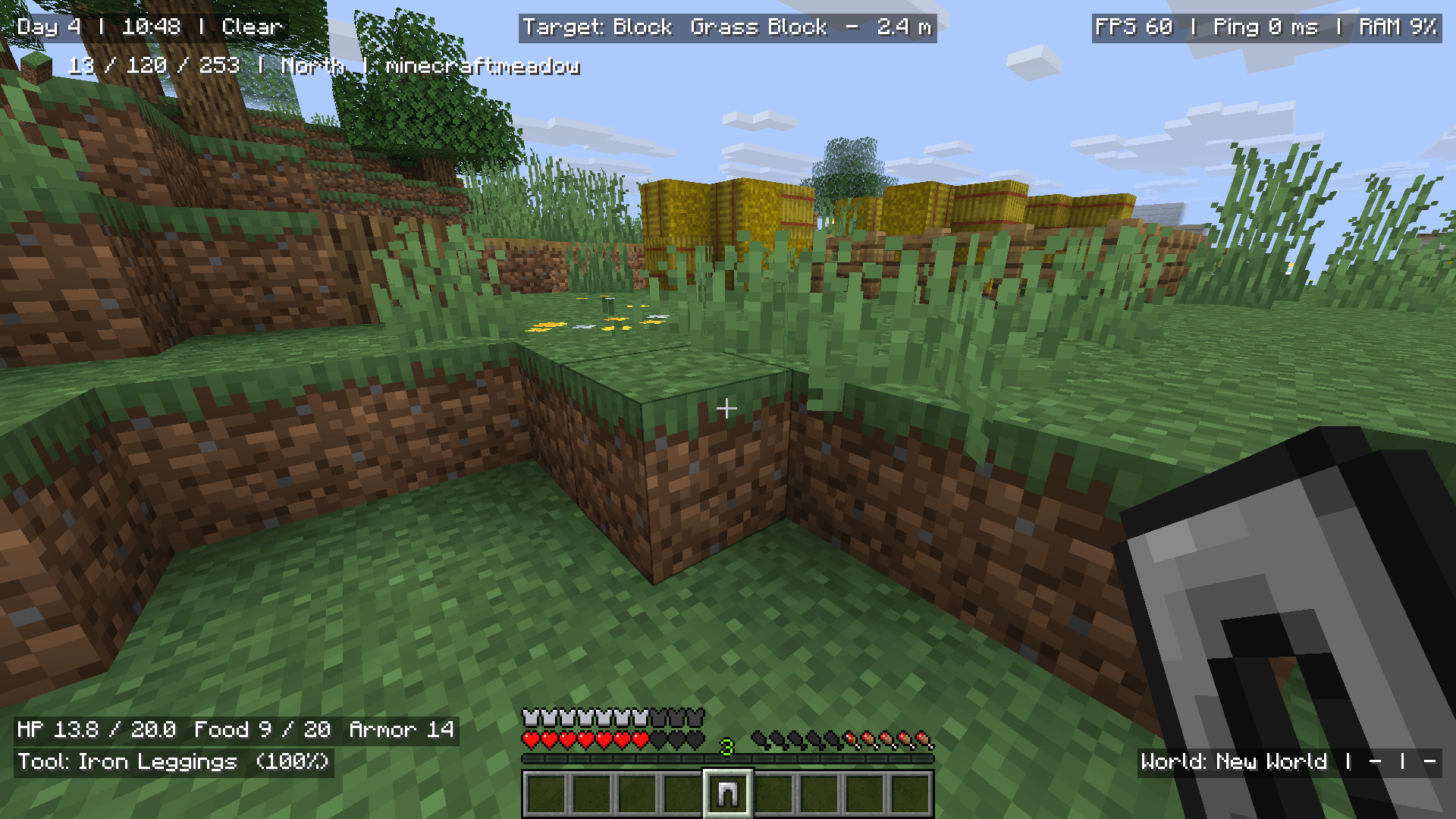
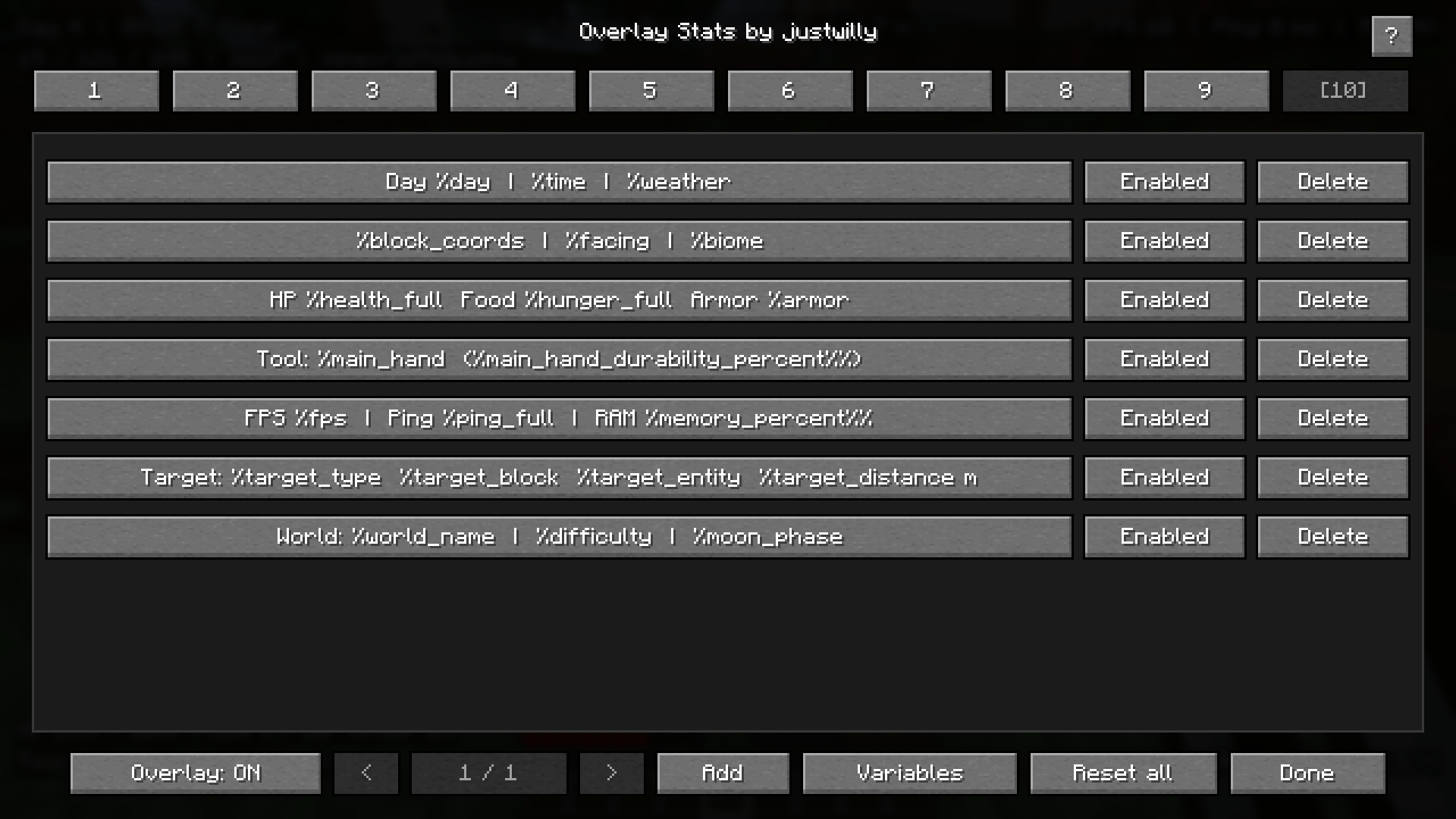
Overlay Stats is a client-side Fabric mod that lets you create your own customizable in-game HUD using editable overlay elements.
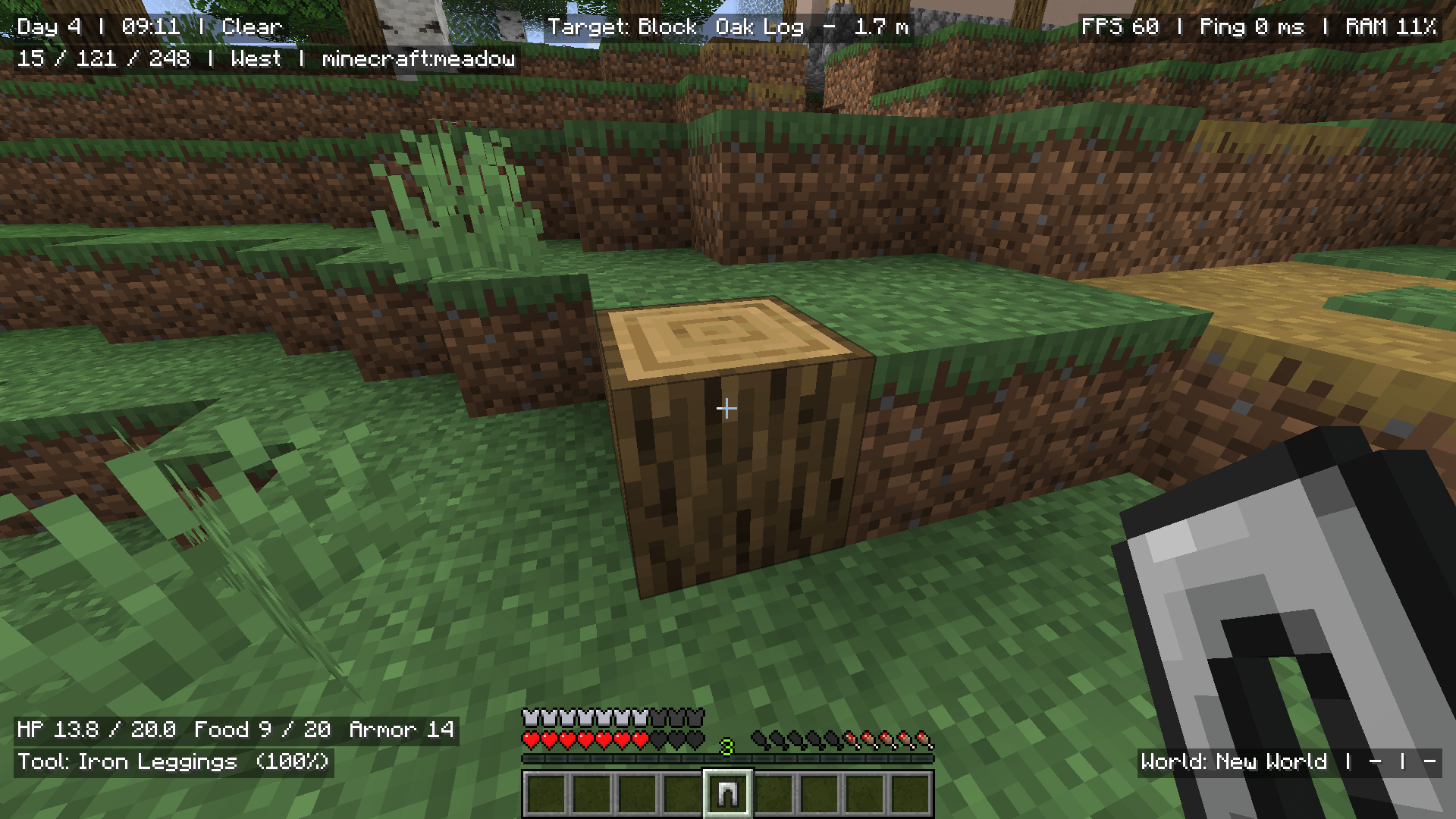
Show the information you care about while playing, such as coordinates, FPS, ping, world time, biome, health, equipment, target block/entity data, potion effects, and more.
The mod uses simple text-based elements with %variables, so you can mix normal text with live Minecraft data however you want.
Features
- Create multiple custom overlay elements
- Use live
%variablesinside your element text - Render Minecraft item/block icons using
$item_name - Drag elements around the screen to reposition them
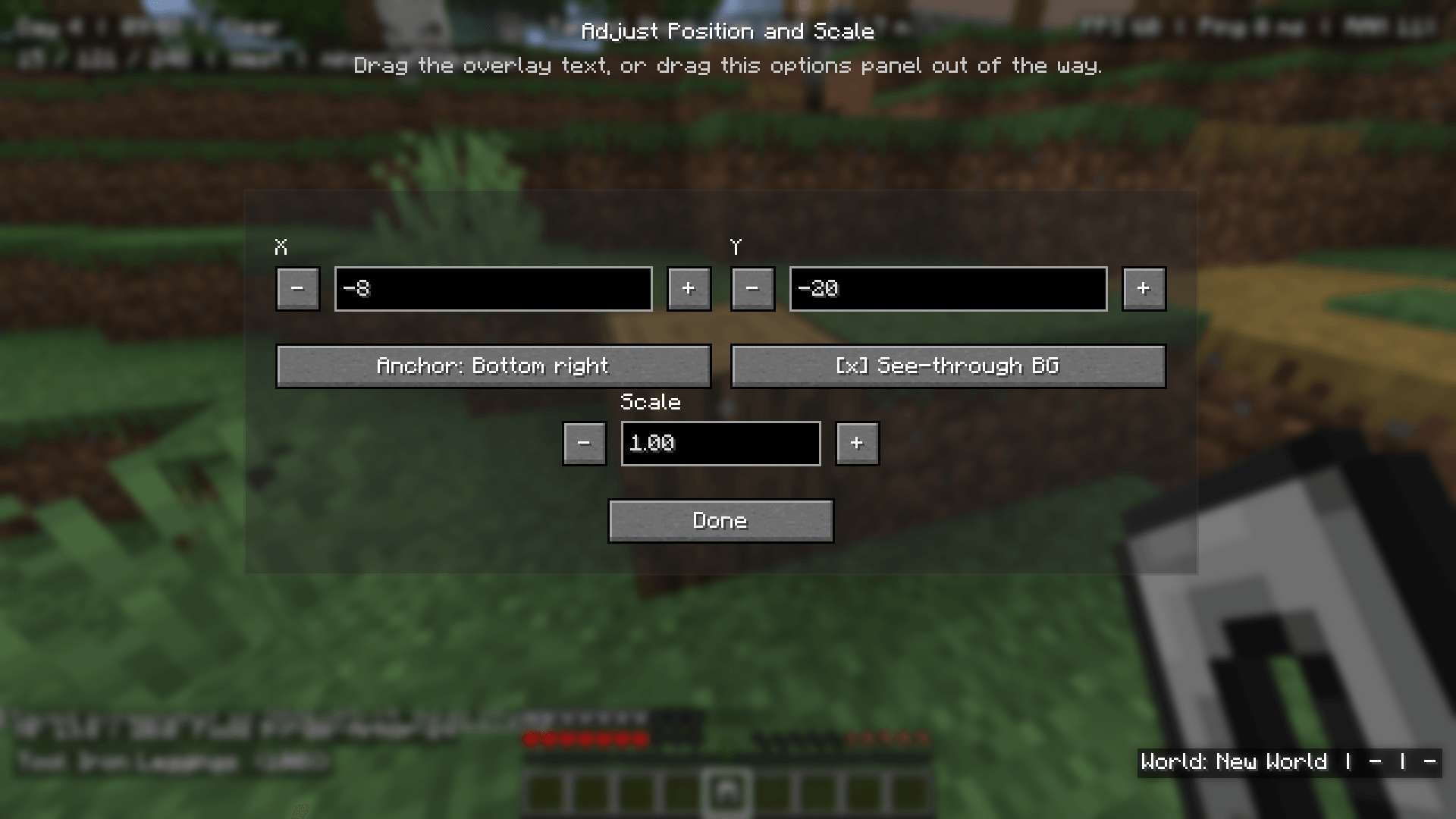
- Adjust X/Y position, anchor, and scale
- Customize text color, opacity, shadow, background color, and background opacity
- Enable or disable each element separately
- Use multiple presets and switch between them
- Includes a showcase preset with ready-made examples
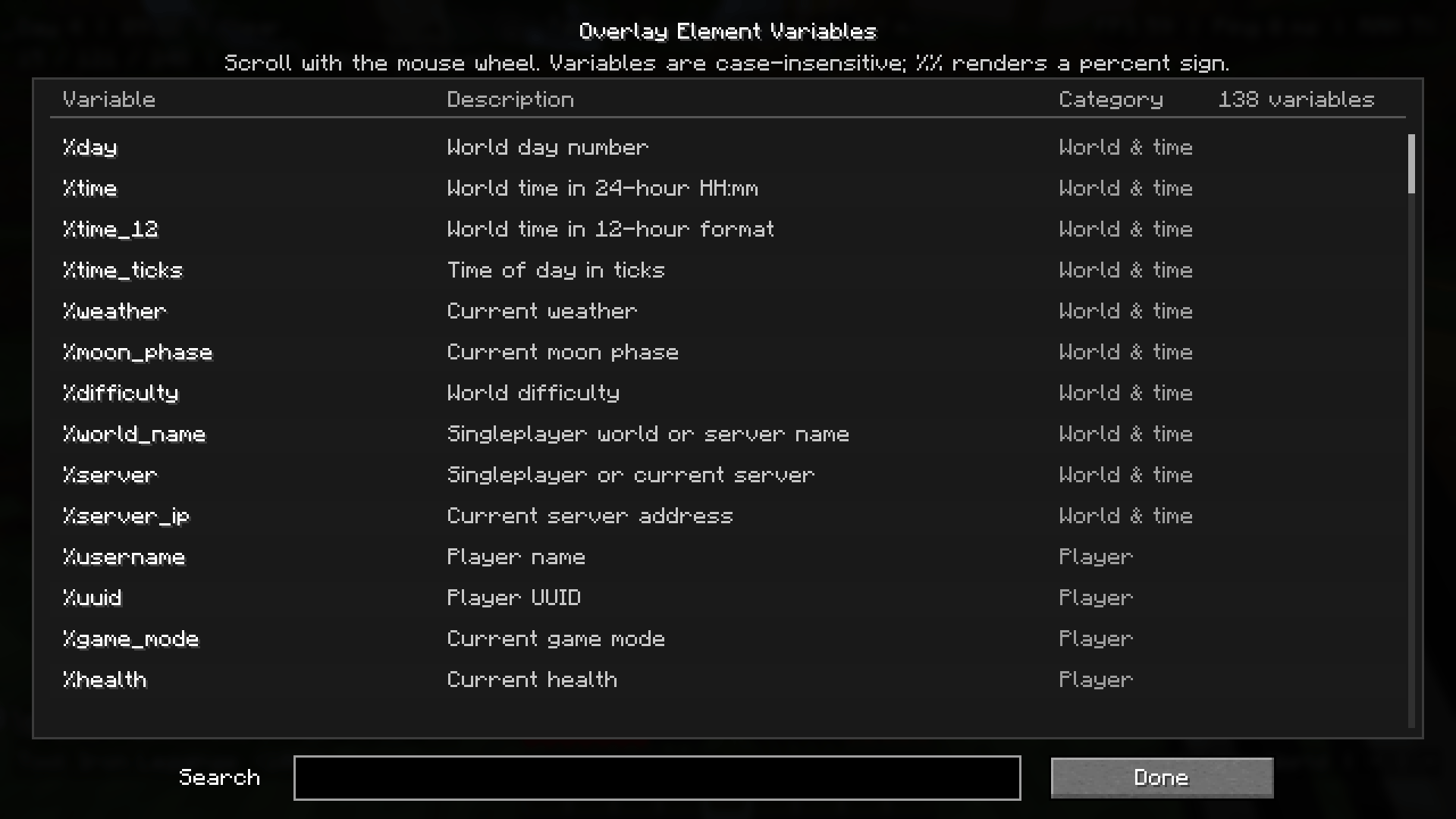
- Searchable variable list
- Variable suggestions while editing
- Item icon suggestions when typing
$ - Template-specific element options, such as hiding air blocks or missing targets
- Client-side only
Examples
You can create simple elements like:
Day %dayXYZ: %x %y %zFPS: %fps | Ping: %ping_fullYou can also combine text, variables, and icons:
$grass_block Looking at: %target_block$clock Time: %time | Day: %day$diamond_sword Target: %target_entity | HP: %target_health_full$compass %direction | %biome | %dimensionItem Icons
Overlay Stats can render Minecraft item and block icons directly inside overlay text.
Use $ followed by an item or block ID:
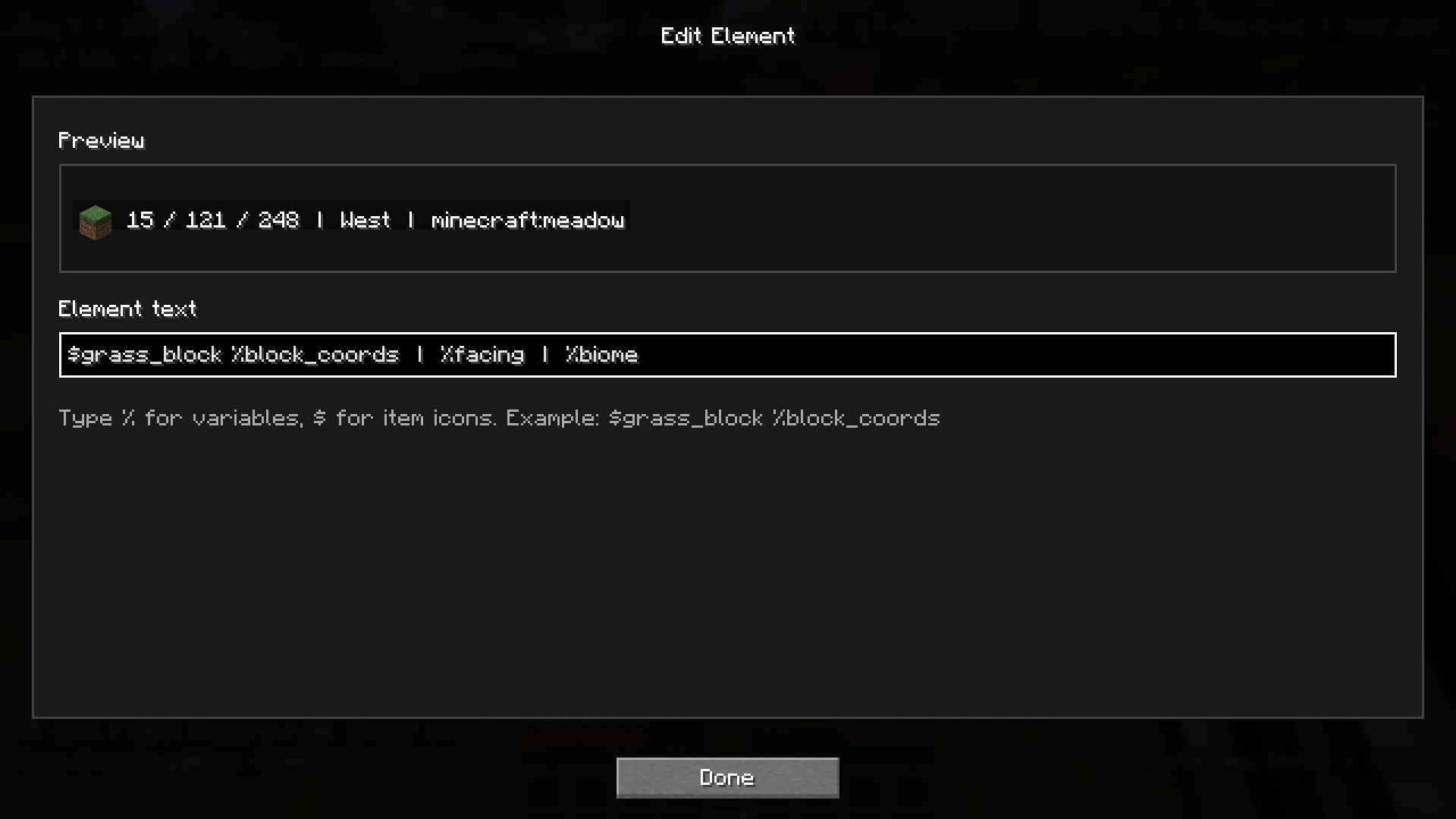
$grass_block %block_coords$diamond_pickaxe Durability: %main_hand_durability_percent%%When editing an element, typing $ will show icon suggestions.
Variables
Overlay Stats includes many built-in variables for different parts of the game.
Some examples include:
%day
%time
%weather
%x
%y
%z
%coords
%biome
%direction
%fps
%ping
%ping_full
%health
%hunger
%armor
%xp_level
%main_hand
%off_hand
%effects
%target_block
%target_entity
%target_health
%target_effects
%server_ip
Open the Variables screen in-game to browse and search the full list.
Presets
The mod includes multiple preset slots, so you can create different HUD layouts for different situations.
For example:
- A clean survival layout
- A technical/debug layout
- A PvP-focused layout
- A server information layout
- A minimal coordinates-only layout
Only one preset is active at a time, making it easy to switch between setups.
Element Options
Each overlay element can be customized individually.
You can change:
- Text color
- Text opacity
- Shadow
- Background color
- Background opacity
- Position
- Anchor
- Scale
- Enabled state
Some variables also unlock extra options.
For example, %target_block can hide the element when you are looking at air, so your HUD stays clean instead of constantly showing Air.
How To Open
Press J in-game to open the Overlay Stats editor.
From there, you can add elements, edit existing ones, adjust position and scale, browse variables, and manage presets.
Client-Side
Overlay Stats is fully client-side.
It does not need to be installed on the server.
Perfect For
- Survival players who want useful HUD info
- Technical players who need coordinates, biome, light, FPS, and ping
- Content creators who want clean custom overlays
- Players who want a more personal HUD
- Server players who want quick access to ping, server IP, or location info
Author
- Modrinth: https://modrinth.com/user/justwilly
- Curseforge: https://www.curseforge.com/members/real_jw/projects
- Ko-fi: https://ko-fi.com/0willy
Donations help support development, testing, maintenance, and future updates.
Overlay Stats
Overlay Stats is a client-side Fabric mod that lets you create your own customizable in-game HUD using editable overlay elements.
Show the information you care about while playing, such as coordinates, FPS, ping, world time, biome, health, equipment, target block/entity data, potion effects, and more.
The mod uses simple text-based elements with %variables, so you can mix normal text with live Minecraft data however you want.
Features
- Create multiple custom overlay elements
- Use live
%variablesinside your element text - Render Minecraft item/block icons using
$item_name - Drag elements around the screen to reposition them
- Adjust X/Y position, anchor, and scale
- Customize text color, opacity, shadow, background color, and background opacity
- Enable or disable each element separately
- Use multiple presets and switch between them
- Includes a showcase preset with ready-made examples
- Searchable variable list
- Variable suggestions while editing
- Item icon suggestions when typing
$ - Template-specific element options, such as hiding air blocks or missing targets
- Client-side only
Examples
You can create simple elements like:
Day %day
XYZ: %x %y %z
FPS: %fps | Ping: %ping_full
You can also combine text, variables, and icons:
$grass_block Looking at: %target_block
$clock Time: %time | Day: %day
$diamond_sword Target: %target_entity | HP: %target_health_full
$compass %direction | %biome | %dimension
Item Icons
Overlay Stats can render Minecraft item and block icons directly inside overlay text.
Use $ followed by an item or block ID:
$grass_block %block_coords
$diamond_pickaxe Durability: %main_hand_durability_percent%%
When editing an element, typing $ will show icon suggestions.
Variables
Overlay Stats includes many built-in variables for different parts of the game.
Some examples include:
%day
%time
%weather
%x
%y
%z
%coords
%biome
%direction
%fps
%ping
%ping_full
%health
%hunger
%armor
%xp_level
%main_hand
%off_hand
%effects
%target_block
%target_entity
%target_health
%target_effects
%server_ip
Open the Variables screen in-game to browse and search the full list.
Presets
The mod includes multiple preset slots, so you can create different HUD layouts for different situations.
For example:
- A clean survival layout
- A technical/debug layout
- A PvP-focused layout
- A server information layout
- A minimal coordinates-only layout
Only one preset is active at a time, making it easy to switch between setups.
Element Options
Each overlay element can be customized individually.
You can change:
- Text color
- Text opacity
- Shadow
- Background color
- Background opacity
- Position
- Anchor
- Scale
- Enabled state
Some variables also unlock extra options.
For example, %target_block can hide the element when you are looking at air, so your HUD stays clean instead of constantly showing Air.
How To Open
Press J in-game to open the Overlay Stats editor.
From there, you can add elements, edit existing ones, adjust position and scale, browse variables, and manage presets.
Client-Side
Overlay Stats is fully client-side.
It does not need to be installed on the server.
Perfect For
- Survival players who want useful HUD info
- Technical players who need coordinates, biome, light, FPS, and ping
- Content creators who want clean custom overlays
- Players who want a more personal HUD
- Server players who want quick access to ping, server IP, or location info
Author
- Modrinth: https://modrinth.com/user/justwilly
- Curseforge: https://www.curseforge.com/members/real_jw/projects
- Ko-fi: https://ko-fi.com/0willy
Donations help support development, testing, maintenance, and future updates.
Screenshots
Gallery
-
 98b82e15f99f7190e64bc3e85a7d472c149fc7fe.png 98b82e15f99f7190e64bc3e85a7d472c149fc7fe.png
 -
 07a1bdb8c85e1c75c8946f77e6cfc532b0180ad8.png 07a1bdb8c85e1c75c8946f77e6cfc532b0180ad8.png
 -
 208a5b126e5c3cbc16c73b26c960edbd47f26335.png 208a5b126e5c3cbc16c73b26c960edbd47f26335.png
 -
 afdbea0b6cfd65b9178a0e233399e603746cb7f5.png afdbea0b6cfd65b9178a0e233399e603746cb7f5.png
 -
 872f0ad49dca89009ad1fade06a78e35f5b5e771.png 872f0ad49dca89009ad1fade06a78e35f5b5e771.png
 -
 d5295af8301ee23ecc3d1161c8297e5574829a54.png d5295af8301ee23ecc3d1161c8297e5574829a54.png
-
 Customizable HUD Example
 -
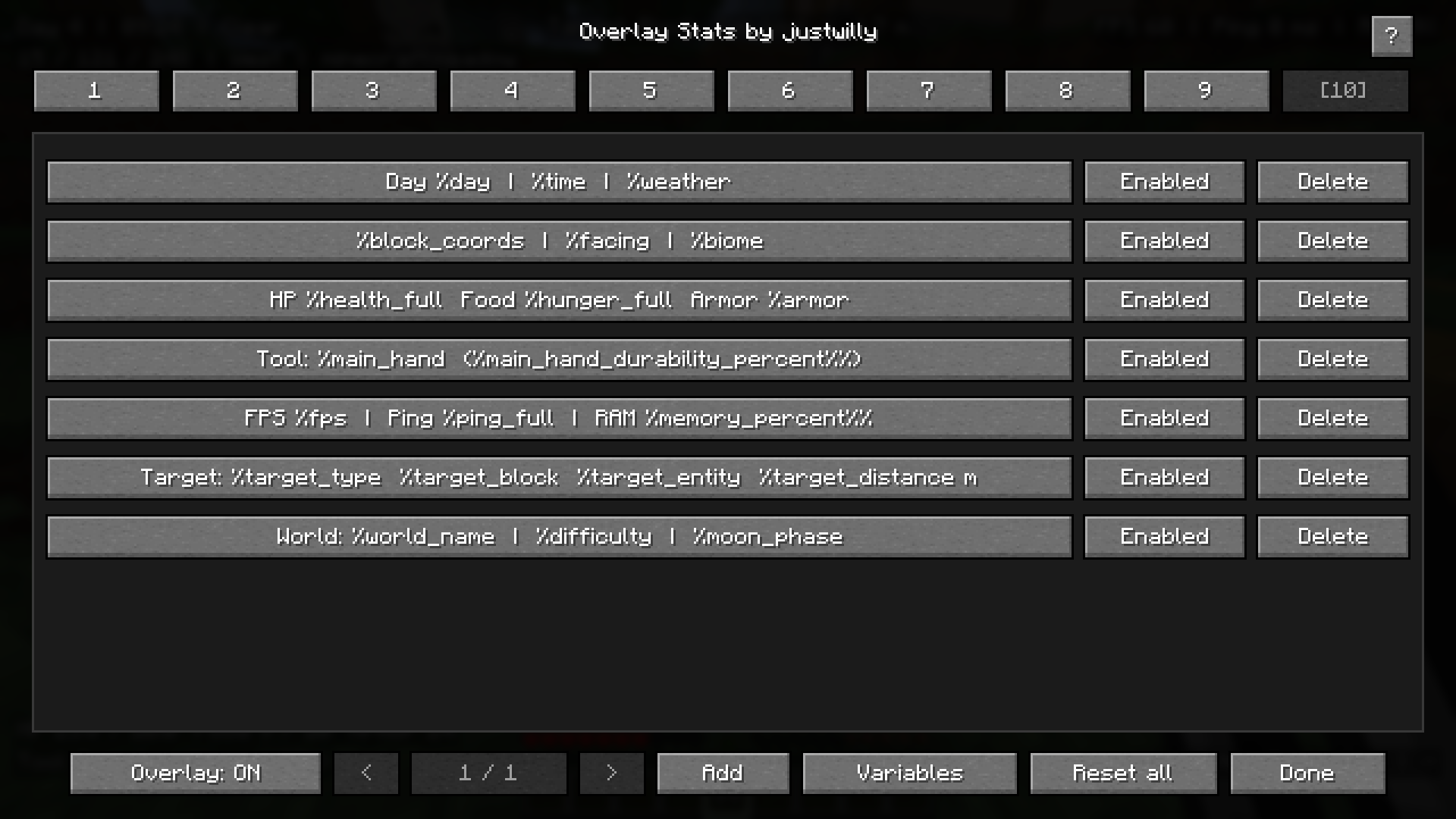 Presets
 -
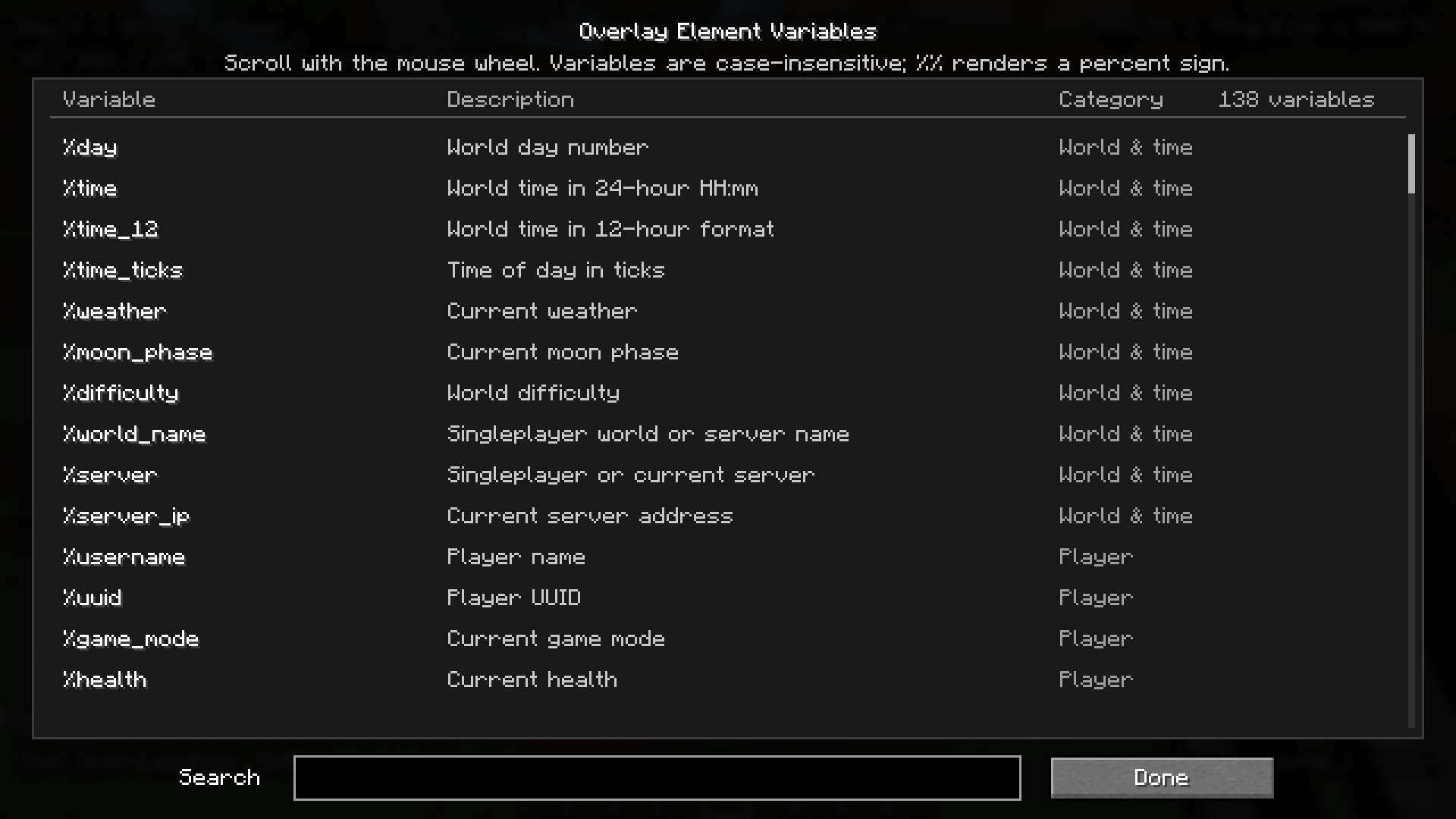 Supported Variables
 -
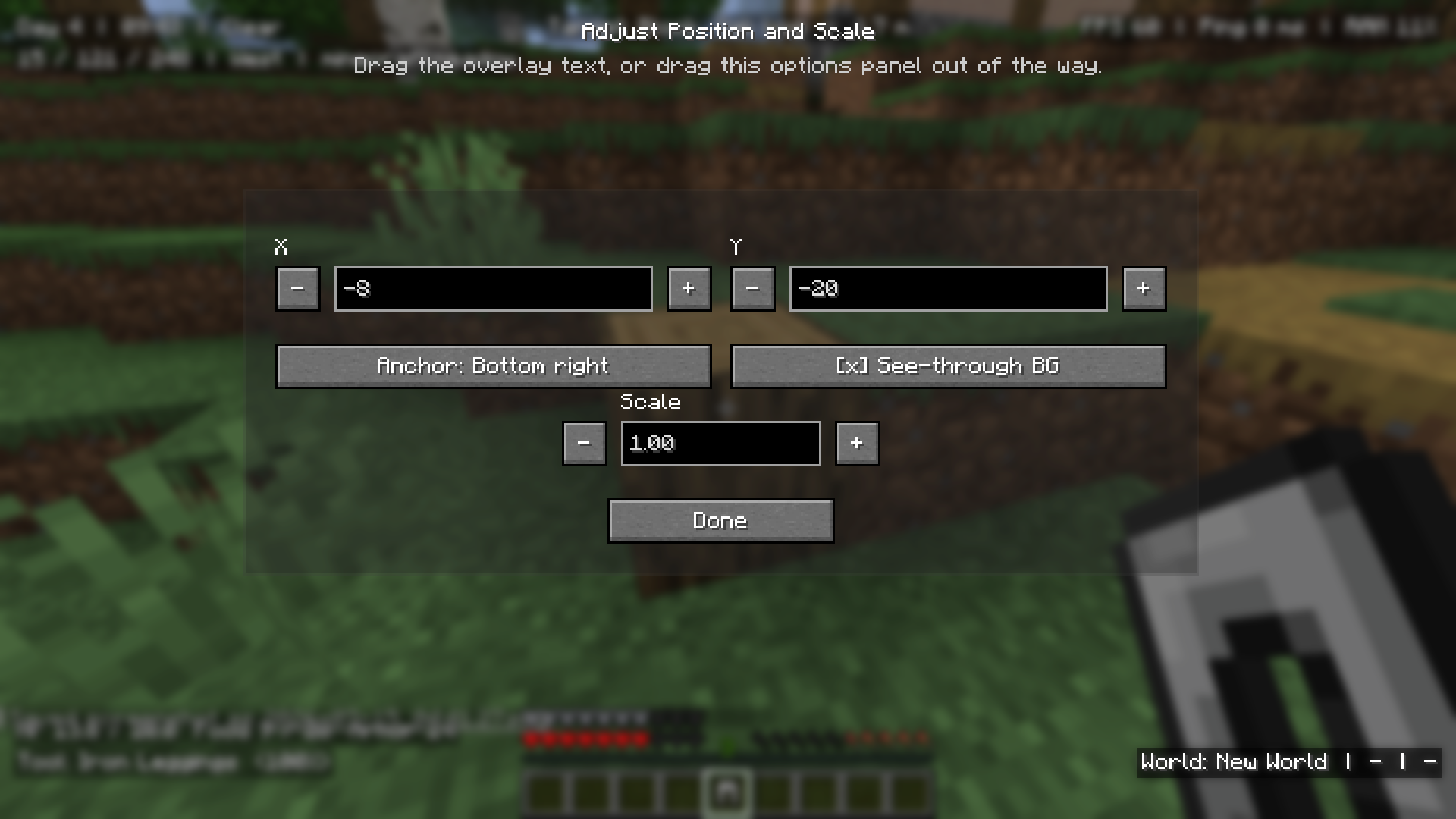 Drag and Drop Move Positions and Scaling Options
 -
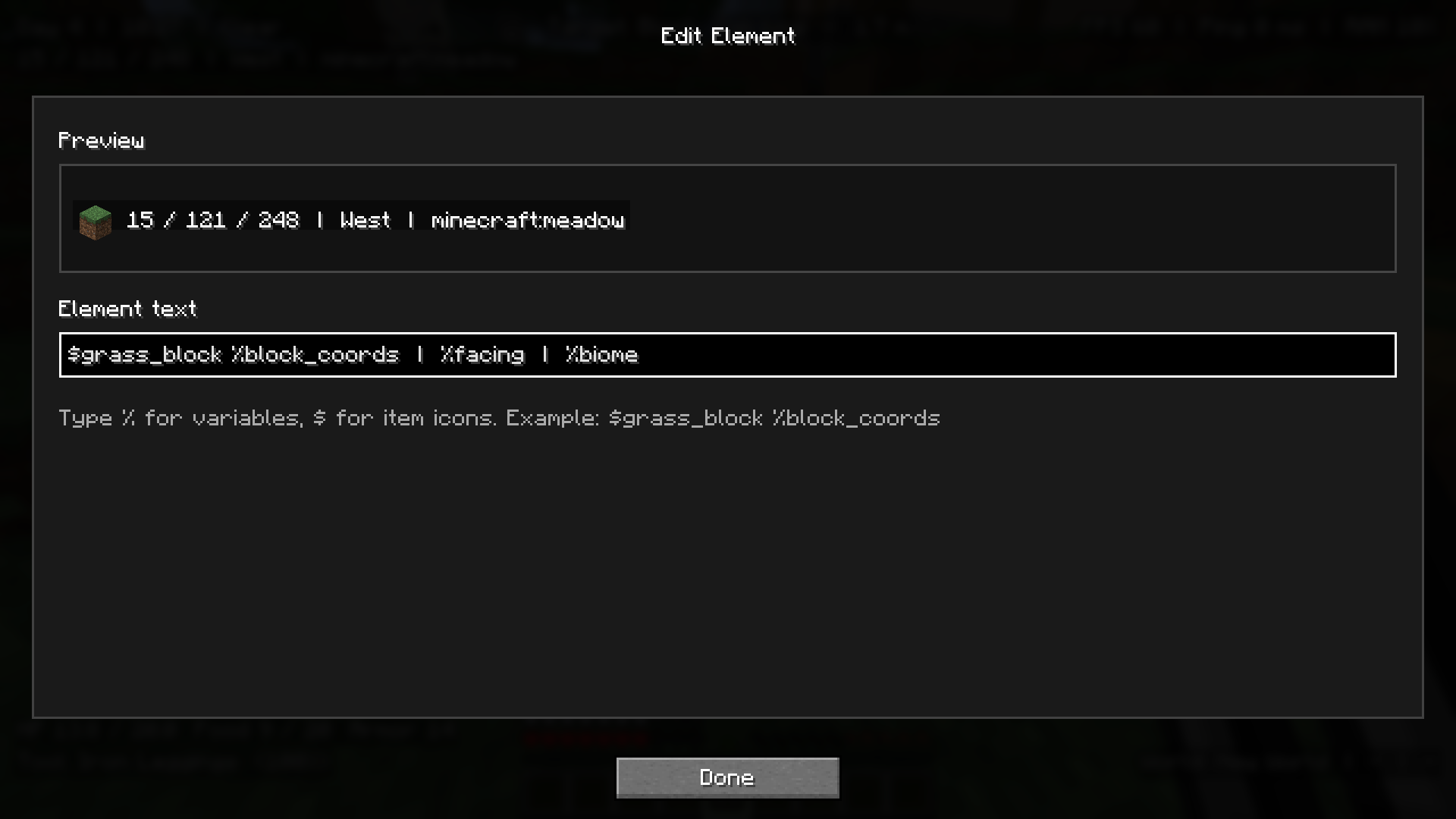 Element Editor User can use %variable to show statistic and $item_name to show minecraft icons
 -
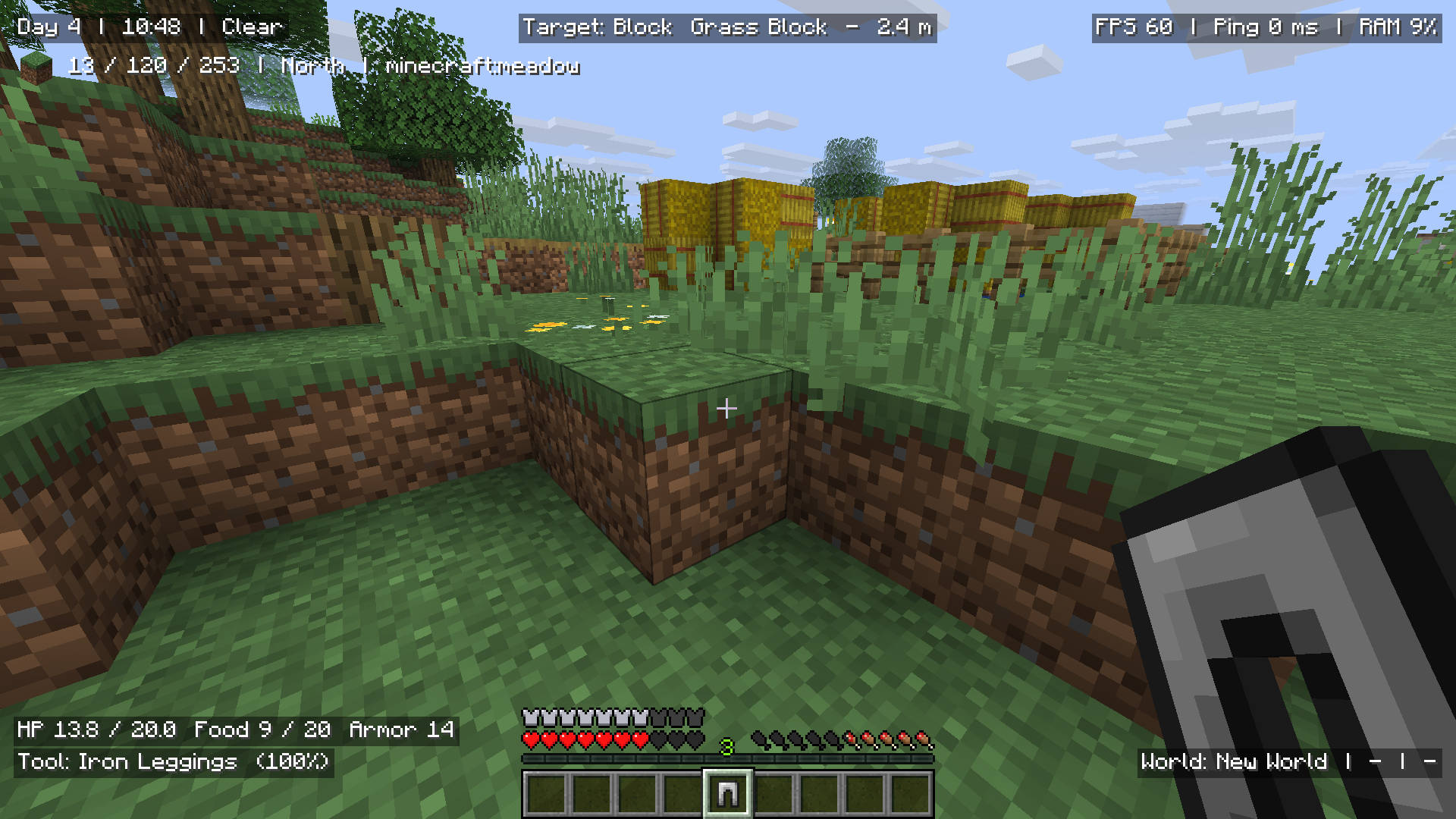 Examples
Versions
Files
Relations
Project Relations
More like this
Similar Mods
Suggestions use data such as tags, dependencies, dependents, descriptions, titles, and more to rank how much they overlap with this mod.
On ModDex
Community snapshot
By the numbers
Statistics
Want to reach Minecraft players?
We're looking for a server hosting partner to feature here and other parts of the site. Interested? Send us a message!
Get in touchGet it on
Available Platforms
On ModDex
Community snapshot
By the numbers
Statistics
Resources