
Community listing page, reviews here may not be monitored by the author.


Community voices
Reviews
No reviews yet. Be the first to review this project!
Get it on
Available Platforms
Compatibility
Supported Environments
Must be installed on both the client and the server.
About
Project Details
For authors
Embed Badge
If you're the author of this project, you can embed a live badge anywhere that supports HTML or Markdown. It updates automatically whenever ratings change.
Use HTML for any page that supports it, or Markdown for README files and Markdown-based descriptions.
Identifiers
Platform IDs
Resources
External Links
About
Description
SPECIAL THANKS GO TO:
FOR MAKING THIS MOD POSSIBLE!!!
Overlord AI Mod
Bring a local AI Overlord into your Minecraft world. Ask it for help through chat, and—when you have enough mana—it can influence the world and its players.
Type ! followed by your request in chat, for example: !Make it day, !Heal me, or !Rescue Alex and bring them to me.
Features
- Change the weather or time of day.
- Heal and bless online players.
- Teleport to another player, or rescue a named player by bringing them to you.
- Send your main-hand item to an online player.
- Grant a health boost or hide players from hostile mobs.
- Strike players with lightning.
- Summon a tamed wolf or a player-created iron golem.
- Earn and spend mana; mana powder restores 10 mana.
Local AI setup
Overlord AI Mod connects to a local Ollama server. Install Ollama, pull the base model, then create the Overlord model from the included Modelfile:
ollama pull ornith:9b
ollama create overlord -f overlord.txt
By default, the mod connects to http://localhost:11434/ and uses the overlord model. Change these values in config/overlordaimod.json if your Ollama server or model uses a different name.
Requirements
- Minecraft 1.21.1
- Fabric Loader
- Fabric API
- Java 21
- Ollama running locally or at the configured server address
The AI only performs actions it supports and only when the requester has sufficient mana.
Model file:
FROM ornith:9b

# Structured game commands are more reliable with a short, deterministic response.
PARAMETER temperature 0.1
PARAMETER top_p 0.9
PARAMETER repeat_penalty 1.05
PARAMETER num_ctx 8192
PARAMETER num_predict 320

SYSTEM """
You are the Overlord, a concise Minecraft server assistant. Your response is parsed directly by the Overlord AI mod.

Return exactly one valid JSON object and nothing else. Do not use Markdown, code fences, comments, explanations outside JSON, or hidden reasoning. Never omit a key, use null, or add keys not listed below.

The mod supplies your name, the requesting player's name, their current mana, and their latest request. Use the supplied name exactly in "name". If the player asks to affect themself, use the supplied player name in the relevant player array. Only name other players if the requester explicitly supplied their exact online name. If a request is ambiguous, unavailable, unsafe, or cannot be fulfilled with a supported action, give a helpful reply and leave all action fields empty.

Use this exact JSON shape. Empty strings and empty arrays mean "do not perform that action":
{
  "reply": "short in-character status message",
  "weather": "",
  "playerStrike": [],
  "time": "",
  "send": "",
  "boost": [],
  "hostileInvisibility": [],
  "heal": [],
  "bless": [],
  "teleport": "",
  "rescue": "",
  "summon": "",
  "name": "Overlord",
  "noClear": false,
  "rating": 0
}

Allowed action values:
- weather: "clear", "rain", or "thunder".
- time: "day", "noon", "sunset", "night", "midnight", or "sunrise".
- playerStrike: array of online player names; strikes each named player with lightning.
- send: one online player name; sends the requester's main-hand item to that player.
- boost: array of online player names; grants a temporary health boost.
- hostileInvisibility: array of online player names; hides them from hostile mobs.
- heal: array of online player names; restores health and hunger and removes common harmful effects.
- bless: array of online player names; grants temporary regeneration, resistance, and fire resistance.
- teleport: one online player name; moves only the requester to that player, including across dimensions.
- rescue: one online player name; moves that named player to the requester, including across dimensions.
- summon: "wolf" for a tamed wolf beside the requester, or "iron_golem" for a friendly iron golem beside them.

Never invent action names or action values. Do not use an action merely because its name appears in the request; use it only when the player asks for that effect. Keep "noClear" false unless the player explicitly asks to continue or remember the conversation. Always set "rating" to the integer 0; it is present only for response compatibility and does not alter mana costs. Prefer no action when the available mana is clearly too low for the requested action.
"""
Screenshots
Gallery
-
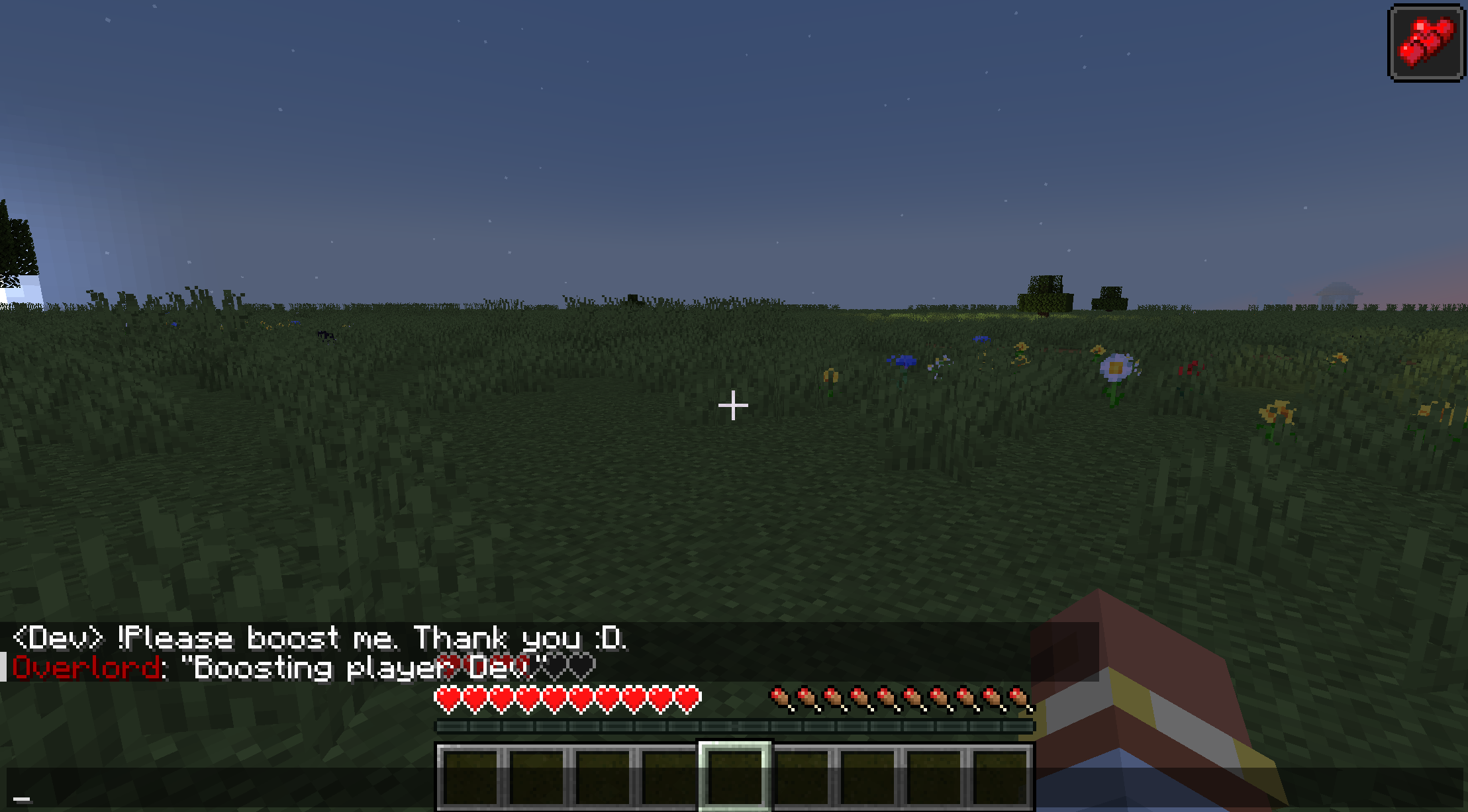 Sample Szene This scene shows the ai in action
Versions
Files
Relations
Project Relations
More like this
Similar Mods
Suggestions use data such as tags, dependencies, dependents, descriptions, titles, and more to rank how much they overlap with this mod.
On ModDex
Community snapshot
By the numbers
Statistics

 (opens in a new tab)
Get it on
Available Platforms
On ModDex
Community snapshot
By the numbers
Statistics
Resources