Community listing page, reviews here may not be monitored by the author.
Pack Gate


No reviews yet
A very simple tool for modpack admins to control updates.
Community voices
Reviews
No reviews yet. Be the first to review this project!
Get it on
Available Platforms
Compatibility
Supported Environments
Runs entirely on the client. Works on vanilla servers.
About
Project Details
For authors
Embed Badge
If you're the author of this project, you can embed a live badge anywhere that supports HTML or Markdown. It updates automatically whenever ratings change.
Use HTML for any page that supports it, or Markdown for README files and Markdown-based descriptions.
Identifiers
Platform IDs
About
Description
PackGate
A simple mod that just does one thing: Checks for modpack updates.
NOTICE: This mod is strictly CLIENT-SIDED. This means that it should NOT be run on a server. Doing so may CRASH the server!
Are you enjoying PackGate? If you are, feel free to 
How does it work?
Pack Gate works by calling out to a remotely-hosted file the modpack author created and compares the version in that file with the version specified in Pack Gate's config file.
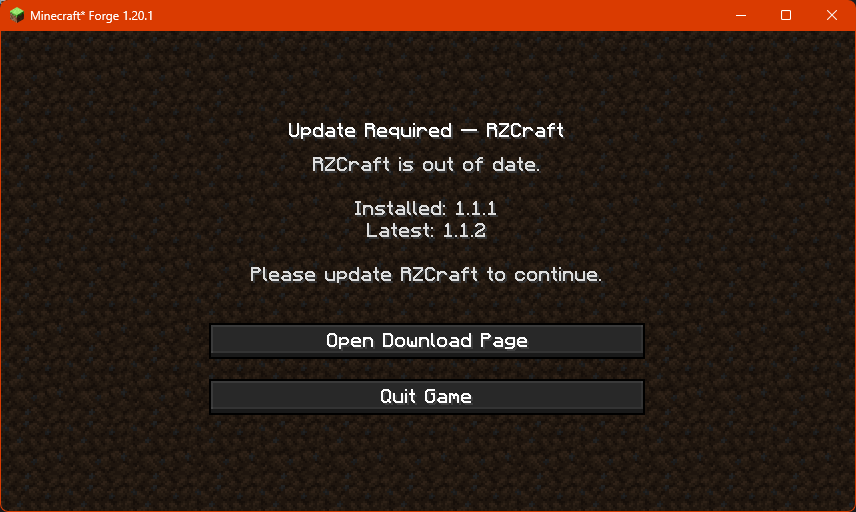
If Pack Gate finds that the remote version is higher than what's been provided in the config, it'll block access to the game and present the user with this screen:
Configuring PackGate
In order to use Pack Gate for your own modpack, you will need to make changes to the mod's config file.
Pack Gate's config is located at config/packgate-client.toml
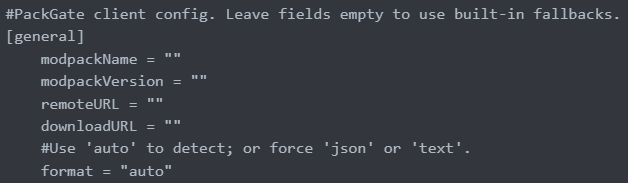
What you'll see when you first open the config:
Definitions
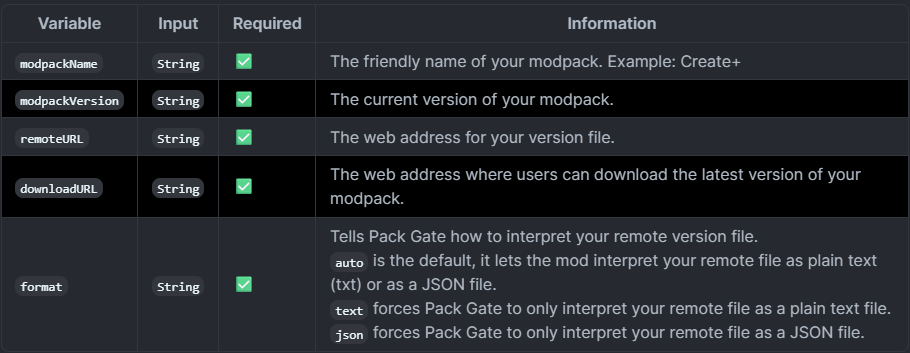
About the remote version file.
In order to utilize Pack Gate in your modpack, you need to have the ability to host either a text file or a JSON file online.
Example Text File:

Example JSON File:

It is important that wherever you host your remote version file has the ability to provide you with a direct URL. This means that file sharing platforms like MediaFire or MEGA won't work.
A working URL would end with the file and its extension, for example: https://example.com/my_awesome_modpack_version.txt
Platforms like Google Drive and Dropbox can work, but you have to modify the URLs they provide in order to get access to the direct, raw file.
If you can't host a file remotely on your own, consider sites like PasteBin or even GitHub. As long as the URL points to the raw text or JSON, Pack Gate will accept it.
A working PasteBin URL like https://pastebin.com/raw/sNBDt7u5 would work.

Pack Gate
A simple modpack update alerter mod for Forge.
Introduction
Pack Gate was born out of the need for a simple modpack version checker that didn't have all kinds of fancy bells and whistles.
A simple mod that just does one thing: Checks for modpack updates.
This is NOT a server mod, it is client-sided only! It WILL crash servers.
How does it work?
Pack Gate works by calling out to a remotely-hosted file the modpack author created and compares the version in that file with the version specified in Pack Gate's config file.
If Pack Gate finds that the remote version is higher than what's been provided in the config, it'll block access to the game and present the user with this screen:

Configuring Pack Gate
In order to use Pack Gate for your own modpack, you will need to make changes to the mod's config file.
Pack Gate's config is located at config/packgate-client.toml.
What you'll see when you first open the config.
#PackGate client config. Leave fields empty to use built-in fallbacks.
[general]
	modpackName = ""
	modpackVersion = ""
	remoteURL = ""
	downloadURL = ""
	#Use 'auto' to detect; or force 'json' or 'text'.
	format = "auto"
Definitions
| Variable | Input | Required | Information |
|---|---|---|---|
modpackName |
String |
✅ | The friendly name of your modpack. Example: Create+ |
modpackVersion |
String |
✅ | The current version of your modpack. |
remoteURL |
String |
✅ | The web address for your version file. |
downloadURL |
String |
✅ | The web address where users can download the latest version of your modpack. |
format |
String |
✅ | Tells Pack Gate how to interpret your remote version file. auto is the default, it lets the mod interpret your remote file as plain text (txt) or as a JSON file. text forces Pack Gate to only interpret your remote file as a plain text file. json forces Pack Gate to only interpret your remote file as a JSON file. |
About the remote version file
In order to utilize Pack Gate with your modpack, you will need to have the ability to host a text file or JSON file online.
Example plain text file:
1.0.0
Example JSON file:
{
  "latest": "1.0.1",
  "downloadURL": "https://github.com/RavenholmZombie/RZCraft-Modpack/releases/latest"
}
It is important that wherever you host your remote version file has the ability to provide you with a direct URL. This means that file sharing platforms like MediaFire or MEGA won't work.
A working URL would end with the file and its extension, for example:
https://example.com/my_awesome_modpack_version.txt
Platforms like Google Drive and Dropbox can work, but you have to modify the URLs they provide in order to get access to the direct, raw file.
If you can't host a file remotely on your own, consider sites like PasteBin or even GitHub. As long as the URL points to the raw text or JSON, Pack Gate will accept it.
A working PasteBin URL like https://pastebin.com/raw/sNBDt7u5 would work.
Screenshots
Gallery
-
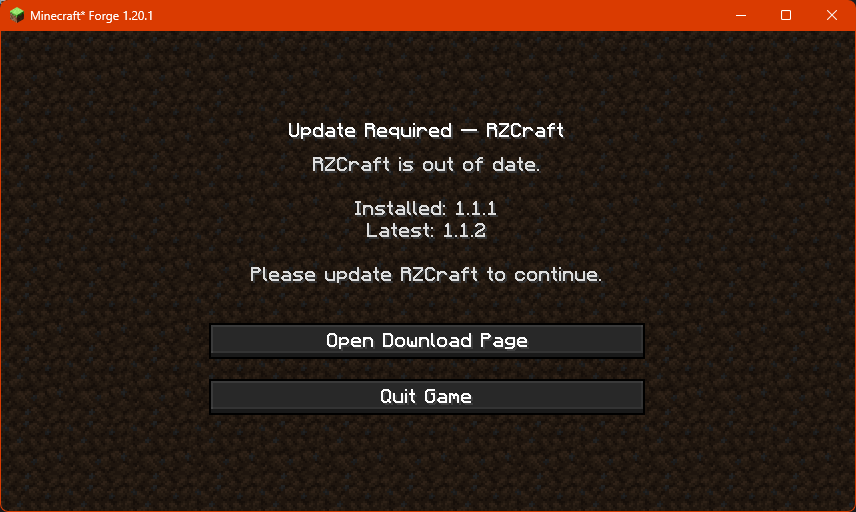 This screen is shown to the player when their modpack is out-of-date.
Versions
Files
Relations
Project Relations
More like this
Similar Mods
Suggestions use data such as tags, dependencies, dependents, descriptions, titles, and more to rank how much they overlap with this mod.
On ModDex
Community snapshot
By the numbers
Statistics
Want to reach Minecraft players?
We're looking for a server hosting partner to feature here and other parts of the site. Interested? Send us a message!
Get in touchGet it on
Available Platforms
On ModDex
Community snapshot
By the numbers