Community listing page, reviews may not be monitored by the author.
Paged inventory

No reviews yet
Paged Inventory expands the player's inventory into multiple pages. It is not a separate backpack item; it is an expansion of the vanilla inventory, adding a range of plugins that extend the backpack beyond simple storage.

Community voices
Reviews
No reviews yet. Be the first to review this project!
Get it on
Available Platforms
About
Project Details
For authors
Embed Badge
If you're the author of this project, you can embed a live badge anywhere that supports HTML or Markdown. It updates automatically whenever ratings change.
Use HTML for any page that supports it, or Markdown for README files and Markdown-based descriptions.
Identifiers
Platform IDs
Resources
External Links
About
Description
Overview
Backpack Expansion turns the player's inventory into a multi-page backpack.
It is not a separate backpack item — it extends the vanilla inventory itself, and adds a set of plugins that give the inventory more to do than just store items.
Features
Expands the capacity of your vanilla inventory.
The mod adds a new item, the Backpack Core — the foundation everything else is built on. Press H to open the plugin panel, then insert the core into the central socket to unlock paging and plugins.
Without the Backpack Core installed, your inventory behaves exactly like vanilla and no plugin features are available.
Flip pages with the arrows below the hotbar or with the mouse wheel. Press B to open the merged view, which shows every backpack page at once.
Plugin sockets: the panel provides 8 regular plugin sockets and 1 core socket.
Core Socket
Only the Backpack Core fits here. Other plugins only take effect once it is installed, and the core is what unlocks extra pages. Cores come in Basic / Copper / Iron / Gold / Diamond / Netherite tiers, each adding more pages than the last.
Regular Sockets
Stacking Upgrade — Copper / Iron / Gold / Diamond / Netherite tiers raise the stack limit to 2× / 3× / 4× / 5× / 6× the vanilla size, up to 384.
Pickup Core — unlocks automatic item pickup within 4 blocks. Its hotkey opens a blacklist screen; blacklisted items are ignored.
Magnet Core — the upgrade to the Pickup Core. Extends pickup to 8 blocks and also collects XP orbs.
Black Hole Core — the upgrade to the Magnet Core. Extends pickup to 12 blocks. Blacklisted items are still picked up, but are destroyed on contact.
Storage Core — while a container is open, press V to push items from every backpack page into the container or storage network, and G to pull back items you already have in your backpack.
Locking Core — hold Alt and click a slot to lock it. Locked slots get a golden highlight; sorting and the V deposit skip them, while G will still restock them. A locked item cannot be taken out — Alt-click again to unlock.
Potion Core — adds the potion rack. Its hotkey opens a rack of slots that each hold up to 10 bottles. Switch it on and it automatically drinks potions whose effect is not currently active. Toggling it off and on again while an effect is still running will not trigger a second drink — it only drinks once the effect has worn off, so no potions are wasted. Holding 6 of the same potion grants a permanent effect that persists even with the rack switched off, and the potion particle effects can be hidden.
Repair Core — press P to toggle auto-repair. Spends your own XP to repair items in the backpack and hotbar, at 2 durability repaired per 1 XP.
Experience Core — press X to open the XP panel, where you can store and withdraw levels and set a level to maintain. Below the target, the core tops you up; above it, the surplus is stored in the core. Stored XP survives crafting the core into something else.
XP Mending Core — combines the Experience Core and Repair Core, with one change: repairs draw from the XP stored in the core first.
Void Lock Core — combines the Locking Core and Black Hole Core.
Feeding Core — automatic eating. Press O to open its screen, store food in the plugin and set the trigger threshold. The plugin's food is used first, left to right. Any food can go in, but by default it skips foods with effects, golden apples, golden carrots and the like.
Feeding Potion Core — combines the Feeding Core and Potion Core (items stored in either plugin are kept when crafting).
Smelting Core — press M to open the smelting screen: 9 input and output slots plus a fuel slot. Ore and fuel are smelted in the background.
Farm Core — press K to open the farming screen: 9 input and output slots plus a bonemeal slot. Seeds planted in the input slots grow automatically; after 3 minutes you harvest 1–3 crops. Bonemeal shortens the growth time to 1 minute.
Smelting Farm Core — combines the Smelting Core and Farm Core.
Notes
Only one plugin from each family can be installed at a time.
While a chest, furnace or AE2/RS terminal is open, your vanilla inventory is also replaced by the paged backpack.
Press R or middle-click to sort every backpack page; the container's own slots are sorted along with them. If Quark or Inventory Sorter (IS) are installed alongside this mod, their sort hotkeys are disabled.
JEI search works: type into the JEI search bar and the backpack jumps to the matching page and highlights it with a green outline. Search matches by item type and distinguishes enchantments/NBT.
Double-clicking to gather the same item across pages now respects your Stacking Core limit instead of vanilla's 64.
Tested on Forge 47.4.5; other Forge versions are untested and the mod may not work there.
The mod replaces the entire vanilla inventory screen, so buttons that other mods add to it may be hidden.
Containers such as chests and furnaces keep their own 64 stack limit — the Stacking Core only affects backpack pages and the hotbar.
The creative inventory is left untouched and is not taken over.
Third-party hotbars that use their own container rather than the player's real hotbar may not follow the stack limit.
Free to include in modpacks as long as the copyright notice is kept.
Screenshots
Gallery
-
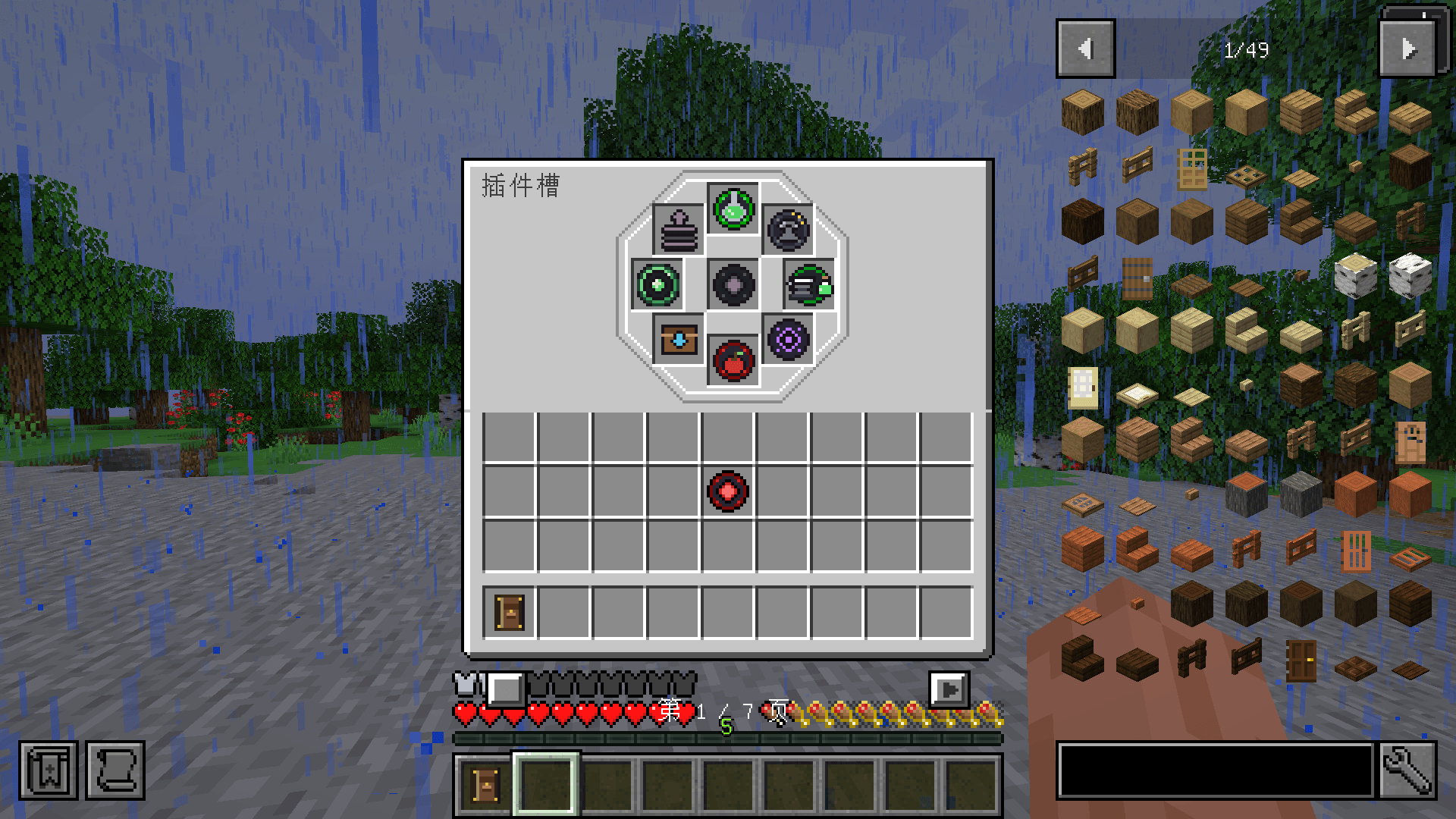 image-attachment_b773b569-58be-45c7-a88b-ba78c61e58a5.png
Versions
Files
Relations
Project Relations
More like this
Similar Mods
Suggestions use data such as tags, dependencies, dependents, descriptions, titles, and more to rank how much they overlap with this mod.
On ModDex
Community snapshot
By the numbers
Statistics

Get it on
Available Platforms
On ModDex
Community snapshot
By the numbers
Statistics
Resources