Community listing page, reviews here may not be monitored by the author.
Paintorize

No reviews yet
In-game pixel art editor for Minecraft paintings. Edit any of the 51 vanilla paintings, draw with 6 tools, zoom, symmetry, undo/redo — no reload screen. 100% client-side.
Community voices
Reviews
No reviews yet. Be the first to review this project!
Get it on
Available Platforms
About
Project Details
For authors
Embed Badge
If you're the author of this project, you can embed a live badge anywhere that supports HTML or Markdown. It updates automatically whenever ratings change.
Use HTML for any page that supports it, or Markdown for README files and Markdown-based descriptions.
Identifiers
Platform IDs
Resources
External Links
About
Description
Paintorize
Edit Minecraft paintings in-game — no resource packs, no reload, no restart.
Overview
Paintorize is a client-side Fabric mod that lets you edit any of the 51 vanilla paintings directly in-game. Open the gallery with a keybind (default: P), pick a painting, and start drawing in the built-in pixel art editor. Your custom texture is applied instantly — no F3+T, no resource pack reload screen.
Features
Gallery
- Browse all 51 vanilla paintings (MC 1.21.11)
- Live search by name or ID
- Preview pane with texture + metadata + override status
Pixel Art Editor
- 6 tools: Brush, Eraser, Fill (flood-fill), Eyedropper, Line (Bresenham), Rectangle
- 32 preset colors + HEX input (6 or 8 digit) + recent colors row
- Brush size 1–4px
- Mirror X/Y — draw one half, the other is auto-generated
- Flip H/V — mirror the entire canvas
- Undo/Redo — 30-level stack
- Zoom 1x–16x via mouse wheel or +/− buttons
- Grid toggle — show/hide pixel grid lines
- Before/After toggle — compare your edit vs vanilla
- Keyboard shortcuts: B/E/G/I/L/R for tools, Ctrl+Z/Y for undo/redo, +/− for zoom
- Save (stays in editor) / Save & Apply (saves + closes) / Delete override / Export PNG
Override System
- No reload screen — custom textures are applied instantly via a mixin on
PaintingRenderer - Both front and back faces of the painting use your custom texture
- Overrides are saved as PNG files in
config/paintorize/overrides/ - Loading existing override on editor open (your previous work is preserved)
- Vanilla texture loaded by default when no override exists
UI
- Dark Studio theme — pure dark gray (no blue tint), orange accent
- 3D pixelated buttons — Minecraft-styled borders (relief top/left, shadow bottom/right)
- Active tool highlighted with orange border
- Preferences persistence — last tool, last color, recent colors saved to
config/paintorize/preferences.json
Technical
- 100% client-side — no server install needed
- Built with owo-lib 0.13.0 (embedded in jar)
- Supports MC 1.21.11, Fabric Loader 0.19.5+, Java 21+
Installation
- Install Fabric Loader for MC 1.21.11
- Install Fabric API
- Download
paintorize-1.0.0.jarand drop it in.minecraft/mods/ - Launch Minecraft — press P to open the gallery
How to use
- Press P to open the Paintorize gallery
- Click any painting (e.g., Kebab, Burning Skull)
- Click Edit Texture — the editor opens with the vanilla texture pre-loaded
- Draw with the Brush (click-drag), switch tools, pick colors, zoom in
- Click Save & Apply — your custom texture is now live in-game
- Place a painting of that type in the world — it shows your custom texture
- To revert, open the editor and click Delete override
Keyboard Shortcuts
| Key | Action |
|---|---|
| P | Open Paintorize gallery |
| B | Brush tool |
| E | Eraser |
| G | Fill bucket |
| I | Eyedropper |
| L | Line tool |
| R | Rectangle tool |
| Ctrl+Z | Undo |
| Ctrl+Y | Redo |
| + / − | Zoom in/out |
| Mouse wheel | Zoom in/out |
License
MIT — feel free to include in modpacks, fork, modify.
Credits
- Author: LunoX
- Built with: owo-lib by Wisp Forest, Fabric API
Screenshots
Gallery
-
 icon.png icon.png
 -
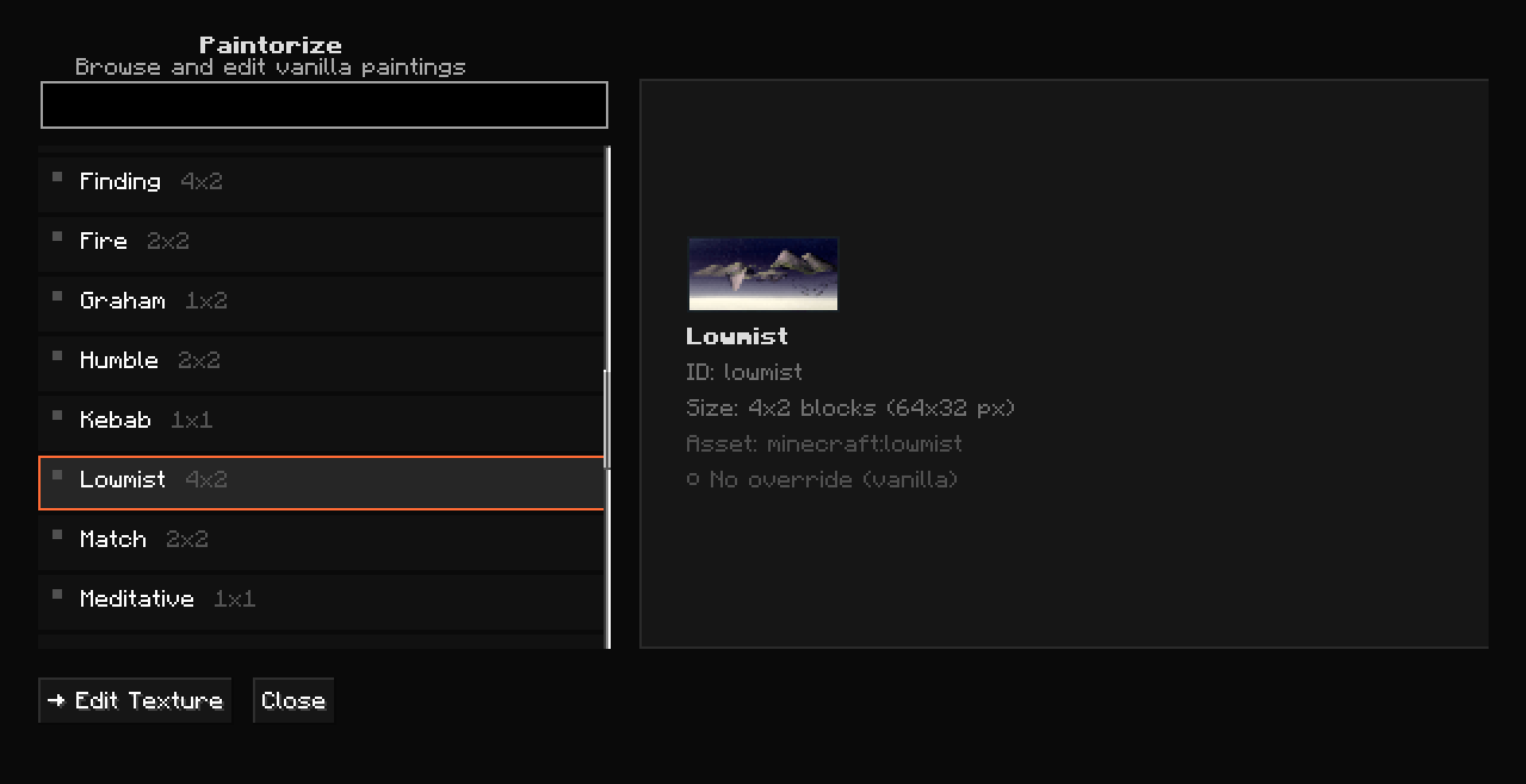 Capture d'écran 2026-09-19 222057.png Capture d'écran 2026-09-19 222057.png
 -
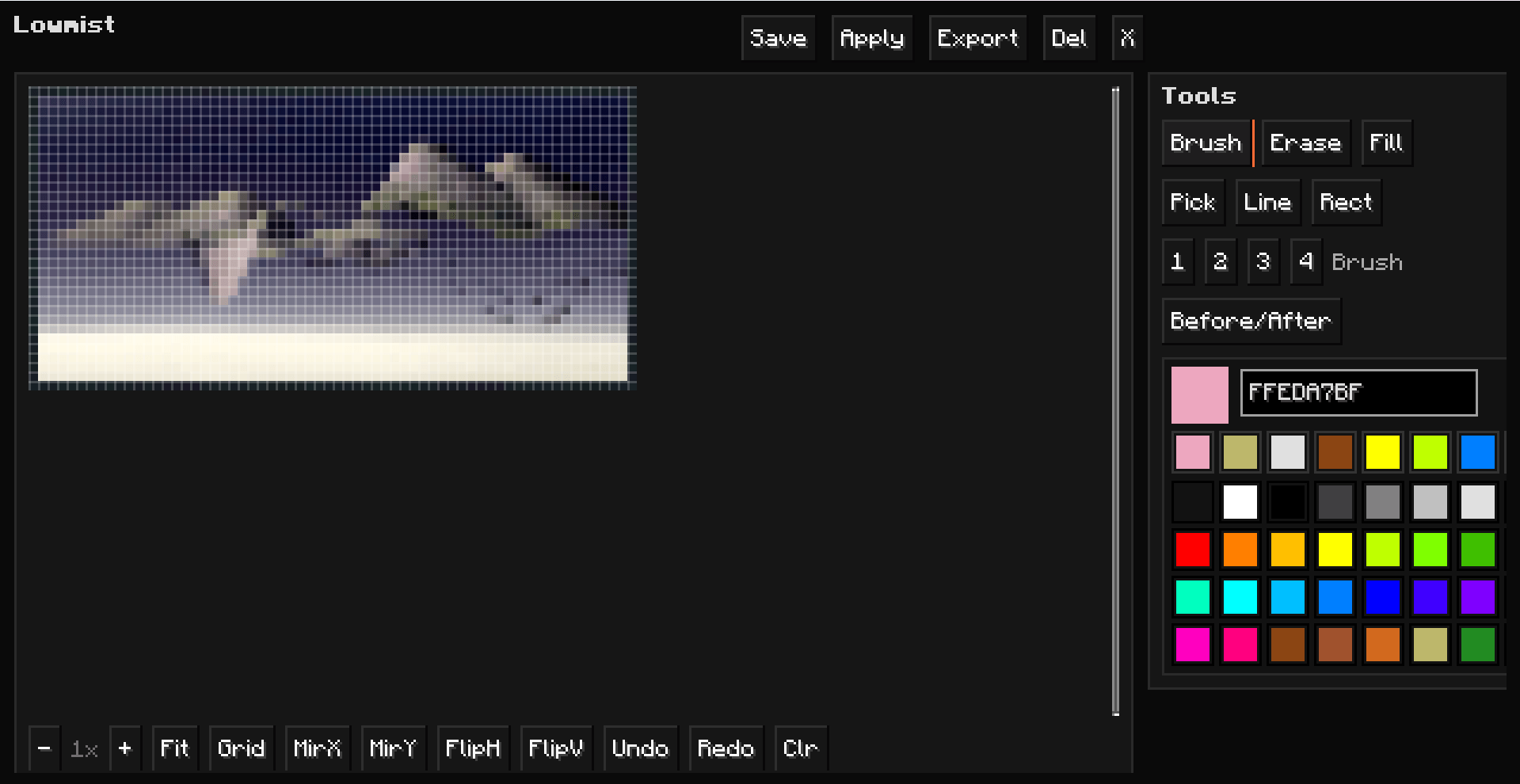 Capture d'écran 2026-09-19 222115.png Capture d'écran 2026-09-19 222115.png
Versions
Files
Relations
Project Relations
More like this
Similar Mods
Suggestions use data such as tags, dependencies, dependents, descriptions, titles, and more to rank how much they overlap with this mod.
On ModDex
Community snapshot
By the numbers
Statistics
Want to reach Minecraft players?
We're looking for a server hosting partner to feature here and other parts of the site. Interested? Send us a message!
Get in touchGet it on
Available Platforms
On ModDex
Community snapshot
By the numbers
Statistics
Resources