
Community listing page, reviews here may not be monitored by the author.
Panorama Studio

No reviews yet
Lets you captue a position in a server then make it your loading screen background via a resource pack. Work's with Free cam, Bobby, Voxy/Distant Horizons and Iris shaders
Community voices
Reviews
No reviews yet. Be the first to review this project!
Get it on
Available Platforms
Compatibility
Supported Environments
Runs entirely on the client. Works on vanilla servers.
About
Project Details
For authors
Embed Badge
If you're the author of this project, you can embed a live badge anywhere that supports HTML or Markdown. It updates automatically whenever ratings change.
Use HTML for any page that supports it, or Markdown for README files and Markdown-based descriptions.
Identifiers
Platform IDs
Resources
External Links
About
Description
Panorama Studio
Panorama Studio is a client-side Fabric mod for Minecraft Java 1.21.11. It captures a true six-face panorama without rotating the player entity, lets you browse, rename, and delete captures in game, and turns any capture into a title-screen resource pack.
Requirements
- Minecraft Java 1.21.11
- Java 21 or newer
- Fabric Loader 0.18.1 or newer
- Fabric API 0.141.5+1.21.11
- Mod Menu 17.0.0 or newer
The mod is client-only and does not need to be installed on a server.
Use
- Join a world or server.
- Press
Jto open Panorama Studio, or open Mods → Panorama Studio in Mod Menu. - Choose Capture and wait while the six square faces and preview are processed.
- Select a capture. Click its thumbnail for the full-screen drag-to-look panorama viewer.
- Rename it, delete it with confirmation, or choose Make title pack.
- Enter a resource-pack name. The mod creates
<name>.zipunderresourcepacks/and enables it automatically by default.
J is the mod's only key binding and is configurable in Minecraft's normal controls screen. Capture is only started from the gallery. Settings cover face resolution, supersampling, per-face warm-up renders, and automatic pack enabling; each option has an explanatory hover tooltip.
The gallery can sort by newest/oldest capture date and filter by dimension or server/single-player world.
Captures are stored in:
screenshots/panorama_studio/<capture-id>
Renderer compatibility
| Mod | Behaviour |
|---|---|
| Iris | Uses the normal Iris world/shader pipeline. Iris's time uniforms stay fixed for the burst while a fail-soft compatibility hook refreshes camera-dependent uniforms for every face. |
| Sodium | Supported; Panorama Studio enables the standard FREX “flawless frames” mode during capture. |
| Bobby | Cached chunks render normally; flawless-frames mode asks Bobby to finish loading ready cached chunks. |
| Voxy | Uses its normal main-target render path and flawless-frames queue draining. Voxy itself requires hardware/driver support that macOS does not provide. |
| Distant Horizons | Its normal GameRenderer hooks and LOD passes participate. A warm-up render is performed for each direction. |
| Entity Culling | Entity and block-entity culling are bypassed in memory only during the six renders and restored immediately afterward. |
| Freecam by Hashalite | The capture and its saved coordinates use Minecraft's active render camera, including Freecam and tripod camera positions. |
All compatibility integrations are optional and fail soft. Panorama Studio can only capture chunks or LOD data the client already has loaded or cached; it cannot invent terrain the server never sent. If an optional renderer is disabled or unavailable, the ordinary rendered world is captured.
Resource-pack behaviour
Packs target resource format 75.0 for Minecraft 1.21.11 and are published as atomic .zip files. The ZIP and Resource Packs screen name follow the user-entered name, with only characters unsafe on Windows/macOS replaced. The description records the server or single-player world, dimension, and that the pack was made with Panorama Studio.
Enabling a new Panorama Studio pack deselects older packs carrying Panorama Studio's generated-pack marker so the latest background has deterministic priority; the older pack ZIPs are not deleted. Success is reported after Minecraft finishes a single resource reload.
Turn off Auto-enable generated packs if you only want the pack added to the resource-pack folder.
Known caveats
- High supersampling and heavy shader packs can use substantial VRAM. The internal render size is capped at 4096×4096.
- Six readback buffers can be outstanding during the atomic burst. At the 4096×4096 cap this matches vanilla panorama capture's roughly 384 MiB of raw GPU staging data before overhead.
- Arbitrary shader-pack temporal history, screen-space reflections, or stochastic effects cannot be made mathematically seamless for every shader, although atomic rendering and overscan remove the common movement/time and framebuffer-edge causes.
- High-resolution captures can briefly freeze the client while its render thread submits every face. This does not pause or alter a multiplayer server.
Licensed under the MIT License.
Screenshots
Gallery
-
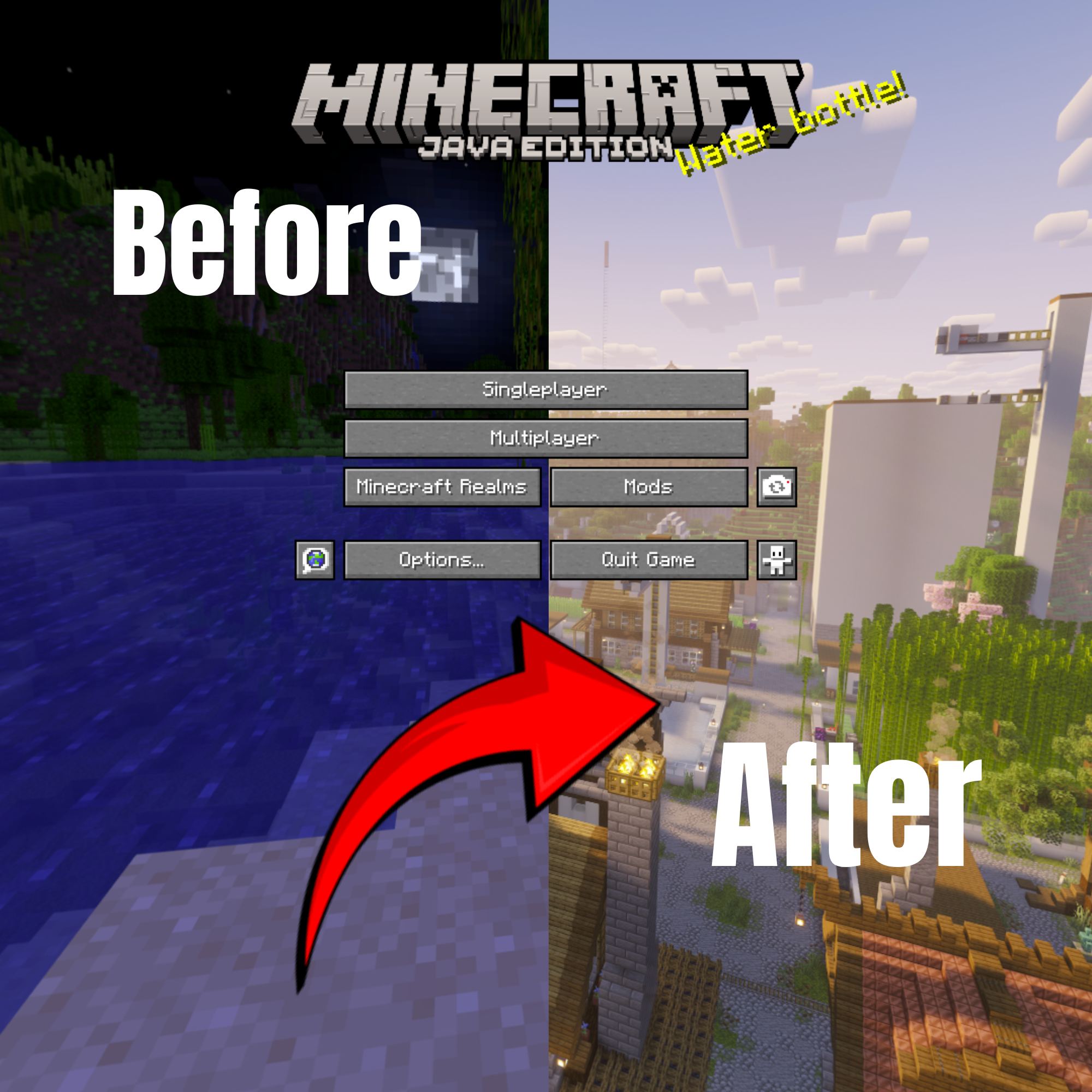 Before vs after
Versions
Files
Relations
Project Relations
More like this
Similar Mods
Suggestions use data such as tags, dependencies, dependents, descriptions, titles, and more to rank how much they overlap with this mod.
On ModDex
Community snapshot
By the numbers
Statistics

Want to reach Minecraft players?
We're looking for a server hosting partner to feature here and other parts of the site. Interested? Send us a message!
Get in touchGet it on
Available Platforms
On ModDex
Community snapshot
By the numbers
Statistics
Resources