Community listing page, reviews here may not be monitored by the author.
Parties: RPG Party System & Team UI

No reviews yet
An in-depth RPG hud and party system featuring a modular interface, unique team mechanics, and expansive mod support. Easily build custom frames for solo or party adventures, share or bundle presets, and drop seamlessly into any modpack!
Community voices
Reviews
No reviews yet. Be the first to review this project!
Get it on
Available Platforms
About
Project Details
For authors
Embed Badge
If you're the author of this project, you can embed a live badge anywhere that supports HTML or Markdown. It updates automatically whenever ratings change.
Use HTML for any page that supports it, or Markdown for README files and Markdown-based descriptions.
Identifiers
Platform IDs
About
Description







Parties brings a full party system and customizable HUD to your world, built to make both solo and co-op gameplay a lot more fun. It tweaks some vanilla mechanics and hooks into other mods so team play actually feels smooth and connected. Best of all, just about everything can be tweaked to your liking, including building and sharing your own custom UI layouts with friends. Read on for all the details!

Parties adds a fully customizable, ever-expanding UI system that allows you to customize how you want your party UI to look like. Parties: Dynamics is bundled with this mod as well, which adds or enhances social mechanics/interactions for a better experience.
Extensive HUD Overlay
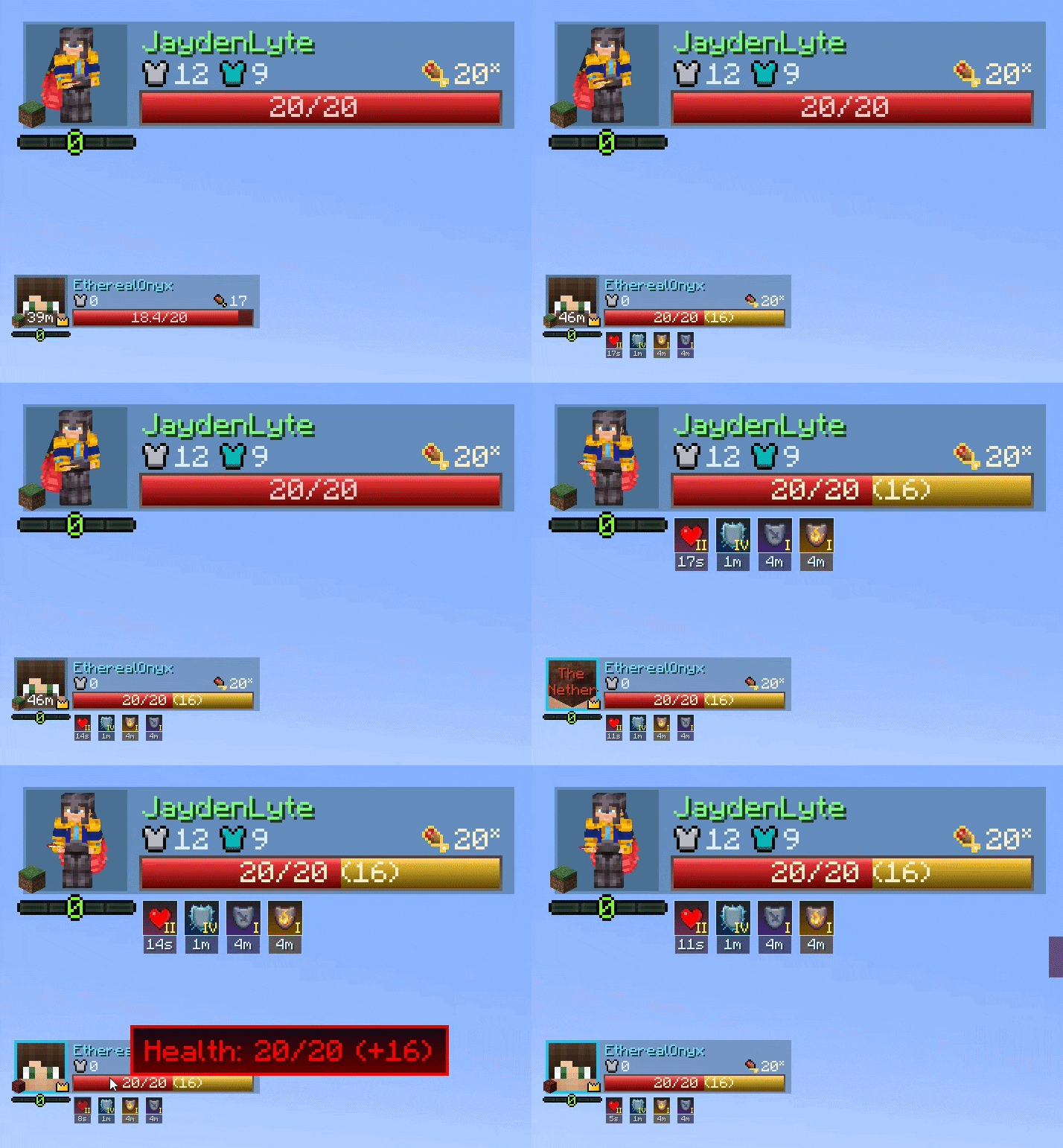
Renders player & party member health bars, status effects, and more in the form of 'elements'. Every single element can be hovered for tooltip information, and configured to your heart's desire. There are currently 11 different elements with more in the works as more mod support gets added.
In-Depth Element Customization
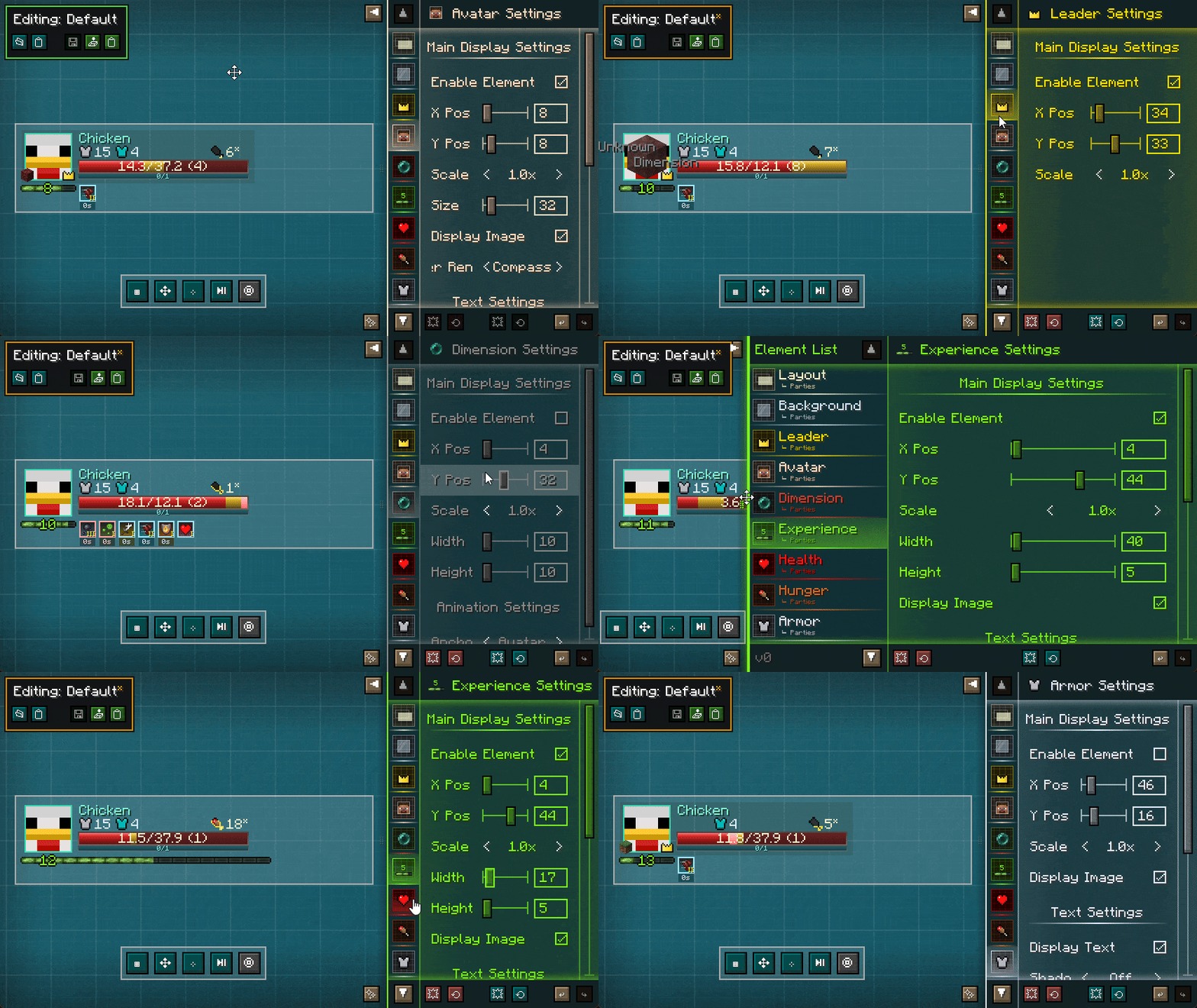
Each element has a myriad of customization options allowing you to create unique and meaningful designs. They can also be disabled if preferring a more minimalist look or emphasis on specific elements.
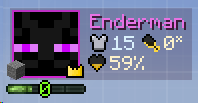
The customized layout can be exported as a file or a string of characters to share with others!
Full-Fledged Display Configuration
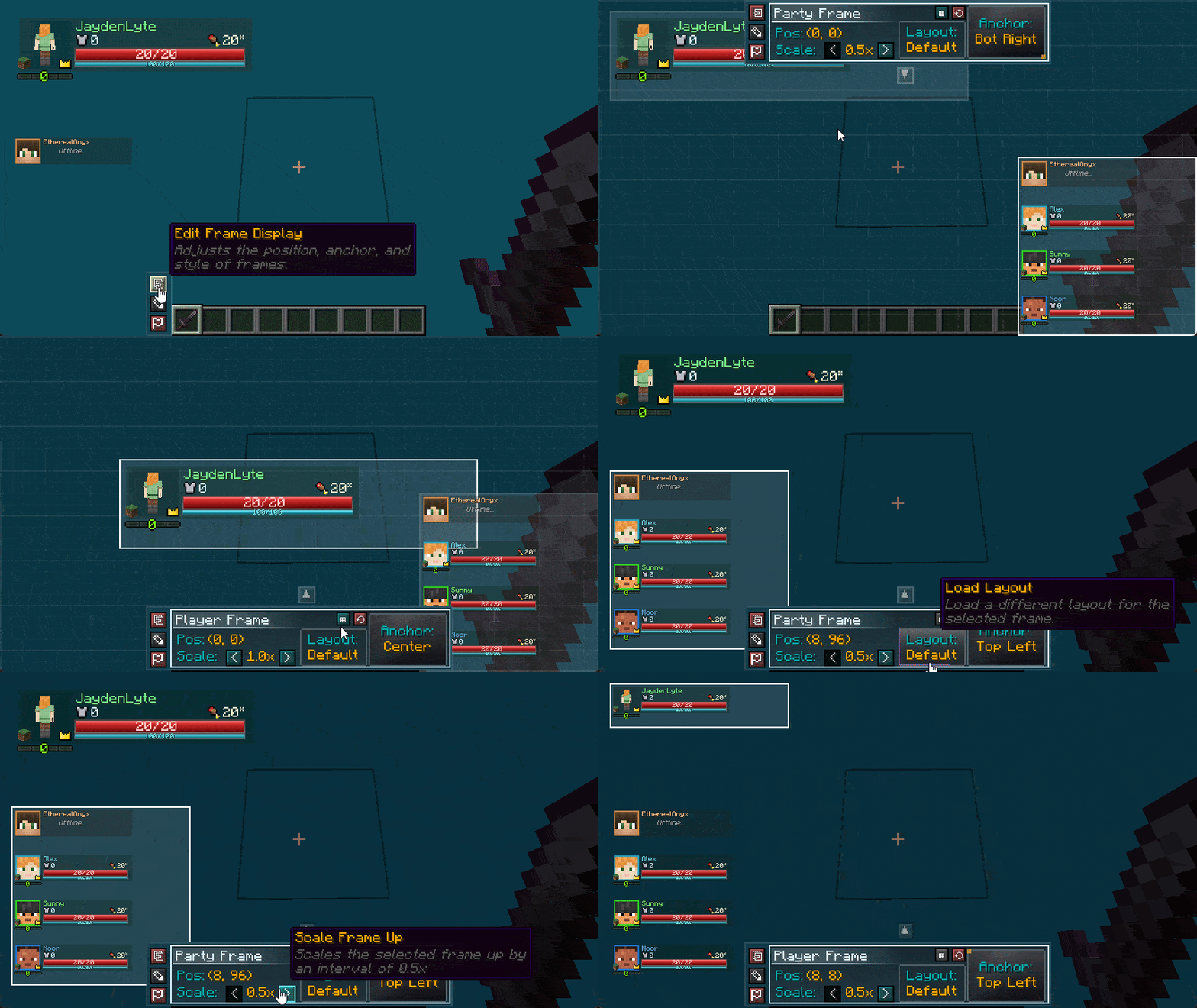
Modify the look of the player and party frame in the display editor, with support for other types of frames as well. The layouts previously saved in the layout editor (displayed above) can be attached to a frame in this menu.
These layouts persist across launches, allowing you to ship the mod with completely customized layouts for any theme and purpose!
Other Party Interactions & Dynamics
- Party Tracking - Party UI element compass/screen hud tracking with visuals of the player head and distance to track party members throughout the world and even in tight spaces!
- XP Sharing - Proximity-based (configurable) xp splitting mechanics. Obtained experience is shared evenly across party members, according to configuration.
- Friendly-fire Protection - Extended definitions on what a "teammate" is, to prevent unwanted friendly-fire. Now covers pets, summons, and leashed mobs. Also extended protection to cover unwanted potion effect applications and more!
- [Iron's Spellbooks] Hostile Spell tag - A new data tag that allows you to define targeted spells from Iron's Spellbooks. If friendly-fire is disabled, these spells will no longer target allies.
- More features to come! See below.

Commands
The following commands are available from the mod (Note that the /parties prefix also has the following as options: /p, /party):
| Command | Description |
|---|---|
/parties invite |
Sends a party invite to a player. Invites expire after 60 seconds. |
/parties accept |
Accepts a party invite from a player. If receiving an invitation, you can also click on the respective chat link. |
/parties decline |
Declines the last party invite from a player. Clicking on the respective chat link also allows you to decline a specific invitation as well. |
/parties disband |
Disbands the party you're currently in. Can only be done by the party leader. |
/parties kick |
Removes a player from your current party. If no other players were to remain, it disbands the party instead. Can only be done by the party leader. |
/parties leave |
Leaves your current party. If leader, it passes leadership to someone else. If party would be left with one player, the party disbands instead. |
/parties promote |
Transfers leadership to another player. Note that if the leader is offline, leadership may automatically be transferred depending on settings in parties-common.toml. |
/parties help |
Provides a little bit of info as to how party works. Will be overhauled soon. |
/partiescfg reload |
Reloads client side configuration, like from /dimensions/active.json. |
Setup
Parties comes bundled with its core library (LyteCore) along with its core addon (Parties: Dynamics), meaning that setup is as simple as downloading the mod and adding it to your game! All the configuration options are housed within the minecraft_root/config/parties directory:
| Directory/File Name | Description |
|---|---|
parties-common.toml |
Contains simple party configuration options, including max party size, automatic leader transfer timers, and an option to use a different party system for the UI (although only supports the Parties mod for now). |
parties-client.toml |
Contains several client-side rendering options, ranging from radar arrow modifications, UI rendering options, player colorizing, and the HUD Editor button position. |
parties_dynamics-common.toml |
Contains an option to enable friendlyFire, along with configuring the XP Sharing distance. |
lytecore-common.toml |
Provides the core Team alliance providers and ownership/damage resolvers. Also dictates the range that "vicinity" means. |
/dimensions/active.json & known_cache.json |
Contains the active list that the UI pulls dimension data from, along with the known cache dump of dimensions found in the game. |
/layouts/ |
The root directory of custom layout files. These files allow you to create your own unique, sharable party layouts. |
active_layouts.json |
This file contains the active frame positioning and layout attachment for the current game. |
mixins.properties |
This file contains options for disabling specific code alterations. The functionality of the Parties mod depends on these changes, so only modify this as a last resort. |
modules.properties |
This file contains a list of "addon modules" that are used in the Parties mod. This allows you to toggle any specific mod compatibility currently made for the Parties mod. |

Parties has a ton of customization options, ranging from an extensive layout editor to complete control on what features you would like enabled.
View the configuration details here!

Older versions of this mod had a different subset of mod compatibility. Starting from 2.0.0, the mod compatibility along with future support is as follows:
| Mod Name | Target Version | Support Description | Status |
|---|---|---|---|
Iron's Spells n' Spellbooks |
~v1.20.1-3.4.0.9+ | A Cast Bar element (WIP), a Mana Bar element, summon, spells, and projectile spell integration for friendly fire prevention. Note: If playing earlier versions of Iron's Spells, you should change resolveIronsSummons to false inside minecraft_root/config/parties/lytecore-common.toml. |
🟡 |
Ars Nouveau |
- | A Mana Bar element, considering Cast Bar integration for spells that meet the requirements. | 🟡 |
Simple Voice Chat |
- | Voice Chat Element/border, party synchronization, and automatic group creations. | ⚪ |
Epic Fight |
- | A Stamina bar element, considering Cast Bar integration for Epic Fight skills. | ⚪ |

Can I use this mod in a modpack or playthrough?
Of course! You are completely free to include this mod in any public or private modpack, server, video, or stream.
How do I disable or edit the UI?
Full instructions are listed in the Configuration section above.
There are two types of editors:
- Layout: Controls visual positioning, anchors, and scaling.
- HUD: Controls visibility, toggles, and element behaviors.
Keybinds for both menus can be customized directly in your Minecraft Options → Controls menu.
This mod is conflicting with another mod or causing a crash!
Please file a report here with your crash log (
crash-reportsorlatest.log).Because this mod is mainly made of custom data and UI rendering, mod compatibility is usually easy to implement or fix, especially if logs are provided.
Can you add support for another mod?
Submit a request here with details about the mod and how you'd like them to integrate, and it will be taken into consideration!
Is there a Fabric version available?
Not right now. The focus remains on Forge and NeoForge, but definitely in the future!
Can you backport changes or support older Minecraft versions?
No backports, yet. Still prioritizing modern versions of Minecraft, first.
Questions? Send me a message! I am reachable on CurseForge :)
Screenshots
Gallery
-
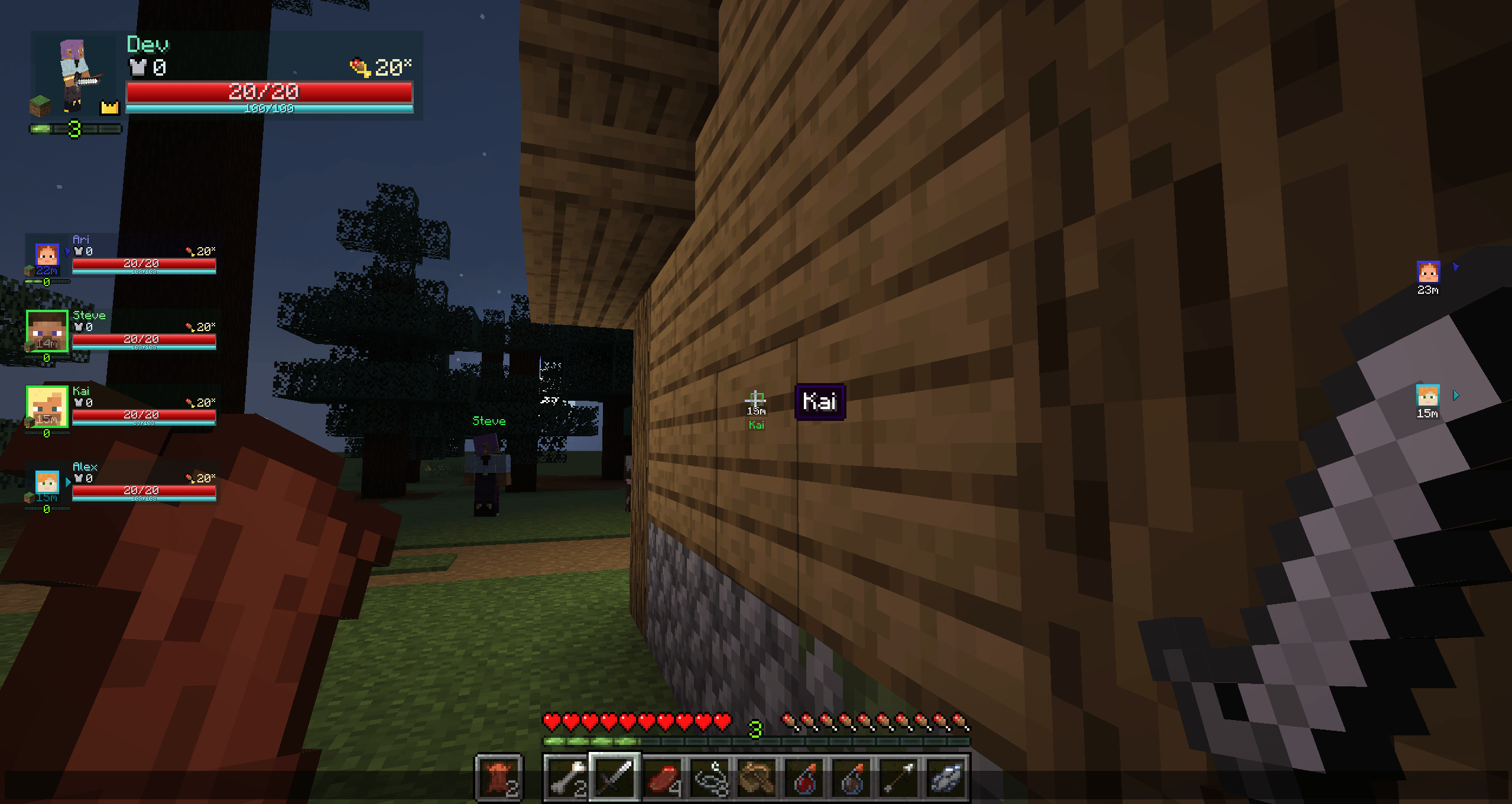 Party Tracker Kai renders through walls with a head and distance tag, and hovering the head reveals a name tooltip. Fully visible, Steve shows only a nameplate. Off-screen allies show head pointers. Party UI also supports radar mode by default. (Mock teammates shown.)
 -
feature_ui Representation of the default UI layout, cropped and anchored to the top left part of the screen
-
feature_minimal.png An example of a minimal layout done within a minute in the Layout Editor.
-
feature_editor The Layout Editor being utilized. The UI is transparent by default, allowing you to see the world behind the editor - Steve was just staring at Cyan Concrete to save bandwidth.
-
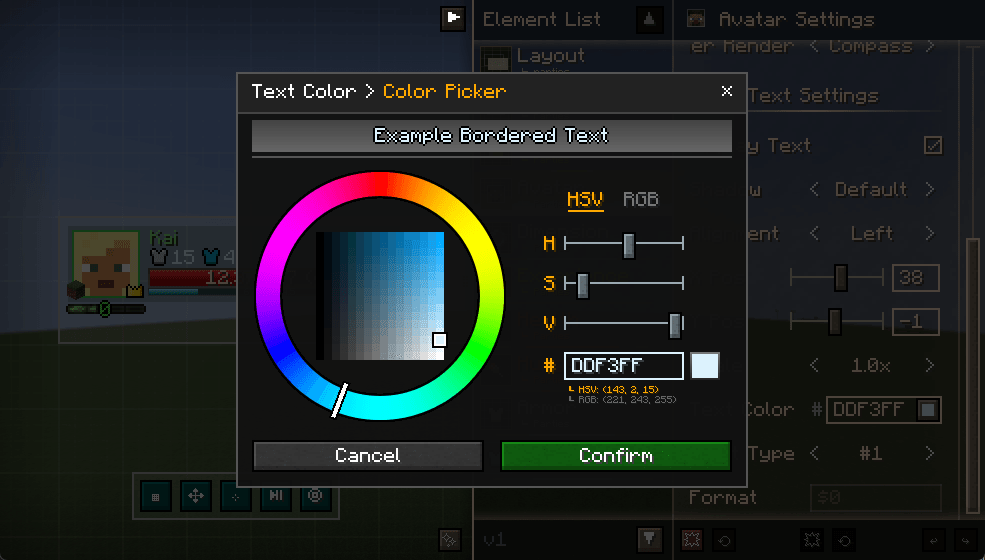 Layout Editor - Color Picker An example of how the Color Picker in the Layout Editor looks like. Primarily used to choose text colors of elements.
 -
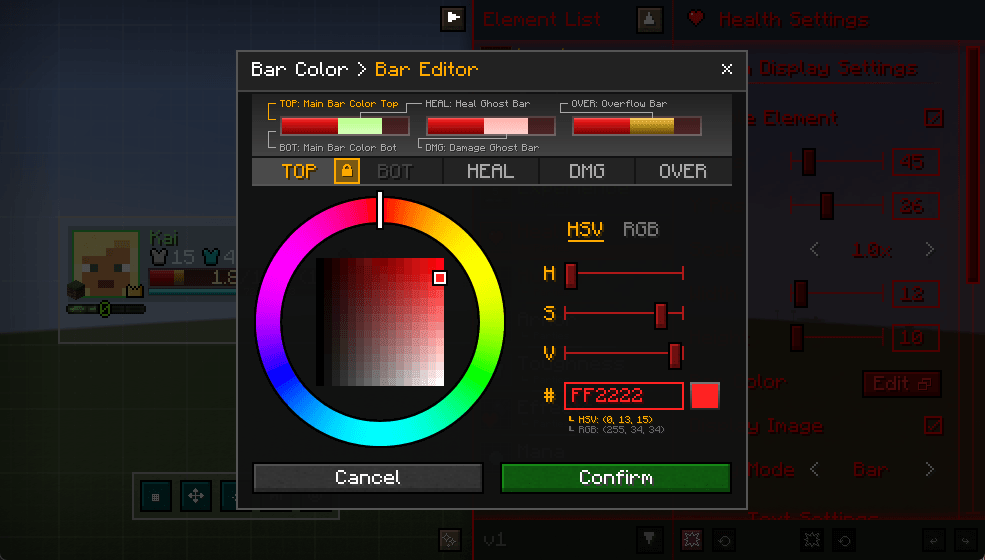 Layout Editor - Bar Editor Example of how the bar editor looks like. Allows you to customize bar gradient colorings (allowing dual-color main bars if wanted), as well as the heal bar and damage bar animation colors. The overflow bar is Absorption for health, Saturation for hunger.
 -
feature_layout.gif The Layout Editor in action. Allows you to reposition frames with the ability to scale and anchor as well. Steve was still staring at cyan concrete.
-
main_logo.png main_logo.png
-
title_features.png title_features.png
-
title_commands.png title_commands.png
-
title_config.png title_config.png
-
title_support.png title_support.png
-
title_faq.png title_faq.png
Versions
Files
Relations
Project Relations
More like this
Similar Mods
Suggestions use data such as tags, dependencies, dependents, descriptions, titles, and more to rank how much they overlap with this mod.
On ModDex
Community snapshot
By the numbers
Statistics
Want to reach Minecraft players?
We're looking for a server hosting partner to feature here and other parts of the site. Interested? Send us a message!
Get in touchGet it on
Available Platforms
On ModDex
Community snapshot
By the numbers