
Community listing page, reviews here may not be monitored by the author.
Pepsi's Brew Queue


No reviews yet
Program your brewing stand to brew full potion runs automatically.
Community voices
Reviews
No reviews yet. Be the first to review this project!
Get it on
Available Platforms
Compatibility
Supported Environments
Must be installed on both the client and the server.
About
Project Details
For authors
Embed Badge
If you're the author of this project, you can embed a live badge anywhere that supports HTML or Markdown. It updates automatically whenever ratings change.
Use HTML for any page that supports it, or Markdown for README files and Markdown-based descriptions.
Identifiers
Platform IDs
Resources
External Links
About
Description
Brew Queue
Turn the vanilla brewing stand into a programmable potion station.
Brew Queue upgrades the brewing stand you already use instead of replacing it with a separate machine. You get extra built-in storage, nine recipe imprint slots, and automation controls that let one stand handle full potion runs with far less babysitting.
If you love setting up organized brewing rooms, compact redstone labs, or hopper-fed potion lines, Brew Queue is built for exactly that. Load the stand up, imprint the ingredient order you want, flip automation on, and let it work through full batches while you do something more interesting.
What Brew Queue is about
- It keeps the vanilla brewing stand at the center of your setup.
- It removes the repetitive ingredient-swapping that makes brewing feel tedious.
- It gives every stand its own built-in reserve inventory.
- It lets you save a real brewing sequence instead of remembering every step by hand.
- It works beautifully for batch brewing, hopper-fed potion rooms, and redstone-controlled stations.
Features
Vanilla Brewing Stand, Upgraded
Brew Queue is designed as an addon to the normal brewing stand, not a replacement for it. The familiar brewing area stays in the middle, so it still feels like the same block you already know how to use.
What changes is everything around it:
- a built-in storage column on the left for brewing supplies
- a recipe program column on the right for saved ingredient steps
- compact automation toggles at the top
The result feels like a vanilla brewing stand that finally grew up.
Built-In Supply Storage
Every Brew Queue stand gets its own 27-slot reserve inventory. That means you can keep the ingredients for repeated brewing runs right inside the stand instead of juggling chests, shulker boxes, or your own inventory every time.
Great for storing:
- nether wart and other brewing ingredients
- glass bottles for fresh runs
- blaze powder for fuel
- a water bucket for automatic bottle refills
- backup ingredients for multiple brewing sessions
This makes a single brewing stand feel more like a self-contained workstation instead of a block that constantly needs external help.
Program Your Recipe Once
The nine recipe imprint slots let you save the order of ingredients for a potion chain. Click each step into the program from top to bottom, and Brew Queue will remember the sequence for that stand.
That means you can set up runs like:
- awkward potions into speed potions
- speed potions into extended speed potions
- splash or lingering upgrade chains
- any other step-by-step brewing path you use often
You can repeat ingredients, leave unused steps blank, and adjust the program whenever you want.
Automatic Full Potion Runs
This is the heart of the mod.
Once automation is enabled, Brew Queue handles the boring part of brewing for you:
- it refills the stand for a full three-bottle run
- it waits for the correct moment to feed the next ingredient
- it continues through the programmed recipe step by step
- it finishes the whole batch instead of stopping after one ingredient
This makes potion brewing feel smooth and deliberate instead of repetitive. Set up the sequence once, keep the stand stocked, and let it work through proper batches.
Automatic Refills Between Runs
Brew Queue is built around real batch brewing, not one-off single bottle micromanagement.
When the stand is ready for a fresh cycle, it can pull from its internal storage and prepare another three-bottle run automatically. Keep the storage filled with bottles and a water source, and the stand is ready to keep going.
That makes it especially useful for potion rooms where you want a stand to stay productive instead of constantly waiting on manual reset steps.
Fuel Handling That Feels Natural
The stand still behaves like a brewing stand should. Blaze powder is still the fuel, and the vanilla fuel behavior stays familiar.
Brew Queue adds convenience on top of that:
- extra blaze powder can be kept in the internal reserve
- hoppers can keep the stand supplied
- if the fuel slot is full, overflow blaze powder can still be stored for later use
You get less micromanagement without losing the normal feel of brewing.
Made for Hopper Setups
Brew Queue shines in automated brewing rooms.
You can use hoppers to:
- feed ingredients and bottles into the stand's reserve inventory
- keep blaze powder stocked
- pull finished potions out from below once a run is complete
This makes it easy to build a brewing corner that stays stocked, finishes complete batches, and hands the results off to your storage or sorting system with minimal player input.
Optional Redstone Control
Want a stand that only runs when your system says so? Brew Queue includes a redstone gate toggle.
You can:
- leave automation free-running for a simple always-on setup
- require redstone power so the stand only works while powered
- wire it into timing systems, item lines, or room-wide control panels
It is a small feature, but it opens the door for much smarter brewing rooms.
Clear Status While It Works
Brew Queue does not leave you guessing about what the stand is doing.
The screen shows:
- whether automation is on
- whether redstone is required
- what step the stand is currently on
- whether it is brewing, refilling, exporting, waiting, or paused
If something is missing, blocked, or incompatible, the stand tells you instead of silently failing.
Still Friendly to Manual Brewing
Brew Queue is there to help, not to lock you out of the brewing stand.
You can still:
- use the brewing stand manually
- change the recipe program whenever you want
- step in and rearrange supplies
- decide whether a stand should be a fully automated station or just a smarter manual one
That flexibility makes it easy to use in early-game bases, late-game automation rooms, and everything in between.
Perfect For...
Brew Queue is especially good if you:
- brew the same potions over and over
- like tidy, purpose-built utility rooms
- want potion automation without replacing the vanilla stand with a giant machine
- build hopper-fed brewing stations
- want brewing to feel smoother without feeling less like Minecraft
The Brew Queue Experience
Stock the stand. Imprint your recipe. Flip automation on.
From there, Brew Queue turns brewing from a repetitive chore into a proper station workflow. It keeps the vanilla identity of the brewing stand intact, but adds the quality-of-life features that make players wish the base game had gone just a little further.
If you want potion brewing to be faster, cleaner, more repeatable, and much more satisfying, Brew Queue is built for that exact job.
Brew Queue
Turn the vanilla brewing stand into a programmable potion station.
Brew Queue upgrades the brewing stand you already use instead of replacing it with a separate machine. You get extra built-in storage, nine recipe imprint slots, and automation controls that let one stand handle full potion runs with far less babysitting.
If you love setting up organized brewing rooms, compact redstone labs, or hopper-fed potion lines, Brew Queue is built for exactly that. Load the stand up, imprint the ingredient order you want, flip automation on, and let it work through full batches while you do something more interesting.
What Brew Queue is about
- It keeps the vanilla brewing stand at the center of your setup.
- It removes the repetitive ingredient-swapping that makes brewing feel tedious.
- It gives every stand its own built-in reserve inventory.
- It lets you save a real brewing sequence instead of remembering every step by hand.
- It works beautifully for batch brewing, hopper-fed potion rooms, and redstone-controlled stations.
Features
Vanilla Brewing Stand, Upgraded
Brew Queue is designed as an addon to the normal brewing stand, not a replacement for it. The familiar brewing area stays in the middle, so it still feels like the same block you already know how to use.
What changes is everything around it:
- a built-in storage column on the left for brewing supplies
- a recipe program column on the right for saved ingredient steps
- compact automation toggles at the top
The result feels like a vanilla brewing stand that finally grew up.
Built-In Supply Storage
Every Brew Queue stand gets its own 27-slot reserve inventory. That means you can keep the ingredients for repeated brewing runs right inside the stand instead of juggling chests, shulker boxes, or your own inventory every time.
Great for storing:
- nether wart and other brewing ingredients
- glass bottles for fresh runs
- blaze powder for fuel
- a water bucket for automatic bottle refills
- backup ingredients for multiple brewing sessions
This makes a single brewing stand feel more like a self-contained workstation instead of a block that constantly needs external help.
Program Your Recipe Once
The nine recipe imprint slots let you save the order of ingredients for a potion chain. Click each step into the program from top to bottom, and Brew Queue will remember the sequence for that stand.
That means you can set up runs like:
- awkward potions into speed potions
- speed potions into extended speed potions
- splash or lingering upgrade chains
- any other step-by-step brewing path you use often
You can repeat ingredients, leave unused steps blank, and adjust the program whenever you want.
Automatic Full Potion Runs
This is the heart of the mod.
Once automation is enabled, Brew Queue handles the boring part of brewing for you:
- it refills the stand for a full three-bottle run
- it waits for the correct moment to feed the next ingredient
- it continues through the programmed recipe step by step
- it finishes the whole batch instead of stopping after one ingredient
This makes potion brewing feel smooth and deliberate instead of repetitive. Set up the sequence once, keep the stand stocked, and let it work through proper batches.
Automatic Refills Between Runs
Brew Queue is built around real batch brewing, not one-off single bottle micromanagement.
When the stand is ready for a fresh cycle, it can pull from its internal storage and prepare another three-bottle run automatically. Keep the storage filled with bottles and a water source, and the stand is ready to keep going.
That makes it especially useful for potion rooms where you want a stand to stay productive instead of constantly waiting on manual reset steps.
Fuel Handling That Feels Natural
The stand still behaves like a brewing stand should. Blaze powder is still the fuel, and the vanilla fuel behavior stays familiar.
Brew Queue adds convenience on top of that:
- extra blaze powder can be kept in the internal reserve
- hoppers can keep the stand supplied
- if the fuel slot is full, overflow blaze powder can still be stored for later use
You get less micromanagement without losing the normal feel of brewing.
Made for Hopper Setups
Brew Queue shines in automated brewing rooms.
You can use hoppers to:
- feed ingredients and bottles into the stand's reserve inventory
- keep blaze powder stocked
- pull finished potions out from below once a run is complete
This makes it easy to build a brewing corner that stays stocked, finishes complete batches, and hands the results off to your storage or sorting system with minimal player input.
Optional Redstone Control
Want a stand that only runs when your system says so? Brew Queue includes a redstone gate toggle.
You can:
- leave automation free-running for a simple always-on setup
- require redstone power so the stand only works while powered
- wire it into timing systems, item lines, or room-wide control panels
It is a small feature, but it opens the door for much smarter brewing rooms.
Clear Status While It Works
Brew Queue does not leave you guessing about what the stand is doing.
The screen shows:
- whether automation is on
- whether redstone is required
- what step the stand is currently on
- whether it is brewing, refilling, exporting, waiting, or paused
If something is missing, blocked, or incompatible, the stand tells you instead of silently failing.
Still Friendly to Manual Brewing
Brew Queue is there to help, not to lock you out of the brewing stand.
You can still:
- use the brewing stand manually
- change the recipe program whenever you want
- step in and rearrange supplies
- decide whether a stand should be a fully automated station or just a smarter manual one
That flexibility makes it easy to use in early-game bases, late-game automation rooms, and everything in between.
Perfect For...
Brew Queue is especially good if you:
- brew the same potions over and over
- like tidy, purpose-built utility rooms
- want potion automation without replacing the vanilla stand with a giant machine
- build hopper-fed brewing stations
- want brewing to feel smoother without feeling less like Minecraft
The Brew Queue Experience
Stock the stand. Imprint your recipe. Flip automation on.
From there, Brew Queue turns brewing from a repetitive chore into a proper station workflow. It keeps the vanilla identity of the brewing stand intact, but adds the quality-of-life features that make players wish the base game had gone just a little further.
If you want potion brewing to be faster, cleaner, more repeatable, and much more satisfying, Brew Queue is built for that exact job.
Screenshots
Gallery
-
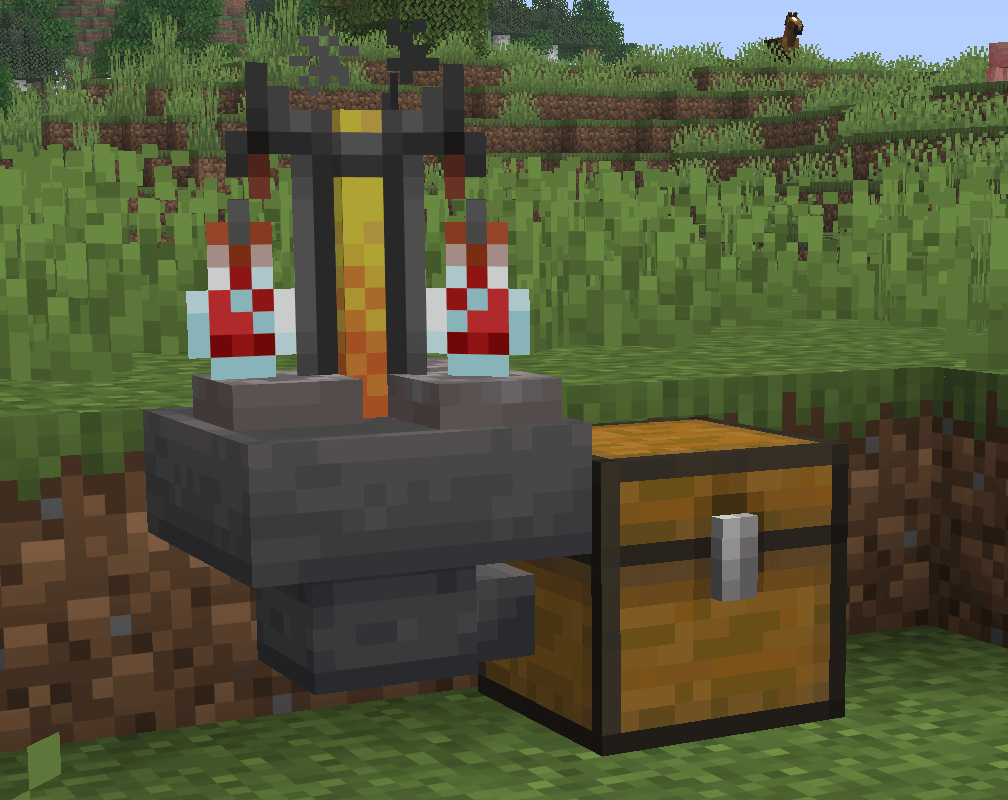 Setup No super machines needed.
 -
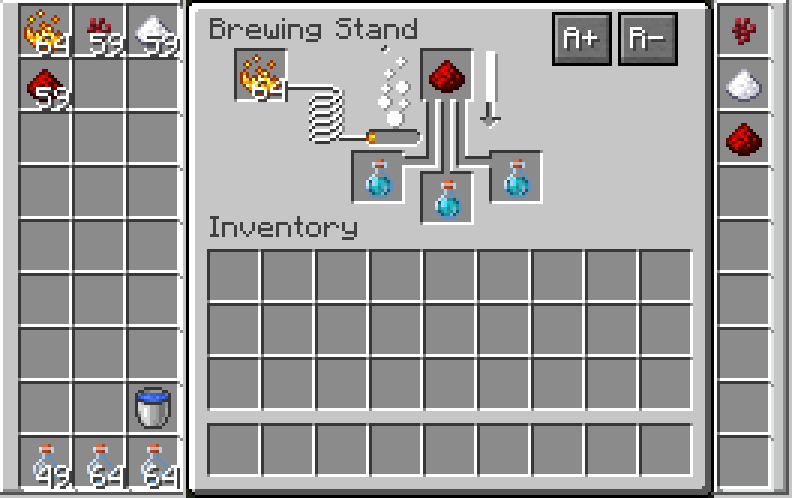 Interface Interface
-
 Interface
 -
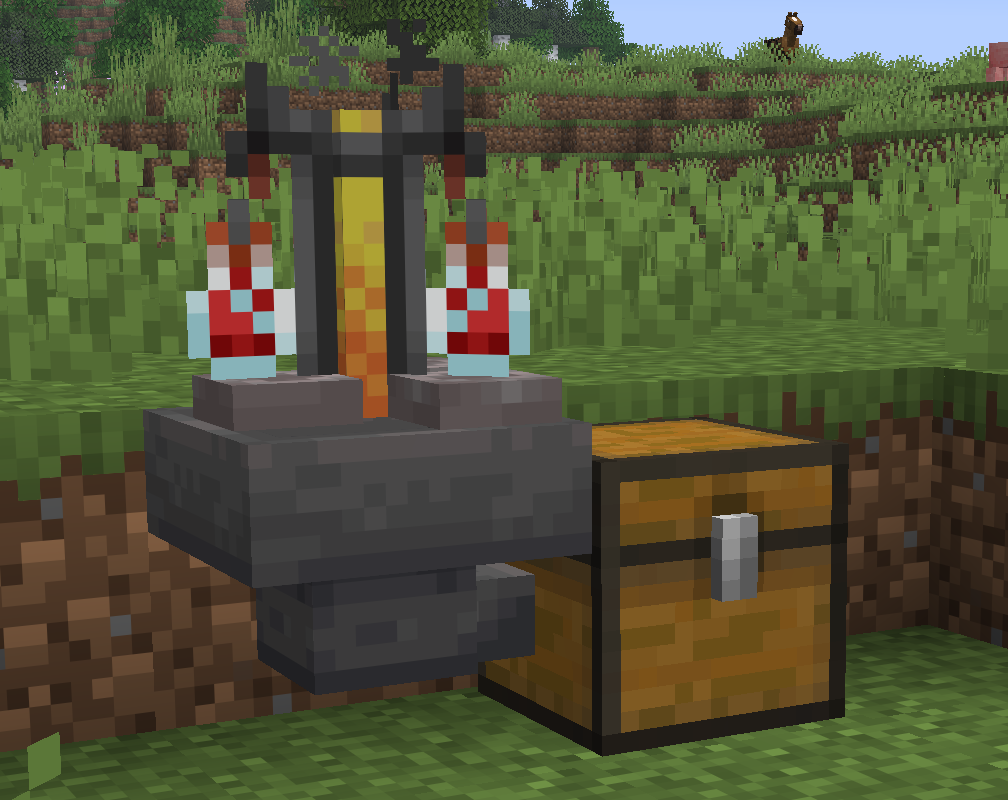 Casual setup No super machines needed.
Versions
Files
Relations
Project Relations
More like this
Similar Mods
Suggestions use data such as tags, dependencies, dependents, descriptions, titles, and more to rank how much they overlap with this mod.
On ModDex
Community snapshot
By the numbers
Statistics
Want to reach Minecraft players?
We're looking for a server hosting partner to feature here and other parts of the site. Interested? Send us a message!
Get in touchGet it on
Available Platforms
On ModDex
Community snapshot
By the numbers
Statistics
Resources