Community listing page, reviews here may not be monitored by the author.
Performance Monitoring Enhancer

No reviews yet
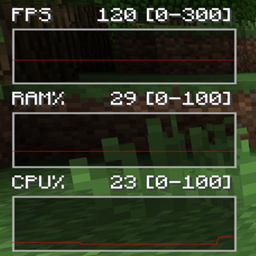
Performance Monitoring Enhancer is a lightweight Forge mod that overlays real-time performance stats—current FPS, 1 % low FPS, 0.01 % low FPS, server TPS and ping—directly on your screen.
Community voices
Reviews
No reviews yet. Be the first to review this project!
Get it on
Available Platforms
About
Project Details
For authors
Embed Badge
If you're the author of this project, you can embed a live badge anywhere that supports HTML or Markdown. It updates automatically whenever ratings change.
Use HTML for any page that supports it, or Markdown for README files and Markdown-based descriptions.
Identifiers
Platform IDs
Resources
External Links
About
Description
Features include:
– Server TPS (updated every 10 server ticks, approximately 0.5 s);
– Current FPS, 1% Low, and 0.01% Low Ping of the player (ms) RAM utilization for the JVM (used/max MB) – CPU load on the system (percentage of total cores) – Free MB or GPU VRAM usage (supported by NVIDIA and ATI).
- Hotkeys:
• H → Turn
• G → Enter/Exit "drag mode" (pause game, position HUD, ungrab mouse). • K → Launch the settings GUI (status and color mode checkboxes) Toggle the verbose overlay (small line-charts) using the V key. A background box that is semi-transparent and automatically resizes The hud.cfg configuration file ensures that all settings including the HUD position are persistent.
Credits to
arcana on discord for the icon
Commented Directory Structure
<project-root>/
├── build.gradle                   # Gradle build script
├── settings.gradle                # Gradle settings
├── src/
│   ├── main/
│   │   ├── java/                  # Java source files
│   │   │   └── iamfmgod/
│   │   │       └── performancemonitoringenhanc/
│   │   │           ├── core/      # Mod entry point & sided proxies
│   │   │           │   ├── ModMain.java
│   │   │           │   ├── CommonProxy.java
│   │   │           │   └── ClientProxy.java
│   │   │           ├── config/    # Config loader & saver
│   │   │           │   └── HudConfig.java
│   │   │           ├── hud/       # HUD state & overlay rendering
│   │   │           │   ├── HudManager.java
│   │   │           │   └── HudOverlay.java
│   │   │           ├── input/     # Key+mouse handlers (client‐only)
│   │   │           │   ├── KeyHandler.java
│   │   │           │   └── MouseDragHandler.java
│   │   │           ├── gui/       # Drag‐mode & settings screens
│   │   │           │   ├── HudDragScreen.java
│   │   │           │   └── HudSettingsGui.java
│   │   │           ├── network/   # TPS/ping packet & server tick handler
│   │   │           │   ├── NetworkHandler.java
│   │   │           │   ├── PacketTpsPing.java
│   │   │           │   └── ServerTickHandler.java
│   │   │           └── util/      # Rendering utilities
│   │   │               └── RenderUtils.java
│   │   └── resources/             # Non‐code resources
│   │       ├── mcmod.info         # 1.12.2 mod metadata (mcmod.info JSON)
│   │       └── assets/
│   │           └── performancemonitoringenhanc/
│   │               ├── logo.png   # Mod icon
│   │               └── lang/
│   │                   └── en_us.lang  # Localization keys/values
│   └── test/                      # (optional) unit tests
└── config/                        # Runtime config directory
    └── hud.cfg                    # Created/updated by HudConfig at first run
Screenshots
Gallery
Versions
Files
Relations
Project Relations
More like this
Similar Mods
Suggestions use data such as tags, dependencies, dependents, descriptions, titles, and more to rank how much they overlap with this mod.
On ModDex
Community snapshot
By the numbers
Statistics
Want to reach Minecraft players?
We're looking for a server hosting partner to feature here and other parts of the site. Interested? Send us a message!
Get in touchGet it on
Available Platforms
On ModDex
Community snapshot
By the numbers
Statistics
Resources