Community listing page, reviews here may not be monitored by the author.
PeterWolf's TX/RX Redstone

No reviews yet
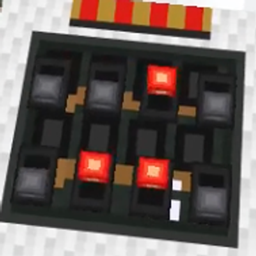
Tired of long, ugly redstone wire lines across your base? **PeterWolf's TX/RX Redstone** introduces sleek white carpet modules that wirelessly transmit and receive redstone signals across 256 synchronized channels,
Community voices
Reviews
No reviews yet. Be the first to review this project!
Get it on
Available Platforms
About
Project Details
For authors
Embed Badge
If you're the author of this project, you can embed a live badge anywhere that supports HTML or Markdown. It updates automatically whenever ratings change.
Use HTML for any page that supports it, or Markdown for README files and Markdown-based descriptions.
Identifiers
Platform IDs
Resources
External Links
About
Description
PeterWolf's TX/RX Redstone
Wireless redstone transmission carpets & analog rotary potentiometer dial for Minecraft 26.3!
Tired of long, ugly redstone wire lines across your base? PeterWolf's TX/RX Redstone introduces sleek white carpet modules that wirelessly transmit and receive redstone signals across 256 synchronized channels, plus a precision rotary potentiometer dial to control signal strength from 0% to 100%!
⚡ Features
📡 Wireless TX & RX Carpet Modules
- Transmitter (TX): Thin white wool carpet module that takes redstone input from its front port and broadcasts it wirelessly.
- Receiver (RX): Matching carpet module that receives the broadcast and outputs the exact same signal strength (0–15).
- Directional Ports: Signal enters and exits strictly from one side (the side facing the player when placed), keeping adjacent circuitry clean and isolated.
- 8 DIP Jumpers (256 Channels):
- Two rows of 4 switches directly on the carpet.
- Right-click directly on any switch to toggle it (0 ↔ 1).
- Active switches glow with a bright red illuminated jumper in the dark!
- Matching channel (0–255) synchronizes TX and RX modules instantly worldwide.
🎛️ Rotary Potentiometer (Dial Lever)
- Smooth Analog Control: Select redstone output strength in 10 steps (0% to 100%, corresponding to redstone power 0 to 15).
- Intuitive Mouse Controls:
- LPM (Left Click): Turns down power (-10%) towards the gray bubble (0%).
- PPM (Right Click): Turns up power (+10%) towards the red bubble (100%).
- Break Protection: Left-clicking will never accidentally break the block! To mine/break it, hold Shift + LPM.
- Visual Needle: The pointer rotates clockwise from 0% (left, gray bubble) through 12:00 (50%, straight ahead) to 100% (right, glowing red bubble). The needle itself glows vibrant red when active!
- Full TX/RX Compatibility: Hook a potentiometer directly to a TX module to wirelessly send fine-tuned power levels to remote receivers!
- Mount Anywhere: Place on floors, walls, or ceilings just like a vanilla lever.
🛠️ Survival Crafting Recipes
| Item | Recipe (Crafting Table) |
|---|---|
| Transmitter (TX) | Top: Redstone Torch / Middle: Lever + Repeater + Lever / Bottom: 3x White Carpet |
| Receiver (RX) | Top: Redstone Torch / Middle: Lever + Comparator + Lever / Bottom: 3x White Carpet |
| Potentiometer | Vertical line: Any Button (top) + Lever (middle) + Redstone Dust (bottom) |
All recipes unlock automatically in your Recipe Book as soon as you gather Redstone, Carpet, or Levers!
📋 Requirements
- Minecraft:
26.3 - Fabric Loader:
>= 0.19.5 - Fabric API
- Java:
25
Screenshots
Gallery
Versions
Files
Relations
Project Relations
More like this
Similar Mods
Suggestions use data such as tags, dependencies, dependents, descriptions, titles, and more to rank how much they overlap with this mod.
On ModDex
Community snapshot
By the numbers
Statistics
Want to reach Minecraft players?
We're looking for a server hosting partner to feature here and other parts of the site. Interested? Send us a message!
Get in touchGet it on
Available Platforms
On ModDex
Community snapshot
By the numbers
Statistics
Resources