
Community listing page, reviews may not be monitored by the author.
EMI - Port Forward


No reviews yet
A fork of EMI for newer versions, 1.21.2+

Community voices
Reviews
No reviews yet. Be the first to review this project!
Get it on
Available Platforms
Compatibility
Supported Environments
Runs entirely on the client. Works on vanilla servers.
Must be installed on both the client and the server.
Varies by version.
About
Project Details
For authors
Embed Badge
If you're the author of this project, you can embed a live badge anywhere that supports HTML or Markdown. It updates automatically whenever ratings change.
Use HTML for any page that supports it, or Markdown for README files and Markdown-based descriptions.
Identifiers
Platform IDs
About
Description
EMI - Port Forward
PF-EMI or EMI - Port Forward started as a standalone port forward for 1.21.11 for my mod, ProjectFlint, and has now become a widely used port for 1.21.2+, featuring NeoForge, Forge, and Fabric versions. Port Forward exists to not only port forward the last features from the prev. version of EMI, but also so it can add new features for the newest versions, improving EMI overall. Below is EMI's direct description.
EMI's Main Changes
EMI is a featureful and accessible item and recipe viewer for Minecraft.


Developers
To add EMI to your project as a dependency you need to add the following to your build.gradle:
repositories {
    maven {
        name = "TerraformersMC"
        url = "https://maven.terraformersmc.com/"
    }
}
How EMI gets added to your dependencies varies based on modloader and setup.
The Gradle property emi_version should be something like 1.0.0+1.19.4 with EMI's version and Minecraft's version.
Here are common dependency setups for different loaders and build systems.
dependencies {
    // Fabric
    modCompileOnly "dev.emi:emi-fabric:${emi_version}:api"
    modLocalRuntime "dev.emi:emi-fabric:${emi_version}"

    // Forge (see below block as well if you use Forge Gradle)
    compileOnly fg.deobf("dev.emi:emi-forge:${emi_version}:api")
    runtimeOnly fg.deobf("dev.emi:emi-forge:${emi_version}")

    // NeoForge
    compileOnly "dev.emi:emi-neoforge:${emi_version}:api"
    runtimeOnly "dev.emi:emi-neoforge:${emi_version}"

    // Architectury
    modCompileOnly "dev.emi:emi-xplat-intermediary:${emi_version}:api"

    // MultiLoader Template/VanillaGradle
    compileOnly "dev.emi:emi-xplat-mojmap:${emi_version}:api"
}
For Forge Gradle users, you will need to enable Mixin refmaps in your client sourceset. This can be done by adding 2 lines inside of your client runs, to look like below.
runs {
    client {
        // Add these two lines
        property 'mixin.env.remapRefMap', 'true'
        property 'mixin.env.refMapRemappingFile', "${projectDir}/build/createSrgToMcp/output.srg"

        // The rest of the code that was already here
        // ...
    }
}
EMI - Port Forward
PF-EMI or EMI - Port Forward started as a standalone port forward for 1.21.11 for my mod, ProjectFlint, and has now become a widely used port for 1.21.2+, featuring NeoForge, Forge, and Fabric versions. Port Forward exists to not only port forward the last features from the prev. version of EMI, but also so it can add new features for the newest versions, improving EMI overall. Below is EMI's direct description.
EMI's Main Changes
EMI is a featureful and accessible item and recipe viewer for Minecraft.
Developers
To add EMI to your project as a dependency you need to add the following to your build.gradle:
repositories {
	maven {
		name = "TerraformersMC"
		url = "https://maven.terraformersmc.com/"
	}
}
How EMI gets added to your dependencies varies based on modloader and setup.
The Gradle property emi_version should be something like 1.0.0+1.19.4 with EMI's version and Minecraft's version.
Here are common dependency setups for different loaders and build systems.
dependencies {
	// Fabric
	modCompileOnly "dev.emi:emi-fabric:${emi_version}:api"
	modLocalRuntime "dev.emi:emi-fabric:${emi_version}"

	// Forge (see below block as well if you use Forge Gradle)
	compileOnly fg.deobf("dev.emi:emi-forge:${emi_version}:api")
	runtimeOnly fg.deobf("dev.emi:emi-forge:${emi_version}")

	// NeoForge
	compileOnly "dev.emi:emi-neoforge:${emi_version}:api"
	runtimeOnly "dev.emi:emi-neoforge:${emi_version}"

	// Architectury
	modCompileOnly "dev.emi:emi-xplat-intermediary:${emi_version}:api"

	// MultiLoader Template/VanillaGradle
	compileOnly "dev.emi:emi-xplat-mojmap:${emi_version}:api"
}
For Forge Gradle users, you will need to enable Mixin refmaps in your client sourceset. This can be done by adding 2 lines inside of your client runs, to look like below.
runs {
	client {
		// Add these two lines
		property 'mixin.env.remapRefMap', 'true'
		property 'mixin.env.refMapRemappingFile', "${projectDir}/build/createSrgToMcp/output.srg"

		// The rest of the code that was already here
		// ...
	}
}
Screenshots
Gallery
-
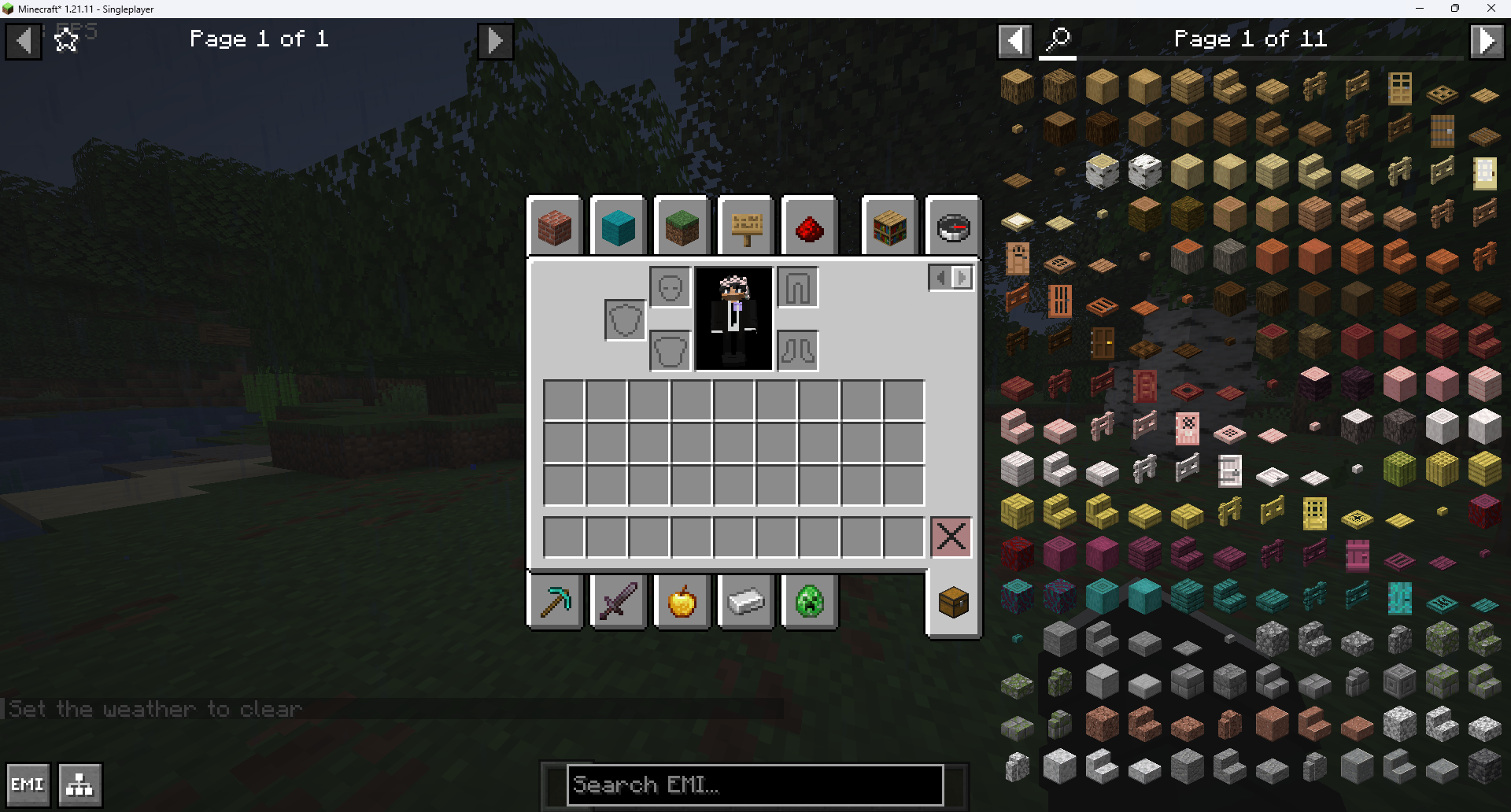 EMI in 1.21.11 EMI working in 1.21.11
-
 EMI 26.3 Native Villager Trading in EMI
-
 EMI 26.3 Enchantments Native Enchantment Rendering
-
 EMI 26.3 Status Effects Native EMI rendering for Status Effects and their Descriptions on 26.3
Versions
Files
Relations
Project Relations
More like this
Similar Mods
Suggestions use data such as tags, dependencies, dependents, descriptions, titles, and more to rank how much they overlap with this mod.
On ModDex
Community snapshot
By the numbers
Statistics

Get it on
Available Platforms
On ModDex
Community snapshot
By the numbers