Community listing page, reviews here may not be monitored by the author.
PingDisplay


No reviews yet
See exact player ping in the Tab list with customizable colors, thresholds and display modes.
Community voices
Reviews
No reviews yet. Be the first to review this project!
Get it on
Available Platforms
Compatibility
Supported Environments
Runs entirely on the client. Works on vanilla servers.
About
Project Details
For authors
Embed Badge
If you're the author of this project, you can embed a live badge anywhere that supports HTML or Markdown. It updates automatically whenever ratings change.
Use HTML for any page that supports it, or Markdown for README files and Markdown-based descriptions.
Identifiers
Platform IDs
About
Description
PingDisplay
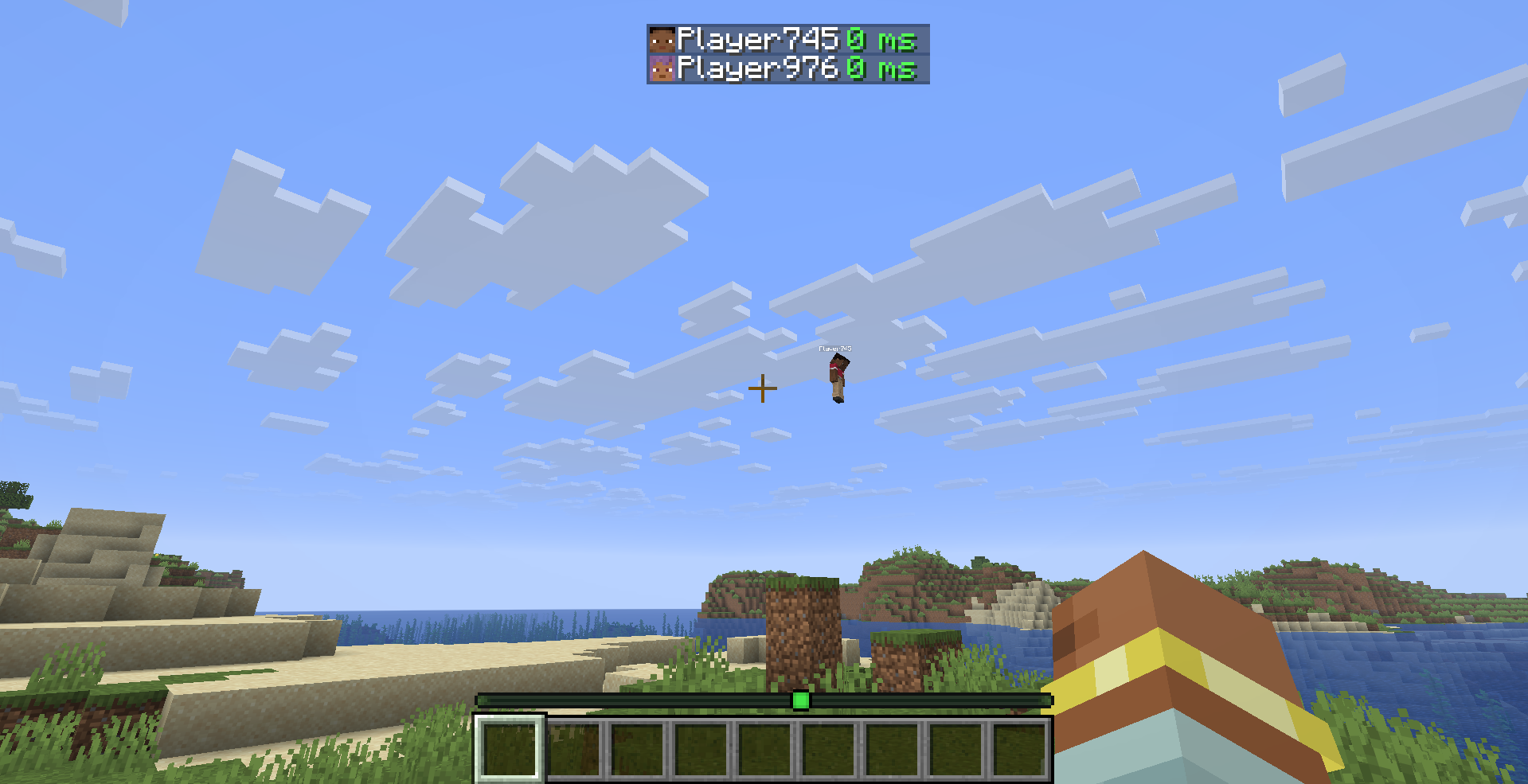
See every player's exact ping directly in the Tab list — no more guessing from signal bars.
What it does
PingDisplay makes Minecraft's Tab player list much more useful by showing each player's real latency as a numerical value.
Choose exactly how you want ping to appear:
- 🔢 Number Only — replaces the vanilla signal bars with values like
42 ms - 📶 Bars + Number — keeps the vanilla connection bars and adds the exact ping
- 🎮 Vanilla Mode — restores the normal Minecraft ping display instantly
Features
- ⚡ Exact numerical ping — see the real latency of every player
- 🎨 5 color-coded ping levels — Excellent, Good, Medium, Bad and Terrible
- 🛠️ Custom thresholds — decide exactly when each ping quality level applies
- 🌈 Custom colors — every ping level can have its own color
- 🔁 3 display modes — Number Only, Bars + Number and Vanilla
- 👁️ Toggle the
mssuffix - ⏻ Enable or disable PingDisplay instantly
- ⚙️ Built-in configuration screen
- 🇬🇧 English localization
- 🇹🇷 Turkish localization
- 🔄 Automatic migration from PingDisplay 1.0.0 configs
- 🪶 Lightweight and client-side only
- 🖥️ No server installation required
Default Ping Levels
| Quality | Ping |
|---|---|
| 🟢 Excellent | Below 50 ms |
| 🟩 Good | Below 100 ms |
| 🟡 Medium | Below 150 ms |
| 🟠 Bad | Below 250 ms |
| 🔴 Terrible | 250 ms and above |
All thresholds and colors can be changed from the in-game configuration screen.
Configuration
PingDisplay stores its settings in:
.minecraft/config/pingdisplay.json
When Mod Menu is installed, simply open:
Mods → PingDisplay → Configure
Mod Menu is optional. PingDisplay works perfectly without it.
Supported Versions
- Minecraft 26.1.2 — Fabric
- Minecraft 26.2 — Fabric
Requirements
Optional
- Mod Menu — quick access to the PingDisplay configuration screen
Cloth Config is no longer required.
Client-Side Only
PingDisplay only needs to be installed on your client.
You can use it on multiplayer servers without requiring the server or other players to install the mod.
Upgrading from 1.0.0
Already using PingDisplay 1.0.0?
Your existing configuration is automatically migrated to the new 1.1.0 system. You don't need to delete your old config.
License
MIT — see LICENSE
PingDisplay
See every player's exact ping directly in the Tab list — no more guessing from signal bars.
What it does
PingDisplay makes Minecraft's Tab player list much more useful by showing each player's real latency as a numerical value.
Choose exactly how you want ping to appear:
- 🔢 Number Only — replaces the vanilla signal bars with values like
42 ms - 📶 Bars + Number — keeps the vanilla connection bars and adds the exact ping
- 🎮 Vanilla Mode — restores the normal Minecraft ping display instantly
Features
- ⚡ Exact numerical ping — see the real latency of every player
- 🎨 5 color-coded ping levels — Excellent, Good, Medium, Bad and Terrible
- 🛠️ Custom thresholds — decide exactly when each ping quality level applies
- 🌈 Custom colors — every ping level can have its own color
- 🔁 3 display modes — Number Only, Bars + Number and Vanilla
- 👁️ Toggle the
mssuffix - ⏻ Enable or disable PingDisplay instantly
- ⚙️ Built-in configuration screen
- 🇬🇧 English localization
- 🇹🇷 Turkish localization
- 🔄 Automatic migration from PingDisplay 1.0.0 configs
- 🪶 Lightweight and client-side only
- 🖥️ No server installation required
Default Ping Levels
| Quality | Ping |
|---|---|
| 🟢 Excellent | Below 50 ms |
| 🟩 Good | Below 100 ms |
| 🟡 Medium | Below 150 ms |
| 🟠 Bad | Below 250 ms |
| 🔴 Terrible | 250 ms and above |
All thresholds and colors can be changed from the in-game configuration screen.
Configuration
PingDisplay stores its settings in:
.minecraft/config/pingdisplay.json
When Mod Menu is installed, simply open:
Mods → PingDisplay → Configure
Mod Menu is optional. PingDisplay works perfectly without it.
Supported Versions
- Minecraft 26.1.2 — Fabric
- Minecraft 26.2 — Fabric
Requirements
Optional
- Mod Menu — quick access to the PingDisplay configuration screen
Cloth Config is no longer required.
Client-Side Only
PingDisplay only needs to be installed on your client.
You can use it on multiplayer servers without requiring the server or other players to install the mod.
Upgrading from 1.0.0
Already using PingDisplay 1.0.0?
Your existing configuration is automatically migrated to the new 1.1.0 system. You don't need to delete your old config.
License
MIT — see LICENSE
Screenshots
Gallery
Versions
Files
Relations
Project Relations
More like this
Similar Mods
Suggestions use data such as tags, dependencies, dependents, descriptions, titles, and more to rank how much they overlap with this mod.
On ModDex
Community snapshot
By the numbers
Statistics
Want to reach Minecraft players?
We're looking for a server hosting partner to feature here and other parts of the site. Interested? Send us a message!
Get in touchGet it on
Available Platforms
On ModDex
Community snapshot
By the numbers