
Community listing page, reviews here may not be monitored by the author.
Placement Utilities


No reviews yet
Utilities and gadgets to help you place blocks and make building far less painful
Community voices
Reviews
No reviews yet. Be the first to review this project!
Get it on
Available Platforms
Compatibility
Supported Environments
Must be installed on both the client and the server.
About
Project Details
For authors
Embed Badge
If you're the author of this project, you can embed a live badge anywhere that supports HTML or Markdown. It updates automatically whenever ratings change.
Use HTML for any page that supports it, or Markdown for README files and Markdown-based descriptions.
Identifiers
Platform IDs
About
Description
Are you one of the people using dirt as temporary blocks for building? Stop doing that! This mod adds instantly breakable temporary blocks as well as upgrades of them. The mod also adds a tool called Angel Wand, which lets you place many blocks in midair and rotate them to make your next build less painful.

This GIF is showing how the Angel Wand works
A list of things the mod adds (you can find these descriptions in-game while hovering over the item and pressing CTRL + SHIFT):
- Temporary Block (Default): A block that you can walk through and break instantly. It's used to place other blocks while building.
- Temporary Block (Returning): Just like a default Temporary Block, but it will go straight into your inventory after breaking.
- Temporary Block (Self Destructing): Just like a default Temporary Block, but it automatically disappears after 10 seconds (alternatively disappears on Random Tick if you configure it that way). Only used by the Temporary Wand.
- Temporary Wand: Right click to place a self-destructing Temporary Block. Unlimited uses
- Temporary Block (Angel): Just like a returning Temporary Block, but you can place it midair.
- Angel Wand: While holding in your offhand, you can place many blocks as if they were angel Temporary Blocks. The distance you place the block is changeable. Upgradeable
- Angel Add-on: Break: An add-on for the Angel Wand to remove the Mining Fatigue effect while holding an Angel Wand in your offhand.
- Angel Add-on: Range: An add-on for the Angel Wand to increase its max reach by 1 Block each (max amount is configurable).
- Angel Add-on: Rotate: An add-on for the Angel Wand to add a feature to rotate blocks you are looking at.
Recipes:
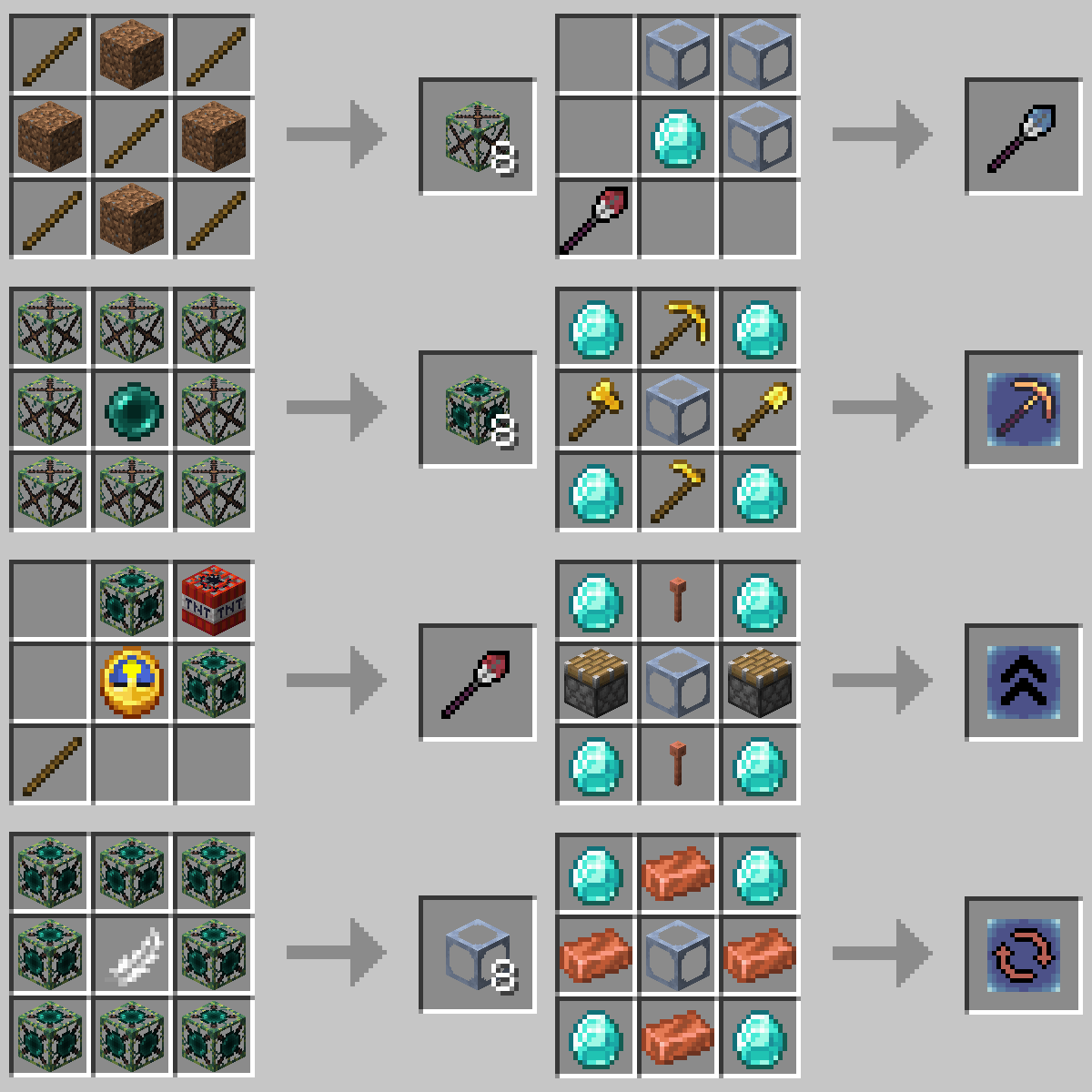
If you want your own Minecraft server to play with friends, check out Kinetic Hosting. They provide powerful servers for a fair price while being easy to use, and they have a nice support. Click on the image below for more information, and if you are interested, use code LAIDBACKSLOTH at checkout for a 15% discount.

Are you one of the people using dirt as temporary blocks for building? Stop doing that! This mod adds instantly breakable temporary blocks as well as upgrades of them. The mod also adds a tool called Angel Wand, which lets you place many blocks in midair and rotate them to make your next build less painful.
This GIF is showing how the Angel Wand works
A list of things the mod adds (you can find these descriptions in-game while hovering over the item and pressing CTRL + SHIFT):
- Temporary Block (Default): A block that you can walk through and break instantly. It's used to place other blocks while building.
- Temporary Block (Returning): Just like a default Temporary Block, but it will go straight into your inventory after breaking.
- Temporary Block (Self Destructing): Just like a default Temporary Block, but it automatically disappears after 10 seconds (alternatively disappears on Random Tick if you configure it that way). Only used by the Temporary Wand.
- Temporary Wand: Right click to place a self-destructing Temporary Block. Unlimited uses
- Temporary Block (Angel): Just like a returning Temporary Block, but you can place it midair.
- Angel Wand: While holding in your offhand, you can place many blocks as if they were angel Temporary Blocks. The distance you place the block is changeable. Upgradeable
- Angel Add-on: Break: An add-on for the Angel Wand to remove the Mining Fatigue effect while holding an Angel Wand in your offhand.
- Angel Add-on: Range: An add-on for the Angel Wand to increase its max reach by 1 Block each (max amount is configurable).
- Angel Add-on: Rotate: An add-on for the Angel Wand to add a feature to rotate blocks you are looking at.
Recipes:
If you want your own Minecraft server to play with friends, check out Kinetic Hosting. They provide powerful servers for a fair price while being easy to use, and they have a nice support. Click on the image below for more information, and if you are interested, use code LAIDBACKSLOTH at checkout for a 15% discount.
Screenshots
Gallery
-
Recipes All the crafting recipes
-
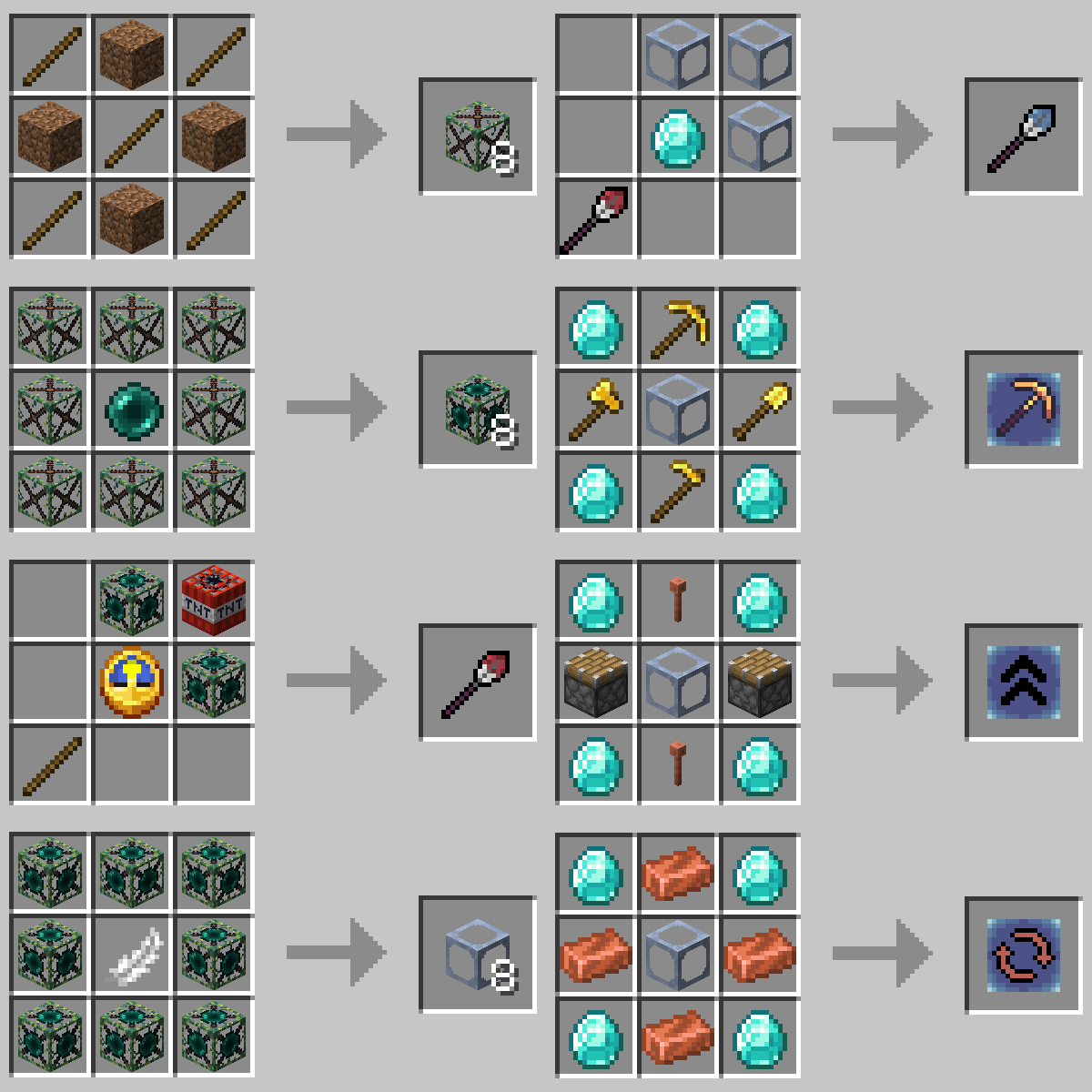 Recipes All the crafting recipes
Versions
Files
Relations
Project Relations
More like this
Similar Mods
Suggestions use data such as tags, dependencies, dependents, descriptions, titles, and more to rank how much they overlap with this mod.
On ModDex
Community snapshot
By the numbers
Statistics
Want to reach Minecraft players?
We're looking for a server hosting partner to feature here and other parts of the site. Interested? Send us a message!
Get in touchGet it on
Available Platforms
On ModDex
Community snapshot
By the numbers