
Community listing page, reviews here may not be monitored by the author.
PlayerPing

No reviews yet
Port of the original Player-Ping plugin made by HoneyBerries.

Community voices
Reviews
No reviews yet. Be the first to review this project!
Get it on
Available Platforms
Compatibility
Supported Environments
Runs on a dedicated server only; does not work in singleplayer.
About
Project Details
For authors
Embed Badge
If you're the author of this project, you can embed a live badge anywhere that supports HTML or Markdown. It updates automatically whenever ratings change.
Use HTML for any page that supports it, or Markdown for README files and Markdown-based descriptions.
Identifiers
Platform IDs
Resources
External Links
About
Description
PlayerPing Mod
A server-side port of the original PlayerPing plugin by HoneyBerries, now available for Fabric and NeoForge modded servers.
For Fabric servers, Fabric API is required.
🆕 What's New in 1.1.1
- Fixed the critical admin-permission glitch from 1.1.0 that could block
/pingplayercommands in-game. - Fixed the critical glitch causing crashes on multiple versions of fabric servers (1.21.5 to 1.21.11).
- Added support for modern admin permission setups:
- Vanilla OP users
- Permission node:
playerping.admin - LuckPerms weight fallback (
minLuckPermsWeight, default:8)
- Added
/ip(self lookup) for all players. - Added
/pingplayer debugto toggle full server-side diagnostics. - Added
/pingplayer dumpto generate a full diagnostic report. - Improved in-game help UI with cleaner formatting and readability.
- Added config header warnings and safer config parsing.
✨ Features
- 🔍 Ping Check - Use
/pingfor self,/ping <player>for admin checks. - 🌐 IP Lookup - Use
/ipfor your own public IP,/ip <player>for admin lookup. - 📋 Tablist Ping Display - Ping values shown directly in the tab list with quality colors.
- 🎛️ Live Threshold Management - Edit ping tiers in-game with
/pingplayer threshold .... - 🚦 Quality Colors - Clear ping quality indicators (Excellent → Terrible).
- 🛠️ Debug + Dump Tools - Built-in diagnostics for troubleshooting and crash investigation.
Commands
| Command | Description | Permission |
|---|---|---|
/ping |
Get your own ping | All players |
/ping <player> |
Check another player's ping | Admins |
/ip |
Get your own public IP | All players |
/ip <player> |
Get another player's public IP | Admins |
/pingplayer help |
Show admin command help | Admins |
/pingplayer debug |
Toggle full debug mode on/off | Admins |
/pingplayer dump |
Generate a full diagnostic dump report | Admins |
/pingplayer threshold <excellent|good|fair|poor|terrible> |
Show current threshold for a tier | Admins |
/pingplayer threshold <tier> equal-or-more <value> |
Set tier to >= value | Admins |
/pingplayer threshold <tier> equal-or-less <value> |
Set tier to <= value | Admins |
/pingplayer threshold <tier> equal <value> |
Set tier to exact value | Admins |
/pingplayer threshold <tier> <min> <max> |
Set tier to a range interval | Admins |
Examples
/pingplayer threshold terrible equal-or-more 500/pingplayer threshold fair 101 250/pingplayer debug/pingplayer dump
🧪 Diagnostics
When you run /pingplayer dump, the mod creates a full diagnostic report at:
config/player-ping/crash_reports/
Fabric file naming format:
pingplayer_crash_MMddyyyy_fabric.txt
🎨 Ping Quality Indicators
- 🟢 Green — Excellent
- 🟡 Yellow — Good
- 🟠 Gold — Fair
- 🔴 Red — Poor
- 🟥 Dark Red — Terrible
(Default ranges are configurable.)
💻 Installation
- Download the
.jarfor your loader. - Place it in your server
/modsfolder. - Restart the server.
🔖 Compatibility
- Minecraft: 1.21.x
- Loaders: Fabric, NeoForge
- Side: Server-side
- Java: 21
Screenshots
Gallery
-
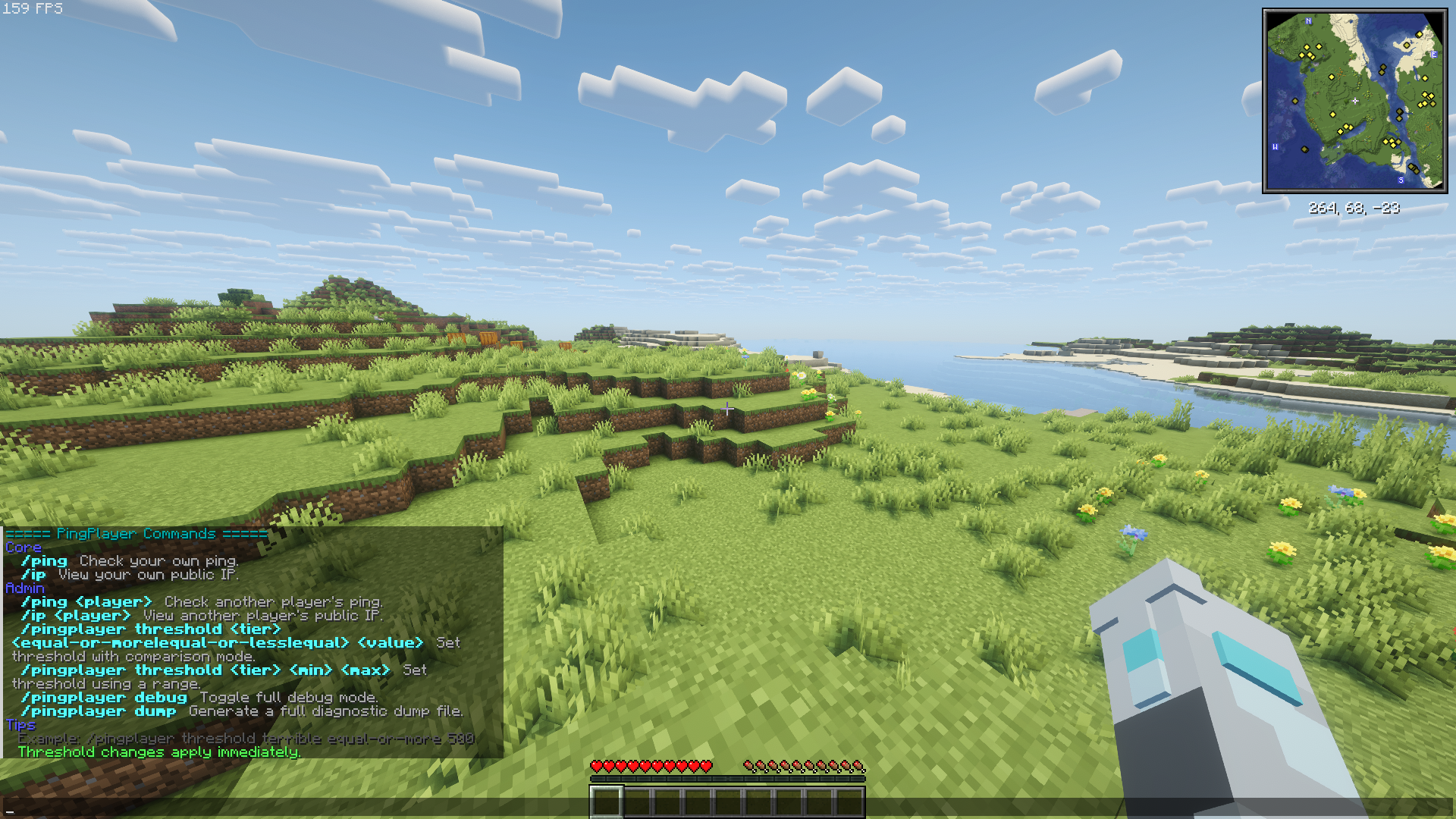 New UI for commands! Latest full commands list with better identification
 -
 Mod icon Yup, that's the mod's icon all right.
Versions
Files
Relations
Project Relations
More like this
Similar Mods
Suggestions use data such as tags, dependencies, dependents, descriptions, titles, and more to rank how much they overlap with this mod.
On ModDex
Community snapshot
By the numbers
Statistics

 (opens in a new tab)
Get it on
Available Platforms
On ModDex
Community snapshot
By the numbers
Statistics
Resources