
Community listing page, reviews may not be monitored by the author.
PlayerNotes


No reviews yet
Fabric client-side mod to manage notes about players by using commands and clickable actions. Optional name tag and tablist highlight.

Community voices
Reviews
No reviews yet. Be the first to review this project!
Get it on
Available Platforms
Compatibility
Supported Environments
Runs entirely on the client. Works on vanilla servers.
About
Project Details
For authors
Embed Badge
If you're the author of this project, you can embed a live badge anywhere that supports HTML or Markdown. It updates automatically whenever ratings change.
Use HTML for any page that supports it, or Markdown for README files and Markdown-based descriptions.
Identifiers
Platform IDs
About
Description
Commands
(All Commands can be seen by running /PlayerNotes)
- /PlayerNotes view <name> - View all notes of the given player.
- /PlayerNotes add <name> <note> - Adds the given note to the given player.
- /PlayerNotes listOnline - Lists all players that have notes and are currently online, including a view button.
- /PlayerNotes list - Lists all players that have notes, including a view button.
Example: /PlayerNotes add notch Likes trading emeralds.
To delete a note, run /PlayerNotes view <name> and click on the delete button (recommended). Alternatively, run /PlayerNotes del <name> <id>.
More Features
- Noted players have a prefix above their name tag (toggleable in config)
- Noted players are displayed first in tablist with a prefix (toggleable in config)
- If the noted player changes their name, the old name will be shown in parentheses.
- If you want to see the creation date of a note, hover over it with your mouse.
Hints
- If you want to create a personal note, just create a note for your own username.
- This mod pairs nicely with PlayerPrefixes, which lets you assign custom prefixes to players
Privacy
Your notes are not sent to any server.
Dependencies
No need to install any other mod than Fabric API.
Please note that Mod Menu is required to access the config GUI.
Questions? Issues? Feature Requests?
Feel free to join the Discord ( https://www.lucasedvk.de/discord ) or send me a PM on Discord (Lucas.EDVK).
Issues and feature requests are encouraged to be reported on GitLab. Discord is also fine. Thank you!!
Quality Assurance
My code and description are at least 90 % human-written. Only the icon was made using generative AI. Also, my goal is to port to new Minecraft versions asap. All my mods were updated from 1.21. within 1 week of the release of 26.1. #HumanWritten
Special Thanks
Special Thanks to Motschen for providing this awesome config library with jar-in-jar option!
Commands
(All Commands can be seen by running /PlayerNotes)
- /PlayerNotes view - View all notes of the given player.
- /PlayerNotes add - Adds the given note to the given player.
- /PlayerNotes listOnline - Lists all players that have notes and are currently online, including a view button.
- /PlayerNotes list - Lists all players that have notes, including a view button.
Example: /PlayerNotes add notch Likes trading emeralds.
To delete a note, run /PlayerNotes view and click on the delete button (recommended). Alternatively, run /PlayerNotes del .
More Features
- Noted players have a prefix above their name tag (toggleable in config)
- Noted players are displayed first in tablist with a prefix (toggleable in config)
- If the noted player changes their name, the old name will be shown in parentheses.
- If you want to see the creation date of a note, hover over it with your mouse.
Hints
- If you want to create a personal note, just create a note for your own username.
- This mod pairs nicely with PlayerPrefixes, which lets you assign custom prefixes to players
Privacy
Your notes are not sent to any server.
Dependencies
No need to install any other mod than Fabric API.
Please note that Mod Menu is required to access the config GUI.
Questions? Issues? Feature Requests?
Feel free to join the Discord ( https://www.lucasedvk.de/discord ) or send me a PM on Discord (Lucas.EDVK).
Issues and feature requests are encouraged to be reported on GitLab. Discord is also fine. Thank you!!
Quality Assurance
My code and description are at least 90 % human-written. Only the icon was made using generative AI. Also, my goal is to port to new Minecraft versions asap. All my mods were updated from 1.21. within 1 week of the release of 26.1.
#HumanWritten
Special Thanks
Special Thanks to Motschen for providing this awesome config library with jar-in-jar option!
Screenshots
Gallery
-
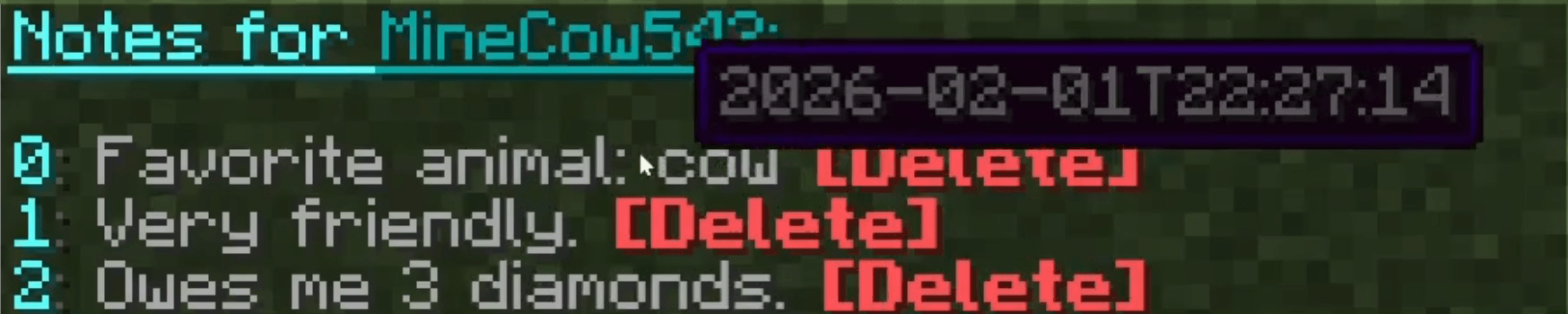 Example notes of a player
 -
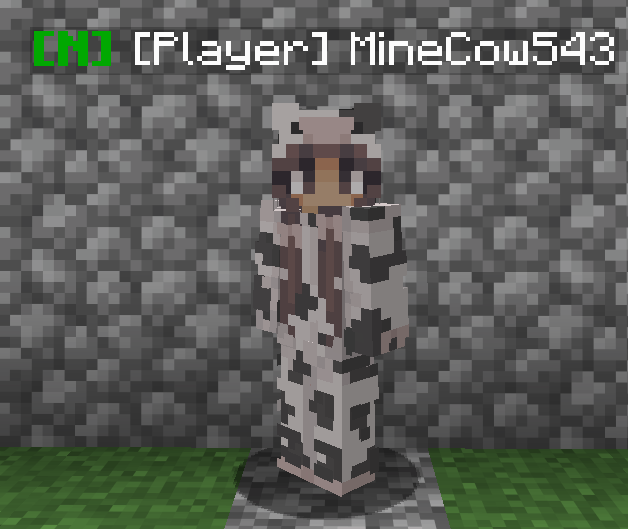 A player with the default note prefix in the name tag This setting is optional and can be configured in the config.
 -
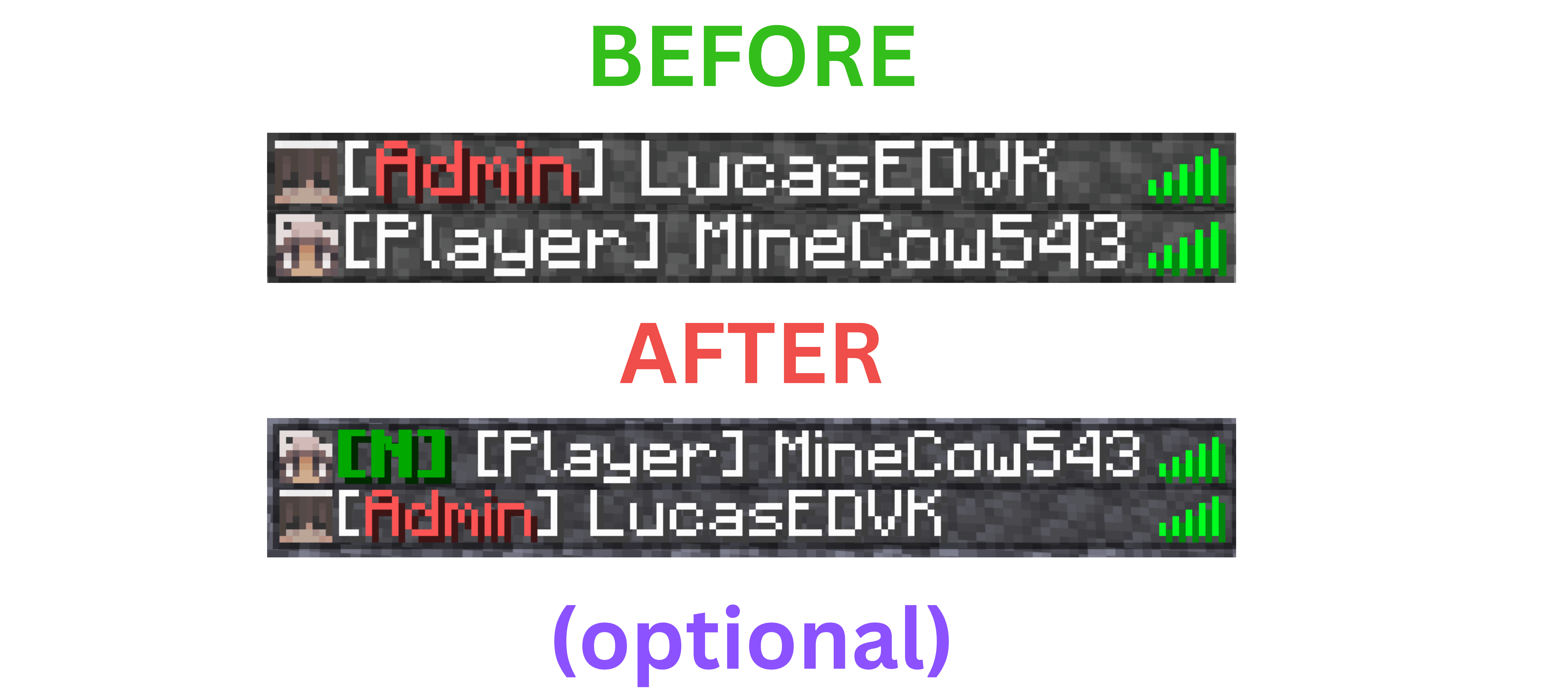 Tablist priority This setting is optional and can be configured in the config.
 -
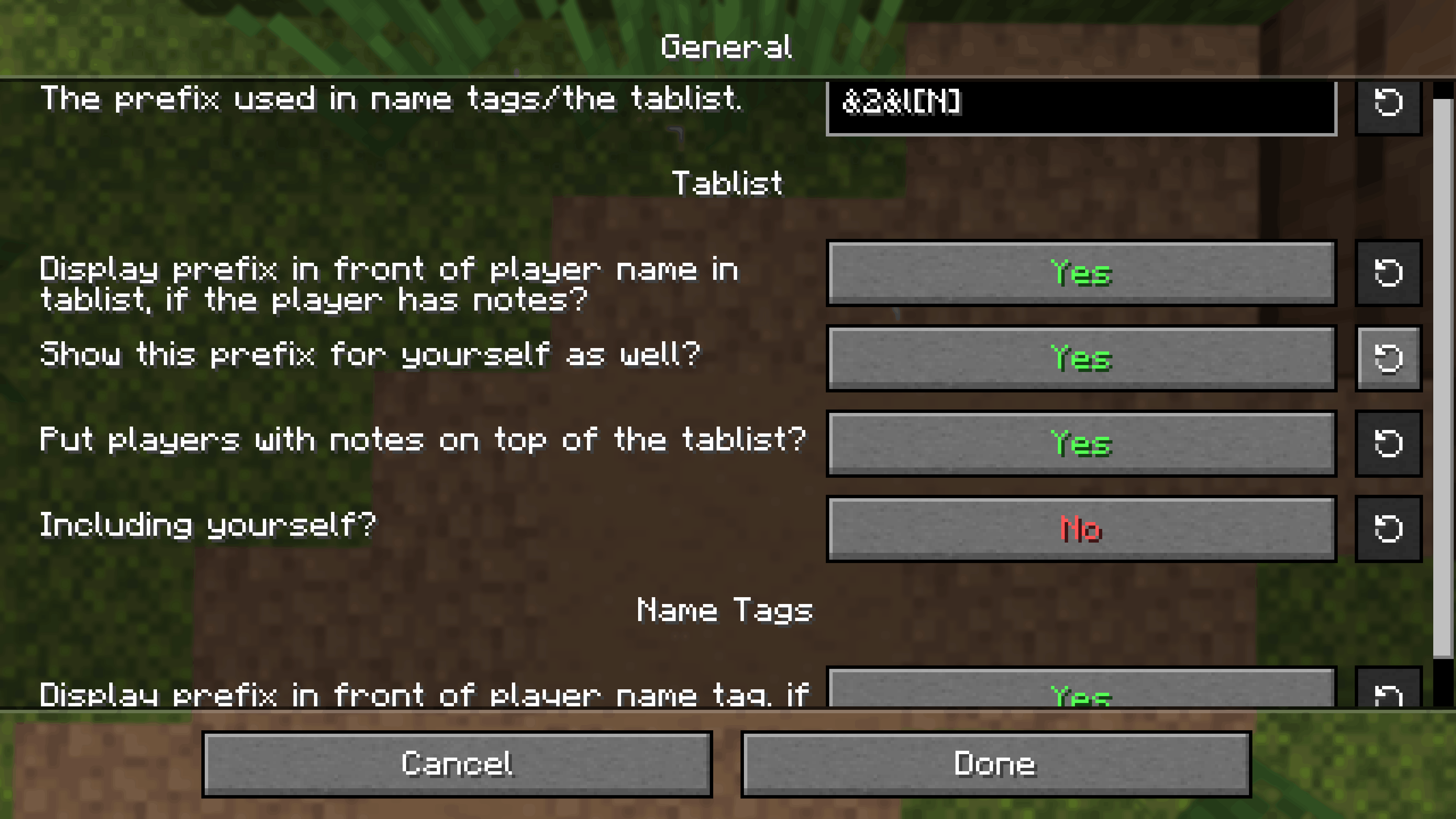 Config GUI
 -
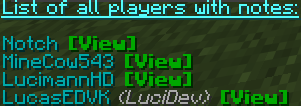 Example list of all players with notes including a name change Name changes are also tracked per note.
-
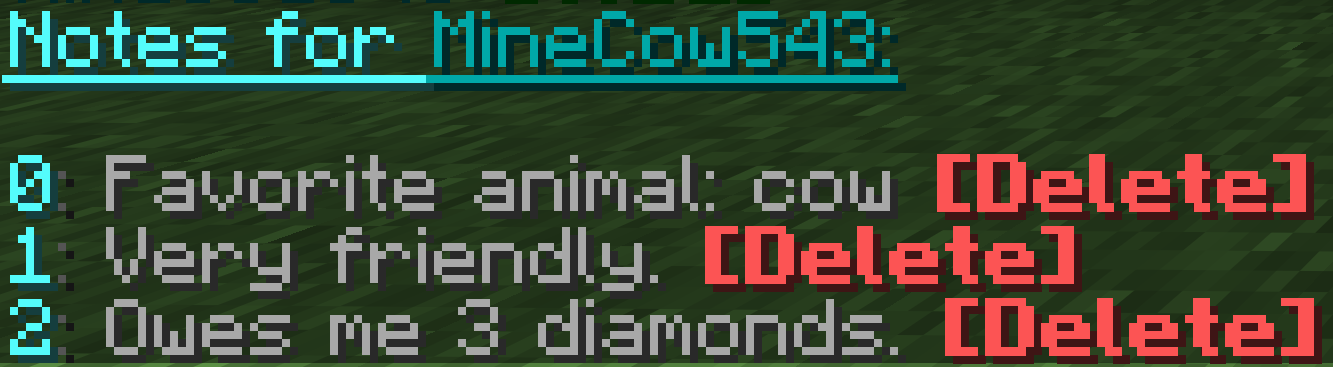 Example notes of a player If the player had a different name at note creation, their old name will be in in parentheses next to the note.
 -
 Example list of all players with notes including a name change Name changes are also tracked per note.
 -
 A player with the default note prefix in the name tag This setting is optional and can be configured in the config.
 -
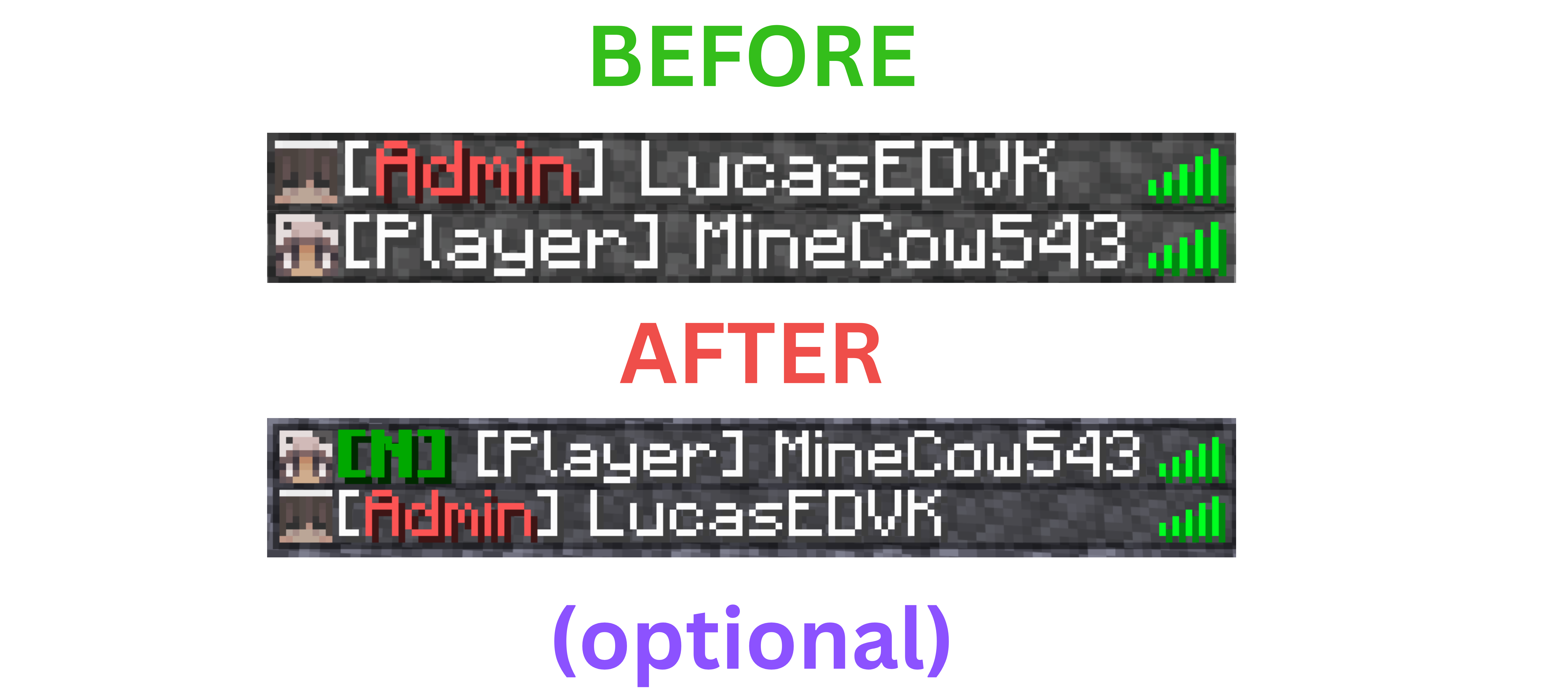 Tablist priority This setting is optional and can be configured in the config.
 -
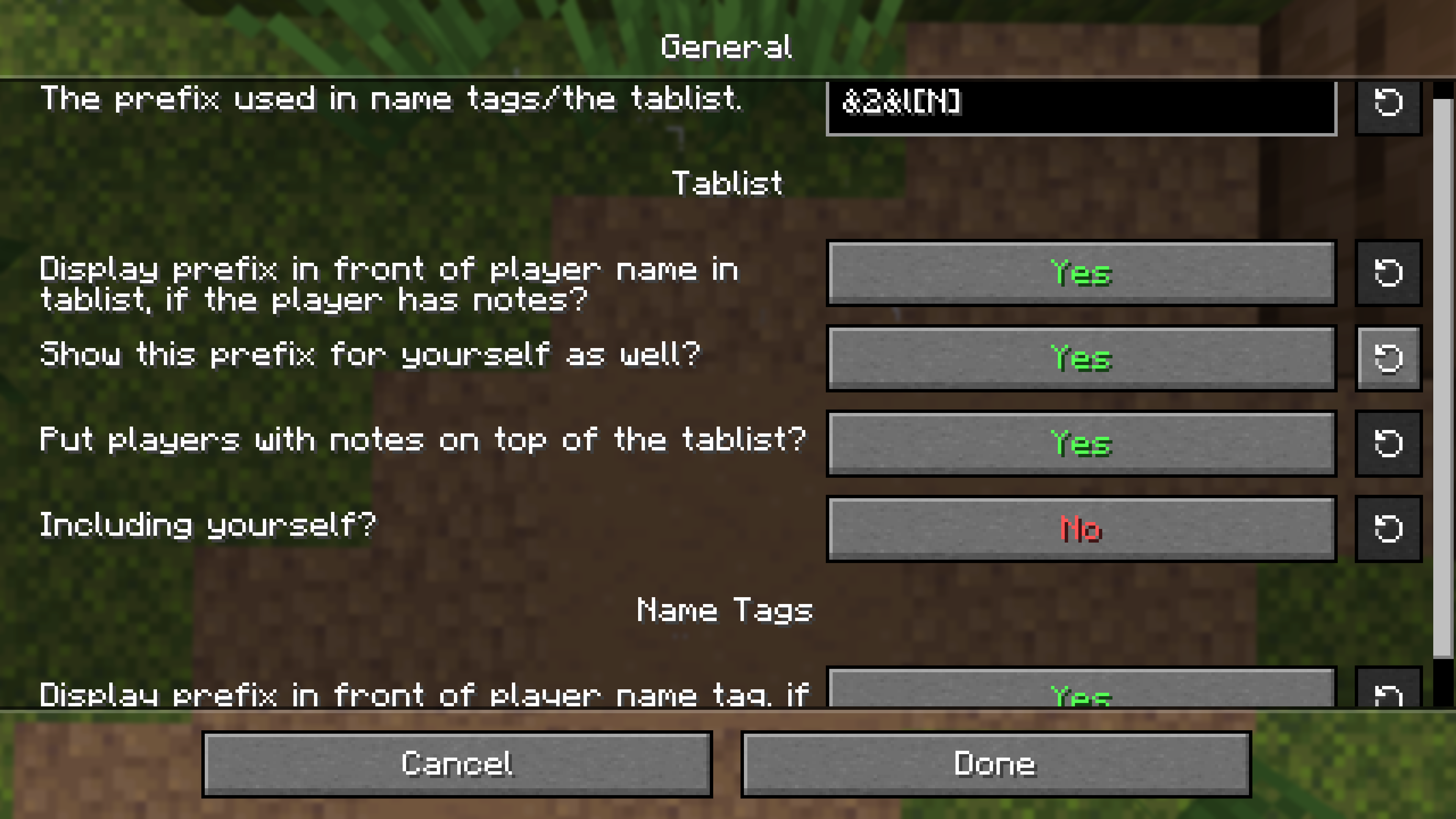 Config GUI
Versions
Files
Relations
Project Relations
More like this
Similar Mods
Suggestions use data such as tags, dependencies, dependents, descriptions, titles, and more to rank how much they overlap with this mod.
On ModDex
Community snapshot
By the numbers
Statistics
 (opens in a new tab)
Get it on
Available Platforms
On ModDex
Community snapshot
By the numbers