Community listing page, reviews here may not be monitored by the author.
Plugin Stlye Shop


No reviews yet
A customizable plugin-style GUI shop mod featuring dynamic pricing and team integration.
Community voices
Reviews
No reviews yet. Be the first to review this project!
Get it on
Available Platforms
Compatibility
Supported Environments
Must be installed on both the client and the server.
About
Project Details
For authors
Embed Badge
If you're the author of this project, you can embed a live badge anywhere that supports HTML or Markdown. It updates automatically whenever ratings change.
Use HTML for any page that supports it, or Markdown for README files and Markdown-based descriptions.
Identifiers
Platform IDs
Resources
External Links
About
Description
Plugin Style Shop
Server-like GUI Shops for Forge
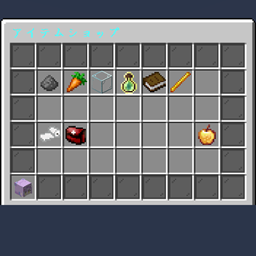
Plugin Style Shop brings the polished user experience of Spigot/Bukkit server shops to the Minecraft Forge platform. It provides a secure, menu-based GUI where items act as buttons. Clicking an item triggers a transaction instantly without the risk of item theft or messy inventory management.
This mod is perfect for modpack creators, RPG servers, and map makers who need a robust economy system with advanced features like team-based inflation and NBT support.
Key Features
1. Advanced Dynamic Pricing
Create an economy that reacts to supply and demand. Prices can automatically increase (inflation) or decrease based on purchase history.
- Math Modes:
- Linear: Price increases by a fixed amount per purchase (e.g., +50 Gold).
- Exponential: Price multiplies per purchase (e.g., x1.1 per buy).
- Power: Price increases based on a power curve.
- Configurable Limits: Set minimum and maximum prices to prevent the economy from breaking.
2. Team System Integration
Fully integrated with Minecraft's vanilla Scoreboard Teams.
- Team Scoping: You can set price inflation to be shared among a team. If the "Red Team" buys a lot of swords, the price increases only for the Red Team.
- Team Color Items: Items can automatically change color (e.g., Wool, Concrete) to match the buyer's team color.
3. Flexible Currency & Rewards
- Currency: Use Scoreboard values (Points, Money) or physical Items.
- NBT Support: Supports strict NBT matching. You can require a specific "Golden Coin" with custom lore as currency, not just any gold nugget.
- Command Rewards: Sell permissions, potion effects, or teleports by executing commands upon purchase.
How to Use & Configuration
1. In-Game Setup
To create a shop, you simply need an entity with the specific tag pss_shop.
Basic Shop (Default):
Summon a villager that opens the default.json shop.
/summon villager ~ ~ ~ {Tags:["pss_shop"], NoAI:1b, CustomName:'"Shopkeeper"'}Multiple Shops:
To open a specific file (e.g., weapons.json), add a second tag in the format pss_shop:filename.
/summon villager ~ ~ ~ {Tags:["pss_shop", "pss_shop:weapons"], NoAI:1b}2. Configuration Files
Config files are located at: config/plugin_style_shop/shops/.
You can create as many JSON files as you need.
JSON Structure Example
Here is how to configure a dynamic price item in default.json:
{
  "title": "Server Market",
  "size": 27,
  "items": [
    {
      "slot": 13,
      "display": {
        "item": "minecraft:diamond_sword",
        "name": "§bInflation Sword",
        "lore": [
          "§7The more you buy,",
          "§7the more expensive it gets!",
          "§eCurrent Price: %price% Points"
        ]
      },
      "cost": {
        "type": "SCORE",
        "target": "money",
        "base_amount": 100,
        "scaling": {
          "mode": "EXPONENTIAL",
          "factor": 1.2,
          "scope": "TEAM",
          "clamp": { "min": 100, "max": 5000 }
        }
      },
      "reward": {
        "type": "ITEM",
        "item": "minecraft:diamond_sword",
        "count": 1
      }
    }
  ]
}
3. Configuration Breakdown
display: Visual settings.- Use
%price%inloreto show the calculated cost. - Set
custom_display_typeto"team_color_item"to make the item match the player's team color (requires a white base item likewhite_wool).
- Use
cost:type:"SCORE"(Scoreboard) or"ITEM"(Physical Item) or"NONE".target: The objective name for Scoreboard currency.
scaling(Dynamic Pricing):scope:"PLAYER": Counts per individual."TEAM": Counts per Vanilla Team."GLOBAL": Counts for the whole server.
reward:type:"ITEM"or"COMMAND".- For commands, use the list format
"commands": ["command1", "command2"]. Use%player%as a placeholder.
4. Admin Commands
/pss reload: Reloads all JSON configurations instantly. (Requires OP)
Plugin Style Shop reproduces the user experience of server plugin shops (Spigot/Bukkit) on the Forge platform. It provides a secure GUI where items function as buttons—clicking them triggers a transaction without physical item movement.
Key Features
- Plugin-like GUI: Prevents item theft or movement within the shop menu. Clicking an item instantly processes the transaction.
- Dynamic Pricing: Supports flexible price scaling (Linear, Exponential, Power) based on purchase counts.
- Team Integration: Pricing logic can be scoped to individual players, the entire server (Global), or vanilla Teams (e.g., prices increase only for a specific team).
- Flexible Currency: Supports Scoreboard objectives and Items (including strict NBT matching) as currency.
- JSON Configuration: All shop layouts, items, and pricing rules are fully customizable via JSON files.
How to Use (I plan to write a detailed explanation at some point.)
- Summon an entity with the tag
pss_shop(configurable).- Example:
/summon villager ~ ~ ~ {Tags:["pss_shop"], NoAI:1b}
- Example:
- Right-click the entity to open the shop.
- Edit
config/pluginstyleshop/shops/default.jsonto customize the shop content.
Screenshots
Gallery
Versions
Files
Relations
Project Relations
More like this
Similar Mods
Suggestions use data such as tags, dependencies, dependents, descriptions, titles, and more to rank how much they overlap with this mod.
On ModDex
Community snapshot
By the numbers
Statistics
Want to reach Minecraft players?
We're looking for a server hosting partner to feature here and other parts of the site. Interested? Send us a message!
Get in touchGet it on
Available Platforms
On ModDex
Community snapshot
By the numbers
Statistics
Resources