
Community listing page, reviews here may not be monitored by the author.
PokdeDetails for Cobblemon


No reviews yet
A client side mod that adds two commands to check basic details of the pokemon, eg the biomes, dex no, conditions for spawn, etc.

Community voices
Reviews
No reviews yet. Be the first to review this project!
Get it on
Available Platforms
Compatibility
Supported Environments
Runs entirely on the client. Works on vanilla servers.
About
Project Details
For authors
Embed Badge
If you're the author of this project, you can embed a live badge anywhere that supports HTML or Markdown. It updates automatically whenever ratings change.
Use HTML for any page that supports it, or Markdown for README files and Markdown-based descriptions.
Identifiers
Platform IDs
Resources
External Links
About
Description
PokeDetails Fabric Mod
PokeDetails is a Client Side Fabric mod that enhances your Pokémon gameplay experience by providing detailed information about various Pokémon directly in-game. With just a simple command, you can retrieve essential details about any Pokémon in the game, helping you strategize and plan your gameplay better.
Features
PokeDetails offers two primary commands to access Pokémon information:
/pokedetails
The main command that serves as the entry point to access Pokémon information. This command has two subcommands:
/pokedetails dexno [1-999]
Retrieve information about a Pokémon by its Dex Number./pokedetails name [mon name]
Retrieve information about a Pokémon by its name.
Information Retrieved
When you use the PokeDetails commands, the following information is retrieved:
- Dex No.: The Pokémon's National Dex number.
- Pokémon Levels: The range of levels at which the Pokémon can be found.
- Rarity: How rare the Pokémon is in the wild.
- Context: Additional contextual information about the Pokémon.
- Preset: Any preset conditions associated with finding the Pokémon.
- Biome: The biome(s) where the Pokémon can be encountered.
- Time: The time of day when the Pokémon is most commonly found.
- Weather: The weather conditions that favor the appearance of the Pokémon.
- Sky: The type of sky conditions that are ideal for encountering the Pokémon.
- Conditions: Any additional conditions required to find the Pokémon.
Commands Overview
/pokedetails dexno [1-999]
This command allows you to retrieve Pokémon details using their Dex Number. Simply input the Dex Number, and you'll receive a detailed breakdown of all relevant information.
Example Usage:
/pokedetails dexno 25
This would return the details for Pikachu.
/pokedetails name [mon name]
This command lets you find Pokémon details by their name. Just type the name of the Pokémon, and the mod will fetch all the related information.
Example Usage:
/pokedetails name Pikachu
This would return the details for Pikachu.
Installation
To install PokeDetails, follow these steps:
- Download the PokeDetails mod file.
- Place the mod file in your Minecraft mods folder.
- Launch Minecraft with Fabric loader.
- Use the /pokedetails command in-game to start retrieving Pokémon information.
PokeDetails Fabric Mod
PokeDetails is a Client Side Fabric mod that enhances your Pokémon gameplay experience by providing detailed information about various Pokémon directly in-game. With just a simple command, you can retrieve essential details about any Pokémon in the game, helping you strategize and plan your gameplay better.
Features
PokeDetails offers two primary commands to access Pokémon information:
/pokedetails
The main command that serves as the entry point to access Pokémon information. This command has two subcommands:
-
/pokedetails dexno [1-999]
Retrieve information about a Pokémon by its Dex Number. -
/pokedetails name [mon name]
Retrieve information about a Pokémon by its name.
Information Retrieved
When you use the PokeDetails commands, the following information is retrieved:
- Dex No.: The Pokémon's National Dex number.
- Pokémon Levels: The range of levels at which the Pokémon can be found.
- Rarity: How rare the Pokémon is in the wild.
- Context: Additional contextual information about the Pokémon.
- Preset: Any preset conditions associated with finding the Pokémon.
- Biome: The biome(s) where the Pokémon can be encountered.
- Time: The time of day when the Pokémon is most commonly found.
- Weather: The weather conditions that favor the appearance of the Pokémon.
- Sky: The type of sky conditions that are ideal for encountering the Pokémon.
- Conditions: Any additional conditions required to find the Pokémon.
Commands Overview
/pokedetails dexno [1-999]
This command allows you to retrieve Pokémon details using their Dex Number. Simply input the Dex Number, and you'll receive a detailed breakdown of all relevant information.
Example Usage:
/pokedetails dexno 25
This would return the details for Pikachu.
/pokedetails name [mon name]
This command lets you find Pokémon details by their name. Just type the name of the Pokémon, and the mod will fetch all the related information.
Example Usage:
/pokedetails name Pikachu
This would return the details for Pikachu.
Installation
To install PokeDetails, follow these steps:
- Download the PokeDetails mod file.
- Place the mod file in your Minecraft mods folder.
- Launch Minecraft with Fabric loader.
- Use the /pokedetails command in-game to start retrieving Pokémon information.
Screenshots
Gallery
-
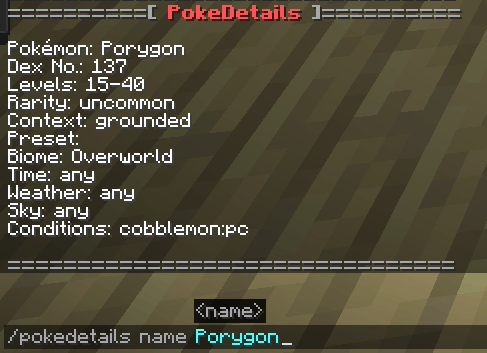 Screenshot from 2024-08-24 17-57-02.png Screenshot from 2024-08-24 17-57-02.png
 -
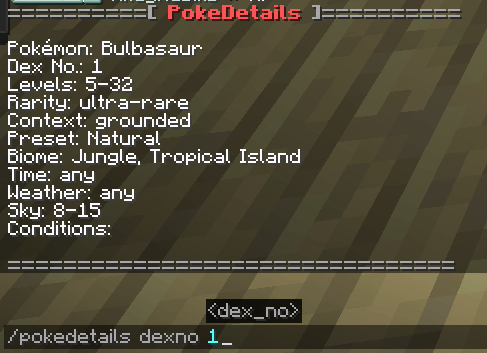 Screenshot from 2024-08-24 17-56-33.png Screenshot from 2024-08-24 17-56-33.png
-
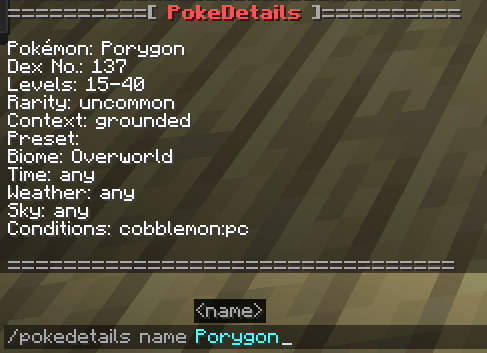 Pokemon Details for Pokemon Name
 -
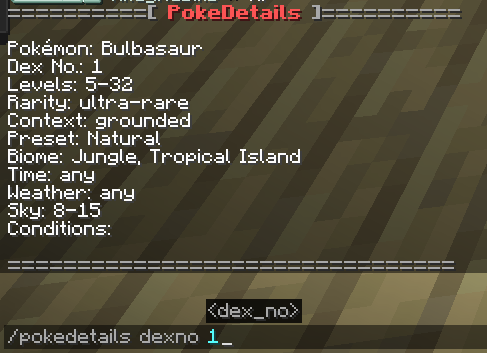 Pokemon Details for Dex no
Versions
Files
Relations
Project Relations
More like this
Similar Mods
Suggestions use data such as tags, dependencies, dependents, descriptions, titles, and more to rank how much they overlap with this mod.
On ModDex
Community snapshot
By the numbers
Statistics
 (opens in a new tab)
Get it on
Available Platforms
On ModDex
Community snapshot
By the numbers
Statistics
Resources