![Pokebelt [Cobblemon]](https://media.forgecdn.net/avatars/thumbnails/1905/796/256/256/639190148926730826.png)
Community listing page, reviews here may not be monitored by the author.
Pokebelt [Cobblemon]


No reviews yet
This mod adds Pokebelt from Pokemon games/anime which works as additional storage for pokeballs
Community voices
Reviews
No reviews yet. Be the first to review this project!
Get it on
Available Platforms
Compatibility
Supported Environments
Must be installed on both the client and the server.
About
Project Details
For authors
Embed Badge
If you're the author of this project, you can embed a live badge anywhere that supports HTML or Markdown. It updates automatically whenever ratings change.
Use HTML for any page that supports it, or Markdown for README files and Markdown-based descriptions.
Identifiers
Platform IDs
Resources
External Links
About
Description
Pokebelt
Pokebelt is an essential QoL add-on for the Cobblemon mod that introduces a functional Pokémon trainer's belt. Tired of Poké Balls cluttering your inventory? The main goal of this mod is to free up your space by providing a dedicated, stylish, and upgradeable storage specifically for your catching tools!
✨ Key Features
- Dedicated Ball Storage: The belt acts as a specialized pouch where you can store all your Poké Balls, Great Balls, Ultra Balls, and any custom Cobblemon balls.
- Accessories Integration: The belt does not take up any vanilla armor slots! It equips smoothly into a dedicated slot provided by the Accessories mod.
- Smart Pickup System: Any Poké Balls you pick up from the ground will automatically be transferred directly into your belt's slots, bypassing your main inventory.
- Quick Access: Keep all your tools for catching new Pokémon organized in one convenient place, always ready to use. Just scroll and throw!
🎮 Controls & Combinations
- [B*] - Open/Close belt's GUI
- Shift + [B*] - Open belt's inventory
- Shift + Right click (Belt Opened) - Puts pokeball from belt slot in inventory
- Shift + Right click (Belt Closed) - Puts pokeball from hand in belt slot
- [Q] (Belt Opened) - Throw out pokeballs from slot on the ground
- Right Click (Belt Opened) - throw the pokball
📈 Progression & Upgrades
You don't just get an infinite belt right away. You have to earn your slots! You can increase your belt's capacity in two ways:
- Crafting Upgrades: Use a special recipe in the Crafting Table to manually upgrade your belt's capacity. (Check the Gallery tab for recipe screenshots).
- Pokédex Milestones: Catching unique Pokémon species grants passive capacity bonuses. (Example: Catching 20 Rattatas will only count as 1 unique species). Whenever you hit a catch milestone, a notification card will slide onto your screen to give information about pokemon and catch numbers!
🎨 Customization & Dyeing
The belt is not only a convenient tool but also a way of self-expression! You can use dyes to customize its appearance.
- Two-Part Dyeing: The belt is divided into the Base and the Elements.
- To dye the Elements, combine the Belt + Dye.
- To dye the Base, combine the Belt + 1 Leather + Dye.
- Color Mixing: Just like vanilla leather armor, applying multiple dyes will mix the colors together (Colors will mix after you used dye the at first time or if you put 2 dyes at the same time)!
- Dynamic GUI: The belt's on-screen GUI will automatically adjust to match the custom colors of your dyed belt!
💡 Tip: If you want to wash the dye off and start over, simply right-click a Cauldron filled with water while holding the belt!
⚙️ Fully Configurable
You can configure your belt capacity and milestones via ModMenu or mod's config:
- Starting and Maximum slot capacity.
- How many unique Pokémon are needed to get a Pokedex slot bonus.
- The position of the milestone notification card (Bottom, Top, Left, Right, or Disabled).
- GUI Theme (Dynamic, Light, or Dark).
📦 Required Dependencies
- Cobblemon
- Fabric API
- Lavender
- Accessories
- Cloth Config API (Optional)
- ModMenu (Optional)
💬 Feedback & Support: If you have suggestions for improving the mod or happen to find a bug, please let me know in the feedback section on mod's Discord page!
Pokebelt
Pokebelt is an essential QoL add-on for the Cobblemon mod that introduces a functional Pokémon trainer's belt. Tired of Poké Balls cluttering your inventory? The main goal of this mod is to free up your space by providing a dedicated, stylish, and upgradeable storage specifically for your catching tools!
✨ Key Features
- Dedicated Ball Storage: The belt acts as a specialized pouch where you can store all your Poké Balls, Great Balls, Ultra Balls, and any custom Cobblemon balls.
- Accessories Integration: The belt does not take up any vanilla armor slots! It equips smoothly into a dedicated slot provided by the Accessories mod.
- Smart Pickup System: Any Poké Balls you pick up from the ground will automatically be transferred directly into your belt's slots, bypassing your main inventory.
- Quick Access: Keep all your tools for catching new Pokémon organized in one convenient place, always ready to use. Just scroll and throw!
🎮 Controls & Combinations
- [B] - Open/Close belt's GUI
- Shift + [B] - Open belt's inventory
- Shift + Right click (Belt Opened) - Puts pokeball from belt slot in inventory
- Shift + Right click (Belt Closed) - Puts pokeball from hand in belt slot
- [Q] (Belt Opened) - Throw out pokeballs from slot on the ground
- Right Click (Belt Opened) - throw the pokball
📈 Progression & Upgrades
You don't just get an infinite belt right away. You have to earn your slots! You can increase your belt's capacity in two ways:
- Crafting Upgrades: Use a special recipe in the Crafting Table to manually upgrade your belt's capacity. (Check the Gallery tab for recipe screenshots).
- Pokédex Milestones: Catching unique Pokémon species grants passive capacity bonuses. (Example: Catching 20 Rattatas will only count as 1 unique species). Whenever you hit a catch milestone, a notification card will slide onto your screen to give information about pokemon and catch numbers!
🎨 Customization & Dyeing
The belt is not only a convenient tool but also a way of self-expression! You can use dyes to customize its appearance.
- Two-Part Dyeing: The belt is divided into the Base and the Elements.
- To dye the Elements, combine the Belt + Dye.
- To dye the Base, combine the Belt + 1 Leather + Dye.
- Color Mixing: Just like vanilla leather armor, applying multiple dyes will mix the colors together (Colors will mix after you used dye the at first time or if you put 2 dyes at the same time)!
- Dynamic GUI: The belt's on-screen GUI will automatically adjust to match the custom colors of your dyed belt!
💡 Tip: If you want to wash the dye off and start over, simply right-click a Cauldron filled with water while holding the belt!
⚙️ Fully Configurable
You can configure your belt capacity and milestones via ModMenu or mod's config:
- Starting and Maximum slot capacity.
- How many unique Pokémon are needed to get a Pokedex slot bonus.
- The position of the milestone notification card (Bottom, Top, Left, Right, or Disabled).
- GUI Theme (Dynamic, Light, or Dark).
📦 Required Dependencies
- Cobblemon
- Fabric API
- Accessories
- Lavender
- Cloth Config API (Optional)
- ModMenu (Optional)
💬 Feedback & Support: If you have suggestions for improving the mod or happen to find a bug, please let me know in the feedback section on mod's Discord page!
Screenshots
Gallery
-
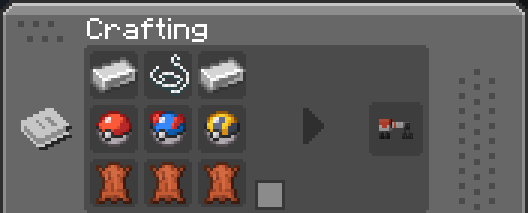 Belt craft recipe (You can use any type of poke balls)
 -
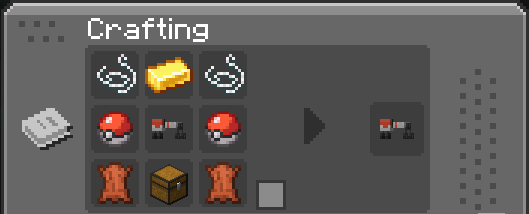 Belt upgrade recipe (You can use any type of poke balls)
-
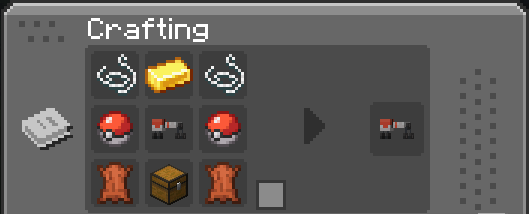 Belt upgrade recipe You can use any type of pokeballs
 -
![Pokebelt [Cobblemon] screenshot](https://cdn.modrinth.com/data/kgst0RnJ/images/b9ef2fa08f1cefa5c9518dabcf238848fbc20cc2.png)
-
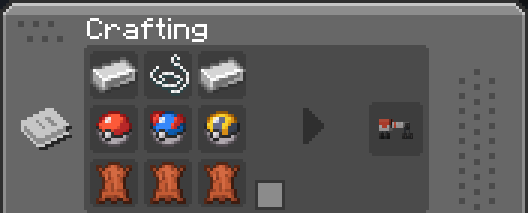 Belt craft recipe You can use any type of pokeballs
 -
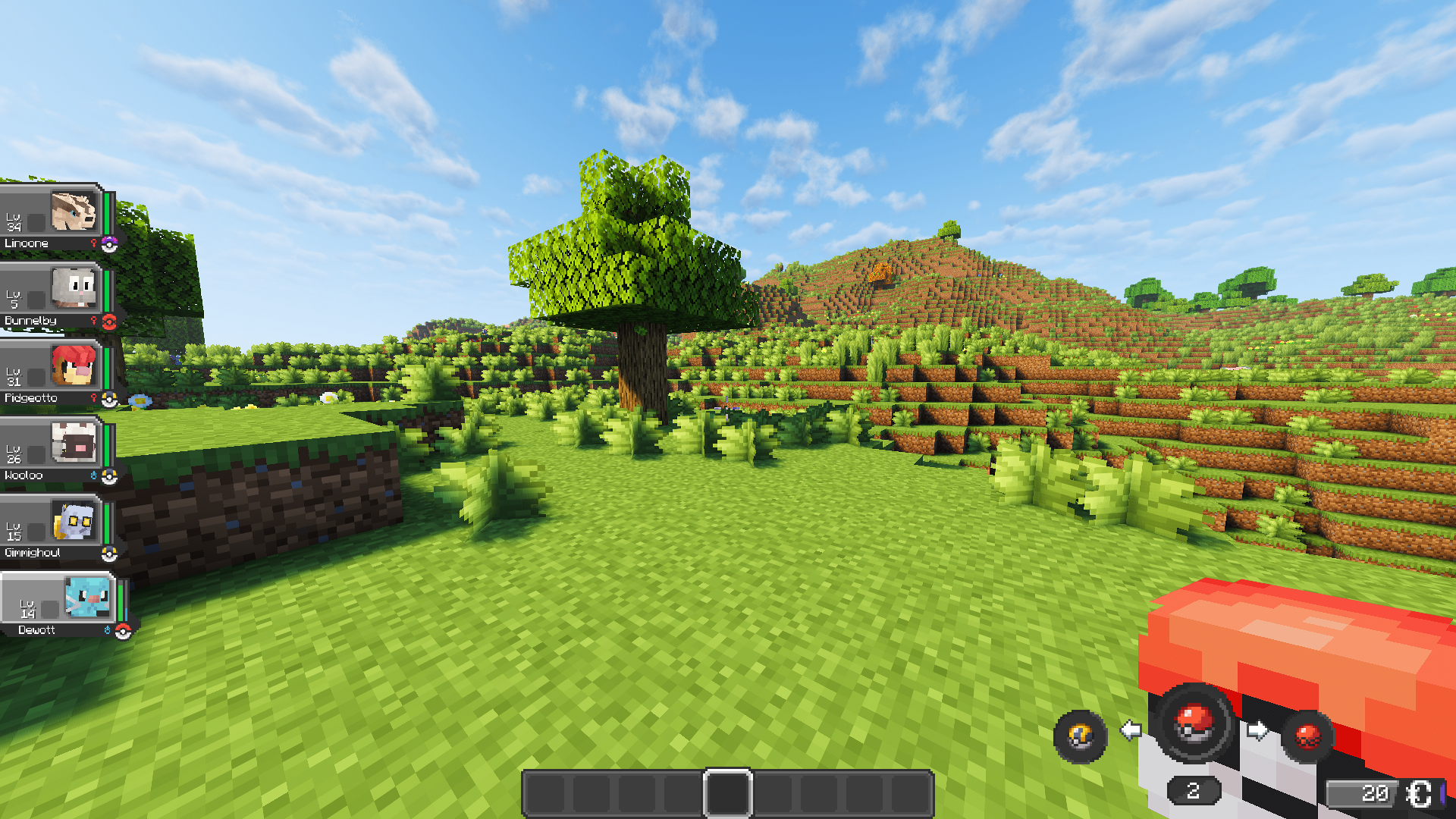 Belt's GUI
 -
![Pokebelt [Cobblemon] screenshot](https://cdn.modrinth.com/data/kgst0RnJ/images/cc7dfa8ad7c27fe7162c1a4388bbf5edba6446d0.png)
Versions
Files
Relations
Project Relations
More like this
Similar Mods
Suggestions use data such as tags, dependencies, dependents, descriptions, titles, and more to rank how much they overlap with this mod.
On ModDex
Community snapshot
By the numbers
Statistics
Want to reach Minecraft players?
We're looking for a server hosting partner to feature here and other parts of the site. Interested? Send us a message!
Get in touchGet it on
Available Platforms
On ModDex
Community snapshot
By the numbers
Statistics
Resources