![Pokemon Editor [Cobblemon]](https://media.forgecdn.net/avatars/thumbnails/1961/999/256/256/639213771045211407.png)
Community listing page, reviews here may not be monitored by the author.
Pokemon Editor [Cobblemon]


No reviews yet
An in-game administrative Pokémon editor for Cobblemon with controls for stats, moves, appearance, origin data, and evolution.

Community voices
Reviews
No reviews yet. Be the first to review this project!
Get it on
Available Platforms
Compatibility
Supported Environments
Must be installed on both the client and the server.
About
Project Details
For authors
Embed Badge
If you're the author of this project, you can embed a live badge anywhere that supports HTML or Markdown. It updates automatically whenever ratings change.
Use HTML for any page that supports it, or Markdown for README files and Markdown-based descriptions.
Identifiers
Platform IDs
Resources
External Links
About
Description
Pokémon Editor [Cobblemon]
Pokémon Editor is a server-authoritative in-game administration addon for Cobblemon. It provides two separate tools:
- Pokémon Editor changes one wild, party, or PC Pokémon.
- Pokémon Data Editor changes the shared definition of an entire species for everyone on the server.
It is intended for server administrators, modpack and datapack developers, map makers, content creators, tournament hosts, and custom challenge runs. Changes are made through localized visual interfaces and validated by the server—no direct save-file editing is required.
Pokémon Editor is an administrative tool. Access is restricted to operators by default.
Individual Pokémon Editor
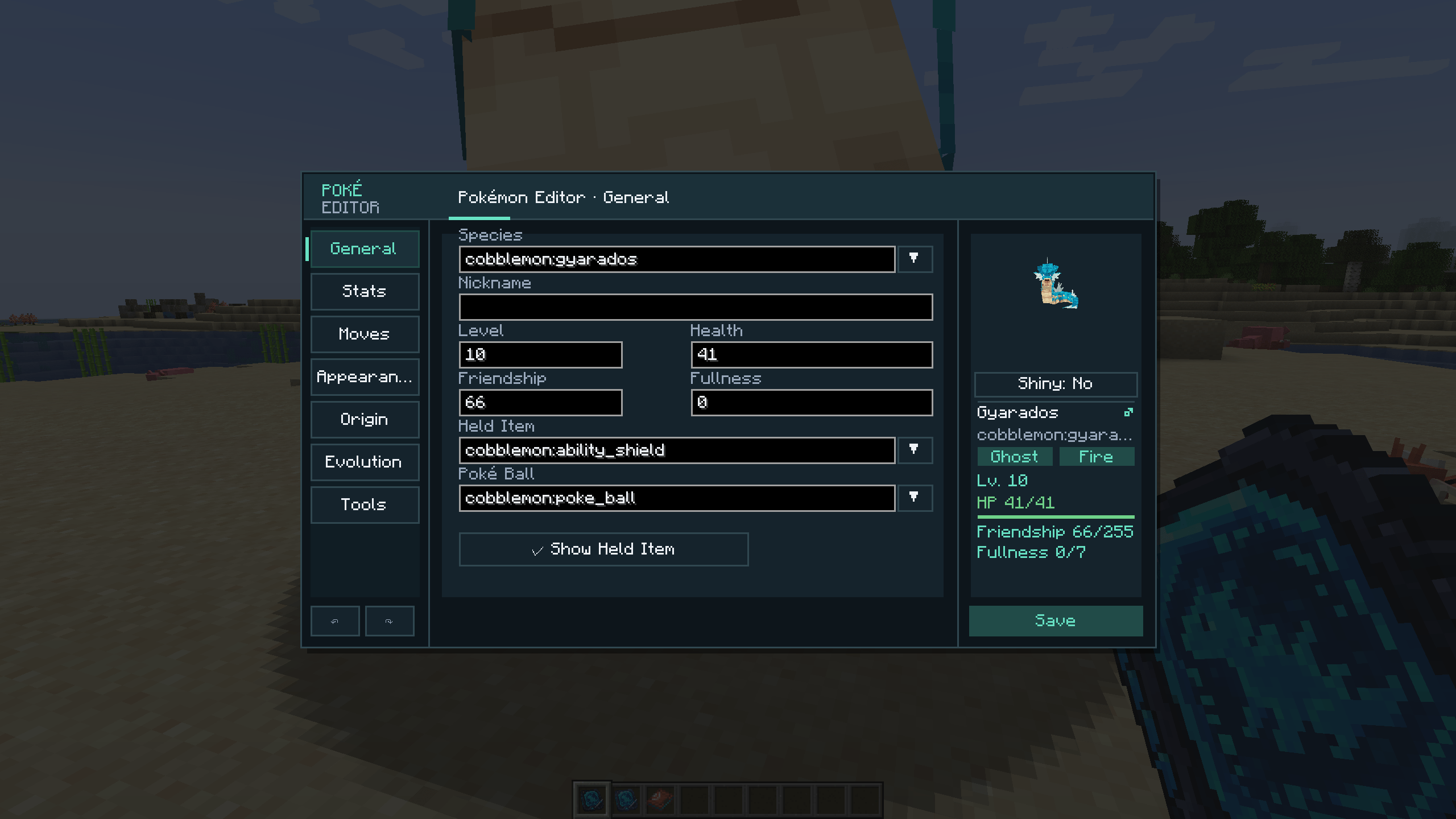
Use the regular editor item on a Pokémon entity, or open an online player's stored Pokémon with a command. The editor contains seven sections.
General
- Species
- Nickname
- Level and current HP
- Friendship and fullness
- Held item and whether it is visible on the model
- Poké Ball
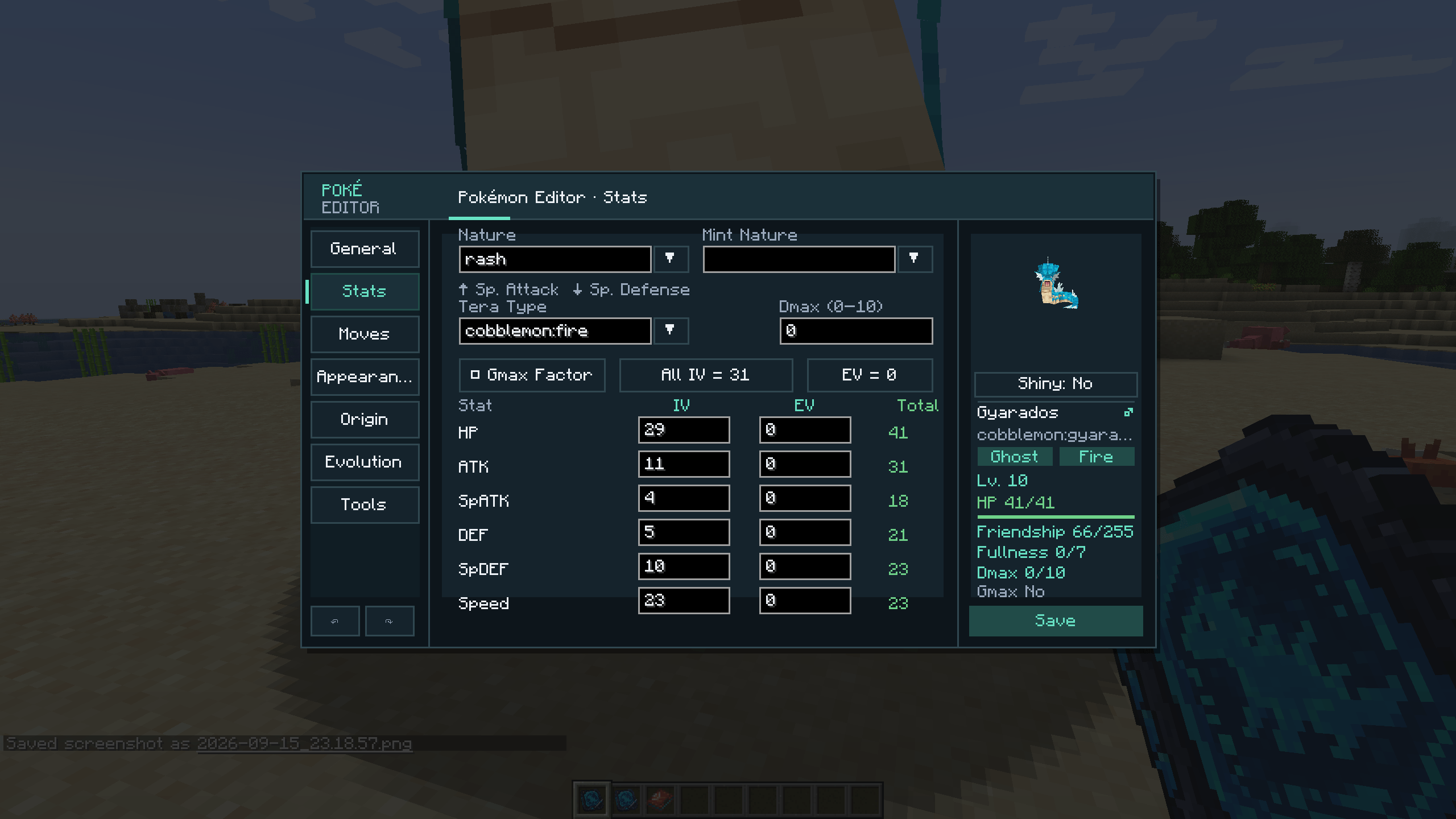
Stats
- Original nature and minted nature
- Tera type
- Dynamax level and Gigantamax factor
- All six IVs and EVs
- Calculated stat totals
- One-click perfect IVs and EV reset
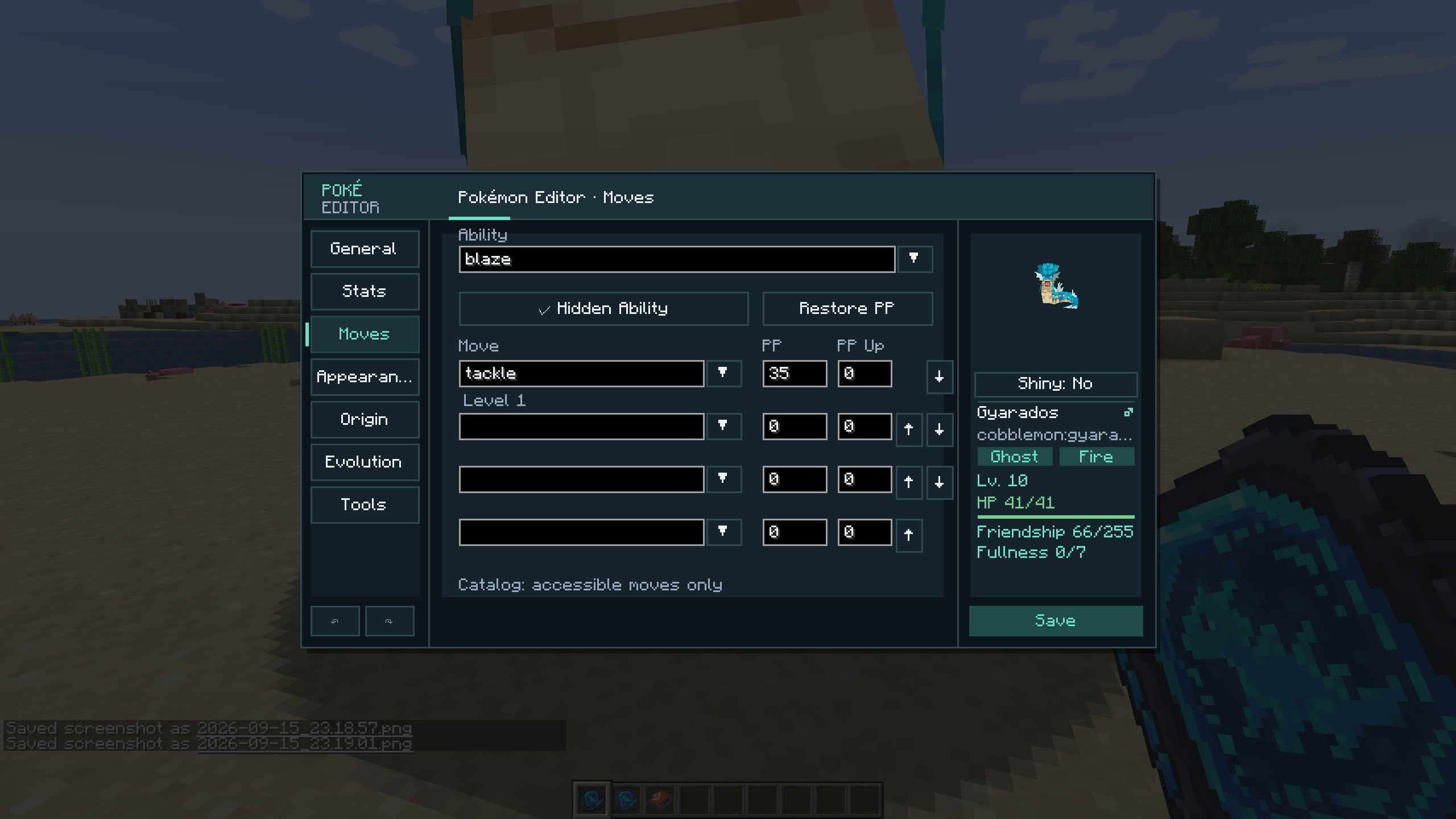
Moves and ability
- Ability and hidden-ability state
- Four move slots
- Current PP and PP Ups for each move
- Move reordering and PP restoration
- Move-source labels: level-up, TM, tutor, egg, evolution, form change, legacy, or special/event
- Optional server setting for otherwise illegal moves
When illegal moves are disabled, both the client catalog and server save validation use the moves available to the selected species and form.
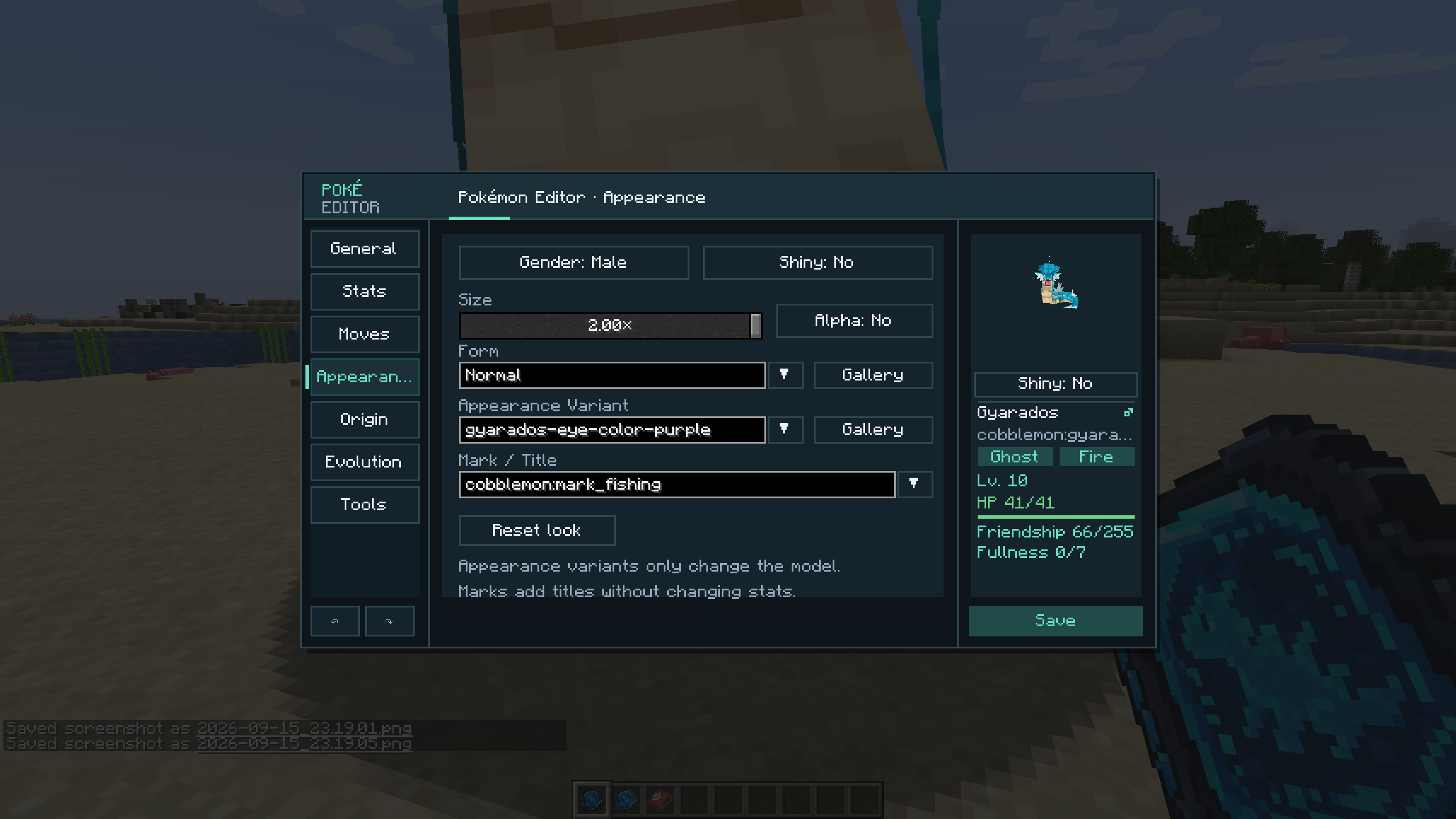
Appearance
- Gender
- Shiny state
- Alpha state from Cobblemon 1.8
- Size from 0.50× to 2.00×
- Form and appearance/skin variant
- Mark or title
- Visual form and skin gallery with live models
- Appearance reset without replacing unrelated Pokémon data
The preview card shows the model, localized species name, types, gender, shiny state, level, HP, friendship, and fullness. Drag the model to rotate it. The preview Shiny button is temporary; the saved value is edited on the Appearance page.
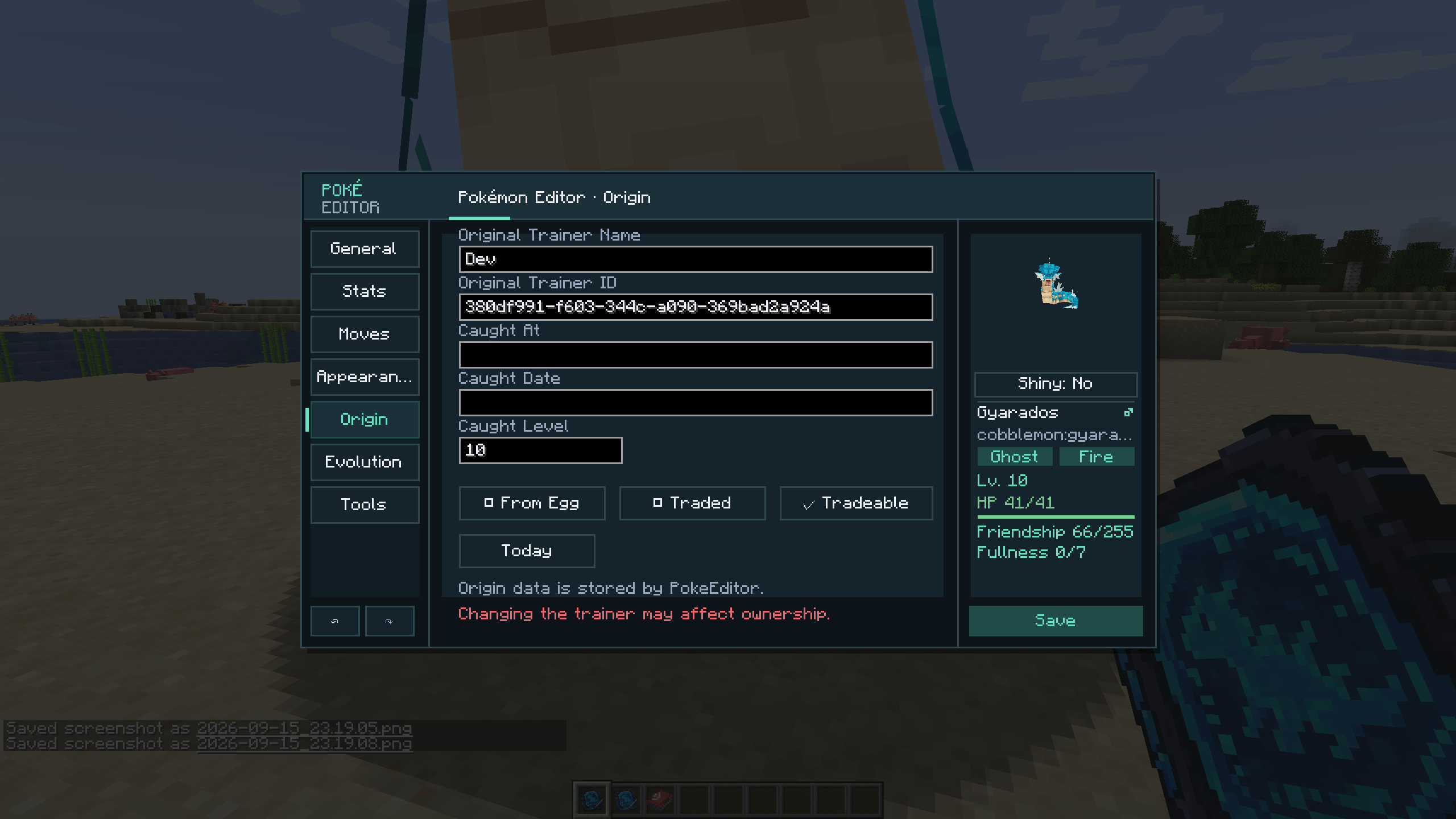
Origin
- Original Trainer name and UUID
- Caught location, date, and level
- Egg origin
- Traded state
- Whether the Pokémon may be traded
- One-click insertion of today's date
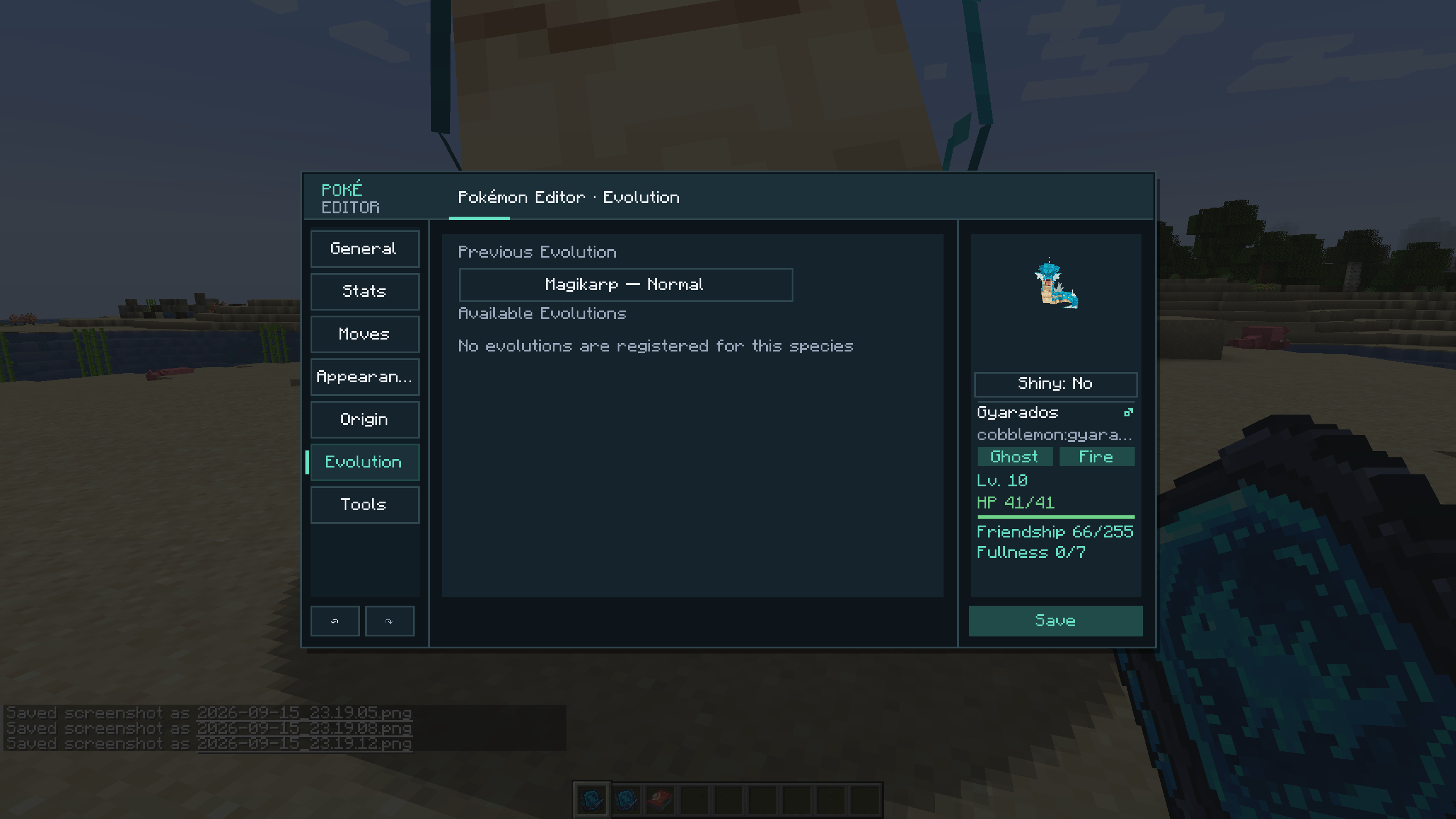
Evolution
- Registered evolution choices for the current species and form
- Exact synchronized requirement summaries
- Preview of the selected result, including form/aspect details
- Direct one-step evolution
- Direct one-step rollback to the previous evolution
Evolution or rollback is applied when the edit is saved. It is server-side and does not play Cobblemon's normal evolution animation.
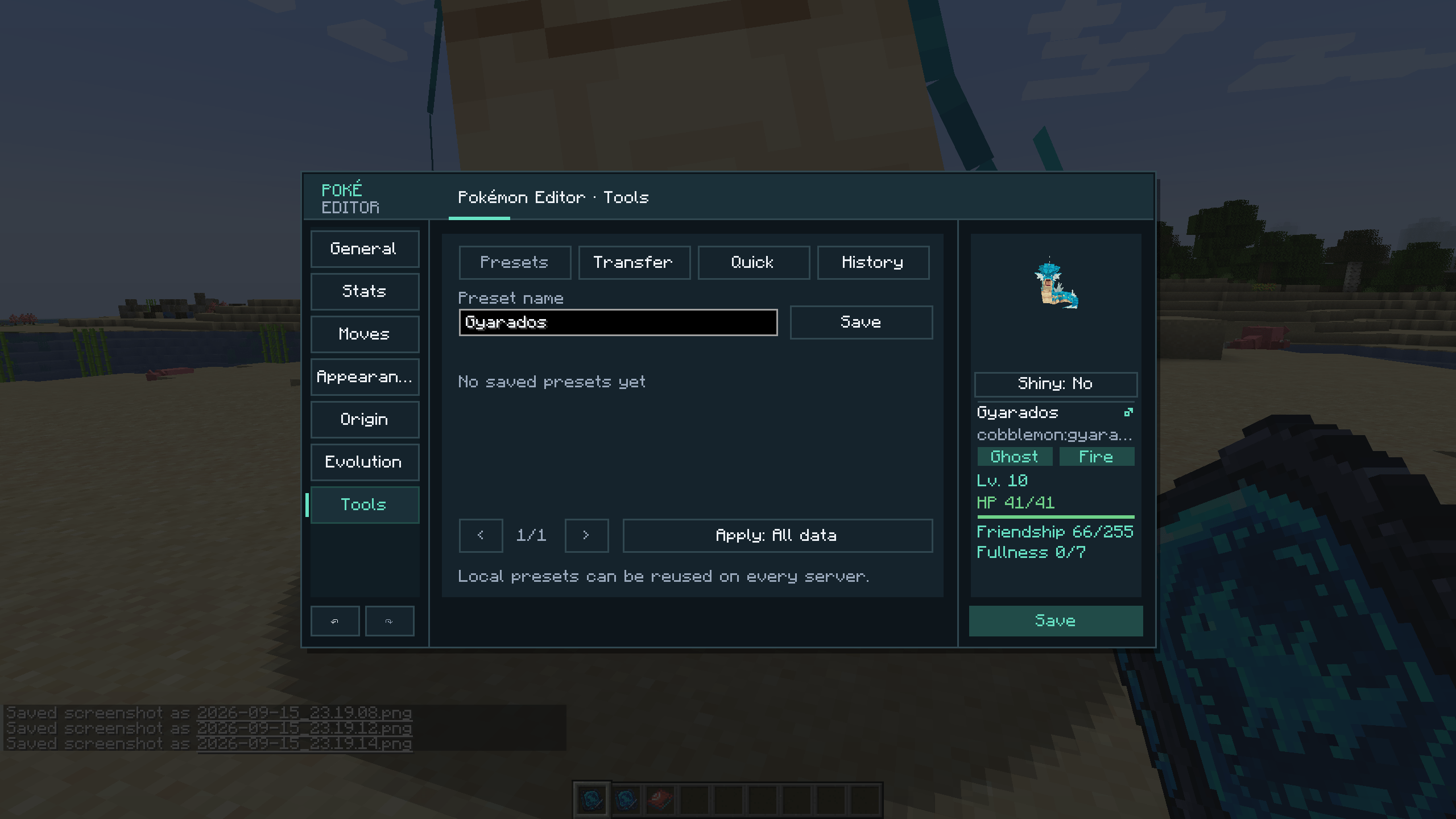
Tools
- Locally stored reusable presets
- Full Data, Battle Build, and Appearance Only preset scopes
- Full JSON clipboard copy/import
- Pokémon Showdown set copy/import
- Automatic recognition of JSON or Showdown clipboard input
- Perfect IV, clear EV, physical attacker, and special attacker quick actions
- Session reset and cancellation of a scheduled evolution
- Undo, redo, and up to ten restorable history snapshots
Presets are stored locally at config/pokemon_editor/presets.json. Showdown import is intentionally partial and applies only the fields represented by that format.
Safe save workflow
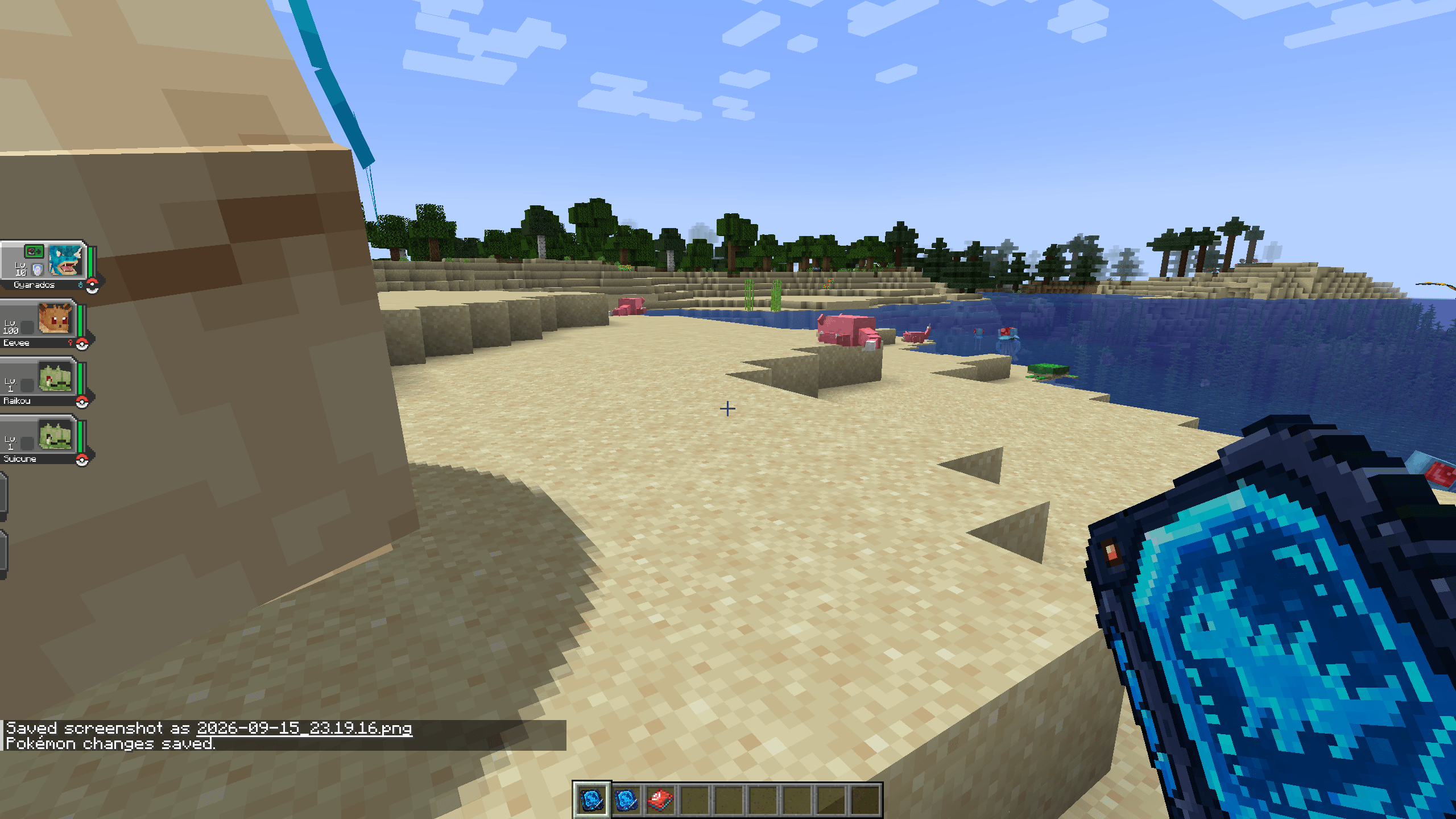
Saving does not immediately close the screen. Pokémon Editor first displays a grouped review containing every changed field and its complete before/after value. Individual fields can be restored from that review.
After confirmation, one correlated request is sent to the server. Duplicate submissions are blocked while it is pending. The server resolves the original entity, party slot, or PC slot again, verifies access and validates the data. A rejected save leaves the editor open.
Unsaved work is protected by local JSON recovery drafts under:
config/pokemon_editor/recovery/To recover a draft, copy the JSON file contents, open the intended Pokémon, then use Tools → Transfer → Import and review the result before saving. Recovery drafts are never applied automatically and may be stale if the server already accepted the save.
Keyboard controls include Ctrl+Z for Undo, Ctrl+Y for Redo, and Page Up/Page Down or the mouse wheel for the change review. Escape opens a confirmation when unsaved changes exist.
Opening the individual editor
Give an authorized player the regular item:
/give @s pokemon_editor:pokemon_editorUse the item directly on a wild or spawned Pokémon.
To inspect an online player's storage:
/pokemoneditor <player>This prints clickable entries for the player's party and up to the first 60 occupied PC slots. A specific slot can be opened directly:
/pokemoneditor <player> party <1-6>
/pokemoneditor <player> pc <box> <slot>
PC box and slot numbers start at 1. The command must be run by an authorized in-game player because the editor is a client interface.
Species-wide Pokémon Data Editor
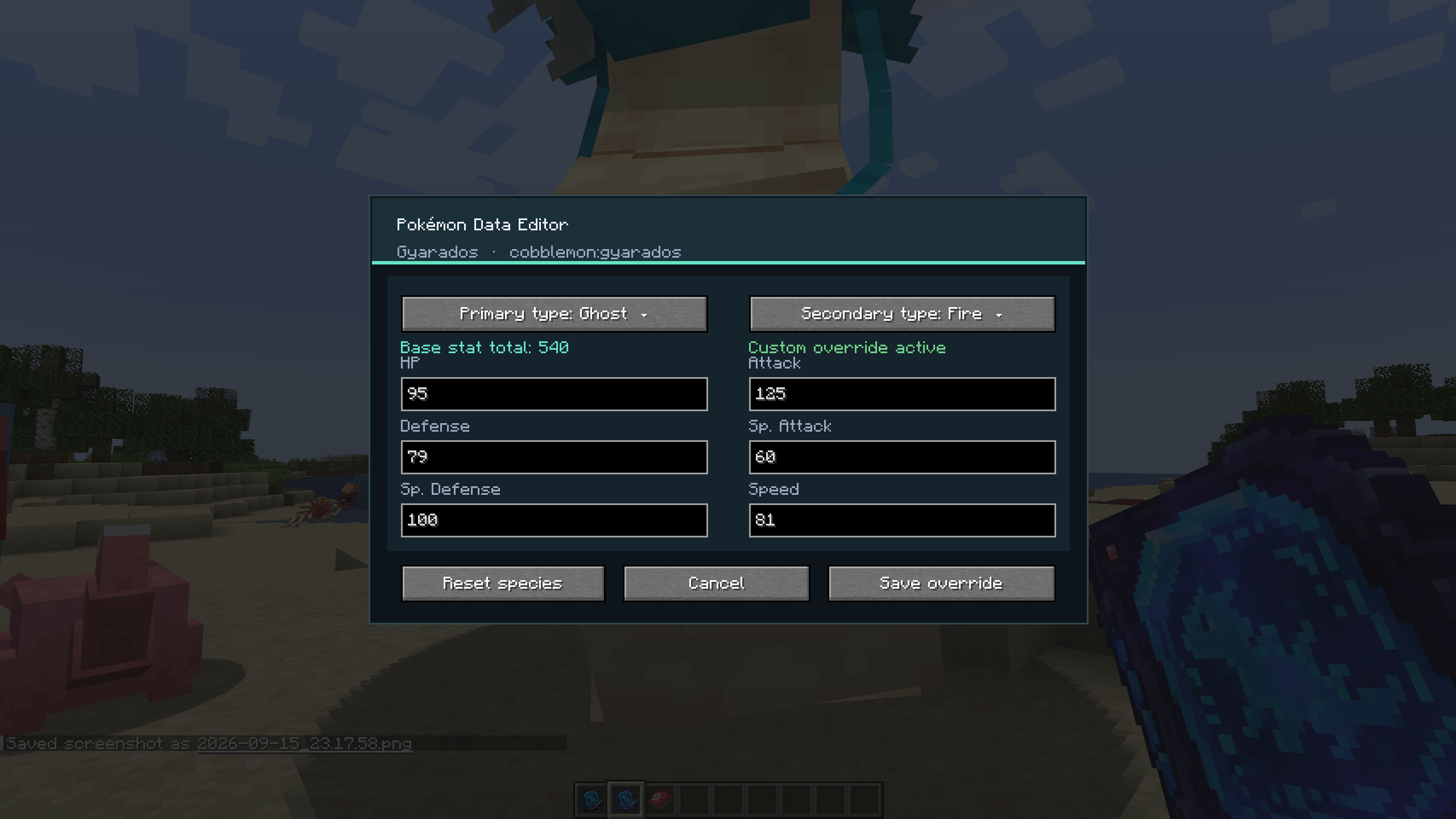
Version 1.6.0 adds a separate glinting tool for changing shared species data. Use it on a Pokémon to open an adaptive visual editor for:
- Primary type
- Optional secondary type
- Base HP
- Base Attack
- Base Defense
- Base Special Attack
- Base Special Defense
- Base Speed
- Live base-stat total
The type selectors are scrollable dropdowns. Every base stat must be between 1 and 255.
Global-impact warning: a Data Editor change affects every Pokémon of that species, including existing Pokémon. Avoid applying changes during an active battle because the battle may already contain a snapshot of the previous data.
Give the Data Editor item with:
/give @s pokemon_editor:pokemon_data_editorData Editor command reference
Species IDs may be written as charizard or cobblemon:charizard.
Set both types:
/pokemondata set charizard types dragon fireMake the species single-type by using none as the secondary type:
/pokemondata set charizard types fire noneSet one base stat:
/pokemondata set charizard stat hp 90
/pokemondata set charizard stat attack 100
/pokemondata set charizard stat defence 90
/pokemondata set charizard stat special_attack 125
/pokemondata set charizard stat special_defence 95
/pokemondata set charizard stat speed 110
defense is also accepted as an alias for defence. Supported special-stat aliases include sp_attack, spa, sp_defence, sp_defense, and spd.
List loaded overrides and their changed values:
/pokemondata listReload override JSON files from disk and immediately synchronize species data to connected clients:
/pokemondata reloadTemporarily restore all underlying values while keeping every override file:
/pokemondata disableApply the stored overrides again:
/pokemondata enableThe enabled/disabled state persists across server restarts.
Remove one species override and restore the value supplied by Cobblemon or the highest-priority ordinary datapack:
/pokemondata reset charizardPermanently remove every species override:
/pokemondata reset allFor safety, the command returns a one-time confirmation command such as:
/pokemondata reset all confirm-1234The exact generated code must be used within 60 seconds.
Export all current overrides into a portable pack:
/pokemondata export challenge-teamImport and apply a pack placed in the exports directory:
/pokemondata import challenge-teamThe .peditorpack manifest, schema, species IDs, paths, types, and stats are validated before imported entries are installed. Imported species replace overrides for those species; overrides not present in the pack remain unchanged.
Data storage and priority
Species patches are compact, versioned JSON files stored on the server at:
config/pokemon-editor/data-editor/species/Portable packs are read from and written to:
config/pokemon-editor/data-editor/exports/The effective priority is:
- Pokémon Editor Data Editor overrides
- Ordinary datapacks in their configured order
- Cobblemon's built-in species data
The addon never rewrites Cobblemon or datapack source files. Resetting an override reveals the next value in that stack. Overrides are automatically re-applied after resource reloads and synchronized to connected clients.
Custom forms that explicitly provide their own types or stats may continue to use those form-specific values. Existing current HP may not be proportionally recalculated immediately after changing base HP.
Permissions and server configuration
The first server launch creates:
config/pokemon_editor-server.propertiesDefault contents:
required_permission_level=2
allow_singleplayer_owner=true
audit_log=true
allow_illegal_moves=falserequired_permission_level— operator level required to open and save with the editor items or/pokemoneditor; accepted range is 0–4.allow_singleplayer_owner— lets the integrated-server owner use the editor even without the configured operator level.audit_log— records successful saves and relevant access events in the server log.allow_illegal_moves— allows selection and saving of moves outside the selected species/form's registered move sources.
These settings belong in pokemon_editor-server.properties, not Minecraft's server.properties. Restart the server after manually changing the file. /pokemondata commands require permission level 2.
Compatibility and installation
- Minecraft 1.21.1
- Cobblemon 1.8.0
- NeoForge 21.1.235+ or Fabric Loader 0.18.4+
- Fabric API 0.116.15+1.21.1 when using Fabric
- Java 21
- English, Russian, and Ukrainian
Install the matching Pokémon Editor 1.6.0 JAR on both the client and server. All players opening the interface need the correct loader build. Do not mix Pokémon Editor versions between client and server.
Pokémon Editor is an unofficial Cobblemon addon. It is not affiliated with or endorsed by the Cobblemon team, Mojang Studios, Microsoft, Nintendo, Game Freak, or The Pokémon Company.
Pokémon Editor
Pokémon Editor is a server-authoritative in-game administration addon for Cobblemon. It includes two tools with deliberately different scopes:
- Pokémon Editor edits one wild, party, or PC Pokémon.
- Pokémon Data Editor edits the shared definition of an entire species across the server.
The addon is designed for server owners, modpack and datapack developers, map makers, content creators, tournaments, and custom challenge runs. It provides localized visual interfaces, server-side validation, permissions, and recoverable configuration instead of requiring direct save-file edits.
This is an administrative tool. Operator access is required by default.
Individual Pokémon editing
Use the regular item on a Pokémon entity or open an online player's party/PC Pokémon through /pokemoneditor.
Editable data
General
- Species, nickname, level, and current HP
- Friendship and fullness
- Held item, held-item model visibility, and Poké Ball
Stats
- Nature and minted nature
- Tera type
- Dynamax level and Gigantamax factor
- Six IVs and six EVs with calculated totals
- Perfect-IV and clear-EV actions
Moves and ability
- Ability and hidden-ability state
- Four moves, current PP, and PP Ups
- Move ordering and PP restoration
- Acquisition-source labels for level-up, TM, tutor, egg, evolution, form-change, legacy, and special/event moves
- Optional illegal-move editing controlled by the server
Appearance
- Gender, shiny state, and Cobblemon 1.8 Alpha state
- Size from 0.50× to 2.00×
- Form, appearance/skin variant, and mark/title
- Visual form and skin gallery with live models
- Appearance reset
Origin
- Original Trainer name and UUID
- Caught location, date, and level
- Egg origin, traded state, and whether the Pokémon is tradeable
Evolution
- Registered evolution options and exact synchronized requirements
- Result preview with form/aspect details
- Direct one-step evolution
- Direct one-step rollback to the previous evolution
Evolution changes are applied by the server when saving and do not play the normal evolution animation.
Tools
- Named local presets with Full Data, Battle Build, and Appearance Only scopes
- Full JSON and Pokémon Showdown clipboard transfer
- Automatic JSON/Showdown import detection
- Perfect IV, clear EV, physical attacker, and special attacker quick builds
- Session reset and scheduled-evolution cancellation
- Undo, redo, and up to ten restorable history snapshots
Presets are stored locally at config/pokemon_editor/presets.json. Showdown import changes only the fields represented by the Showdown format.
Review, validation, and recovery
Every save opens a grouped review with full before/after values. Any changed field can be restored before confirmation.
The confirmed edit is sent as one correlated request. The server resolves the target again, rechecks permission, validates the data, and returns a result. Duplicate submissions are blocked while waiting; a rejected save leaves the editor and draft open.
Local recovery copies are written to:
config/pokemon_editor/recovery/
To recover one, copy its JSON contents, open the intended Pokémon, and use Tools → Transfer → Import. Review before saving because recovery files are not automatically applied and can become stale.
The interface supports Ctrl+Z/Ctrl+Y, change-review scrolling, adaptive scaling for smaller windows, searchable catalogs, localized labels, a rotatable model, type and gender badges, shiny preview, and an HP bar.
Individual editor commands
Give the regular editor item:
/give @s pokemon_editor:pokemon_editor
Use it directly on a wild or spawned Pokémon.
List clickable party and PC targets belonging to an online player:
/pokemoneditor <player>
Open a specific stored Pokémon:
/pokemoneditor <player> party <1-6>
/pokemoneditor <player> pc <box> <slot>
PC box and slot numbers start at 1. The list displays the party and up to the first 60 occupied PC slots. Because this opens a client UI, /pokemoneditor must be run by an authorized in-game player.
Species-wide Data Editor
Pokémon Editor 1.6.0 adds a separate glinting Data Editor item. Use it on a Pokémon to edit the shared species definition through a localized visual screen:
- Primary and optional secondary type
- Base HP, Attack, Defense, Special Attack, Special Defense, and Speed
- Live base-stat total
- Reset to underlying Cobblemon/datapack values
The type fields use scrollable dropdowns. Base stats accept values from 1 through 255.
Important: these changes affect every Pokémon of the species, including existing Pokémon. Avoid changing species data during an active battle.
Give the item with:
/give @s pokemon_editor:pokemon_data_editor
Complete /pokemondata reference
Species IDs may use either charizard or cobblemon:charizard.
Change both types:
/pokemondata set charizard types dragon fire
Remove the secondary type with none:
/pokemondata set charizard types fire none
Change individual base stats:
/pokemondata set charizard stat hp 90
/pokemondata set charizard stat attack 100
/pokemondata set charizard stat defence 90
/pokemondata set charizard stat special_attack 125
/pokemondata set charizard stat special_defence 95
/pokemondata set charizard stat speed 110
defense is accepted as an alias for defence. Special-stat aliases include sp_attack, spa, sp_defence, sp_defense, and spd.
Inspect the currently loaded overrides:
/pokemondata list
Reload JSON files from disk, apply them, and synchronize connected clients:
/pokemondata reload
Temporarily restore underlying values without deleting files, then reapply the stored overrides:
/pokemondata disable
/pokemondata enable
The enabled state persists across restarts.
Reset one species:
/pokemondata reset charizard
Request a permanent reset of every override:
/pokemondata reset all
The server returns a one-time command such as the following, which must be used within 60 seconds:
/pokemondata reset all confirm-1234
Export all current overrides or import a pack from the exports folder:
/pokemondata export challenge-team
/pokemondata import challenge-team
The .peditorpack manifest, schema, paths, species, types, and stats are validated before installation. Entries contained in the imported pack replace the corresponding species overrides; other existing overrides remain in place.
Override storage and priority
Species JSON patches:
config/pokemon-editor/data-editor/species/
Portable .peditorpack files:
config/pokemon-editor/data-editor/exports/
Effective priority:
- Pokémon Editor Data Editor overrides
- Ordinary datapacks in their configured order
- Cobblemon's built-in data
No Cobblemon or datapack source file is rewritten. Resetting a patch restores the value underneath it. Overrides are reapplied after resource reloads and synchronized from the authoritative server to clients.
Custom forms with explicit type/stat definitions may keep their own form-specific values. Existing current HP may not be proportionally recalculated immediately after editing base HP.
Server configuration
The first launch generates config/pokemon_editor-server.properties:
required_permission_level=2
allow_singleplayer_owner=true
audit_log=true
allow_illegal_moves=false
required_permission_level— operator level 0–4 required for the items and/pokemoneditor.allow_singleplayer_owner— grants access to the integrated-server owner.audit_log— records successful edits and relevant access events in the server log.allow_illegal_moves— exposes all registered moves and permits the server to save moves outside the selected form's normal sources.
This is a separate addon configuration file, not Minecraft's server.properties. Restart the server after manually changing it. /pokemondata commands require permission level 2.
Compatibility
| Component | Supported version |
|---|---|
| Minecraft | 1.21.1 |
| Cobblemon | 1.8.0 |
| NeoForge | 21.1.235+ |
| Fabric Loader | 0.18.4+ |
| Fabric API | 0.116.15+1.21.1 |
| Java | 21 |
| Languages | English, Russian, Ukrainian |
| Environment | Matching Pokémon Editor 1.6.0 build on client and server |
Install the correct Fabric or NeoForge JAR on both sides. Do not mix Pokémon Editor versions between the client and server.
Pokémon Editor is an unofficial Cobblemon addon and is not affiliated with or endorsed by the Cobblemon team, Mojang Studios, Microsoft, Nintendo, Game Freak, or The Pokémon Company.
Screenshots
Gallery
-
 2026-09-15_23.18.03.png 2026-09-15_23.18.03.png
 -
 2026-09-15_23.18.17.png 2026-09-15_23.18.17.png
 -
 2026-09-15_23.18.45.png 2026-09-15_23.18.45.png
 -
 2026-09-15_23.18.57.png 2026-09-15_23.18.57.png
 -
 2026-09-15_23.19.01.png 2026-09-15_23.19.01.png
 -
 2026-09-15_23.19.05.png 2026-09-15_23.19.05.png
 -
 2026-09-15_23.19.08.png 2026-09-15_23.19.08.png
 -
 2026-09-15_23.19.12.png 2026-09-15_23.19.12.png
 -
 2026-09-15_23.19.14.png 2026-09-15_23.19.14.png
 -
 2026-09-15_23.19.16.png 2026-09-15_23.19.16.png
 -
 2026-09-15_23.19.24.png 2026-09-15_23.19.24.png
 -
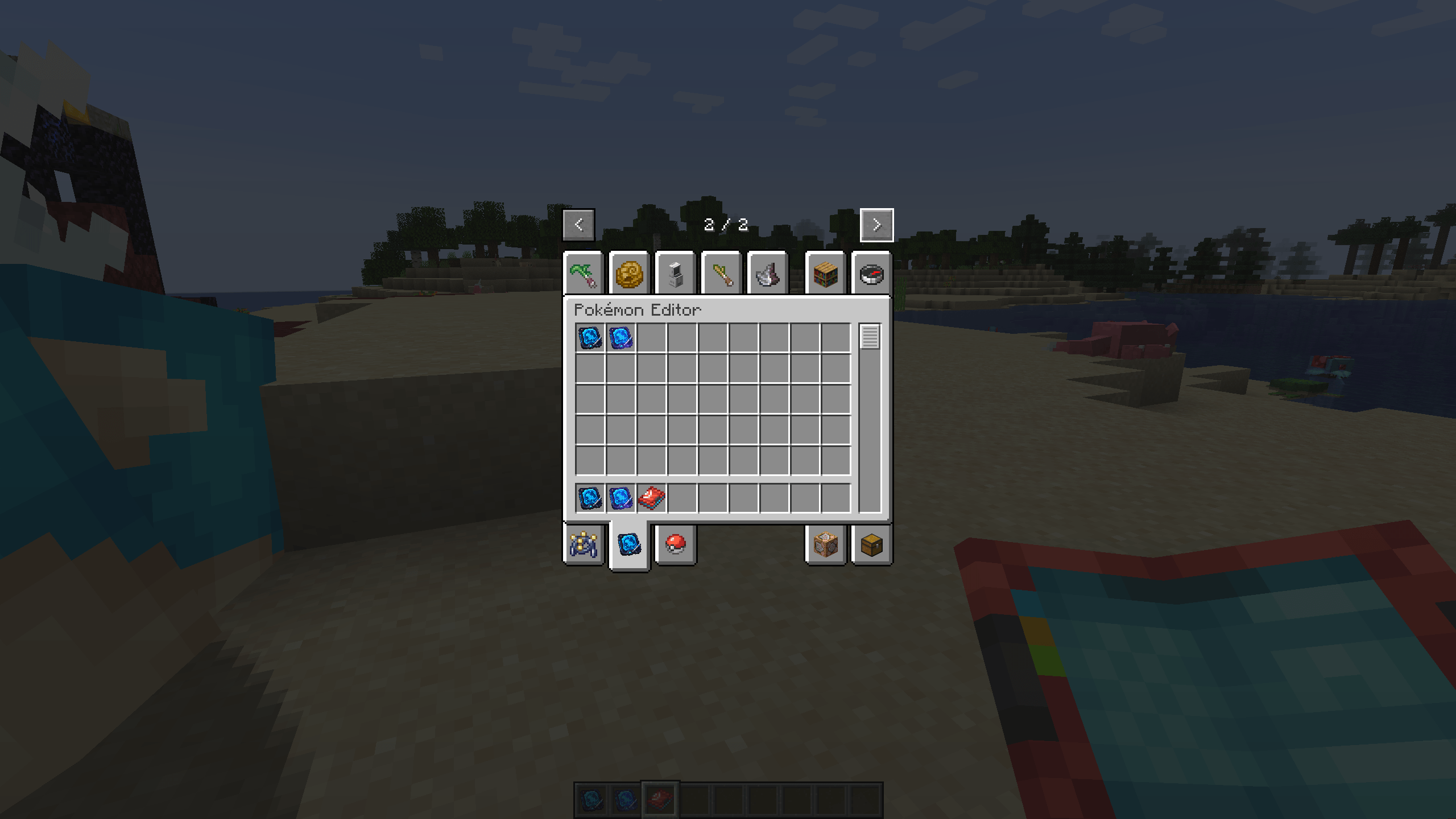 image-attachment_d3bda3a7-9aa7-4735-9865-324b3fefac03.png
![Pokemon Editor [Cobblemon] screenshot](https://cdn.modrinth.com/data/KYLCiWFr/images/339af71faacca3a4b13afba8e73b365e461b717a.png)
![Pokemon Editor [Cobblemon] screenshot](https://cdn.modrinth.com/data/KYLCiWFr/images/35d645f05ee250f666804bbb2915692430a36b36.png)
![Pokemon Editor [Cobblemon] screenshot](https://cdn.modrinth.com/data/KYLCiWFr/images/390492f79574e8360a8432d124c4d8fb5b3036dc.png)
![Pokemon Editor [Cobblemon] screenshot](https://cdn.modrinth.com/data/KYLCiWFr/images/3b1644bf6651ac3f8f79ad8759943bcf17ebf8c2.png)
![Pokemon Editor [Cobblemon] screenshot](https://cdn.modrinth.com/data/KYLCiWFr/images/3e7f9bf006bbf06549a690a6b54dd9250ef2762d.png)
![Pokemon Editor [Cobblemon] screenshot](https://cdn.modrinth.com/data/KYLCiWFr/images/53e301370ee0020a474feee8df82d50a053d32a0.png)
![Pokemon Editor [Cobblemon] screenshot](https://cdn.modrinth.com/data/KYLCiWFr/images/5d603eed3eb0a1e9dc9f9d8cff37b167e2d15fd3.png)
![Pokemon Editor [Cobblemon] screenshot](https://cdn.modrinth.com/data/KYLCiWFr/images/6bbf7ec06707af7df03d58735c17af98bc47903d.png)
![Pokemon Editor [Cobblemon] screenshot](https://cdn.modrinth.com/data/KYLCiWFr/images/8b7b755084ed35a70263103b38ae133590a6eaf9.png)
![Pokemon Editor [Cobblemon] screenshot](https://cdn.modrinth.com/data/KYLCiWFr/images/a31be323485f952526b7fef963d3189874c55291.png)
![Pokemon Editor [Cobblemon] screenshot](https://cdn.modrinth.com/data/KYLCiWFr/images/cc7caadb3ddb746eec6e62915c5654cd00077fc4.png)
![Pokemon Editor [Cobblemon] screenshot](https://cdn.modrinth.com/data/KYLCiWFr/images/cd942c3a29b2dbd0ec1f8a493086acd0859de372.png)
Versions
Files
Relations
Project Relations
More like this
Similar Mods
Suggestions use data such as tags, dependencies, dependents, descriptions, titles, and more to rank how much they overlap with this mod.
On ModDex
Community snapshot
By the numbers
Statistics
 (opens in a new tab)
Get it on
Available Platforms
On ModDex
Community snapshot
By the numbers
Statistics
Resources