Community listing page, reviews here may not be monitored by the author.
Pomkots Mechs


No reviews yet
adds variety of mechs into your home!
Community voices
Reviews
No reviews yet. Be the first to review this project!
Get it on
Available Platforms
Compatibility
Supported Environments
Must be installed on both the client and the server.
About
Project Details
For authors
Embed Badge
If you're the author of this project, you can embed a live badge anywhere that supports HTML or Markdown. It updates automatically whenever ratings change.
Use HTML for any page that supports it, or Markdown for README files and Markdown-based descriptions.
Identifiers
Platform IDs
About
Description
What's this?
This is a mod for Minecraft Java Edition. It adds various mechs
Demo Movies
If you need a post apocalyptic map
Try Pomkots World, Lost Cities Add-on, for world generation!
Introduction
- Included
- Entity types: Vehicles, Mobs, Bosses
- Items to summon the above entities
- Not Included
- Drop tables
- Custom recipes
- Auto-spawn in the field
- Biomes
This mod is actually a standalone combat portion of a Mod Pack game the creator plans to make in the future. Therefore, the mod will be actively updated with features necessary for that game, but features for other uses may have lower priority.
For more about the intended game, please check below!
https://minecraft-hourouki.hatenablog.com/entry/2024/09/05/230455
Mod Status
Very Alpha
Note: The creator is a beginner in modding, and this is the first project. The creator does not take responsibility for any issues or damages caused by the use of this mod. Use at your own risk, and make sure to back up your data first!
If you could kindly provide feedback, advice, or bug reports, it would be greatly appreciated!
Elements to be added
Entities
Vehicles: PMV Series
- PMV01: id=entity.pomkotsmechs.pmv01
- The red one
- PMV01B: id=entity.pomkotsmechs.pmv01b
- The black one (same functions as PMV01, only color is different)
Mobs: PMS Series
Enemy mobs that start moving in Survival Mode
- PMS01: id=entity.pomkotsmechs.pms01
- Charges at you full speed
- PMS02: id=entity.pomkotsmechs.pms02
- Floats and attacks from above
- PMS03: id=entity.pomkotsmechs.pms03
- Fires physical bullets
- PMS04: id=entity.pomkotsmechs.pms04
- Launches missiles
- PMS05: id=entity.pomkotsmechs.pms05
- Multi-legged type that throws grenades
Bosses: PMB Series
- PMB01
- A boss focused on relentless power attacks
- Terrain is only destroyed by attacks if the difficulty is set to Hard and mob-driven terrain destruction is enabled.
Items
Item Group
In Creative Mode, all items are listed under the “Pomkots Mechs” tab.
Normal Items
- Core Stone PMV01: id=item.pomkotsmechs.corestone_pmv01
- Right-click to summon PMV01 once, left-click to heal PMV01.
- Core Stone PMV01B: id=item.pomkotsmechs.corestone_pmv01b
- Same as above for PMV01B
- Core Stone PMB01: id=item.pomkotsmechs.corestone_pmb01
- Allows you to ride mobs and bosses. No other specific function.
Spawn Eggs
Spawn eggs are available for mobs and bosses
- Spawn egg PMB01: id=item.pomkotsmechs.pmb01_spawn_egg
- Spawn egg PMS01-05: id=item.pomkotsmechs.pms01-05_spawn_egg
Recommended Hardware Setup
This mod is resource-heavy, generating a lot of objects, so a high-spec machine (especially with strong graphics performance) is recommended.
Below is the setup used by the creator during development, which should match the performance in videos uploaded to YouTube:
- CPU: Intel(R) Core(TM) i7-14700F 2.10 GHz
- Memory: DDR4 16GB
- Disk: SSD 800GB
- GPU: GeForce RTX4070 Ti SUPER
Required Minecraft/Mods
- Minecraft: 1.20.1
- Fabric or Forge
- geckolib: 1.20.1-4.4.9
- leawind_third_person: 2.1.0
- modmenu: 7.2.2
- cloth_config: 11.1.118
- architectury_api: 9.2.14
(Forge compatibility is planned for the official release…)
Recommended Mods
- iris-1.7.2+mc1.20.1
- sodium-fabric-0.5.11+mc1.20.1
- indium-1.0.34+mc1.20.1
- Controlify-2.0.0-beta.13+1.20.1 (fabric)
Recommended Shader Pack
BSL Original_v8.3
Note: Since this mod's visuals are designed with BSL Shader, graphics without a shader pack may look lackluster.
How to Start
Be sure to back up your data first!
Assuming the mod jar files are already installed and a launch configuration is set up:
1. Key Configuration
Refer to the key configuration below and set it up as you prefer.
2. Leawind's Third Person Configuration
Mods > Leawind's Third Person > Configure
- Common > Player Entity Rotation > Force player to rotate with the camera: Enable
- Common > Player Entity Rotation > Player rotate to intrest point: Enable
- Camera Offset > Normal Mode > X Offset: 0
3. (Optional) Controlify Configuration
Mods > Controlify > Configure
- Basic > Sprint: Hold
4. (Optional) BSL Shader Configuration
Options > Video Settings… > Shader Packs
- Shaders: Enabled
- BSLOriginal_v8.d.zip: Selected
- Shader Pack Settings > Material > Advanced Materials: On
- Shader Pack Settings > Material > Material Format: labPBR 1.3
Key Configs (Default)
Strongly recommend to change key configs for your comfortable use.
*I'm using a PS5 controller tuned for AC6 :)
- Mode Switch: Y key
- Switches between Combat Mode and Construction Mode.
- Combat Mode
- Right Arm Weapon (Gatling Gun): Left-click
- Left Arm Weapon (Pile Bunker): Right-click
- Right Shoulder Weapon (Vertical Missile Launcher): P key
- Left Shoulder Weapon (Grenade Cannon): O key
- Construction Mode
- Hammer: Left-click
- Shovel: Right-click
Usage Instructions
- Summon Vehicles (PMV01)
- Hold "Core Stone PMV01" or "Core Stone PMV01B" in the main hand
- Right-click near yourself to summon the vehicle once
- Heal Vehicles
- Hold "Core Stone PMV01" or "Core Stone PMV01B" in the main hand
- Left-click the vehicle to heal
- Summon mobs or bosses
- Use the corresponding spawn egg to summon
- Mobs do not move in Creative Mode.
- Fight mobs or bosses
- Switch to Survival Mode with mobs or bosses placed.
- Ride mobs or bosses
- Hold "Core Stone PMB01" in the main hand and right-click the desired target.
Current Thoughts on Licensing and Asset Sharing
The creator has greatly benefited from open-source software (OSS) in other industries and appreciates the value of OSS in mod development as well, so the intent is to make this mod open-source in the future. However, for now (at least during the alpha and beta phases), it will remain ARR (All Rights Reserved) and private.
The reason is that the creator has no experience in mod or OSS development, and there’s uncertainty about how things might develop after release. Therefore, the creator would like to observe how things go for a while. Additionally, since the creator currently has no influence or connections, it’s important to first establish a stable position for both this mod and themselves.
Once the full version is released and things settle down, the plan is to transition to OSS and fully release the assets under an MIT or GPL3 license.
Messages from the Creator
To Everyone
Please enjoy the mod! Feedback, ideas, and bug reports are very welcome; feel free to submit them in the Issues section of this repository!
To Mod Developers
If anyone out there is interested in collaborating or submitting pull requests, please feel free to reach out! Also, I'm actively looking for advice—particularly on performance optimization and maintainability.
To Datapack / Resource Pack / Map Creators
My hands are full just creating the entities, so I don’t have the bandwidth to integrate this mod fully into Survival Mode. Therefore, if anyone could use this mod to create new biomes, maps, recipes, or loot tables, I would be extremely grateful!
To Content Creators
This mod offers a lot of different ways to play, so I’d be thrilled to see it featured in your videos and creative projects!
Sites Providing Assets Used in This Mod
- Textures: Poly Haven
- Sound Effects: Sound-Effect Lab
What's this?
This is a mod for Minecraft Java Edition. It adds various mechs
Latest Update
Introduction
Mech Customize Feature Introduction & Quick Start
[New] Added new bosses, mobs, mechs!
FYI: If you need a post apocalyptic map
Try Pomkots World, Lost Cities Add-on, for world generation!
Contents
- Included
- Entity types: Vehicles, Mobs, Bosses
- Items to summon the above entities
- Not Included
- Drop tables
- Custom recipes
- Auto-spawn in the field
- Biomes
This mod is actually a standalone combat portion of a Mod Pack game the creator plans to make in the future. Therefore, the mod will be actively updated with features necessary for that game, but features for other uses may have lower priority.
For more about the intended game, please check below!
https://minecraft-hourouki.hatenablog.com/entry/2024/09/05/230455
Mod Status
Very Alpha
Note: The creator is a beginner in modding, and this is the first project. The creator does not take responsibility for any issues or damages caused by the use of this mod. Use at your own risk, and make sure to back up your data first!
If you could kindly provide feedback, advice, or bug reports, it would be greatly appreciated!
Elements to be added
Entities
Vehicles: PMV Series
- PMV01: id=entity.pomkotsmechs.pmv01
- The red one
- PMV01B: id=entity.pomkotsmechs.pmv01b
- The black one (same functions as PMV01, only color is different)
Mobs: PMS Series
Enemy mobs that start moving in Survival Mode
- PMS01: id=entity.pomkotsmechs.pms01
- Charges at you full speed
- PMS02: id=entity.pomkotsmechs.pms02
- Floats and attacks from above
- PMS03: id=entity.pomkotsmechs.pms03
- Fires physical bullets
- PMS04: id=entity.pomkotsmechs.pms04
- Launches missiles
- PMS05: id=entity.pomkotsmechs.pms05
- Multi-legged type that throws grenades
Bosses: PMB Series
- PMB01
- A boss focused on relentless power attacks
- Terrain is only destroyed by attacks if the difficulty is set to Hard and mob-driven terrain destruction is enabled.
Items
Item Group
In Creative Mode, all items are listed under the “Pomkots Mechs” tab.
Normal Items
- Core Stone PMV01: id=item.pomkotsmechs.corestone_pmv01
- Right-click to summon PMV01 once, left-click to heal PMV01.
- Core Stone PMV01B: id=item.pomkotsmechs.corestone_pmv01b
- Same as above for PMV01B
- Core Stone PMB01: id=item.pomkotsmechs.corestone_pmb01
- Allows you to ride mobs and bosses. No other specific function.
Spawn Eggs
Spawn eggs are available for mobs and bosses
- Spawn egg PMB01: id=item.pomkotsmechs.pmb01_spawn_egg
- Spawn egg PMS01-05: id=item.pomkotsmechs.pms01-05_spawn_egg
Recommended Hardware Setup
This mod is resource-heavy, generating a lot of objects, so a high-spec machine (especially with strong graphics performance) is recommended.
Below is the setup used by the creator during development, which should match the performance in videos uploaded to YouTube:
- CPU: Intel(R) Core(TM) i7-14700F 2.10 GHz
- Memory: DDR4 16GB
- Disk: SSD 800GB
- GPU: GeForce RTX4070 Ti SUPER
Required Minecraft/Mods
- Minecraft: 1.20.1
- Fabric or Forge
- geckolib: 1.20.1-4.4.9
- leawind_third_person: 2.1.0
- modmenu: 7.2.2
- cloth_config: 11.1.118
- architectury_api: 9.2.14
(Forge compatibility is planned for the official release…)
Recommended Mods
- iris-1.7.2+mc1.20.1
- sodium-fabric-0.5.11+mc1.20.1
- indium-1.0.34+mc1.20.1
- Controlify-2.0.0-beta.13+1.20.1 (fabric)
Recommended Shader Pack
BSL Original_v8.3
Note: Since this mod's visuals are designed with BSL Shader, graphics without a shader pack may look lackluster.
How to Start
Be sure to back up your data first!
Assuming the mod jar files are already installed and a launch configuration is set up:
1. Key Configuration
Refer to the key configuration below and set it up as you prefer.
2. Leawind's Third Person Configuration
Mods > Leawind's Third Person > Configure
- Common > Player Entity Rotation > Force player to rotate with the camera: Enable
- Common > Player Entity Rotation > Player rotate to intrest point: Enable
- Camera Offset > Normal Mode > X Offset: 0
3. (Optional) Controlify Configuration
Mods > Controlify > Configure
- Basic > Sprint: Hold
4. (Optional) BSL Shader Configuration
Options > Video Settings... > Shader Packs
- Shaders: Enabled
- BSLOriginal_v8.d.zip: Selected
- Shader Pack Settings > Material > Advanced Materials: On
- Shader Pack Settings > Material > Material Format: labPBR 1.3
Key Configs (Default)
Strongly recommend to change key configs for your comfortable use.
*I'm using a PS5 controller tuned for AC6 :)
- Mode Switch: Y key
- Switches between Combat Mode and Construction Mode.
- Combat Mode
- Right Arm Weapon (Gatling Gun): Left-click
- Left Arm Weapon (Pile Bunker): Right-click
- Right Shoulder Weapon (Vertical Missile Launcher): P key
- Left Shoulder Weapon (Grenade Cannon): O key
- Construction Mode
- Hammer: Left-click
- Shovel: Right-click
Usage Instructions
- Summon Vehicles (PMV01)
- Hold "Core Stone PMV01" or "Core Stone PMV01B" in the main hand
- Right-click near yourself to summon the vehicle once
- Heal Vehicles
- Hold "Core Stone PMV01" or "Core Stone PMV01B" in the main hand
- Left-click the vehicle to heal
- Summon mobs or bosses
- Use the corresponding spawn egg to summon
- Mobs do not move in Creative Mode.
- Fight mobs or bosses
- Switch to Survival Mode with mobs or bosses placed.
- Ride mobs or bosses
- Hold "Core Stone PMB01" in the main hand and right-click the desired target.
Current Thoughts on Licensing and Asset Sharing
The creator has greatly benefited from open-source software (OSS) in other industries and appreciates the value of OSS in mod development as well, so the intent is to make this mod open-source in the future. However, for now (at least during the alpha and beta phases), it will remain ARR (All Rights Reserved) and private.
The reason is that the creator has no experience in mod or OSS development, and there’s uncertainty about how things might develop after release. Therefore, the creator would like to observe how things go for a while. Additionally, since the creator currently has no influence or connections, it’s important to first establish a stable position for both this mod and themselves.
Once the full version is released and things settle down, the plan is to transition to OSS and fully release the assets under an MIT or GPL3 license.
Messages from the Creator
To Everyone
Please enjoy the mod! Feedback, ideas, and bug reports are very welcome; feel free to submit them in the Issues section of this repository!
To Mod Developers
If anyone out there is interested in collaborating or submitting pull requests, please feel free to reach out! Also, I'm actively looking for advice—particularly on performance optimization and maintainability.
To Datapack / Resource Pack / Map Creators
My hands are full just creating the entities, so I don’t have the bandwidth to integrate this mod fully into Survival Mode. Therefore, if anyone could use this mod to create new biomes, maps, recipes, or loot tables, I would be extremely grateful!
To Content Creators
This mod offers a lot of different ways to play, so I’d be thrilled to see it featured in your videos and creative projects!
Sites Providing Assets Used in This Mod
- Textures: Poly Haven
- Sound Effects: Sound-Effect Lab
- Sound Effects: OtoLogic
Screenshots
Gallery
-
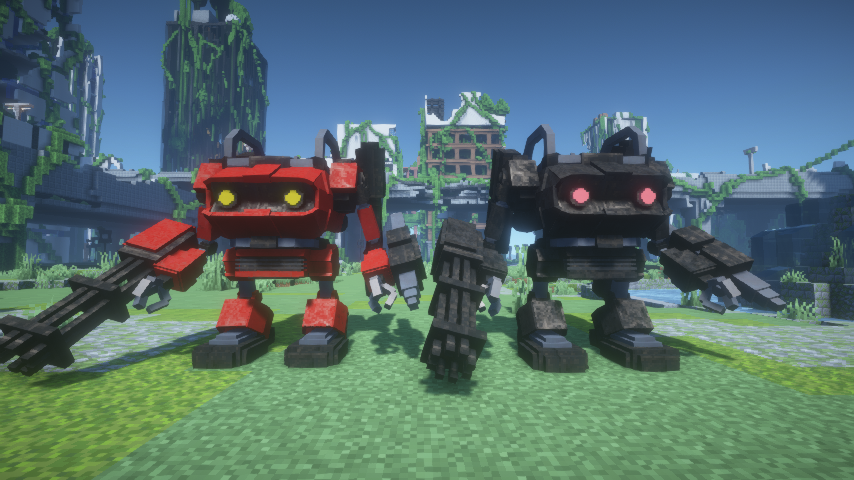 Vehicles /w BSL Sheder Original
 -
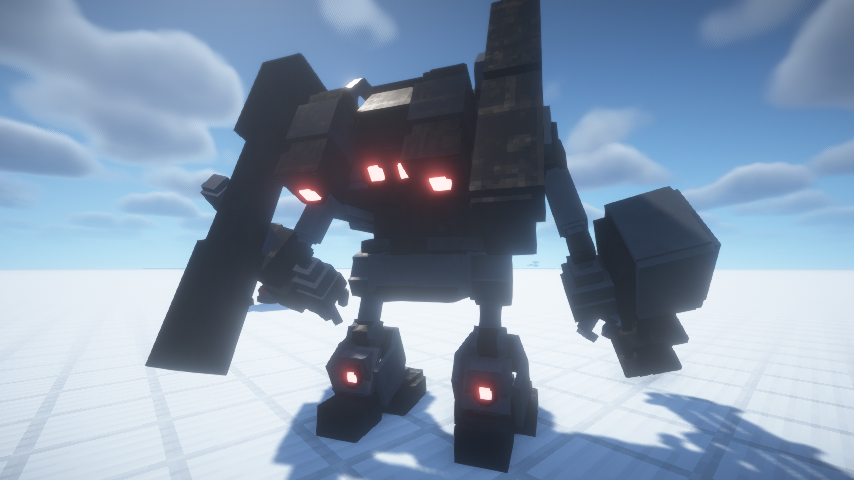 MSV01B /w BSL Sheder Original
 -
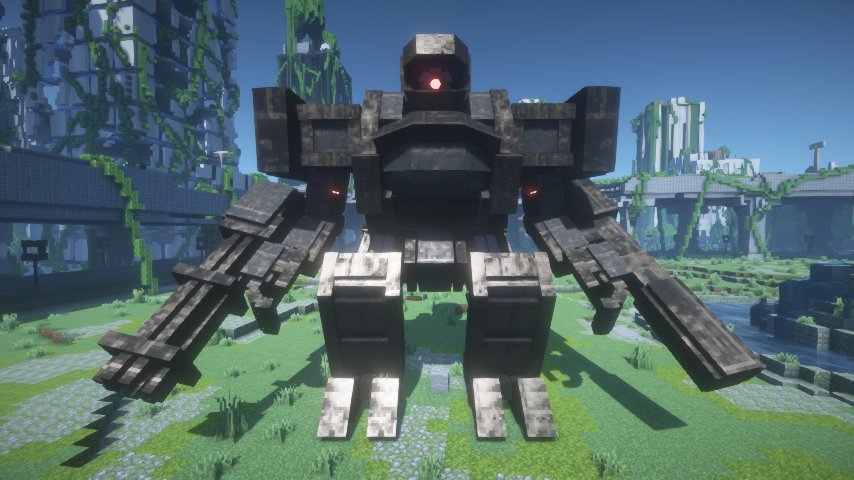 Boss /w BSL Sheder Original
 -
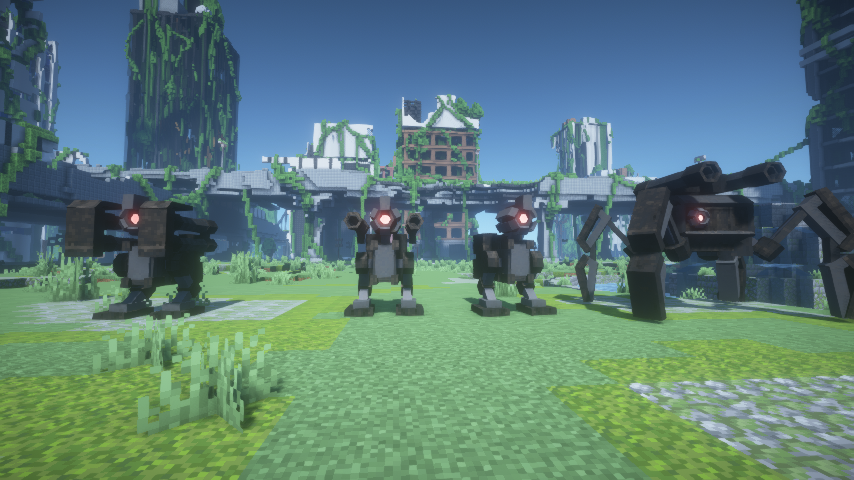 Mobs /w BSL Sheder Original
Versions
Files
Relations
Project Relations
More like this
Similar Mods
Suggestions use data such as tags, dependencies, dependents, descriptions, titles, and more to rank how much they overlap with this mod.
On ModDex
Community snapshot
By the numbers
Statistics
Want to reach Minecraft players?
We're looking for a server hosting partner to feature here and other parts of the site. Interested? Send us a message!
Get in touchGet it on
Available Platforms
On ModDex
Community snapshot
By the numbers