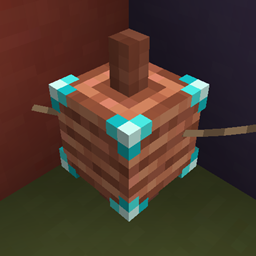
Community listing page, reviews here may not be monitored by the author.
Power Networks


No reviews yet
Adds the ability to create networks of wires and coils for a more interesting and slightly more realistic power transfer
Community voices
Reviews
No reviews yet. Be the first to review this project!
Get it on
Available Platforms
Compatibility
Supported Environments
Runs entirely on the server. Also works in singleplayer.
About
Project Details
For authors
Embed Badge
If you're the author of this project, you can embed a live badge anywhere that supports HTML or Markdown. It updates automatically whenever ratings change.
Use HTML for any page that supports it, or Markdown for README files and Markdown-based descriptions.
Identifiers
Platform IDs
About
Description
Power Networks




This mod adds coils and wires that you can use to build energy transfer networks. There are four tiers of coils: basic, improved, advanced and ultimate. You can configure coils to input or output exclusively, or do both.
Getting Started
To get started with the mod you should craft some wire and coils. I recommend that you use a recipe viewer like REI, JEI or EMI to view the recipes as modpacks often change them. If in doubt, you should use REI as it has the best mod compatibility on fabric.
Once you have your coils you can place them on your energy sources and consumers. Then use the wire to connect the coils by first clicking on one and then the other. You can configure nodes to only transfer in one direction by clicking on them. Different tiers of coils have different capacities. See the next section for more details.
How It Works
When building optimized power delivery systems it's useful to know how ones mods work. This section documents how coils behave to avoid unnecessary confusion.
Coils internally have two energy buffers, both with the size of the transfer rate of the tier, one for input and one for output. Whenever another mod pushes energy into a coil it goes into the energy buffer and whenever other mods pull energy it comes from the output buffer. Coils also push the energy from the output buffer once per tick.
Because of the dual buffers you often see coils that appear to only be half full of energy, when their output buffer is full.
When the first coil on a network ticks, after having pushed its energy, it ticks the network. During a network tick all the energy that can be is moved from the input buffers to the output buffers. The energy is evenly distributed to all output buffers, but the removal from the input buffers is in an arbitrary order.
Modpacks
You may use this mod in any modpacks you create. I'd prefer if you don't distribute the jar directly, but instead link to it. For curseforge and modrinth packs you should use the mod on the respective platform. If you create a modpack outside of that you can get a direct download link from modrinth.
I recommend that modpack developers change the recipes of coils to better integrate with the progression of tech mods in the pack. You can also change the textures if you want to have them match changed recipes.
Configuration
The mods config can be edited in the json file at config/power_networks.json or in game with a YACL based gui from modmenu.
To reload changes from file use /power_networks reload.
If your config at any point becomes invalid you can attempt a repair by setting "repair" to true on the root of the file.
This will try to keep as much as possible of your config while ensuring that it becomes valid.
It can not repair json syntax errors, but a good text editor like vscode will allow you to easily do it yourself.
Transfer Rates
The transfer rates section allows you to change the capacity of the energy buffers of coils. The size of the buffer directly translates to the maximum transfer rate of a coil.
Textures
The textures section allows you to change the textures of all player heads used in the mod. The textures are in the base64 encoded json form seen in player head items. You can decode it if you want to understand the format.
Due to how the client loads textures the url in the texture almost always has to point to Mojangs skin servers. You can look up online how to upload the textures for player heads by setting your skin.
For texture changes to fully apply you have to leave and rejoin the game. On servers each client has to leave to get the new textures to fully apply.
Misc
The misc section of the config currently has one option to enable double lead rendering. Double leads can help if you are having issues with connections not rendering, but causes some z-fighting.
Porting and Forking
You can read my policy on forking and porting mods. This mod will not be ported to anything older than 1.19.4 due to that version adding necessary client features.
Power Networks


This mod adds coils and wires that you can use to build energy transfer networks. There are four tiers of coils: basic, improved, advanced and ultimate. You can configure coils to input or output exclusively, or do both.
Getting Started
To get started with the mod you should craft some wire and coils. I recommend that you use a recipe viewer like REI, JEI or EMI to view the recipes as modpacks often change them. If in doubt, you should use REI as it has the best mod compatibility on fabric.
Once you have your coils you can place them on your energy sources and consumers. Then use the wire to connect the coils by first clicking on one and then the other. You can configure nodes to only transfer in one direction by clicking on them. Different tiers of coils have different capacities. See the next section for more details.
How It Works
When building optimized power delivery systems it's useful to know how ones mods work. This section documents how coils behave to avoid unnecessary confusion.
Coils internally have two energy buffers, both with the size of the transfer rate of the tier, one for input and one for output. Whenever another mod pushes energy into a coil it goes into the energy buffer and whenever other mods pull energy it comes from the output buffer. Coils also push the energy from the output buffer once per tick.
Because of the dual buffers you often see coils that appear to only be half full of energy, when their output buffer is full.
When the first coil on a network ticks, after having pushed its energy, it ticks the network. During a network tick all the energy that can be is moved from the input buffers to the output buffers. The energy is evenly distributed to all output buffers, but the removal from the input buffers is in an arbitrary order.
Modpacks
You may use this mod in any modpacks you create. I'd prefer if you don't distribute the jar directly, but instead link to it. For curseforge and modrinth packs you should use the mod on the respective platform. If you create a modpack outside of that you can get a direct download link from modrinth.
I recommend that modpack developers change the recipes of coils to better integrate with the progression of tech mods in the pack. You can also change the textures if you want to have them match changed recipes.
Configuration
The mods config can be edited in the json file at config/power_networks.json or in game with a YACL based gui from modmenu.
To reload changes from file use /power_networks reload.
If your config at any point becomes invalid you can attempt a repair by setting "repair" to true on the root of the file.
This will try to keep as much as possible of your config while ensuring that it becomes valid.
It can not repair json syntax errors, but a good text editor like vscode will allow you to easily do it yourself.
Transfer Rates
The transfer rates section allows you to change the capacity of the energy buffers of coils. The size of the buffer directly translates to the maximum transfer rate of a coil.
Textures
The textures section allows you to change the textures of all player heads used in the mod. The textures are in the base64 encoded json form seen in player head items. You can decode it if you want to understand the format.
Due to how the client loads textures the url in the texture almost always has to point to Mojangs skin servers. You can look up online how to upload the textures for player heads by setting your skin.
For texture changes to fully apply you have to leave and rejoin the game. On servers each client has to leave to get the new textures to fully apply.
Misc
The misc section of the config currently has one option to enable double lead rendering. Double leads can help if you are having issues with connections not rendering, but causes some z-fighting.
Porting and Forking
You can read my policy on forking and porting mods. This mod will not be ported to anything older than 1.19.4 due to that version adding necessary client features.
Screenshots
Gallery
-
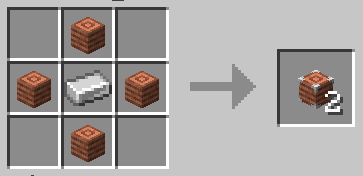 Coil Recipe The crafting recipe for coils
 -
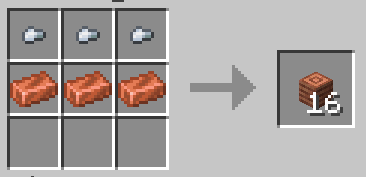 Wire Recipe The crafting recipe for wire
 -
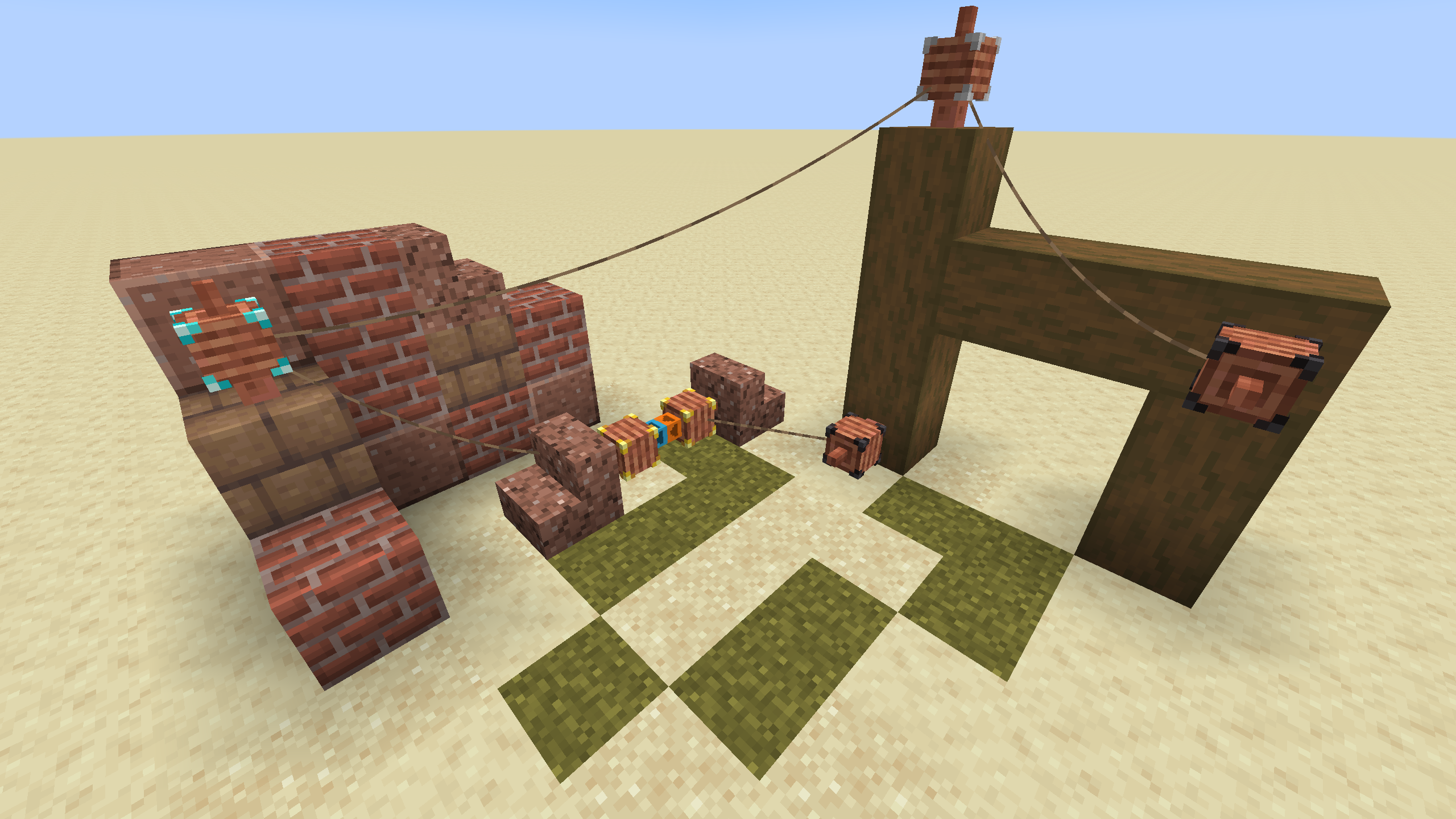 Coils and Structures
-
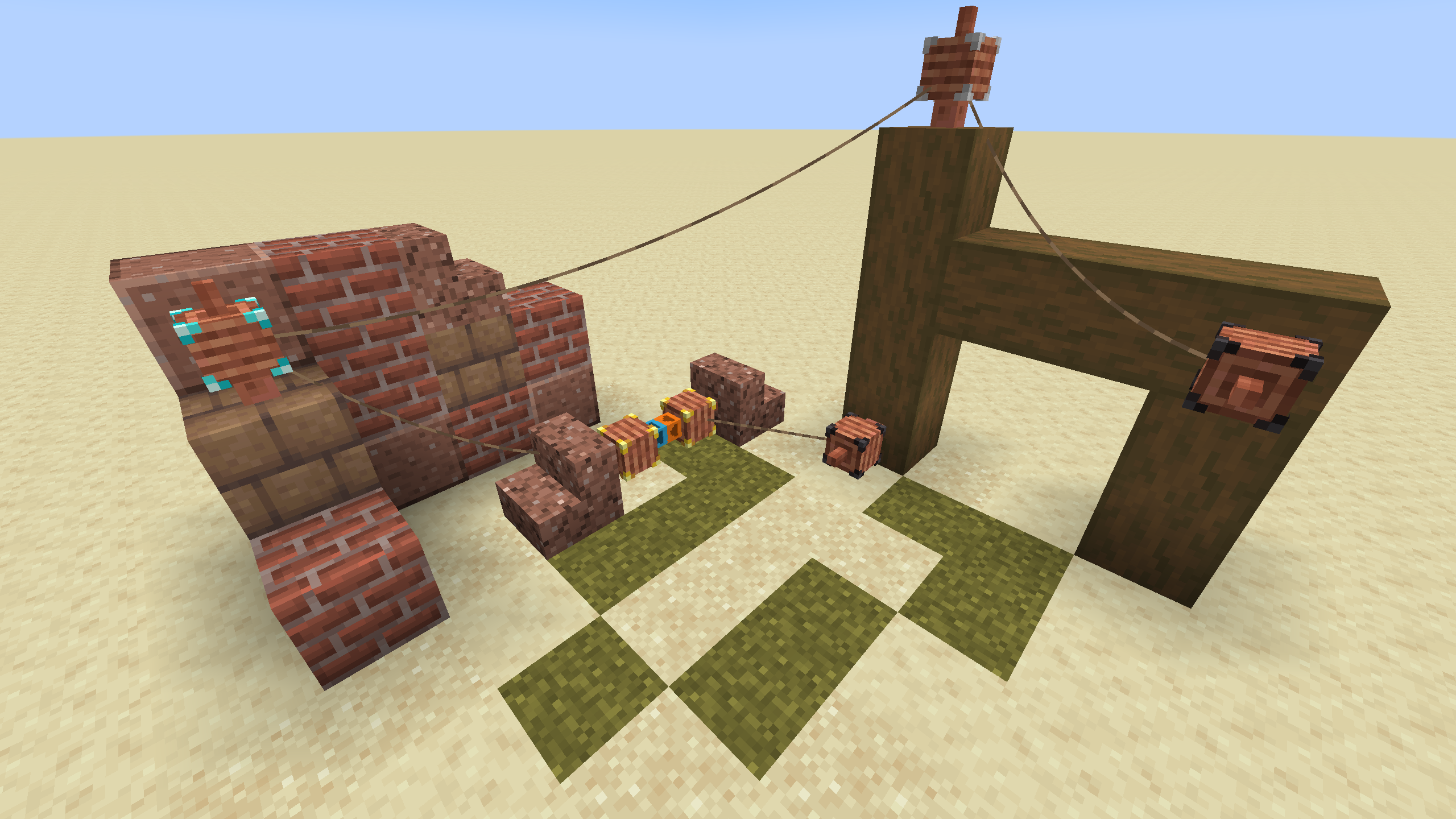 Coils and Structures
 -
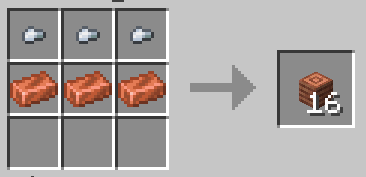 Wire recipw The crafting recipe for wire
 -
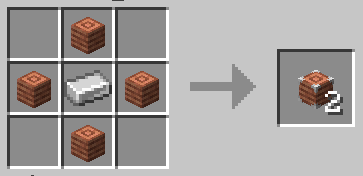 Coil Recipe The crafting recipe for coils
Versions
Files
Relations
Project Relations
More like this
Similar Mods
Suggestions use data such as tags, dependencies, dependents, descriptions, titles, and more to rank how much they overlap with this mod.
On ModDex
Community snapshot
By the numbers
Statistics
Want to reach Minecraft players?
We're looking for a server hosting partner to feature here and other parts of the site. Interested? Send us a message!
Get in touchGet it on
Available Platforms
On ModDex
Community snapshot
By the numbers