
Community listing page, reviews here may not be monitored by the author.
Precision Crafting

No reviews yet
Craft items in specific quantities
Community voices
Reviews
No reviews yet. Be the first to review this project!
Get it on
Available Platforms
About
Project Details
For authors
Embed Badge
If you're the author of this project, you can embed a live badge anywhere that supports HTML or Markdown. It updates automatically whenever ratings change.
Use HTML for any page that supports it, or Markdown for README files and Markdown-based descriptions.
Identifiers
Platform IDs
About
Description
Precision Crafting allows players to craft items in specific quantities. This allows them to use less resources and avoid crafting excess items.
For example, the iron bars recipe requires 6 iron ingots and makes 16 iron bars. In vanilla, if the player only needed 8 iron bars, they would end up with 8 excess iron bars. The excess iron bars are effectively 3 iron ingots lost, plus they will take up space in chests unless disposed of.
With Precision Crafting, the player could craft exactly 8 iron bars using the Precision Crafting Table. This would save them 3 iron ingots and avoid excess iron bars.
Precision Crafting Table Recipe

Usage

1 - Crafting Pattern Slots
2 - Output Slot
3 - Quantity Field & Quantity Adjustment Buttons
4 - Ingredient Slots
5 - Player Inventory & Hotbar Slots
Steps:
- Set the recipe to be used by placing items into the Crafting Pattern Slots. They are ghost/fake slots so the stack you click on them with will stay the same size. Double left clicking or shift-clicking on a pattern slot will clear all pattern slots.
- Use the arrows above and below the Quantity Field to set the quantity of outputs you want, or type into the quantity field.
- The required ingredients and their quantities will be displayed below the Ingredient Slots as partly transparent itemstacks. If an ingredient accepts more one stack(e.g ore dictionary ingredients) then it will cycle through all the itemstacks it accepts. Ingredients that have been satisfied will stop displaying. Place each ingredient in the slot directly above the the corresponding displayed itemstack.
- Once all ingredients are satisfied, you will be able to remove the outputs from the Output Slot.
Notes:
- Required ingredient quantities are rounded up to the nearest integer. The table will consume exactly this amount, excess ingredients beyond this amount will remain in the slots. This means that although crafting 4 iron bars should require 1.5 iron ingots, the table will consume 2.
- The table only works with standard recipes (shaped or shapeless recipes with no custom logic). Ore Dictionary recipes are considered standard recipes. Recipes that use custom logic, like leather armour dying or firework star crafting do not function as they are highly likely to result in exploits otherwise.
Screenshots
Gallery
-
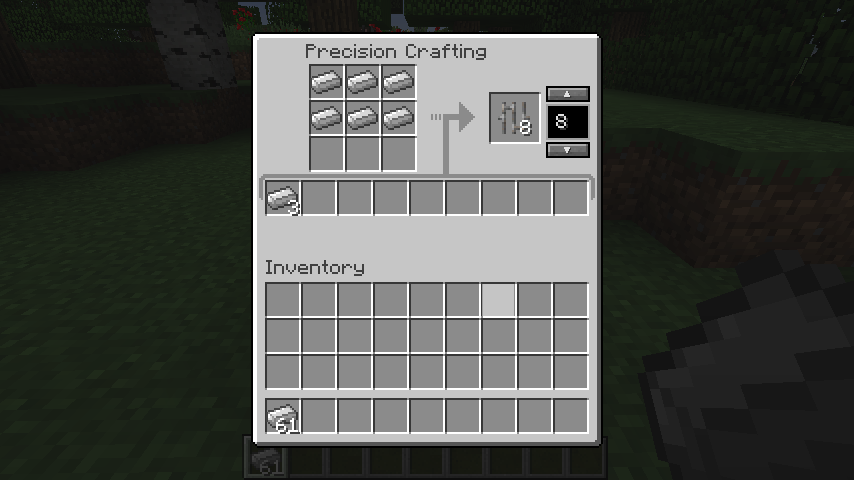 Crafting 8 Iron Bars
Versions
Files
Relations
Project Relations
More like this
Similar Mods
Suggestions use data such as tags, dependencies, dependents, descriptions, titles, and more to rank how much they overlap with this mod.
On ModDex
Community snapshot
By the numbers
Statistics
Want to reach Minecraft players?
We're looking for a server hosting partner to feature here and other parts of the site. Interested? Send us a message!
Get in touchGet it on
Available Platforms
On ModDex
Community snapshot
By the numbers