Community listing page, reviews here may not be monitored by the author.
Prehistoric Rift


No reviews yet
The definitive dinosaur survival experience for Minecraft
Community voices
Reviews
No reviews yet. Be the first to review this project!
Get it on
Available Platforms
Compatibility
Supported Environments
Must be installed on both the client and the server.
About
Project Details
For authors
Embed Badge
If you're the author of this project, you can embed a live badge anywhere that supports HTML or Markdown. It updates automatically whenever ratings change.
Use HTML for any page that supports it, or Markdown for README files and Markdown-based descriptions.
Identifiers
Platform IDs
About
Description
YOU NEED RIFTLIBRARY AND MIXINBOOTER FOR THIS MOD TO WORK
Originally for Bedrock edition, Prehistoric Rift aims to be the definitive dinosaur survival mod for Minecraft Java Edition. No more dinosaur revival for park building, you will find various prehistoric creatures spawning in your world, which you will have to tame.
If you spot any bugs or if you have suggestions you can post them in the bugtracker on GitHub. Just make sure to browse the area first. You may also feel free to join the discord server where you can casually hang out or receive updates.
If you really like this mod btw, you can donate to me on Ko-Fi. You're not obligated to donate, but it at least motivates me to continue working on this mod and any others that I may make.
How to Start
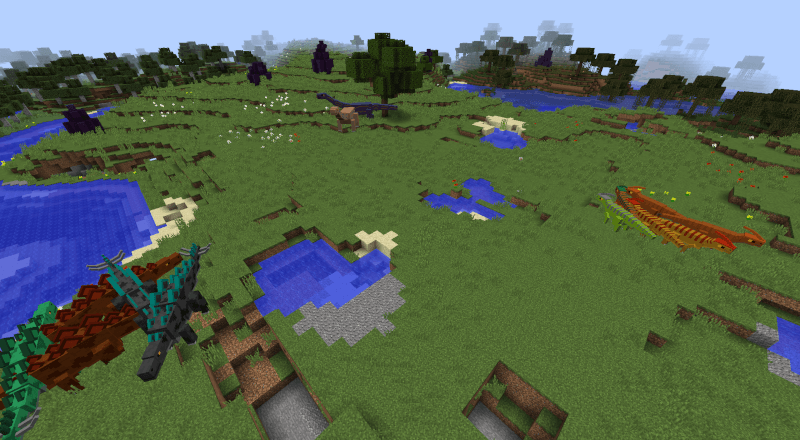
Once you find a creature in the wild, go near it. It will be marked as "discovered" in your journal, where you can read about what foods you need to tame it. Press "J" and go to the "Journal" tab to see it.
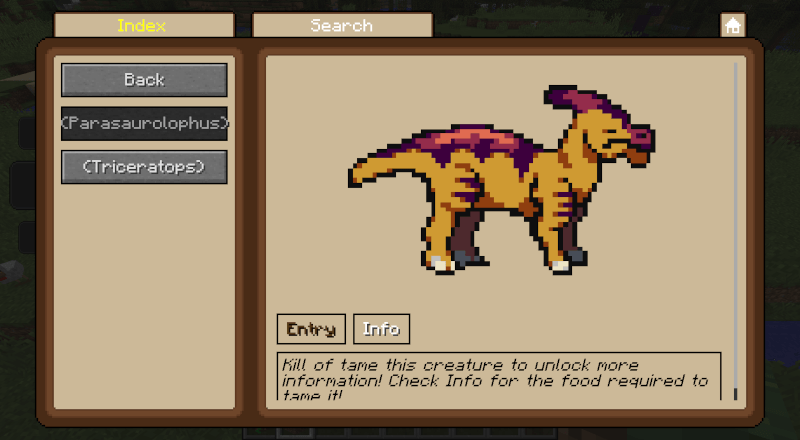
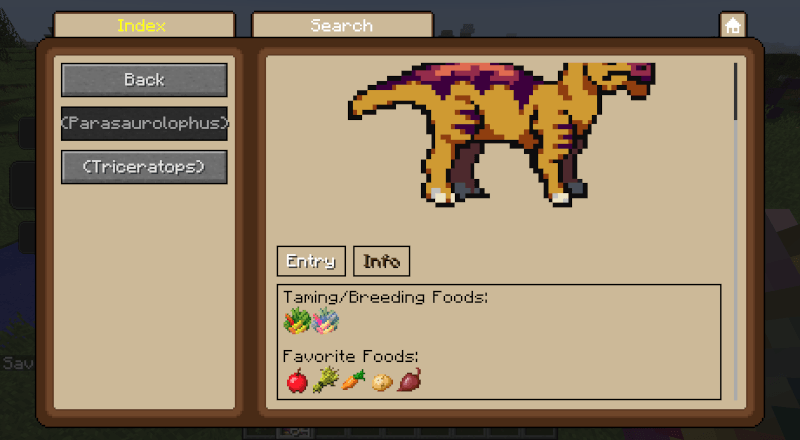
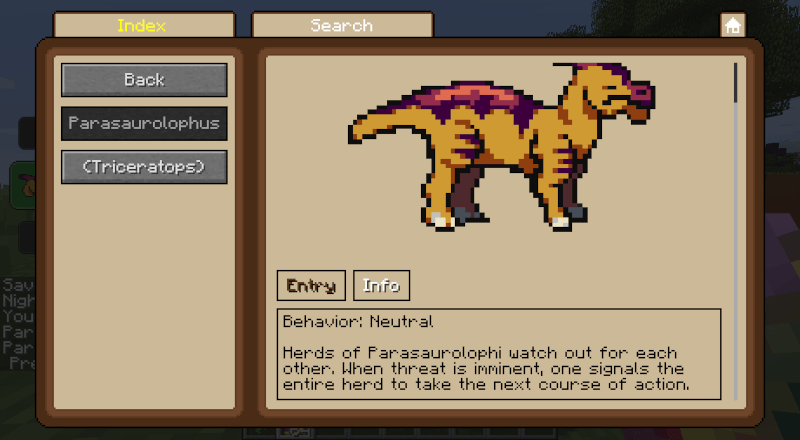
Once you tame said creature, you will finally be able to read its entry, as well as what foods it likes (for healing) and what blocks it can use as workstations.
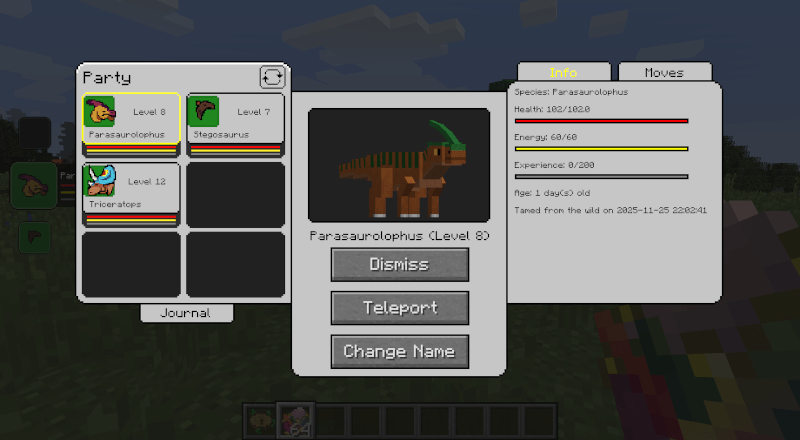
In the party screen, where it will most likely appear in upon taming, you can dismiss it or summon it, or teleport it to you when it's stuck or far away from you.
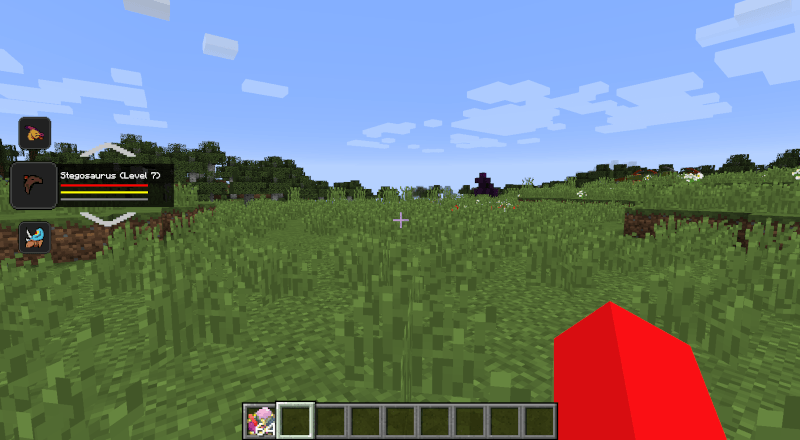
For convenience, there's also a sidebar, from which you can quickly summon a creature from your party. The up and down keys let you switch between them, and presing K lets you summon/dismiss the currently selected creature.
Controlling Creatures
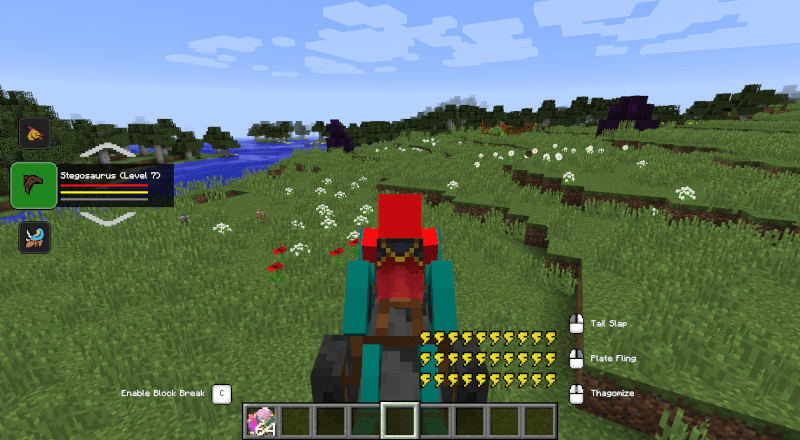 Almost all creatures can be saddled and ridden. Once you put a saddle in its saddle slot in its inventory, you can ride them around the world as much as you please. In addition, you can command your mounts to use a move, which are shown on the bottom right. You can also toggle between block breaking upon using a move by using C.
Aquatic creatures have some additional controls, where spacebar lets them swim up and x lets them swim down.
Finally, in case you have any reservations about this, all creatures (except purely aquatic ones) can easily get out of water to the closest shore, you just need to swim towards the nearest solid block when in water.
Creature Box
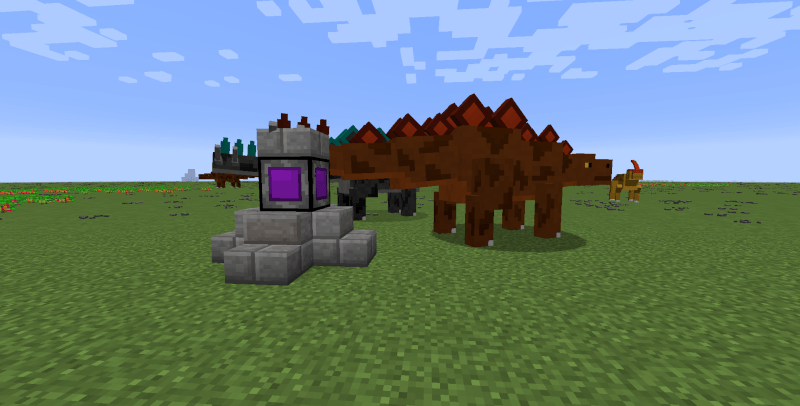
 When your party is full, all creatures that you tame by this point onward get sent to your box. To see them, as well as change party creatures with box creatures and vice versa, you will need to craft a creature box as shown: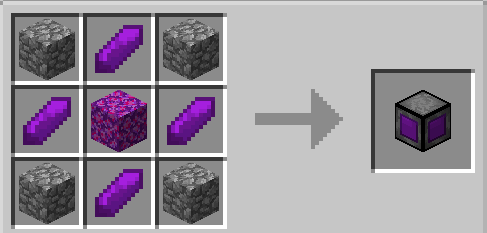
From a creature box, you can change your creature's name, or release any unwanted creatures. You can also deploy them to have them wander around the creature box within a range of 3 x 3 chunks.
When certain creatures are deployed from a creature box, you can do the following:
- Set them to turret mode (for ranged attackers)
- Set them to harvest certain blocks
- Set a workstation for them to work on
Workstations
Some of the blocks in Pyrotech can be used as workstations by certain creatures, such as Parasaurolophuses stoking the heating devices and bloomeries or Ankylosauruses smashing blooms on anvils.

Installing Mystical Mechanics unlocks some new blocks that require mechanical power from said mod, interaction from creatures, or even both. Many of which have Crafttweaker integration (check them out on this section of the wiki)
Configuring
Prehistoric Rift has some pretty extensive config options. In the config folder should be a folder known as "prift", where you can find the general config (for very general config options) and json configs for all creatures.
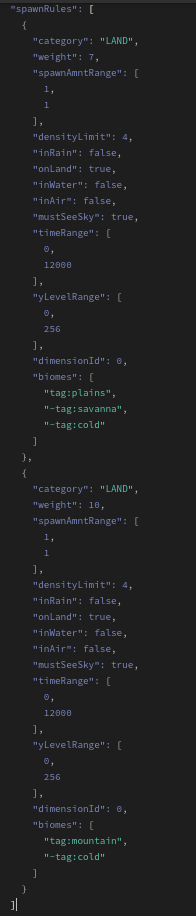
Not only you can edit various stats of the creatures and other traits pertaining to them, you can even edit their spawn rates with a pretty flexible custom spawning system! Here's a sample from the tyrannosaurus (documentation coming soon)
YOU NEED RIFTLIBRARY AND MIXINBOOTER FOR THIS MOD TO WORK
Originally for Bedrock edition, Prehistoric Rift aims to be the definitive dinosaur survival mod for Minecraft Java Edition. No more dinosaur revival for park building, you will find various prehistoric creatures spawning in your world, which you will have to tame.
If you spot any bugs or if you have suggestions you can post them in the bugtracker on GitHub. Just make sure to browse the area first. You may also feel free to join the discord server where you can casually hang out or receive updates.
If you really like this mod btw, you can donate to me on Ko-Fi. You're not obligated to donate, but it at least motivates me to continue working on this mod and any others that I may make.
How to Start
Once you find a creature in the wild, go near it. It will be marked as "discovered" in your journal, where you can read about what foods you need to tame it. Press "J" and go to the "Journal" tab to see it.
Once you tame said creature, you will finally be able to read its entry, as well as what foods it likes (for healing) and what blocks it can use as workstations.
In the party screen, where it will most likely appear in upon taming, you can dismiss it or summon it, or teleport it to you when it's stuck or far away from you.
For convenience, there's also a sidebar, from which you can quickly summon a creature from your party. The up and down keys let you switch between them, and presing K lets you summon/dismiss the currently selected creature.
Controlling Creatures
Almost all creatures can be saddled and ridden. Once you put a saddle in its saddle slot in its inventory, you can ride them around the world as much as you please. In addition, you can command your mounts to use a move, which are shown on the bottom right. You can also toggle between block breaking upon using a move by using C.
Aquatic creatures have some additional controls, where spacebar lets them swim up and x lets them swim down.
Finally, in case you have any reservations about this, all creatures (except purely aquatic ones) can easily get out of water to the closest shore, you just need to swim towards the nearest solid block when in water.
Creature Box
 When your party is full, all creatures that you tame by this point onward get sent to your box. To see them, as well as change party creatures with box creatures and vice versa, you will need to craft a creature box as shown:
From a creature box, you can change your creature's name, or release any unwanted creatures. You can also deploy them to have them wander around the creature box within a 16 block radius.
When certain creatures are deployed from a creature box, you can do the following:
- Set them to turret mode (for ranged attackers)
- Set them to harvest certain blocks
- Set a workstation for them to work on
Workstations
Some of the blocks in Pyrotech can be used as workstations by certain creatures, such as Parasaurolophuses stoking the heating devices and bloomeries or Ankylosauruses smashing blooms on anvils.

Installing Mystical Mechanics unlocks some new blocks that require mechanical power from said mod, interaction from creatures, or even both. Many of which have Crafttweaker integration (check them out on this section of the wiki)
Configuring
Prehistoric Rift has some pretty extensive config options. In the config folder should be a folder known as "prift", where you can find the general config (for very general config options) and json configs for all creatures.
Not only you can edit various stats of the creatures and other traits pertaining to them, you can even edit their spawn rates with a pretty flexible custom spawning system! Here's a sample from the tyrannosaurus (documentation coming soon)
Screenshots
Gallery
Versions
Files
Relations
Project Relations
More like this
Similar Mods
Suggestions use data such as tags, dependencies, dependents, descriptions, titles, and more to rank how much they overlap with this mod.
- Prehistoric
- Prehistoric Fauna
- Prehistoric Nature
- Prehistoric Paintings - Dinosaurs, Landscapes...
- Prehistoric Spawns (A Fossils and Archeology Revival Add-On)
- Prehistoric Nature Precambrian Dimension
- Prehistoric Nature Carboniferous Dimension
- Prehistoric Nature Triassic Dimension
- Prehistoric Nature Ordovician Dimension
- Prehistoric Nature Devonian Dimension
- Prehistoric Nature Cambrian Dimension
- Prehistoric Nature Silurian Dimension
On ModDex
Community snapshot
By the numbers
Statistics
Want to reach Minecraft players?
We're looking for a server hosting partner to feature here and other parts of the site. Interested? Send us a message!
Get in touchGet it on
Available Platforms
On ModDex
Community snapshot
By the numbers