Community listing page, reviews may not be monitored by the author.
Prohibit's Armor Hub

No reviews yet
[New] Simple Vanilla Style Armor Hub

Community voices
Reviews
No reviews yet. Be the first to review this project!
Get it on
Available Platforms
About
Project Details
For authors
Embed Badge
If you're the author of this project, you can embed a live badge anywhere that supports HTML or Markdown. It updates automatically whenever ratings change.
Use HTML for any page that supports it, or Markdown for README files and Markdown-based descriptions.
Identifiers
Platform IDs
Resources
External Links
About
Description
Prohibit's Armor Hub
Your armor, always visible.
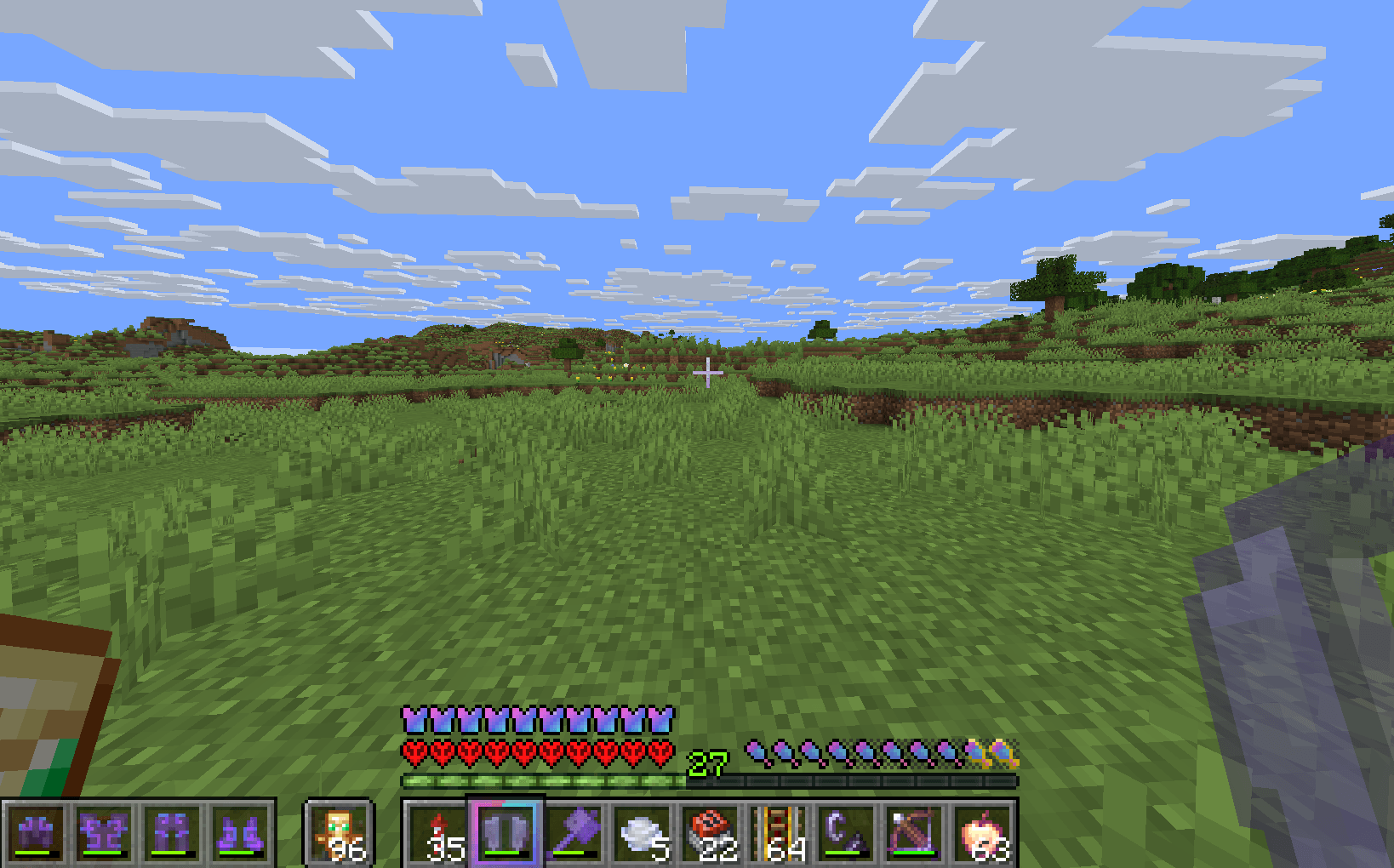
Prohibit's Armor Hub is a lightweight, client-side armor HUD for Minecraft Fabric. It shows your equipped armor in vanilla-style slots right beside your hotbar — so you always know what you're wearing and how close it is to breaking, without opening your inventory.
Built with a focus on looking and feeling like a natural part of the vanilla HUD: real hotbar textures, real item rendering, real durability bars — plus a classic pixel-art low-durability alert that blinks faster as your armor wears out.
Features
Armor Slots HUD
- All four armor slots (helmet, chestplate, leggings, boots) displayed in vanilla-style slots
- Hotbar style — rendered as a genuine slice of the real hotbar texture, with the real bevels and translucent cells. It reads like a natural extension of your hotbar, exactly like the off-hand slot
- Inventory style — the classic light-gray inventory slot look (with configurable slot size and spacing)
- Fixed mode — always shows all four slots, or Dynamic mode — shows only the slots you're actually using, and hides the entire HUD when you're not wearing armor
- Empty slots can show vanilla's own armor silhouettes (helmet/chestplate/leggings/boots outline icons)
- Vertical or horizontal strip, head-first or feet-first order
- Configurable HUD scale (50–200%), slot opacity, and compact mode
Real Item Rendering
- Items are rendered by Minecraft's actual item renderer — enchantment glints, leather dye colors, armor trims, and resource packs all just work
- Enchantment glint can be toggled off if you find it distracting
Durability Display
- Vanilla-style durability bar (toggleable)
- Durability numbers on top of each slot — choose between remaining uses, remaining/max, or percent:
- Auto-scales to fit the slot, so it can never run off the screen or overlap
- Subtle backing plate keeps the number readable even on light armor sprites
- Colored to match the vanilla durability bar color
- Optionally only shown when the piece is actually damaged
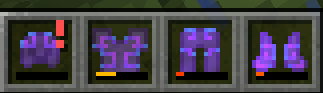
- Low-durability "!" warning — a tiny pixel-art exclamation mark in the corner of the slot, in the style of classic HUD alert mods:
- Starts blinking the moment a piece drops below your configured threshold (5% / 10% / 15% / 20% / 30% / 40% / 50%)
- Blinks faster and faster the closer the armor is to breaking — from a calm pulse down to a frantic flicker
- Never overlaps the durability number — the number automatically makes room
- Optional one-time warning chime when a piece first crosses the threshold (with built-in hysteresis so a piece hovering at the threshold — or flip-flopping with Mending — can't spam the sound)
Smart Positioning
- Beside the hotbar (left or right side) — keeps exactly the same gap the off-hand slot keeps, and automatically steps out of the way of your off-hand item on either main-hand side. It will never cover the off-hand slot
- Above the hotbar, or free placement on any of 9 screen-edge/center anchors with pixel X/Y offsets
- Auto-flip: on narrow screens, the strip automatically moves to whichever side of the hotbar actually has room
- Everything positioned relative to the hotbar, so it stays correct at any GUI scale and window size
Animations & Effects
- Equip "pop" animation — new armor scales up into place, using the same technique the vanilla hotbar uses for the selected-slot pop
- Damage flash — a slot briefly flashes red when that piece takes durability damage
- Blinking low-durability alert with speed ramp (see above)
Visibility Control
- Hide while the debug overlay (F3) is open
- Hide while any screen (inventory, chat, pause menu) is open
- Separate options to hide in the inventory specifically, or in chat specifically
- Vanilla item tooltips when you hover a slot while a screen is open
- Two keybinds (unbound by default): toggle the HUD, and open the settings
In-Game Config Screen
- No config library needed — built entirely from vanilla widgets
- Live preview with a mock hotbar and off-hand slot, showing exactly how the strip will look in-game — including the blinking warning and durability numbers on a sample armor set (empty, damaged, enchanted, and dyed pieces)
- Mini screen-position map showing where the HUD sits relative to your screen
- Five organized tabs (Position, Visibility, Appearance, Armor Display, Effects) with tooltips on every option
- Reset Position and Reset All buttons; changes apply live and save on close
- Opens from ModMenu's Configure button or the settings keybind
Requirements
- Minecraft 1.21 – 26.3 (see the file list below)
- Fabric Loader + Fabric API (both required)
- ModMenu (optional — adds the Configure button)
- Java 21 for the 1.21.x line, Java 25 for the 26.x line (this is what those Minecraft versions themselves require)
Files — pick the one for your Minecraft version
Each file is labeled with the exact versions it supports:
|
File
|
For Minecraft
|
|---|---|
…+mc1.21-1.21.1-fabric.jar |
1.21, 1.21.1 |
…+mc1.21.2-1.21.4-fabric.jar |
1.21.2, 1.21.3, 1.21.4 |
…+mc1.21.5-fabric.jar |
1.21.5 |
…+mc1.21.6-1.21.8-fabric.jar |
1.21.6, 1.21.7, 1.21.8 |
…+mc1.21.9-1.21.10-fabric.jar |
1.21.9, 1.21.10 |
…+mc1.21.11-fabric.jar |
1.21.11 |
…+mc26.1-fabric.jar |
26.1 |
…+mc26.2-fabric.jar |
26.2 |
…+mc26.3-fabric.jar |
26.3 |
Notes for older versions (1.21 – 1.21.5): Minecraft itself skips HUD rendering while a screen (inventory, chat, pause) is open on those versions, so the "hide in screens/chat/inventory" options and in-game HUD tooltips have no visible effect there — those options fully apply from 1.21.6 upward. Everything else works identically on all versions.
Installation
- Install the Fabric Loader for your Minecraft version
- Download Fabric API for your version and put it in your
modsfolder - Download the Prohibit's Armor Hub file matching your Minecraft version and put it in your
modsfolder - (Optional) Install ModMenu for a convenient Configure button
The mod is client-side only — it works in single-player and on any server, and does not need to be installed on the server.
Frequently Asked Questions
Can I use it with my resource pack? Yes. Items are rendered by Minecraft's own renderer, and the hotbar-style background uses the real hotbar texture, so texture packs that restyle the HUD or items are respected.
Where is the config file? .minecraft/config/armorslots.json — but you should never need to touch it; everything is configurable in-game.
Does it work with sulfur/phosphor/sodium? The HUD only uses vanilla GUI rendering paths plus Fabric's HUD registration API, so it is compatible with rendering optimization mods.
Is there a Forge version? No, Fabric only.
License
All rights reserved. You may use the mod freely, include it in modpacks with attribution, and share unmodified copies via the official project pages; any other redistribution or derivative work requires permission.
Credits
Created by Prohibit.
Screenshots
Gallery
-
 In Game
 -
 Damage Alert
Versions
Files
Relations
Project Relations
More like this
Similar Mods
Suggestions use data such as tags, dependencies, dependents, descriptions, titles, and more to rank how much they overlap with this mod.
On ModDex
Community snapshot
By the numbers
Statistics

Get it on
Available Platforms
On ModDex
Community snapshot
By the numbers
Statistics
Resources