Community listing page, reviews here may not be monitored by the author.
Project: War Dance


No reviews yet
Dodge, parry, and dual wield your way to stunning victory.

Community voices
Reviews
No reviews yet. Be the first to review this project!
Get it on
Available Platforms
Compatibility
Supported Environments
Must be installed on both the client and the server.
About
Project Details
For authors
Embed Badge
If you're the author of this project, you can embed a live badge anywhere that supports HTML or Markdown. It updates automatically whenever ratings change.
Use HTML for any page that supports it, or Markdown for README files and Markdown-based descriptions.
Identifiers
Platform IDs
About
Description
Project: War dance is a combat and gameplay mechanic mod that changes the way you fight and adds new mechanics and other systems to support it.
For upcoming milestones or issues, consult GitHub.
Want to join my discord? It's located here.
"_Darks Wardance Mega Compatibility Bundle"_
Looking for the old out-of-box compat? Data for an ever growing list of mods are available through a datapack by Darkmega located here. It also includes values for "Cloak and Dagger", my stealth mod.
Install the datapack with your favorite datapack handling mod like Openloader or Paxi, or simply insert it into your save games as you would a normal datapack.
Mechanics:
Spotlight videos, in case you don't want to read a giant wall of text. These are outdated, so reading is still recommended:
Posture and Staggering: posture is a separate bar determined by how big the mob is and how much armor it's wearing. Being hit will fill it up, and being hit when it's full will stun you. Posture clears naturally for mobs but not players.
Shown as a meter in game. See images tab.
- Max posture is calculated from the size and armor of the entity. The player has about 70, a zombie has about 50.- Being attacked deals posture damage to you. A portion of posture damage dealt is "gray" and cannot be immediately restored; the remaining portion is "red" and can be rallied.
- Posture recovers over time on mobs. This is to force you to keep pressuring. Posture does *not* recover over time on players. Instead, a small buffer of gray posture will gradually turn red. This happens faster if you are blocking, but it has a cap.
- Performing a "fresh" combat action will instantly recover all red posture damage. This is known as rallying.
- Armor can increase max posture, the max amount of rally you can possess at once, or the speed at which it returns. Higher style will increase recovery rate, see below.
- Player rally recovery speed and mob posture regeneration speed are both influenced by current health, poison, and being wet.
- When the posture bar fills up the entity can no longer block. Mobs will rapidly recover posture in this state until their posture bar is once again empty, so make sure to take advantage of this opening. Any breaching damage will stun an entity when their posture bar is maxed out.
- When stunned, entities lose all armor, take more damage, and cannot move or attack. All internal damage will convert back into armor-piercing damage, which is often quite deadly; in compensation, players will become temporarily immune to further damage while stunned. Posture will rapidly recover when any entity is stunned, until it hits full and they regain mobility.
Blocking, Parrying, and Damage Changes: assume a guarding stance to nullify health damage. Shrug off the environment, but watch your posture.
- As long as you are not stunned, incoming damage is reduced depending on the amount of posture remaining. This mechanic is called "composure", or more colloquially "darktide". The reduced damage becomes internal damage, which will be applied again if you are stunned.
- Composure reduces more damage at higher style, works better against projectiles, and will nullify environmental damage by consuming posture instead. Allowing poison or fire to remain on you, however, will rapidly drain your posture and induce internal damage buildup, which will put you dangerously close to a oneshot should a stray hit come your way.
- Internal damage can be reduced by dealing damage, in a manner similar to Bloodborne's rallying.
- Sneak to block. Blocking is identical to blocking in vanilla, except it is omnidirectional. It is omnidirectional because look is highly mutable and a primary driver of movement in Minecraft, making directional blocking clunky to use in practice. I will not be providing an option to make it direction-based.
- Blocks apply counterstrike to the attacker and knock them back slightly. Counterstrike increases posture damage taken and can stack. Blocking also charges up a Guard Counter, so it is also an offensive action.
- Every registered weapon (including shields and fists) have a defense rating. The higher of the two defense ratings in your available hands will always be used to block the attack. Defense rating changes how much of the attack's posture damage is immediately rallyable.
- Some weapons have a defense rating over 1, in which case blocking could actually cause you to gain more rally than you have lost (subject to the cap of max rally)
- Blocking right as an attack is about to land (~0.5 seconds by default) changes the block to a parry. Parries reflect health damage onto the attacker as internal damage and deal posture damage back to them, which can breach. Parries also create a small shockwave that deals some internal damage and non-breaching posture damage in an area around you, knocking mobs back.
- Block rating works the other way around with parries; the lower the block rating, the higher your riposte damage will be, up to double. However, your best hand is still used to calculate parry damage.
- Parrying can be done when your posture is full; blocking cannot. Just like in Sekiro.
- Parry does not apply counterstrike and does not charge guard counter faster. Parry is not a direct upgrade to block and I will not provide options to make it be so.
- Projectiles can also be blocked and parried. They can be configured to still trigger their non-damage effects on impact (e.g. a grenade will explode), or be deleted outright (e.g. shulker bullets). By default, blocking will drop the projectile in front of you and parrying will send it back to its shooter. This includes spells, splash potions, and other more unique projectiles.
Dual Wielding and Combat Mode: attack with weapons in both hands; shift+R to enter a special state that displays more relevant information.
- Pressing shift+R by default enters combat mode.
- In combat mode, normal key function is overridden with PWD key functions where applicable. (so if middle click was set to use skills, it would kick instead of pick block or whatever else it's set to!)
- relevant HUDs and your offhand (if it is empty) also only show up in combat mode. The one exception is posture, since it's rather essential to not dying.
Spirit
- Spirit is a blue bar on your HUD that is gained through melee attacks and spent on skills, breaching moves, and ranged attacks.
- Ranged damage is reduced and deals no knockback if you lack the spirit to fund them. In this way it is sort of a universal ammo gauge.
- Higher style and some skills will allow you to generate spirit faster, and an attribute causes all spirit consumption to refund a bit of the spirit spent. On the converse, spamming the same melee hit will cause its spirit generation to drop to nearly nothing.
Style
- Style is quickly gained by attacks and kills, and quickly lost if not active (sprinting, swinging, blocking, etc).- Each "category" of input awards its full style points for the first use, half for its second use, and nothing after the third use (but they still reset the style cooldown). To track which actions are still fresh, check the style feed under your style multiplier HUD element.
- Notably, different hand attacks, different weapons, and different creative ways to kill enemies will stack style separately. Vary your weapons and angles of attack to maximize your style. As style also reduces incoming damage, the optimal way to stay alive is to be stylish.
- There are seven levels of style, each level provides a subtle increase in movement, attack speed, and recovery speed.
- S style and above also provide a looting bonus to reward fun(tm) mob farms.
Adrenaline
- Adrenaline, the red bar is gained alongside style. It stays around for longer than style, but still resets out of combat.- Adrenaline is used to unleash some of the most powerful skills and attacks in Project: War Dance, known as adrenaline bursts. These skills are the ultimate cinematic rewards for consistently playing stylishly, and can include shooting out numerous weapons, stopping time, or other such powerful effects.
Dual Wielding
- Only "weapons" and "shields" can be swung, and only in combat mode (to prevent accidentally hitting villagers), so buckets and ender pearls will function as normal.
- The exception to the "weapon" rule is fists: they can be swung in the offhand in combat mode.
Weapon Movesets: move states, throws, draw attacks.
- In combat mode, weapon usage is altered dramatically. I like to joke that this is a weapon skinwalking mod, as it alters many functions of existing weapons.
- First and foremost, there are now eight possible ways to attack with each weapon.
1. by default you will perform standing attacks.
2. sprinting, swimming, or dodging will cause you to perform sprint attacks.
3. falling downwards makes you perform falling attacks.
4. jumping, flying upwards or being in aerial mode makes you perform aerial attacks.
5. holding sneak (guard) until you hear a ding will change your next attack into a guard counter.
6. normal tossing is suppressed in combat mode, because why would you want to toss your sword as an item? Holding Q while attacking will perform a throw attack (which might not actually throw the item, depends on its moveset information)
7. swapping hands is suppressed in combat mode, F+attack executes a draw attack with the new weapon you are drawing from your quiver.
8. lastly, picking up a thrown weapon (by timeout, attacking it with an empty hand, or grabbing it with your grapple) will cause you to automatically perform a pickup flourish.
Each and every weapon, and even non-weapons such as shovels and hoes, will behave differently in each of these states. The changes are too all-encompassing to be listed exhaustively here. Instead, open your trance menu (\) and select the labeled thought bubble to study the blade.
Weapon Quiver: rapidly cycle through weapons.
- You can set up your quiver by entering your trance menu (\ by default) and selecting the labeled thought bubble.
- Your quiver has 7 slots to hold weapons. Placed weapons will remember their slots and automatically return to that slot on pickup, if possible.
- When throwing, you can mouse over a weapon in the on-screen quiver radial menu to instantly swap to that weapon after throwing your current one.
- When draw attacking, you can do the same to swap to that weapon and execute its draw attack.
- In either case, selecting the barrier icon will cause you to swap to an empty hand.
Dodging, Grappling, Kicking, and Aerial Mode: moving around is part of dancing, integrate the Y-axis into combat.
- Movement key+alt (default) in combat mode will execute a dodge. Without movement input, dodging defaults to backwards. You can dodge in the air.
- The player performs a small jump with large horizontal velocity, ending about 5 blocks from where they begin. The cooldown is configurable.
- While dodging you are immune to all melee and projectile attacks for 10 ticks.
- Pressing both sprint and sneak will perform a slide forward with the same effect as dodge, but compresses your model down to swimming size. Useful for getting through crawl-holes.
- Dodging just as an attack is about to reach you executes a perfect dodge, which activates a very short localized time slow effect. Mobs will move in slow motion and cannot block or attack. This is colloquially known as "Steve time".
- I-frame times can be adjusted in the configs.
- Jumping in the air sets you to aerial mode for about 1.5 seconds, shown by a little wing on your crosshair. Gravity is reduced during aerial mode.
- Armor can grant additional air jumps. You can roughly track how many jumps you have left using the wing HUD.
- While airborne, dodge into a wall directly to cling to it. While clinging, you can move along the wall, and even onto adjacent walls or the ceiling. Jump to leap off and reset your air jump count.
- Alternatively, dodge into a wall sideways to slide along the wall. Good for parkour and swift engagements. You will start to cling if you are about to fall off or hit a wall during the slide.
- Combat mode increases your step height, and step-up applies even in the air. If you dodge onto a platform from aerial mode, you will not be able to fall off that platform for a brief moment (unless you jump again). This means you can make some otherwise impossible jumps or precisely control your landing even while moving at high speeds.
- Middle mouse button in combat mode to kick.
- Kick consumes 12 posture to deal 12 posture damage, light health damage, and good knockback.
- Kick counts as its own category for combo. A fresh kick will nearly immediately refund its own cost; a stale kick is a gamble at best.
- Kicking a wall while airborne will boost you up slightly.
- The kick damage attribute increases... kick damage.
- Press c by default in combat mode to launch a grappling hook. The grappling hook flies straight forward and attaches to the first block, mob, or thrown weapon it hits.
- While hooked you will swing around the hooked mob or block. This can allow you to catch up with flying mobs or swing around on the nether roof. Vertical motion is slightly damped for more stylish horizontal swings. Overall feels a bit like Titanfall.
- Press c again to zip to the target location, or hold sneak while pressing c to pull the target back to you.
- If you grappled a thrown weapon, you will pick it back up and perform a pickup flourish when you reach it or it reaches you. The weapon will be tucked back into your quiver if your hands are not empty.
- Zipping to a block will boost you up slightly at the end and place you in aerial mode. If you pull a block, you will yank a copy of the block to you, replacing your next kick with a block throw that hits at range and knocks back enemies.
- Zipping to a mob will cause you to kick the mob. This can breach if you have max spirit and is referred to as a dropkick. Pulling a mob will cause you to slowly reel it in, depending on how heavy the mob is. Since pulling involves sneaking, you can prepare a guard counter to land just as the mob comes in range.
- Grappling is as quintessential to vertical movement as the arrow keys are to horizontal movement. I will not be providing the option to disable or gate this feature.
Two-handing: if you don't want to hold two things, you can also just hold one thing really well.
- You are considered to be two-handing if your offhand is bound, if you are wielding a two-handed item (which also happens to bind your offhand), or if your offhand item is not an item or a shield.
- Two-handing confers many buffs. Item-specific two-handing bonuses may be checked in the tooltip.
- The price for these buffs is, of course, that you don't have the extra attack or defense from your offhand.
Death's Door: one last chance.
- Fatal damage puts you at death's door, knocking you down, resetting your combo, and causing your max health to start draining down to 1. During this time you are invulnerable to damage but also cannot heal in any way.
- Reach A rank again during death's door to stop the drain. If you hit death's door repeatedly during a single fight, your health will keep draining lower and lower.
- If you let your max health get drained down to 1, death's door will be disabled until you recover to full health again. Considering that you are literally at 1 health, it may be wise to retreat.
- When out of combat for a while, or while affected by effects marked as comfortable, you will slowly recover lost hearts.
Armor Stats: armor items have more unique ways shape your gameplay. Luck is now useful.
- I highly recommend installing my other mod, Armor Curve, to nerf vanilla damage reduction. These stats don't really add onto your ability to not die per se, but I think armor curve is neat.
- Armor can have different attributes that slightly modify the aforementioned mechanics and in an attempt to break the diamond/netherite monotony. Every piece has one unique attribute to encourage mixing and matching. The overall change on feel in gameplay will be outlined below:
- leather increases aerial mobility and spirit efficiency. It also has nearly no stealth impact. For the discerning assassin and ranger.
- chain increases luck and other opportunistic attributes. Good for a mercenary or rogue who engages and disengages constantly while seeking their lucky break.
- iron increases your block window, rally regeneration, and death's door duration, for the stout warrior locked in back-and-forth combat.
- gold adds skill effectiveness and improves generation of various resources, for a skill-based sifu style
- diamond is juggernaut-oriented, boasting higher max posture and internal damage recovery to trade blows and stun safely.
- netherite amplifies counterstrike and block power for the tanks to amp up their guard counters.
Stealth: manipulate light and vision to remain undetected in light armor, and deal debilitating backstabs.
Completely moved to Cloak and Dagger!
Skills: special actions that may be performed in combat mode to gain an edge in the fight.
- Manuals and scrolls may be used to learn new skills. Scrolls are found in random dungeon chests and are also given out as rewards for particularly impressive feats while using certain skills. Manuals will automatically overwrite your skill loadout with the loadout stored in the manual, ignoring ones you have not yet learned (unless the manual is set to autolearn).
- Manuals can be generated with the command /wardance manualize [true/false] for autolearning. You can also enter the meditation screen with a valid written book in your hand to convert said written book into a manual. Scrolls can be NBT'd to give a random skill or a fixed skill.
- When you first spawn into the world you are given a random hand-crafted manual. The manual is intentionally incomplete so you may fill it up with other skills you find around the world, and each is crafted to demonstrate some basic skill synergies. You don't have to use the manual if you don't want to, of course.
- Skills must be first set in the skill screen, then brought up in combat mode with the R key as a radial menu. You have 5 active slots, 5 passive slots, and 1 "style" slot.
- When you first enter you are greeted with a screen with a single slot dead center for your stance/art/style. The center info screen gives a welcome message and basic instructions on how to pick a style, and the styles are listed on the left.
- After you pick a style, the slot moves into the bottom right corner and the skill screen appears for you to select your skills. You can pick another style by clicking that slot, but picking another style will clear currently selected skills.
- Each skill has a color, and each style only supports up to a certain number of colors.
- Above the skill selection scroll bar is a list of filter options. You may filter by color or revert to default, which shows all equippable skills. The colors that you currently have are tinted instead of white.
- Each color tab has extra tooltips on mousing over that show their names and short descriptions:
white: expertise. Simple but effective skills.
red: dominance. You are mighty. Crush your foes.
green: resolution. Never give, never fall. Be as steady as a wall.
gray: subterfuge. The deadliest strike is the one unseen.
azure: fervor. Implacable, unstoppable. Death rains down in a thousand cuts.
cyan: perception. See all, reach all. None can escape your grasp.
violet: decay. What order has built, entropy shall destroy.
gold: generosity/avarice. A somewhat conflicted category that is built around both group buffs and personal greed.
- All skill icons are taken from Lorc's site game-icons.net.
Configuration: nearly everything can be turned off, datapacking help in spoilers.
- This mod uses datapacks to determine the combat stats of weapons. Place your data under <namespace>/war_stats. For an example, see this json for the vanilla stats. Two-handing bonuses should be placed under <namespace>/war_twohanding, and follow the Attributizer format. It is possible to create stats for an item tag in this manner by prefixing the key with "#", in which case the stats will be applied to any items with the tag that have not been already explicitly defined.
- Different sweeps can be datapacked to occur under different circumstances. See the example vanilla jsons and this document.
- Armor stats and shield attack speed reduction are provided by Attributizer. For an example, see this json for the vanilla stats provided.
- Special cases of mob parrying (e.g. iron golem having an innate shield against projectiles) can be defined with a json datapack. See this github file for an example that gives the spider a harder shell.
- Use /wardance toggle to turn off specific features (such as parrying or sweep attacks) for specific players.
Miscellaneous Changes/Bonus Features: useful luck stat.
- When attacking, a number is rolled between 0 and (attacker luck-target luck), with damage increased or decreased accordingly. The luck bonus can be adjusted or disabled in the config.
undefined
Project: War dance is a combat and gameplay mechanic mod that changes the way you fight and adds new mechanics and other systems to support it.
Thanks to Darkmega for continued support! He made this page shiny and new, for the record.
This mod includes out-of-the-box combat values for the following mods:
- vanilla
- Advanced Hook Launchers
- Akashic Tome (yes, weaponized books)
- Alex's Mobs
- Aquaculture
- Ars Nouveau
- Arsenal Core
- Ars Magica Legacy
- Artifacts
- Miner Arcana: Astral
- Aquamirae
- Atum
- Band of Gigantism
- Better End Reforged
- Better Nether Reforged
- Big Brain
- Biomancy
- Blood Magic
- Blue Skies
- Bountiful Baubles
- Biomes You'll Go
- Cold's Claws
- Comfortable Nether
- Consecration
- CraftVania 2
- Create
- Cyclic
- Darker Depths
- Dave's Potioneering
- Deeper and Darker
- Divine RPG
- Druidcraft
- Dungeons Gear
- Eidolon
- End Remastered
- Endergetic Expansion
- Enigmatic Legacy
- Environmental
- Epic Fight Mod
- Epic Knight
- Evilcraft
- Farmer's Delight
- Feywild
- Fish's Undead Rising
- Fins and Tails
- Forbidden & Arcanus
- Graveyard
- Goety
- Greek Fantasy
- Guns Without Roses
- Hexerei
- Hostile Mobs and Girls
- Ice and Fire
- Immersive Engineering
- Immersive Weathering
- Infernal Expansion
- Kobolds
- Mahou Tsukai
- Majrusz's Difficulty Mod
- Meet Your Fight
- Mowzie's Mobs
- Monsters and Mushrooms
- Mutant Beasts
- Mutant More
- Mystical World
- Nikgub's Blades+
- Outer End
- Pam's Harvestcraft
- Pandora's Creatures
- Pathogen
- Pyromancer
- Rats (Ratlantis)
- Reliquary
- Rising Uppercut
- Roots Classic
- Savage and Ravage
- Securitycraft
- Silent Gear *
- Simply Swords
- Slashblade
- Spartan Shields
- Spartan Weaponry
- Stalwart Dungeons
- Switch-bow
- Twilight Forest
- The Abyss
- Totemic
- Vampirism
- Vanilla Food Pantry
- Vanilla Claws
- Werewolves
- Wyrmroost
* - Items have stats etc but those stats will not change depending on the actual strength of the materials used in the creation of tools, weapons or armors. This is due to the nbt used in their full formation and config limitations within this mod.
All of these thanks to the gracious contributions of others who follow the mod and my own testing. Feedback and other contributions is greatly appreciated.
For upcoming milestones or issues, consult GitHub.
Want to join my discord? It's located here.
Mechanics:
Spotlight videos, in case you don't want to read a giant wall of text. These are outdated, so reading is still recommended:
Posture and Staggering: posture is a separate bar determined by how big the mob is and how much armor it's wearing. When it's emptied, the mob gets stunned and eventually staggered, taking more damage. It goes down when getting attacked depending on how heavy the attacking item is, and regenerates quickly if you stop getting hit.
Shown as a meter in game. See images tab.
[Imgur](https://imgur.com/8Qi6SLM)[/Imgur]
- Max posture is calculated by (width*height*5), so a player starts with 10 posture.- Being attacked consumes posture regardless of parry. This makes parrying unequivocally the best option, since you’ll be taking posture damage either way.
- Posture recovers quickly when not attacking, but has a cooldown after being consumed. At full HP, standing still, you regenerate 10 posture per second.
- Armor items may add max posture. Regeneration is a flat number, so it will take you longer to "fully" recover.
- Moving slows posture regen down by 50%, 70% if sprinting.
- Regeneration also is multiplied by your current health percentage.
- If your attack cooldown is less than 100%, you gain an equivalent regeneration penalty
- Dodging resets your posture cooldown.
- This means that while actions play a role, the real deal-breaker is health. Defeating an enemy requires wearing down their health to make staggering easier.
- At 0 posture the entity is knocked back and stunned, gaining 1 fracture, binding both hands and slowing movement. The stagger ends after 1 seconds or taking damage once. During this time posture regenerates rapidly and cannot be depleted until it reaches max again.
- Special case: taking a stunning instance of posture damage that exceeds half of their max posture will additionally knock them down, which lengthens downtime to 3 seconds and disables movement.
- The expectation to gain a fracture on a reasonably armored entity (around chain grade) is 8 dagger, 6 sword, 5 claymore, 3 axe, or 2 mace hits. Balance around this.
- Accumulating an attribute-defined quantity of fracture marks instead exposes the entity for 5 seconds. In this state the entity cannot do anything, has all armor negated, and the next hit on it deals an extra 10% of its max health in damage.
- Fracture marks are cleared after exposure. Killing any entity that fractured you will also remove their respective fractures, as well as any ownerless fractures.
Parrying: keep your weapon or shield in front of you to guard yourself against melee attacks. Shields also protect you from projectiles and give you some extra posture.
- Vanilla blocking will still mitigate damage, but will also reset the posture cooldown without refreshing the combo cooldown, making it less desirable.
- By holding a “weapon” and orienting yourself towards an attack, you can parry it.- Idle parrying negates damage, but not posture consumption nor attack effects.
- Notably, items have a parry multiplier that is multiplied with the posture damage. This multiplier will additionally multiply the knockback applied to both parties after a parry.
- Shields also parry projectiles
- Projectiles can be configured to consume different amounts of barrier, still trigger their non-damage effects on impact (e.g. a grenade will explode), or be deleted outright (e.g. shulker bullets).
- By popular demand, there is now a config option to restrict parry to a small frame of time after pressing a keybind, because it's more "tactical" or "fun" or something. I don't think it really works in minecraft, but people keep asking for it, so it's there now.
Dual Wielding and Combat Mode: attack with weapons in both hands; shift+R to enter a special state that displays more relevant information.
- Pressing shift+R by default enters combat mode.
- In combat mode, normal key function is overridden with PWD key functions where applicable. (so if middle click was set to use skills, it would use skills instead of pick block or whatever else it's set to!)
- relevant HUDs and your offhand (if it is empty) also only show up in combat mode. The one exception is posture, since it's rather essential to not dying.
Might
- Might is gained at a flat rate every attack, with slower weapons granting dramatically more, charging a bar that can be filled up to twice.- After remaining out of combat for 10 seconds, might will relatively quickly drain to 0.
- Might is consumed in whole bars for specific skills.
Spirit
- Spirit is a bar of icons on your HUD that are consumed in discrete quantities to perform certain skills.
- Spirit regenerates at a rate of 1 icon every 2 seconds.
- Consuming spirit or taking damage will pause spirit regen for 2 seconds.
- Spirit will not regenerate when chanting.
Rank
- Rank is gained by a buildup bar that goes up along with your might.- There are seven levels of rank, each rank provides a subtle increase in movement and attack speed that are briefly halved if you take damage.
- S ranks and above also provide a looting bonus to reward fun(tm) farms.
Dual Wielding
- Possible even out of combat mode.
- Only "weapons" and "shields" can be swung, so buckets and ender pearls will function as normal.
- The exception to the "weapon" rule is fists: they can only be swung in the offhand in combat mode.
Dodging: double tap movement keys to temporarily avoid damage, sprint+sneak to slide forward. Compatibility with Elenai Dodge 2.
- Double tapping any movement key except forward has you dodge in that direction.
- You can also sidestep by key+sprint. Both are only available in combat mode.
- The player performs a small jump with large horizontal velocity, ending about 5 blocks from where they begin. The cooldown is configurable, but defaults to 0.75 seconds (15 ticks).
- It is intended as a quick way to adjust one’s position around a target or dodge a hit.
- While dodging you are immune to all melee and projectile attacks for 10 ticks.
- Pressing both sprint and sneak will perform a slide forward with the same effect as dodge, but compresses your model down to swimming size. Useful for getting through crawl-holes and whatnot.
- I-frame times can be adjusted in the configs.
- Dodges are suppressed with Elenai Dodge 2 installed, though slides are not.
- Might bonus from rank will also apply to Elenai feather regeneration, but regeneration will be halted by posture cooldown. These features can be individually disabled.
Armor Stats: armor items have more unique ways shape your gameplay.
- I highly recommend installing my other mod, Armor Curve, to nerf vanilla damage reduction. These stats don't really add onto your ability to not die per se, but I think armor curve is neat.
- Armor can have different attributes that slightly modify the aforementioned mechanics. The overall change on feel in gameplay will be outlined below:
- light armor increases posture regeneration speed, so you must manage your own fracture and run away frequently, but can easily come back to continue harassing your enemies. They also have better stealth ratings and often conduct spirit well.
- medium armor increases max posture, which encourages using in-combat recovery and certain reckless tactics like suplex. They also have a deflection rating to facilitate taking a few hits, but low magical conductivity.
- heavy armor greatly increases fracture marks, which allows you to tank. Though you have a higher initial pool of not dying, your relative ability to recover it is poor, so you must seek to overpower your opponents before the "fatigue" kicks in.
- To slightly counteract mixing and matching, armor will grant continuous quantities of discrete attributes. This means that you might not hit a breakpoint for max fracture if you swap out your helmet for a lighter one for the regeneration rate. Your armor choices should be considered carefully.
Stealth: manipulate light and vision to remain undetected in light armor, and deal debilitating backstabs.
Completely moved to Cloak and Dagger!
Skills: special actions that may be performed in combat mode to gain an edge in the fight.
- Skills must be first set in the skill screen, then brought up in combat mode with the R key as a radial menu. You have 5 active slots, 5 passive slots, and 1 "style" slot.
- When you first enter you are greeted with a screen with a single slot dead center for your stance/art/style. The center info screen gives a welcome message and basic instructions on how to pick a style, and the styles are listed on the left.
- After you pick a style, the slot moves into the bottom right corner and the skill screen appears for you to select your skills. You can pick another style by clicking that slot, but picking another style will clear currently selected skills.
- Each skill has a color, and each style only supports up to a certain number of colors.
- Above the skill selection scroll bar is a list of filter options. You may filter by color or revert to default, which shows all equippable skills. The colors that you currently have are tinted instead of white.
- Each color tab has extra tooltips on mousing over that show their names and short descriptions:
red: dominance. You are mighty. Crush your foes.
green: resolution. Never give, never fall. Be as steady as a wall.
gray: subterfuge. The deadliest strike is the one unseen.
orange: fervor. Implacable, unstoppable. Death rains down in a thousand cuts.
cyan: perception. See all, reach all. None can escape your grasp.
violet: decay. What order has built, entropy shall destroy.
- All skill icons are taken from Lorc's site game-icons.net.
Miscellaneous changes/bonus features: useful luck stat, sweeping edge buff, block reach adds attack reach.
- When attacking, a number is rolled between 0 and (attacker luck-target luck), with damage increased or decreased accordingly. The luck bonus can be adjusted or disabled in the config.
- Sweep attacks cannot be executed without sweeping edge, but will hit everything in an area for full damage and all enchantment or on-hit effects.
- The default angle increment for each extra level of sweeping edge is 40 degrees.

Screenshots
Gallery
-
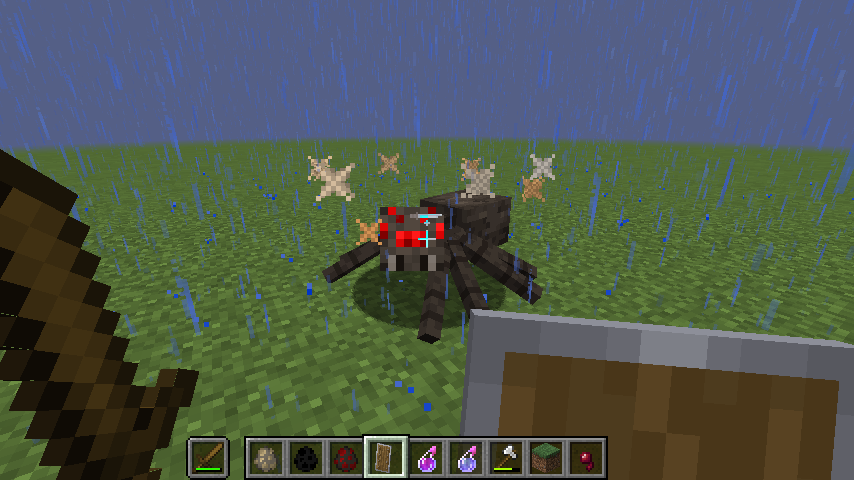 Stun This spider's gone stargazing.
 -
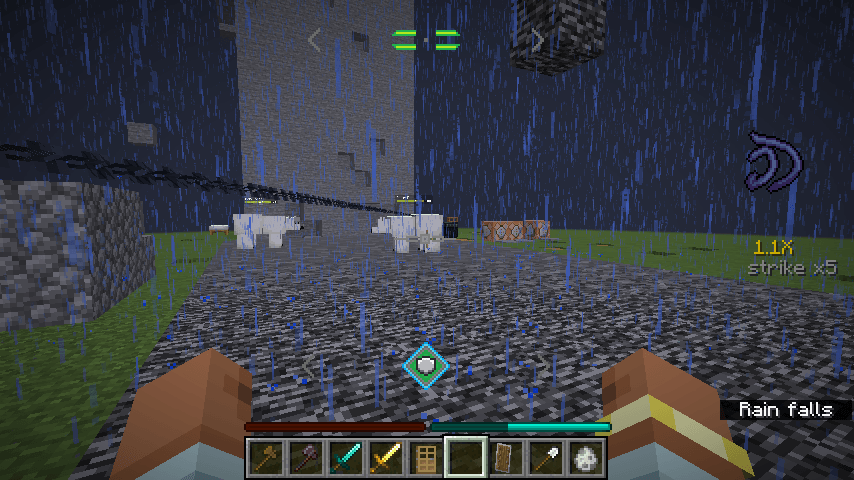 grappling GET OVER HERE
 -
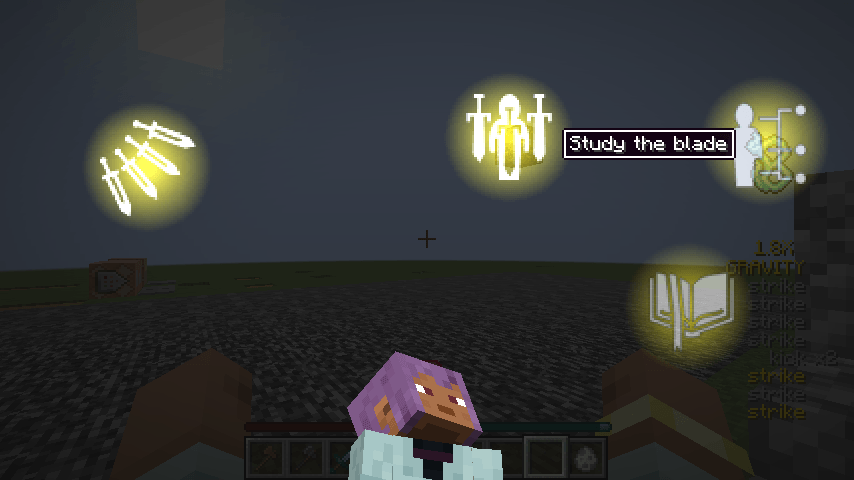 The new trance menu Pondering my orbs
 -
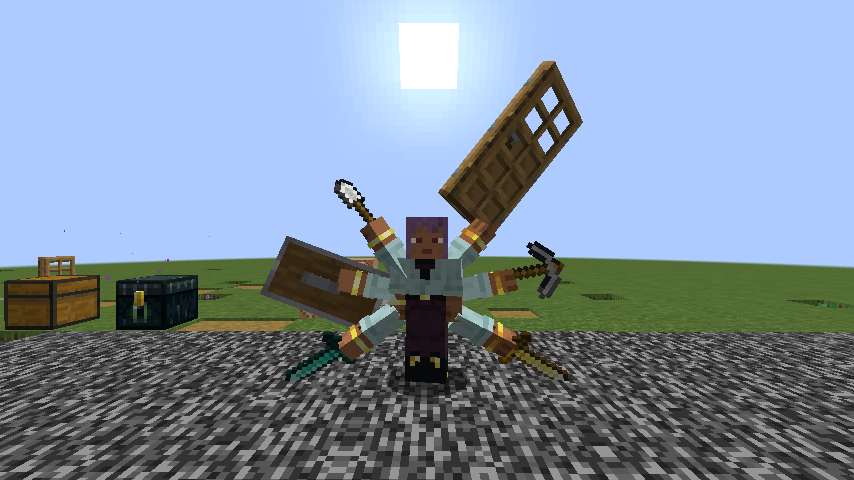 How many weapons do you want to use at once? YES.
 -
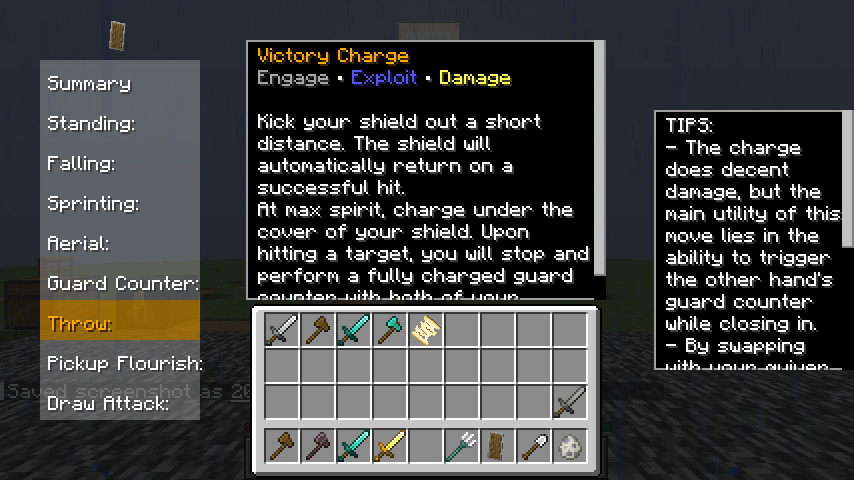 learning made easy Complete descriptions are provided for every move on every weapon!
 -
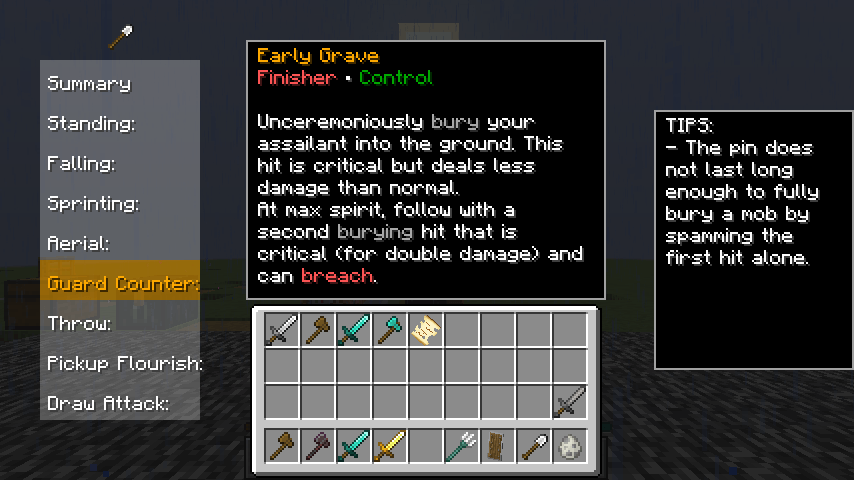 everything is a weapon! hand-crafted movesets for over 50 (and counting) categories! Only a few are as detailed as this one for now, updating all old movesets to the new version.
 -
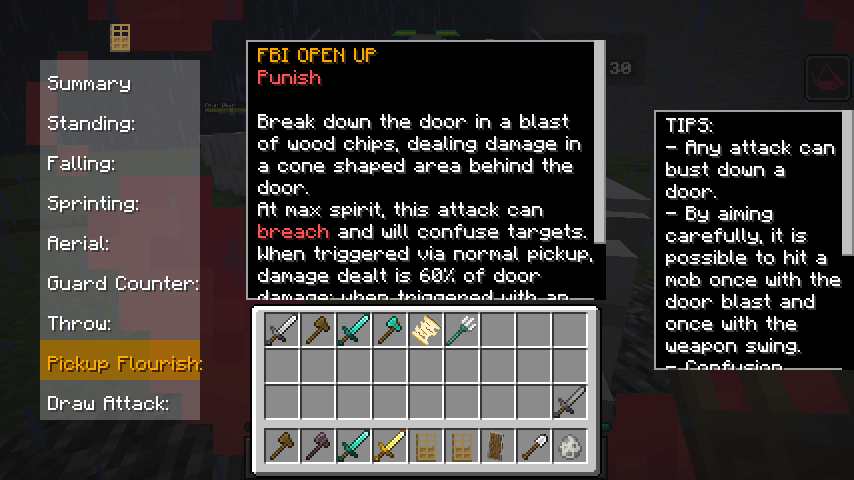 ...seriously, everything! doors are a weapon! because I said so.
 -
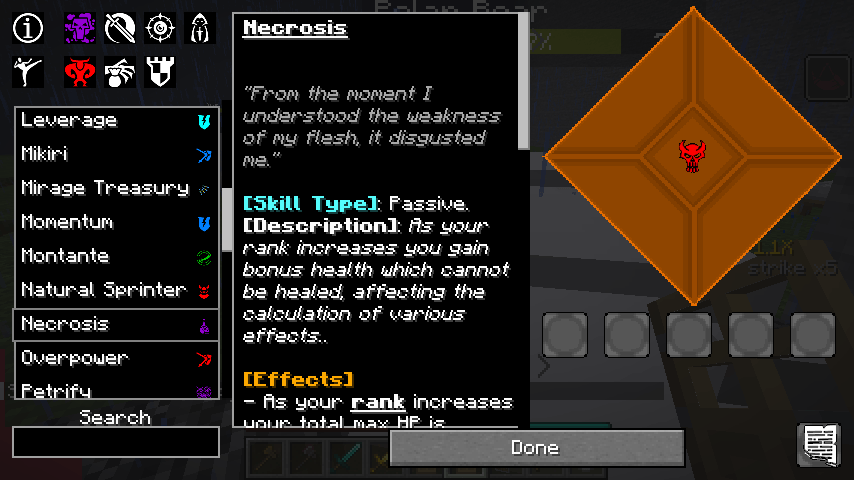 find your skills ten styles, eight categories, at least six skills per category. There's bound to be something in there for you.
-
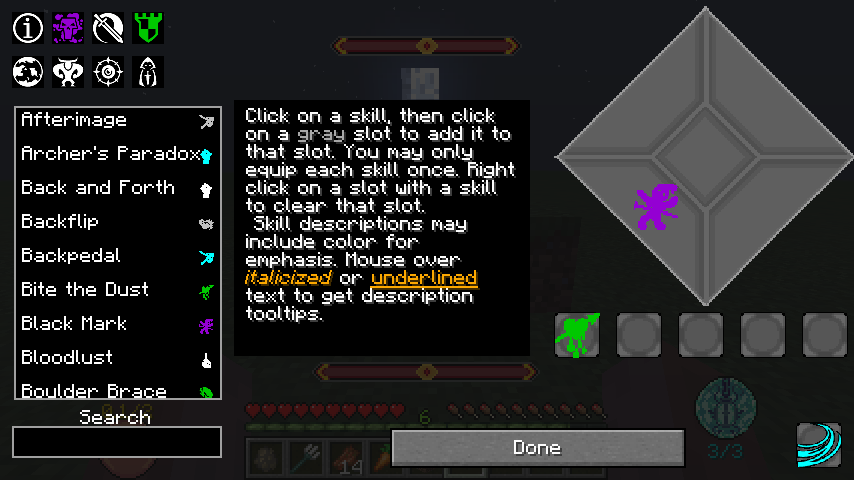 Skills go brrrrr
 -
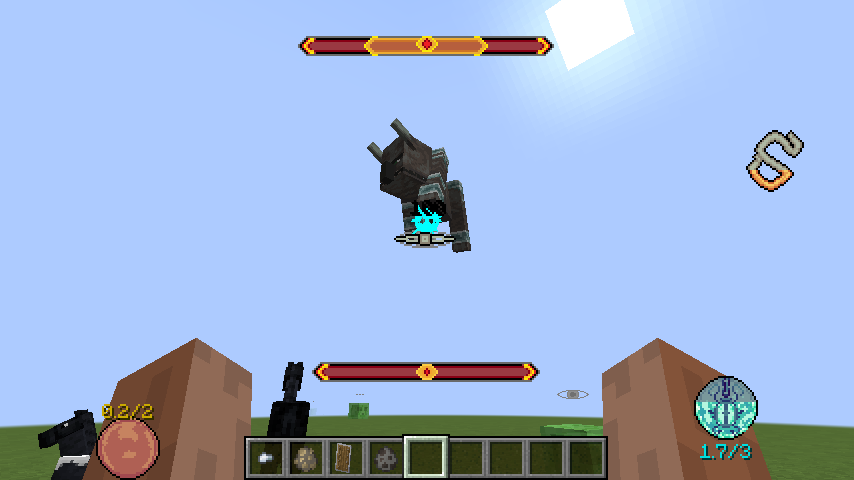 Posture, rank, and ravager yeeting
 -
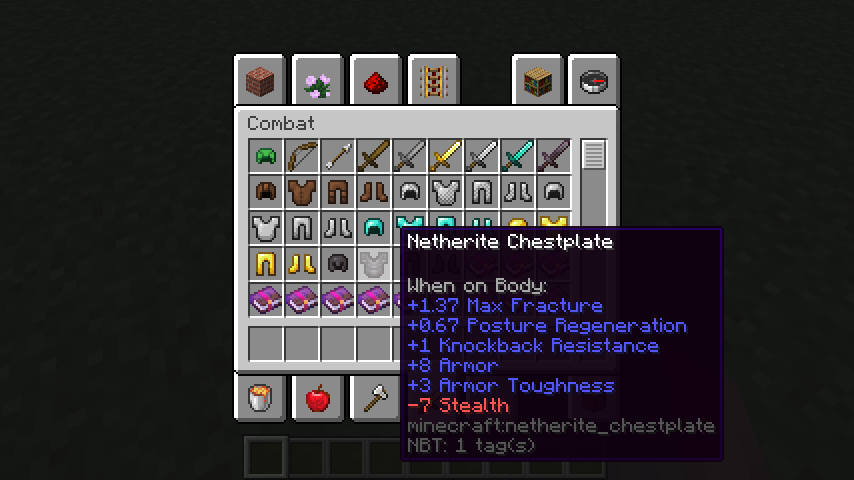 Extra armor stats
Versions
Files
Relations
Project Relations
More like this
Similar Mods
Suggestions use data such as tags, dependencies, dependents, descriptions, titles, and more to rank how much they overlap with this mod.
On ModDex
Community snapshot
By the numbers
Statistics
 (opens in a new tab)
Get it on
Available Platforms
On ModDex
Community snapshot
By the numbers