Community listing page, reviews here may not be monitored by the author.
Proper Ping


No reviews yet
Measure and display ping properly
Community voices
Reviews
No reviews yet. Be the first to review this project!
Get it on
Available Platforms
Compatibility
Supported Environments
Must be installed on both the client and the server.
About
Project Details
For authors
Embed Badge
If you're the author of this project, you can embed a live badge anywhere that supports HTML or Markdown. It updates automatically whenever ratings change.
Use HTML for any page that supports it, or Markdown for README files and Markdown-based descriptions.
Identifiers
Platform IDs
About
Description

Fabric and newer Minecraft versions coming soon.



Vanilla ping/latency calculation always seemed incredibly inaccurate and delayed to me.
public void tick() {
   if (++this.sendAllPlayerInfoIn > 600) {
      this.broadcastAll(new ClientboundPlayerInfoPacket(ClientboundPlayerInfoPacket.Action.UPDATE_LATENCY, this.players));
      this.sendAllPlayerInfoIn = 0;
   }
}int i = (int)(Util.getMillis() - this.keepAliveTime);
this.player.latency = (this.player.latency * 3 + i) / 4;This mod goes around Vanilla and measures latency with a similar custom packet, but takes a proper average of 5 last RTT (round-trip-time) results.
Besides that, it also adds a customizable hud element to always see your ping with options such as:
- Hide completely
- Position anywhere on the screen
- Show last 5 latency measurements in the same hud element
- Show numerical readings for other players on the server instead of abstract bars (there is a config option serverside to change the frequency of the server broadcasting these values to everyone)
["Ping HUD"]
#Enable ping HUD
pingHudEnabled = true
#Additionally show 5 last ping values
showPingQueue = false
#Draw text with a shadow
drawTextWithShadow = true
#Draw ping either on the left side (true), or on the right (false)
leftOrRight = true
#How many scaled GUI pixels to start drawing from the edge of the screen
#Range: > 0
horizontalPadding = 4
#On which line counting from the top to start drawing from
#Range: > 0
lineFromTop = 1
#How many scaled GUI pixels to start drawing from the top of the screen
#Range: > 0
verticalPadding = 4
[Other]
#Show numbers in milliseconds in player list
playerListNumbers = trueExample of a full display with the last 5 measurements turned on, numerical player list values, positioned on the right side of the screen: 
FAQ
Q: Forge?
A: Forge.
Q: Can I include your mod in a video?
A: As long as you include a link to the mod/modpack (if it happens to be in one), absolutely
Q: Can I add your mod to a modpack?
A: CurseForge/Modrinth modpacks are cool.

Fabric and newer Minecraft versions coming soon.


Vanilla ping/latency calculation always seemed incredibly inaccurate and delayed to me.
Info
They only send the latency value to clients once every 30 seconds:
public void tick() {
if (++this.sendAllPlayerInfoIn > 600) {
this.broadcastAll(new ClientboundPlayerInfoPacket(ClientboundPlayerInfoPacket.Action.UPDATE_LATENCY, this.players));
this.sendAllPlayerInfoIn = 0;
}
}
And this is how they "calculate" it:
int i = (int)(Util.getMillis() - this.keepAliveTime);
this.player.latency = (this.player.latency * 3 + i) / 4;
This mod goes around Vanilla and measures latency with a similar custom packet, but takes a proper average of 5 last RTT (round-trip-time) results.
Besides that, it also adds a customizable hud element to always see your ping with options such as:
- Hide completely
- Position anywhere on the screen
- Show last 5 latency measurements in the same hud element
- Show numerical readings for other players on the server instead of abstract bars (there is a config option serverside to change the frequency of the server broadcasting these values to everyone)
Example config with default values
["Ping HUD"]
      #Enable ping HUD
      pingHudEnabled = true
      #Additionally show 5 last ping values
      showPingQueue = false
      #Draw text with a shadow
      drawTextWithShadow = true
      #Draw ping either on the left side (true), or on the right (false)
      leftOrRight = true
      #How many scaled GUI pixels to start drawing from the edge of the screen
      #Range: > 0
      horizontalPadding = 4
      #On which line counting from the top to start drawing from
      #Range: > 0
      lineFromTop = 1
      #How many scaled GUI pixels to start drawing from the top of the screen
      #Range: > 0
      verticalPadding = 4

   [Other]
      #Show numbers in milliseconds in player list
      playerListNumbers = true
Example of a full display with the last 5 measurements turned on, numerical player list values, positioned on the right side of the screen:

FAQ
Q: Forge?
A: Forge.
Q: Can I include your mod in a video?
A: As long as you include a link to the mod/modpack (if it happens to be in one), absolutely
Q: Can I add your mod to a modpack?
A: CurseForge/Modrinth modpacks are cool.
Screenshots
Gallery
-
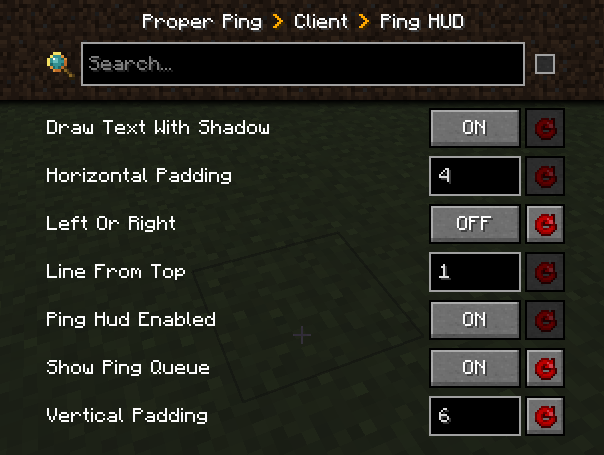 Settings Config, in-game visuals and live editing courtesy of MrCrayfish's "Configured"
 -
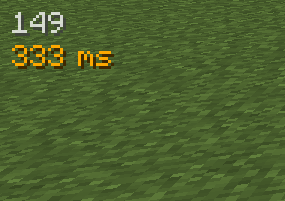 Basic ping display Default settings, the fps element is from Magnesium/Rubidium Extras
 -
 Full display Optional queue of last 5 latency values, hud element on the right side of the scree + numerical values in the player list
-
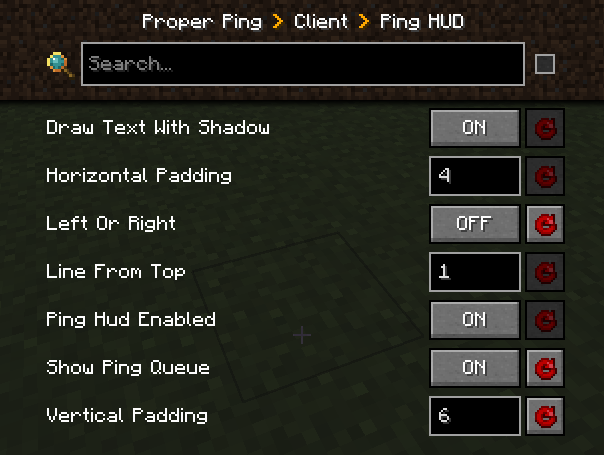 Settings Config, in-game visuals and live editing courtesy of MrCrayfish's "Configured"
 -
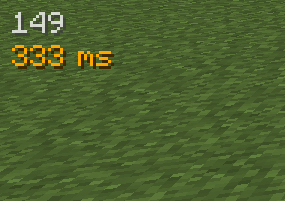 Basic ping display Default settings, the fps element is from Magnesium/Rubidium Extras
 -
 Full display Optional queue of last 5 latency values, hud element on the right side of the scree + numerical values in the player list
Versions
Files
Relations
Project Relations
More like this
Similar Mods
Suggestions use data such as tags, dependencies, dependents, descriptions, titles, and more to rank how much they overlap with this mod.
On ModDex
Community snapshot
By the numbers
Statistics
Want to reach Minecraft players?
We're looking for a server hosting partner to feature here and other parts of the site. Interested? Send us a message!
Get in touchGet it on
Available Platforms
On ModDex
Community snapshot
By the numbers