
Community listing page, reviews here may not be monitored by the author.
PunchList


No reviews yet
Hides every Litematica ghost block except the positions in the Schematic Verifier categories you selected.
Community voices
Reviews
No reviews yet. Be the first to review this project!
Get it on
Available Platforms
Compatibility
Supported Environments
Runs entirely on the client. Works on vanilla servers.
About
Project Details
For authors
Embed Badge
If you're the author of this project, you can embed a live badge anywhere that supports HTML or Markdown. It updates automatically whenever ratings change.
Use HTML for any page that supports it, or Markdown for README files and Markdown-based descriptions.
Identifiers
Platform IDs
About
Description
PunchList is a Litematica companion. Pick the categories you want to work on in the Schematic Verifier (missing, wrong block, wrong state, extra), toggle the filter, and only those positions render as ghost blocks. Every other ghost is hidden, and hidden ghosts do not block your aim, so a flagged block behind unbuilt ghosts can be targeted without moving the camera into the schematic.
Features
- Verifier filter shows only the positions in your selected verifier categories as ghosts. Hidden ghosts do not block Easy Place or pick block.
- Enclosed block hiding adds a cycle button on the verifier screen. It hides positions that are invisible in the finished build, either because every face is covered or because they face a sealed interior pocket. The three modes are described under Usage.
- Adjusted counts appear when you hover a verifier row, showing how many of that material are hidden and how many are visible. This works even with the filter off.
- Follow the player re-centers the verifier marker window as you move. Stock Litematica only re-sorts when you place a block or touch the GUI. The distance defaults to 32 blocks and 0 turns it off. The setting is described under Configuration.
Usage
- Run the Schematic Verifier on a placement and select the categories or entries you want to work on. The filter follows the same selection that drives the verifier's overlay markers.
- Toggle the filter with the hotkey (Litematica > Hotkeys >
punchListFilterToggle, unbound by default) or the PunchList button on the verifier screen. - Cycle the enclosed hiding mode with the Enclosed button on the
verifier screen. Left-click cycles forward and right-click cycles
back. Hiding needs the filter on. Hover counts work either way.
- Show. Nothing is hidden.
- Hide. Positions invisible in the finished build hide, either fully covered or facing a sealed pocket. Leaves are judged with other leaves treated as solid, so canopy interiors hide while logs and branches threading through foliage stay visible.
- Hide (strict). Only opaque full blocks count as cover, so nothing hides behind foliage. Sealed pocket hiding still applies.
- With nothing selected in the verifier the filter does nothing. The filter always starts off at launch.
Configuration
The hotkey binds under Litematica > Hotkeys. Everything else appears in
Litematica's config screen under the Generic tab, searchable like any
Litematica option, and persists in litematica.json.
- Follow Player Distance. Blocks moved before the marker window re-centers. Default 32. 0 disables the feature.
- Enclosed Soft Occluders. Blocks that count as cover only for their
own kind in Hide mode, the way leaves do. Entries are
#namespace:tagornamespace:block. Default#minecraft:leaves. - Pocket Fill. Sealed pocket detection on or off. Default on.
- Pocket Fill Max Volume. Safety cap on the pocket flood fill volume. Default 100 million.
Requirements
Minecraft 26.2, Fabric, plus Fabric API, MaLiLib, and Litematica. Client-side only.
Tested against Litematica 0.28.4 and MaLiLib 0.29.3. On an incompatible version the mod disables itself with a chat message instead of crashing.
Pairs with bHold easyPlace. With the filter on, the only ghosts Easy Place can target are the ones on your list, and hold mode places them without holding the use key.
Credits
masa wrote Litematica and MaLiLib.
Source on GitHub, MIT.
PunchList is a Litematica companion. Pick the categories you want to work on in the Schematic Verifier (missing, wrong block, wrong state, extra), toggle the filter, and only those positions render as ghost blocks. Every other ghost is hidden, and hidden ghosts do not block your aim, so a flagged block behind unbuilt ghosts can be targeted without moving the camera into the schematic.
Features
- Verifier filter shows only the positions in your selected verifier categories as ghosts. Hidden ghosts do not block Easy Place or pick block.
- Enclosed block hiding adds a cycle button on the verifier screen. It hides positions that are invisible in the finished build, either because every face is covered or because they face a sealed interior pocket. The three modes are described under Usage.
- Adjusted counts appear when you hover a verifier row, showing how many of that material are hidden and how many are visible. This works even with the filter off.
- Follow the player re-centers the verifier marker window as you move. Stock Litematica only re-sorts when you place a block or touch the GUI. The distance defaults to 32 blocks and 0 turns it off. The setting is described under Configuration.
Usage
- Run the Schematic Verifier on a placement and select the categories or entries you want to work on. The filter follows the same selection that drives the verifier's overlay markers.
- Toggle the filter with the hotkey (Litematica > Hotkeys >
punchListFilterToggle, unbound by default) or the PunchList button on the verifier screen. - Cycle the enclosed hiding mode with the Enclosed button on the
verifier screen. Left-click cycles forward and right-click cycles
back. Hiding needs the filter on. Hover counts work either way.
- Show. Nothing is hidden.
- Hide. Positions invisible in the finished build hide, either fully covered or facing a sealed pocket. Leaves are judged with other leaves treated as solid, so canopy interiors hide while logs and branches threading through foliage stay visible.
- Hide (strict). Only opaque full blocks count as cover, so nothing hides behind foliage. Sealed pocket hiding still applies.
- With nothing selected in the verifier the filter does nothing. The filter always starts off at launch.
Configuration
The hotkey binds under Litematica > Hotkeys. Everything else appears in
Litematica's config screen under the Generic tab, searchable like any
Litematica option, and persists in litematica.json.
- Follow Player Distance. Blocks moved before the marker window re-centers. Default 32. 0 disables the feature.
- Enclosed Soft Occluders. Blocks that count as cover only for their
own kind in Hide mode, the way leaves do. Entries are
#namespace:tagornamespace:block. Default#minecraft:leaves. - Pocket Fill. Sealed pocket detection on or off. Default on.
- Pocket Fill Max Volume. Safety cap on the pocket flood fill volume. Default 100 million.
Requirements
Minecraft 26.2, Fabric, plus Fabric API, MaLiLib, and Litematica. Client-side only.
Tested against Litematica 0.28.4 and MaLiLib 0.29.3. On an incompatible version the mod disables itself with a chat message instead of crashing.
Pairs with bHold easyPlace. With the filter on, the only ghosts Easy Place can target are the ones on your list, and hold mode places them without holding the use key.
Credits
masa wrote Litematica and MaLiLib.
Source on GitHub, MIT.
Screenshots
Gallery
-
 PunchList a b8b7 mod
 -
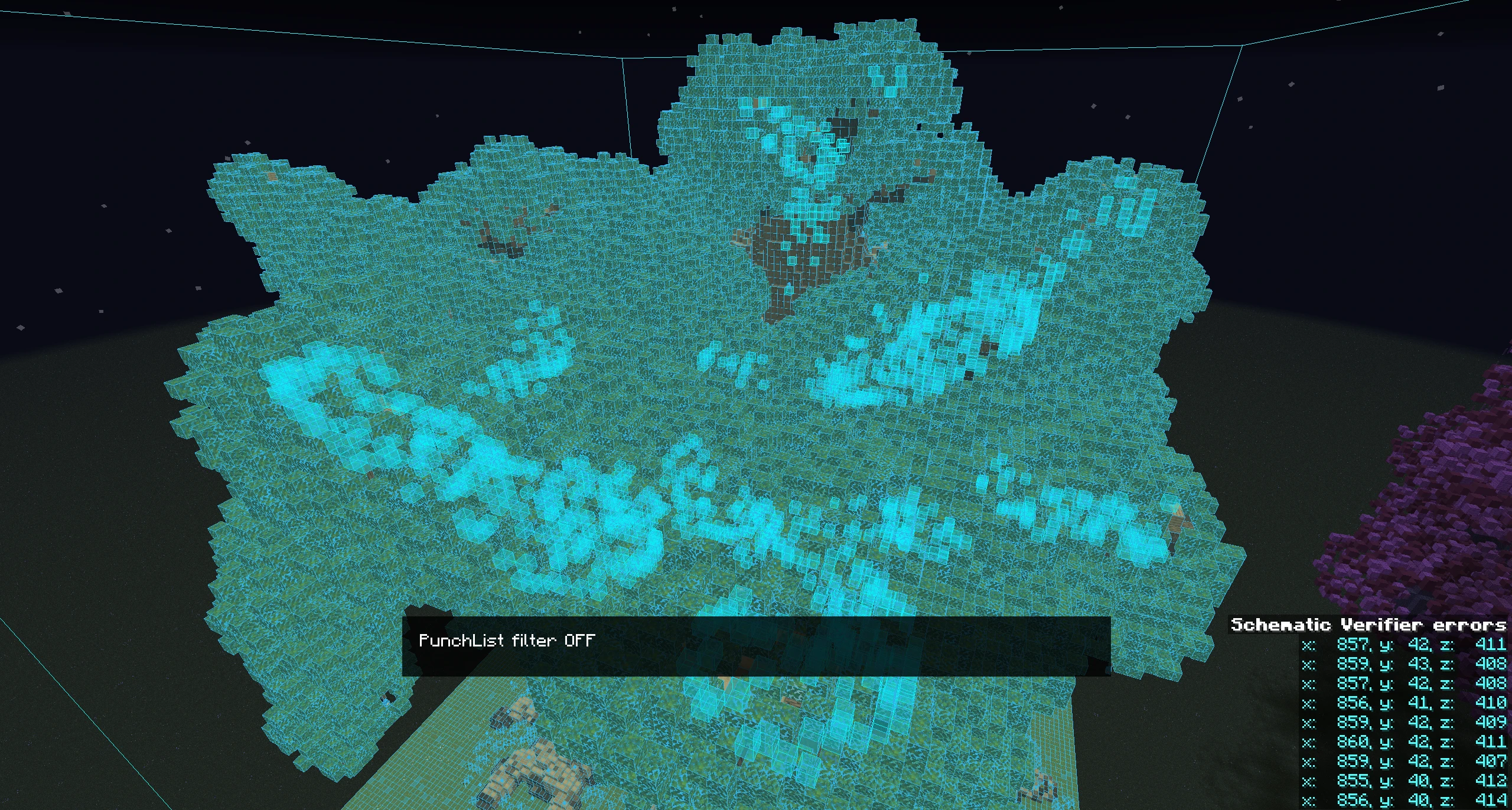 Schematic with PunchList disabled The wood blocks that make up the limbs of three are heavily obfuscated and difficult to place
 -
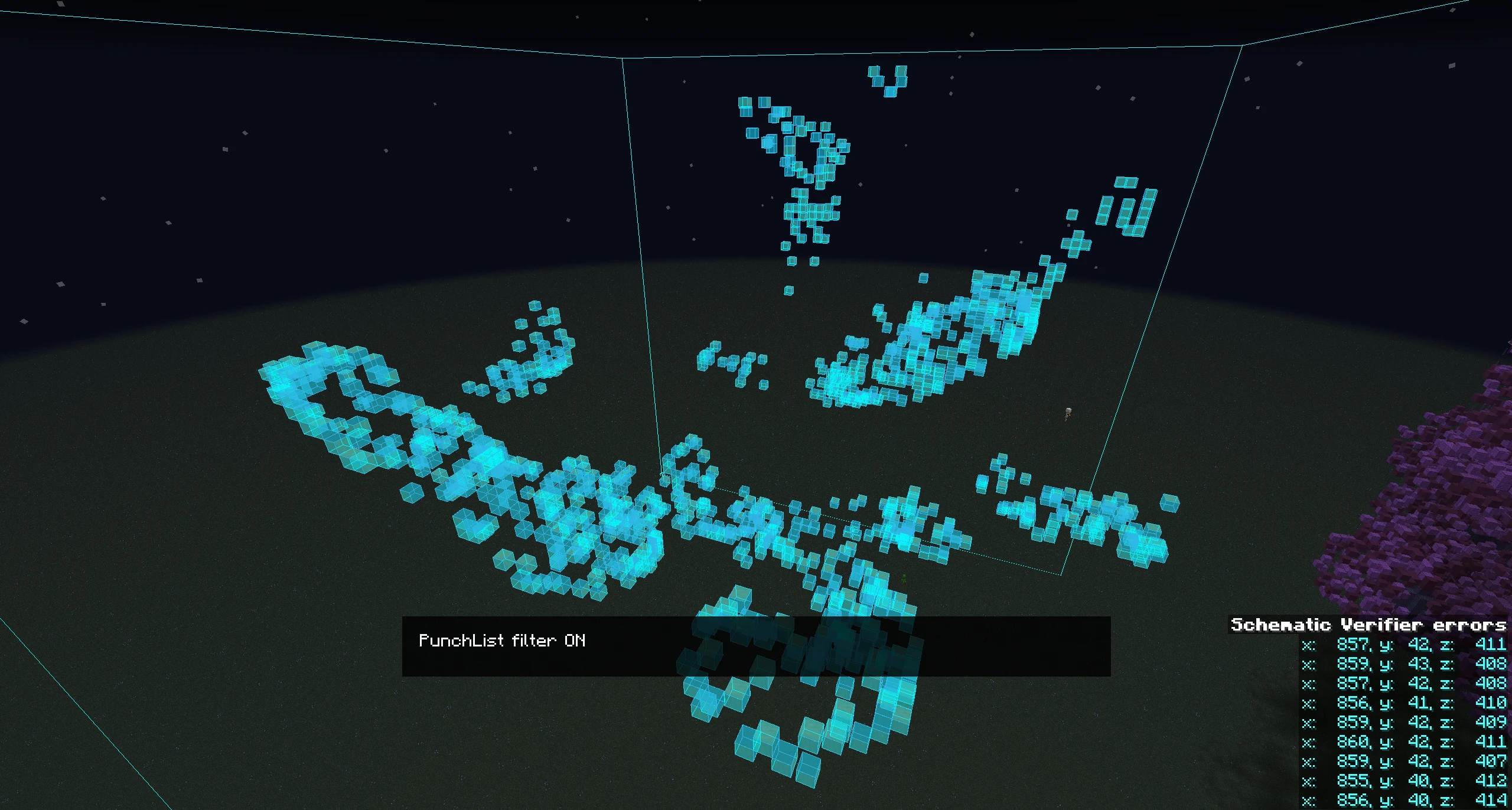 Schematic with PunchList enabled With PunchList, only the blocks you select with Verifier will be shown
 -
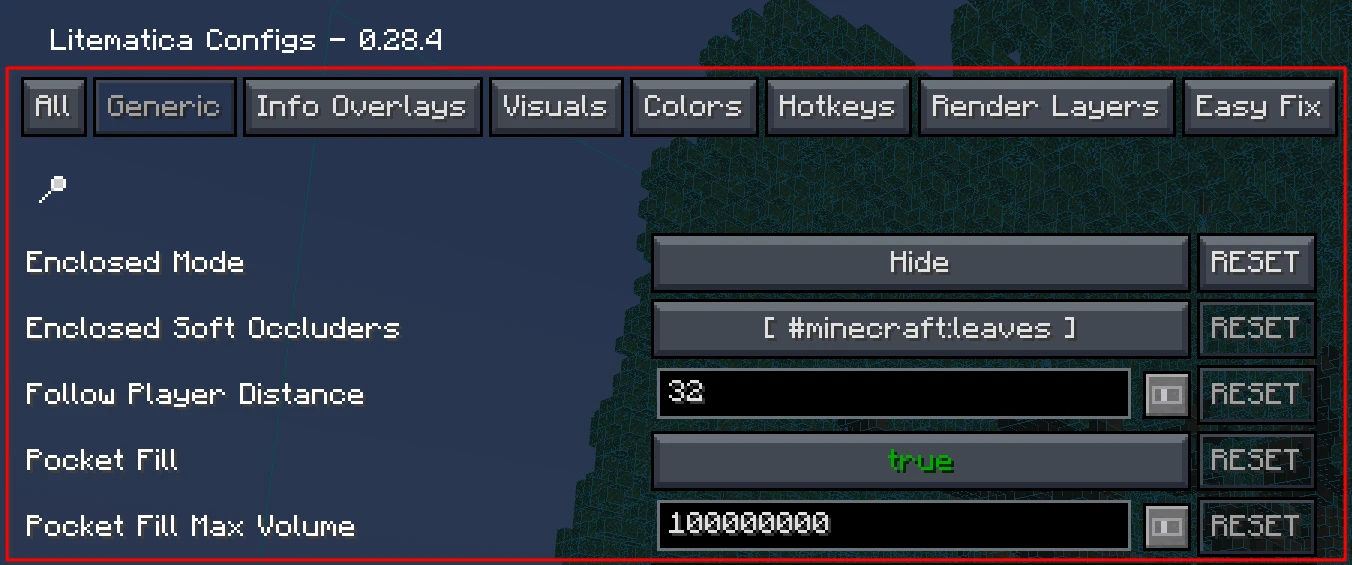 Mod config Shows the PunchList configuration options within Litematica's settings
 -
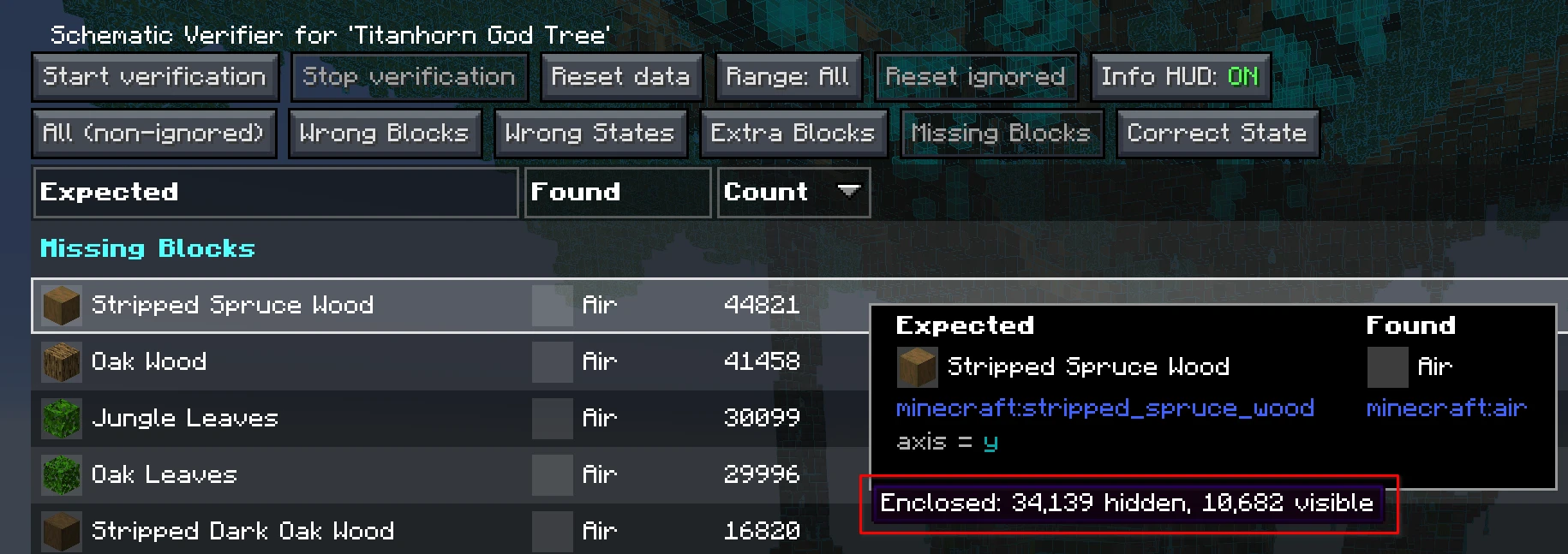 Visible blocks indicator With PunchList enabled, hovering over materials in the Verifier list will show how many visible blocks remain
 -
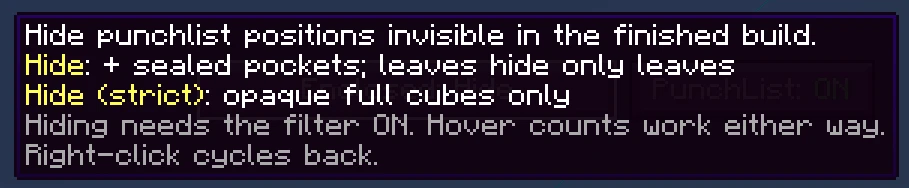 Hide mode tooltip In-game tooltip showing Hide modes
 -
 PunchList toggles within the Verifier Always located in the top-right of the Verifier screen. On/Off can be assigned to a hotkey as well.
-
 PunchList a b8b7 mod
 -
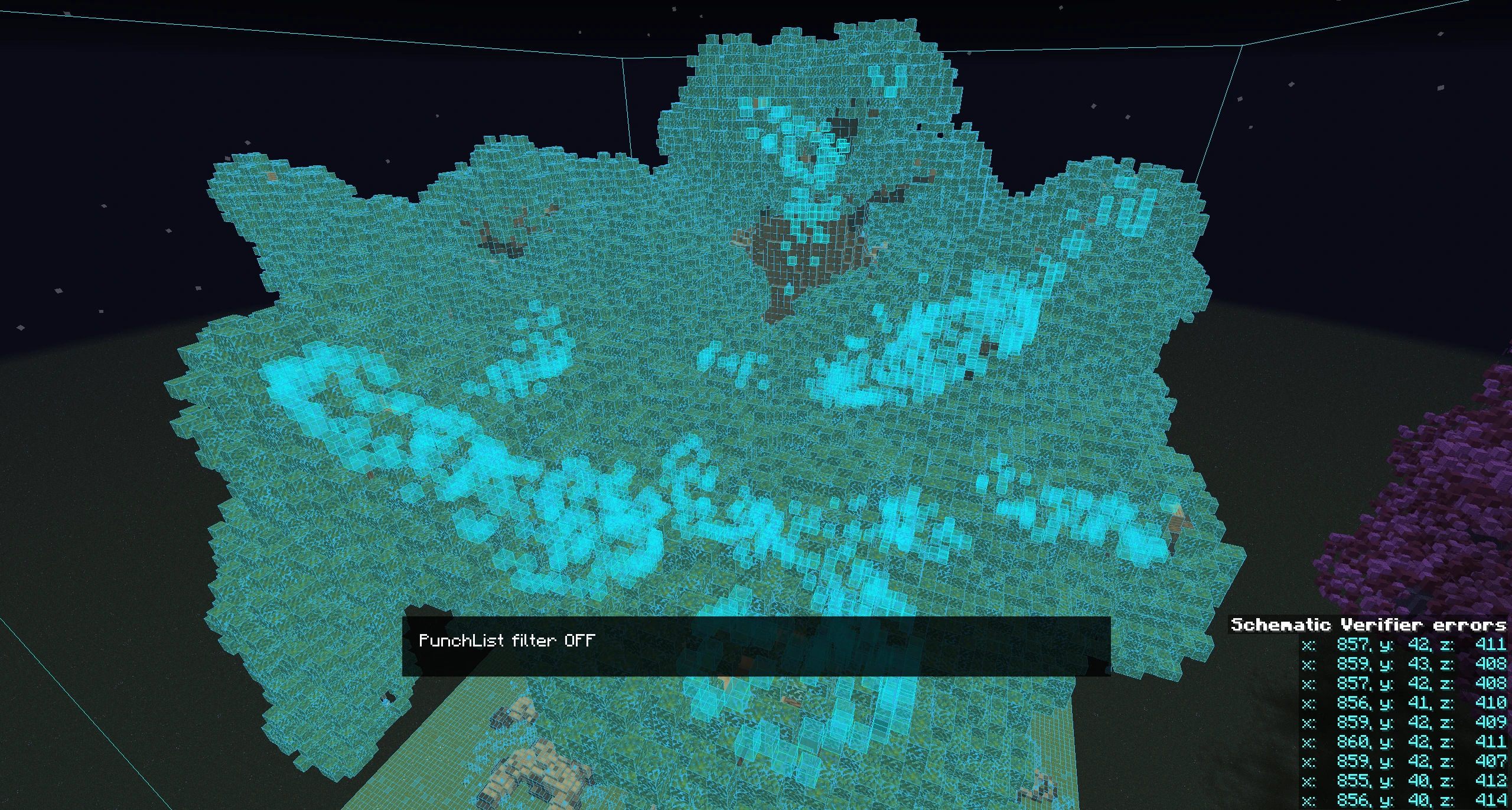 Verifier with PunchList disabled Standard Schematic Verifier experience. Selected blocks from the Verifier are highlighted, but ghost blocks from the schematic are in the way.
 -
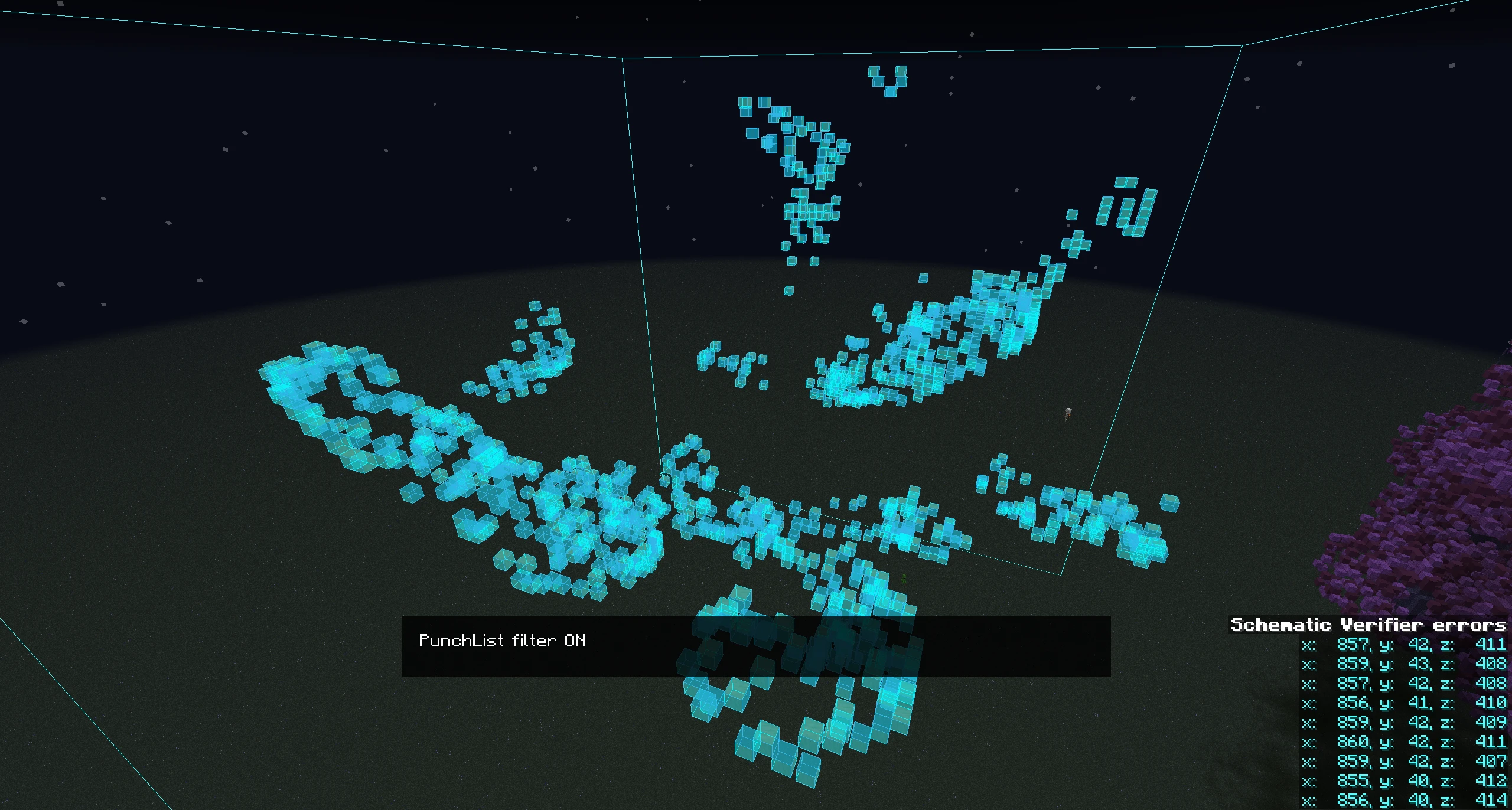 Verifier with PunchList enabled Exact same blocks you've selected in the Verifier with none of the ghost block noise from the rest of the schematic.
 -
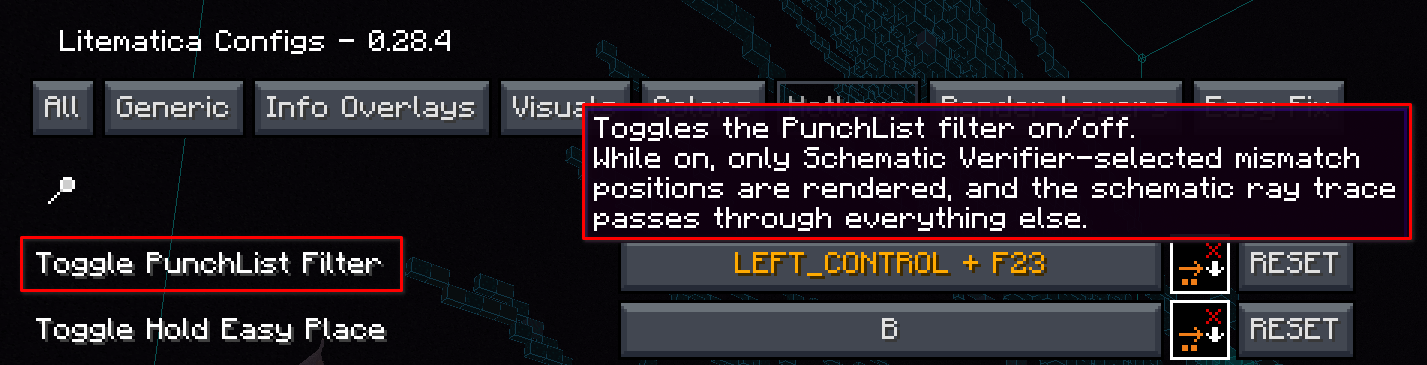 Litematica Hotkey
 -
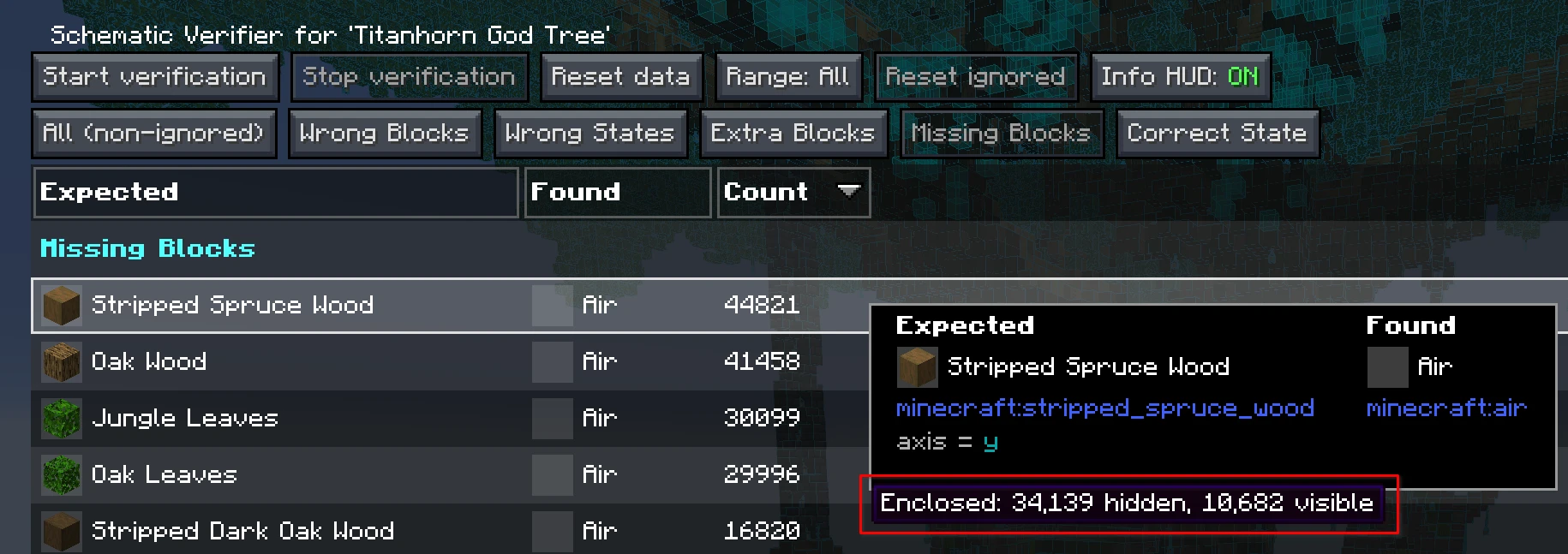 Hidden vs. Visible material comparison Whether PunchList is enabled or not, you will be able to hover and see visible material counts in the Verifier.
 -
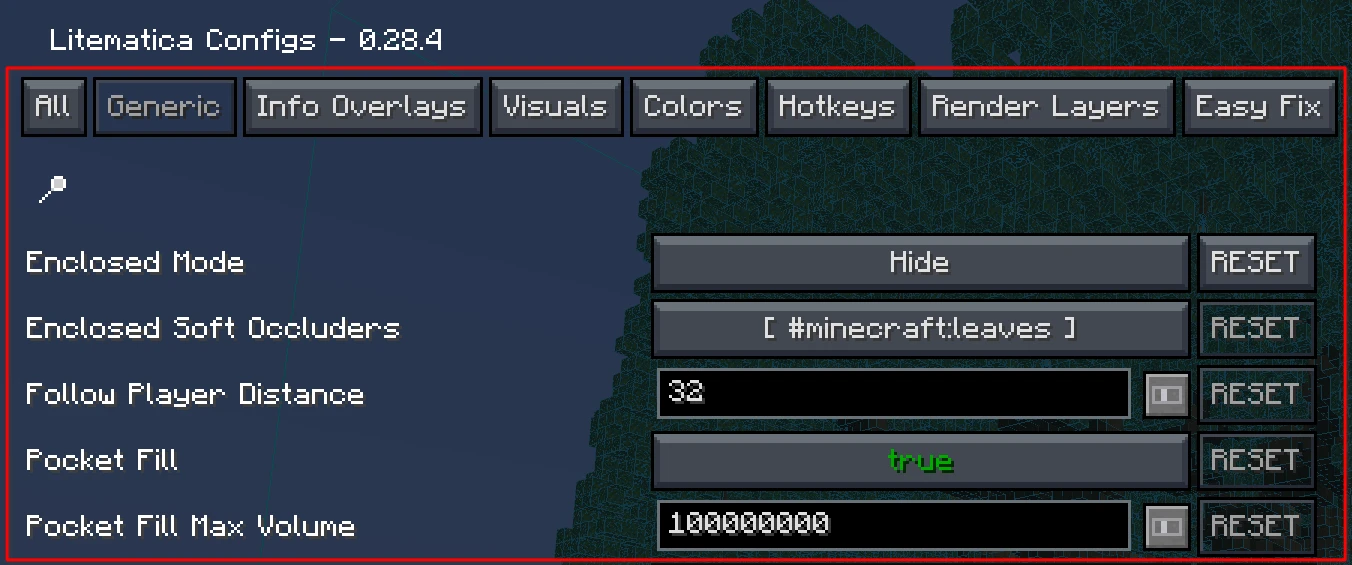 Litematica Config Options Available PunchList settings within Litematica Configs > Generic. All options feature descriptive tooltips on hover.
Versions
Files
Relations
Project Relations
More like this
Similar Mods
Suggestions use data such as tags, dependencies, dependents, descriptions, titles, and more to rank how much they overlap with this mod.
On ModDex
Community snapshot
By the numbers
Statistics
Want to reach Minecraft players?
We're looking for a server hosting partner to feature here and other parts of the site. Interested? Send us a message!
Get in touchGet it on
Available Platforms
On ModDex
Community snapshot
By the numbers