
Community listing page, reviews here may not be monitored by the author.
WEGui


No reviews yet
A mod that provides GUI for the WorldEdit mod and includes paste preview similar to Litematica.
Community voices
Reviews
No reviews yet. Be the first to review this project!
Get it on
Available Platforms
Compatibility
Supported Environments
Runs entirely on the client. Works on vanilla servers.
Must be installed on both the client and the server.
Varies by version.
About
Project Details
For authors
Embed Badge
If you're the author of this project, you can embed a live badge anywhere that supports HTML or Markdown. It updates automatically whenever ratings change.
Use HTML for any page that supports it, or Markdown for README files and Markdown-based descriptions.
Identifiers
Platform IDs
About
Description
Description
Provides a GUI panel and 3D rendering of selections (similar toLitematica) for the WorldEdit mod, allowing you to use WorldEdit easily without having to memorize complicated commands.The mod fully supports English and Chinese.
Function
📂 WE Command Categories</summary> Plans to display all available commands organized by function; simply click to use (still being optimized)
👁 3D rendering preview</summary>
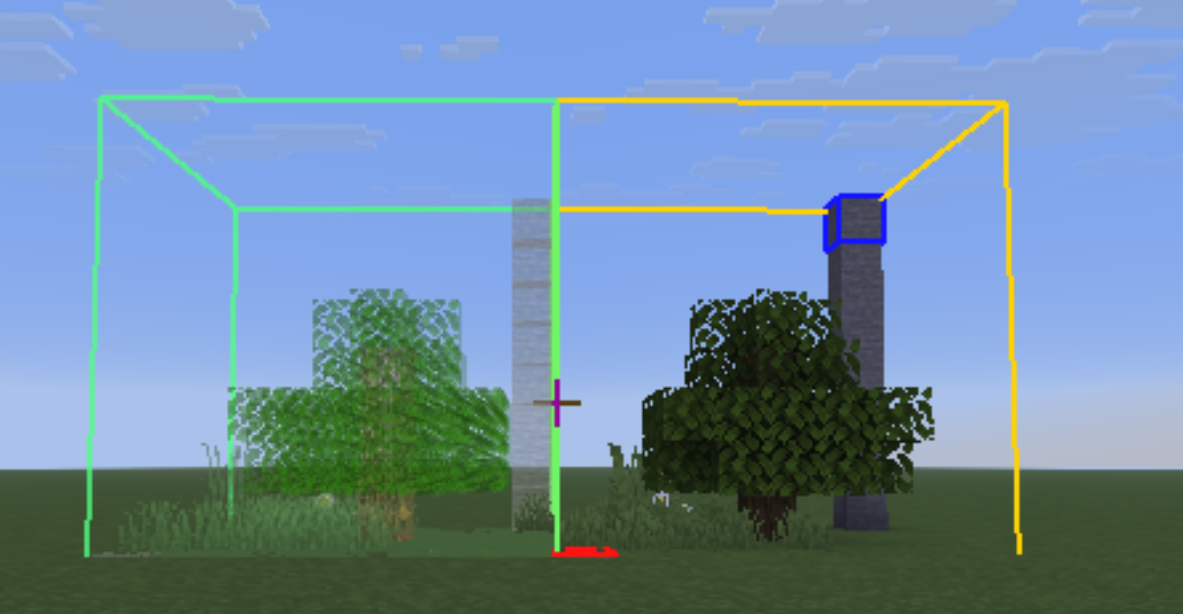
after //copy, you can see where the structure will appear the next time you //paste
📋 Quick Wheel Menu</summary> Supports customizing and adding commands from all available commands
Preview
1 . Paste Preview
⬆️After //copy, you can see where the structure will appear the next time you //paste.If a //rotate or //flip operation is performed, the rendering will be updated accordingly.
2 . Clipboard Position Edit
⬆️After //copy, you can use Ctrl + the scroll wheel to switch to ‘Move Paste Position’ mode, allowing you to move the structure from the clipboard in the same way as the Litematica
3 . GUI
⬆️The GUI.
4 . The Quick Wheel
⬆️Once the GUI is open, click the ⭐️ button to the left of a command to add it to your favourites. Open the wheel to quickly access your favourite commands. The wheel displays a maximum of six items per page; if there are more, a new page will be added.
Note
- Starting with version 0.5.0, this mod adds Litematica as a dependency.
- The preview below shows the old version (which is no longer recommended). The new version features a rendering style that more similar to Litematica
- If you encounter any problem , please feel free to provide feedback to issue
- Versions below 0.5.9 suffer from log leakage! A log entry is output every frame, causing the log size to expand. Please ensure you replace old versions with 0.5.9 or above and clean up any residual logs.
Description
Provides a GUI panel and 3D rendering of selections (similar to Litematica) for the WorldEdit mod, allowing you to use WorldEdit easily without having to memorize complicated commands.The mod fully supports English and Chinese.
Function
📂 WE Command Categories
Plans to display all available commands organized by function; simply click to use (still being optimized)👁 3D rendering preview
after `//copy`, you can see where the structure will appear the next time you `//paste`📋 Quick Wheel Menu
Supports customizing and adding commands from all available commandsPreview
Paste Preview
⬆️After //copy, you can see where the structure will appear the next time you //paste.If a //rotate or //flip operation is performed, the rendering will be updated accordingly.
Clipboard Position Edit
⬆️After //copy, you can use Ctrl + the scroll wheel to switch to ‘Move Paste Position’ mode, allowing you to move the structure from the clipboard in the same way as the Litematica
GUI
⬆️The GUI.
The Quick Wheel
⬆️Once the GUI is open, click the ⭐️ button to the left of a command to add it to your favourites. Open the wheel to quickly access your favourite commands. The wheel displays a maximum of six items per page; if there are more, a new page will be added.
Screenshots
Gallery
Versions
Files
Relations
Project Relations
More like this
Similar Mods
Suggestions use data such as tags, dependencies, dependents, descriptions, titles, and more to rank how much they overlap with this mod.
On ModDex
Community snapshot
By the numbers
Statistics
Want to reach Minecraft players?
We're looking for a server hosting partner to feature here and other parts of the site. Interested? Send us a message!
Get in touchGet it on
Available Platforms
On ModDex
Community snapshot
By the numbers