![[Archived] QDAA (Reforged)](https://media.forgecdn.net/avatars/thumbnails/1734/560/256/256/639104016940814972.png)
Community listing page, reviews here may not be monitored by the author.
[Archived] QDAA (Reforged)


No reviews yet
Forge port of Quick & Dirty Anti-Aliasing which uses super-sampling to achieve less jagged edges on distant blocks.
Community voices
Reviews
No reviews yet. Be the first to review this project!
Get it on
Available Platforms
Compatibility
Supported Environments
Runs entirely on the client. Works on vanilla servers.
About
Project Details
For authors
Embed Badge
If you're the author of this project, you can embed a live badge anywhere that supports HTML or Markdown. It updates automatically whenever ratings change.
Use HTML for any page that supports it, or Markdown for README files and Markdown-based descriptions.
Identifiers
Platform IDs
About
Description
Due to a lack of time, I am no longer updating this mod
QDAA is a mod for Fabric/Quilt (and later on NeoForge in 1.21+) that adds super-sampling to Minecraft. This mod is a port of that mod to Forge 1.20.1
Differences from Original: This forge port includes a settings to configure the scaling factor for the oversampled image. You have options between 1.0x (off), 1.25x, 1.5x, 1.75x, and 2.0x. By default, the mod uses 1.5x as 2.0x is overkill for most cases.
Side-effects (also present in fabric version): Due to the way this mod works, GUI scaling may be different with different scaling factors and thus will need to be readjusted in the settings.
Original Mod Description
Huh?
Antialiasing is often implemented via "FXAA", "TAA", "MSAA", etc. All of these methods are approximations, but they're very fast. FXAA and TAA are basically just really fancy blurs, and MSAA can only smooth polygon edges; pixelated textures are totally missed out on, which is most of what Minecraft is.
Super-sampling is the most pure, accurate, and expensive form of antialiasing. The entire scene is rendered at a higher resolution, and then downscaled for presentation. It's also the easiest to implement.
For example, if you're playing in a 1280×720 window, then QDAA (at 2.0x) will render the game at 2560×1440 instead, and then resize it to 1280×720 before it's drawn to the screen.
This mod reuses functionality in Minecraft that handles macOS Retina displays, so it should be quite compatible, except with other mods that modify how the framebuffer is drawn to the screen. It also technically optimizes the final render step, replacing a normal quad render with a blit.
Notably, due to how this works, QDAA can even antialias GUIs, improving readability of rotated text and smoothing the edges of 3D item models. Shaders only work on the world.

Due to a lack of time, I am no longer updating this mod
This mod is currently cancelled as I have a lot of work these days.
QDAA is a mod for Fabric/Quilt (and later on NeoForge in 1.21+) that adds super-sampling to Minecraft. This mod is a port of that mod to Forge 1.20.1
Differences from Original: This forge port includes a settings to configure the scaling factor for the oversampled image. You have options between 1.0x (off), 1.25x, 1.5x, 1.75x, and 2.0x. By default, the mod uses 1.5x as 2.0x is overkill for most cases.
Side-effects (also present in fabric version): Due to the way this mod works, GUI scaling may be different with different scaling factors and thus will need to be readjusted in the settings.
Original Mod Description
Huh?
Antialiasing is often implemented via "FXAA", "TAA", "MSAA", etc. All of these methods are approximations, but they're very fast. FXAA and TAA are basically just really fancy blurs, and MSAA can only smooth polygon edges; pixelated textures are totally missed out on, which is most of what Minecraft is.
Super-sampling is the most pure, accurate, and expensive form of antialiasing. The entire scene is rendered at a higher resolution, and then downscaled for presentation. It's also the easiest to implement.
For example, if you're playing in a 1280×720 window, then QDAA (at 2.0x) will render the game at 2560×1440 instead, and then resize it to 1280×720 before it's drawn to the screen.
This mod reuses functionality in Minecraft that handles macOS Retina displays, so it should be quite compatible, except with other mods that modify how the framebuffer is drawn to the screen. It also technically optimizes the final render step, replacing a normal quad render with a blit.
Notably, due to how this works, QDAA can even antialias GUIs, improving readability of rotated text and smoothing the edges of 3D item models. Shaders only work on the world.
Screenshots
Gallery
-
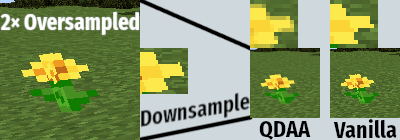 image.png image.png
![[Archived] QDAA (Reforged) screenshot](https://cdn.modrinth.com/data/CBsIxo5J/images/4a336efc8224e40a34bd31c8c9d5da34650aa8f1.png)
Versions
Files
Relations
Project Relations
More like this
Similar Mods
Suggestions use data such as tags, dependencies, dependents, descriptions, titles, and more to rank how much they overlap with this mod.
On ModDex
Community snapshot
By the numbers
Statistics
Want to reach Minecraft players?
We're looking for a server hosting partner to feature here and other parts of the site. Interested? Send us a message!
Get in touchGet it on
Available Platforms
On ModDex
Community snapshot
By the numbers