
Community listing page, reviews here may not be monitored by the author.
Quick Restart

No reviews yet
Quick restart mod FAKES mods reloading like dataPack but actualy it's reloading minecraft.
Community voices
Reviews
No reviews yet. Be the first to review this project!
Get it on
Available Platforms
About
Project Details
For authors
Embed Badge
If you're the author of this project, you can embed a live badge anywhere that supports HTML or Markdown. It updates automatically whenever ratings change.
Use HTML for any page that supports it, or Markdown for README files and Markdown-based descriptions.
Identifiers
Platform IDs
Resources
External Links
About
Description
QuickRestart
Press F10 to reload your mods. QuickRestart saves what you're doing, restarts Minecraft, and puts you right back where you were.
Read this first
QuickRestart does not hot-reload mods. No Forge mod can safely do that – the game simply isn't built for it, and anything claiming otherwise is either lying or about to corrupt your world.
What QuickRestart actually does is restart Minecraft completely, then automatically restore your session. Because the world or server you were on comes back on its own, it feels like a hot reload – without pretending to be one.
If you build modpacks, write mods, or just tweak configs constantly, this replaces the whole "close game → open launcher → wait → click world → wait" ritual with a single keypress.
Features
One key, or one button
- F10 – the "Reload Mods" keybind (rebindable in Controls)
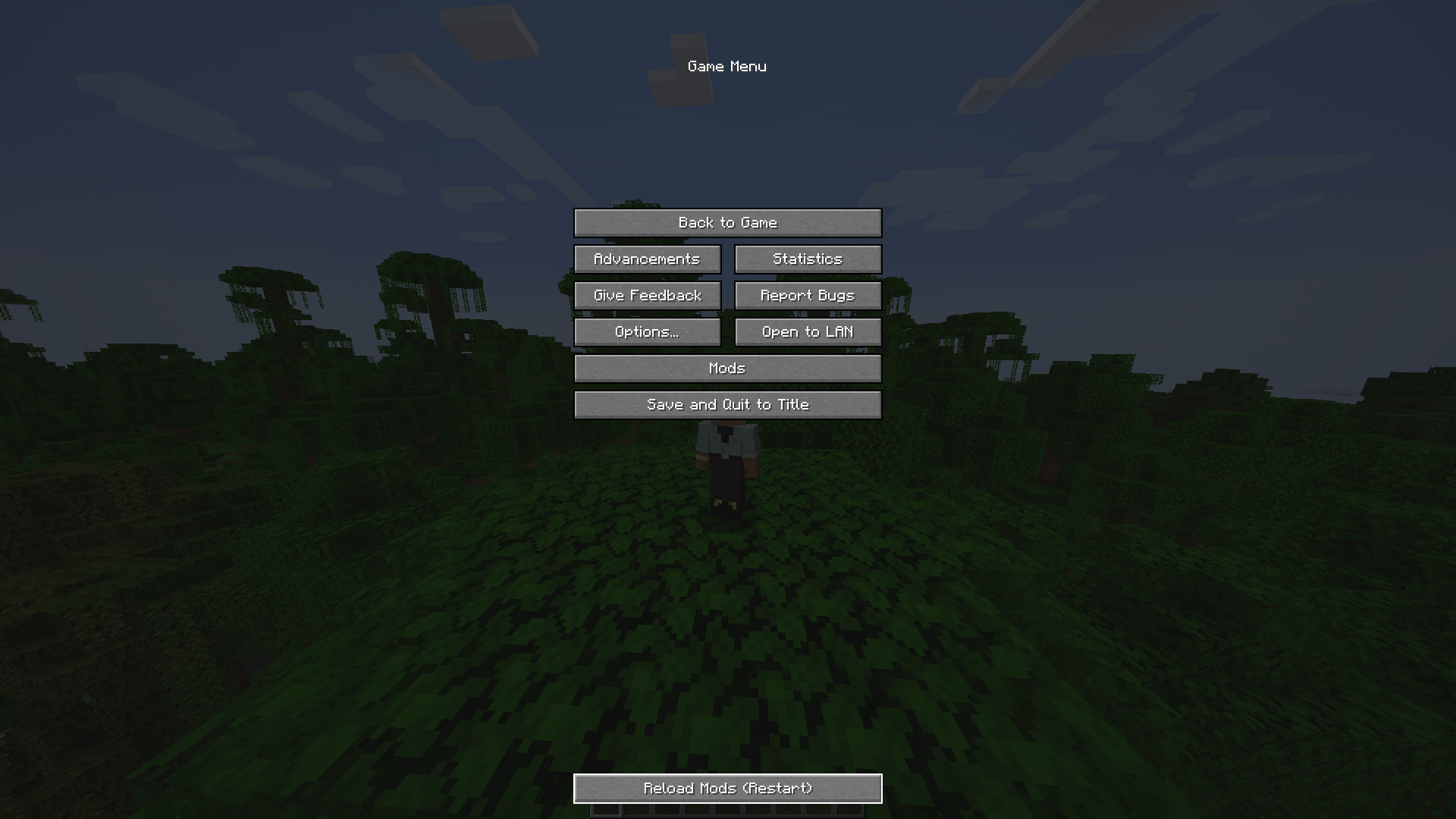
- "Reload Mods (Restart)" – a button added to the pause menu
Both do exactly the same thing, and both ask you to confirm first, so a stray F10 can never nuke your session by accident.
Your session comes back
Before restarting, QuickRestart records where you were:
- On a server? It saves the IP, port and server name, then reconnects you once the game reaches the title screen.
- In a singleplayer world? It saves the world folder and display name, then loads it straight back up.
Once you're back in, the saved session file is deleted. It only ever fires once.
Clean restart experience
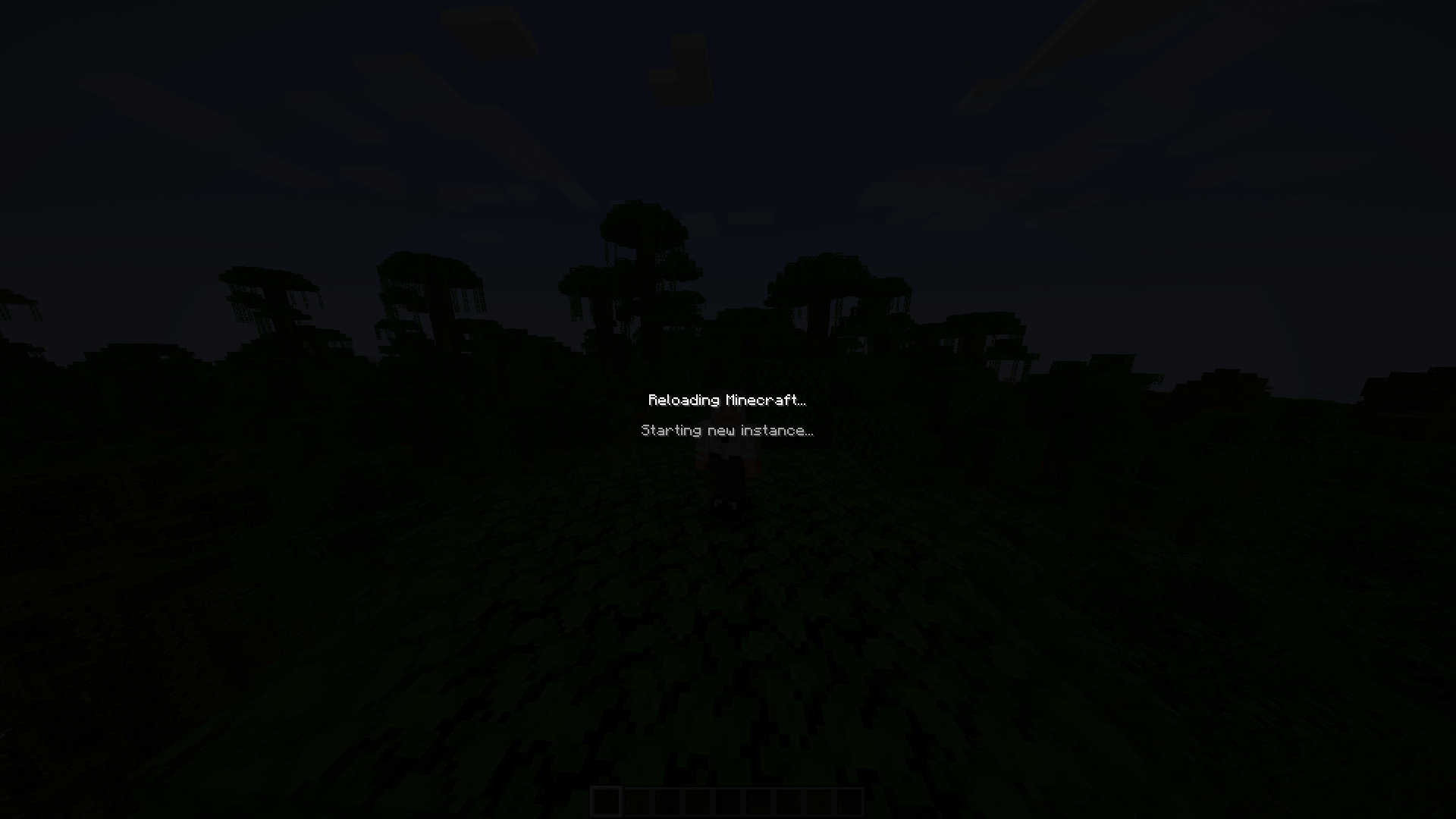
- The screen fades to black with "Reloading Minecraft..." and a live status line
- All input is locked while the restart is in progress
- The old process only closes after the new one is confirmed running – a failed launch can never leave you with no game at all
- A "Minecraft restarted successfully." toast greets you on the way back in
It won't trap you
- Restart failed? You get a proper error screen with the reason and a way back – never a black screen or a hang.
- Auto-rejoin failed? You're left safely at the title screen.
- No restart loops, ever. Restart depth is capped at one, and the counter only resets once the game proves it can reach the title screen.
Screenshots
Screenshots go here – the "Reloading Minecraft..." screen, the confirmation prompt, the pause menu button, and the success toast.
Launcher compatibility
Using the CurseForge App? You're fully supported.
QuickRestart contains no launcher-specific code. It reads the arguments the running game was actually given and replays them, so any launcher that starts Minecraft normally just works – with zero configuration.
| Launcher | Supported |
|---|---|
| CurseForge App | Yes |
| Official Minecraft Launcher | Yes |
| GDLauncher | Yes |
| Legacy Launcher | Yes |
| Modrinth App | Yes |
| ATLauncher / TLauncher | Yes |
| Prism Launcher | No |
| MultiMC / PolyMC | No |
Why Prism, MultiMC and PolyMC can't work
These launchers don't start Minecraft directly. They start a small Java wrapper whose main method ignores its command-line arguments entirely and instead reads the real launch parameters from standard input.
That means the process's own command line contains no game arguments at all. Replaying it would spawn a game that hangs forever waiting on input that never arrives – and the real parameters were consumed long before any mod loads, so they can't be recovered either.
Rather than hang your game, QuickRestart detects these launchers up front and asks you to restart manually. The detected launcher is logged at startup, so it shows up in any bug report.
Configuration
config/quickrestart-client.toml, generated on first launch. Nothing needs configuring – these are only here if you want them.
| Option | Default | What it does |
|---|---|---|
autoReconnect |
true |
Rejoin your previous world/server automatically |
restartDelay |
1000 |
Milliseconds to wait before launching the new process |
showToast |
true |
Show the success toast after restarting |
confirmBeforeRestart |
true |
Ask before restarting (applies to key and button) |
Languages
- English (
en_us) - Русский (
ru_ru)
Every string in the mod is translatable – translation contributions are welcome.
Requirements
- Minecraft 1.20.1
- Forge 47.x
- Java 17
- Client-side only – no need to install it on the server
Technical notes
- No mixins. Everything is built on standard Forge events, so there's nothing to conflict with other mods.
- Safe alongside anything else – QuickRestart touches no game logic, only the launch and session lifecycle.
License
MIT – do what you like with it.
Screenshots
Gallery
-
 Снимок ÑкÑана Ð¾Ñ 2026-07-28 18-06-12.png Снимок ÑкÑана Ð¾Ñ 2026-07-28 18-06-12.png
 -
 Снимок ÑкÑана Ð¾Ñ 2026-07-28 18-06-21.png Снимок ÑкÑана Ð¾Ñ 2026-07-28 18-06-21.png
Versions
Files
Relations
Project Relations
More like this
Similar Mods
Suggestions use data such as tags, dependencies, dependents, descriptions, titles, and more to rank how much they overlap with this mod.
On ModDex
Community snapshot
By the numbers
Statistics
Want to reach Minecraft players?
We're looking for a server hosting partner to feature here and other parts of the site. Interested? Send us a message!
Get in touchGet it on
Available Platforms
On ModDex
Community snapshot
By the numbers
Statistics
Resources