QuickGlance
A minimalist HUD that allows you to see resources and fuel inside the furnaces without opening them.
No ratings yet
Be the first to rate it.
Community listing page
Community listing page, reviews may not be monitored by the author.

Community voices
Reviews
No reviews yet. Be the first to review this project!
Get it on
Available Platforms
Compatibility
Supported Environments
Runs entirely on the client. Works on vanilla servers.
About
Project Details
For authors
Embed Badge
If you're the author of this project, you can embed a live badge anywhere that supports HTML or Markdown. It updates automatically whenever ratings change.
Use HTML for any page that supports it, or Markdown for README files and Markdown-based descriptions.
Identifiers
Platform IDs
About
Description
QuickGlance
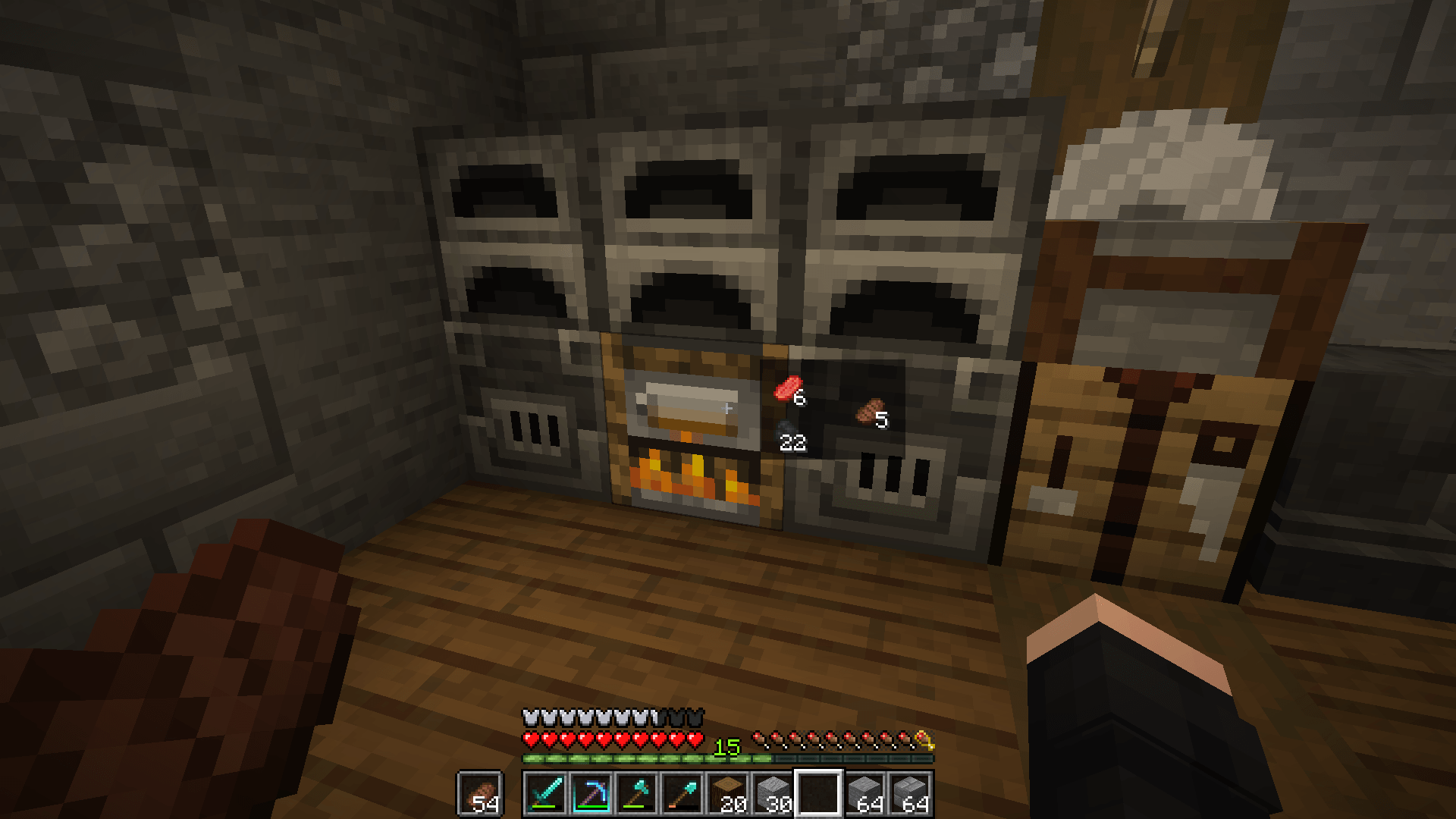
A sleek, minimalist HUD mod that lets you preview container contents in real time just by looking at them — no GUI opening required.
✨ Features
- 👁️ Instant Inspection: Glance at any container to instantly see what's inside without opening it.
- 🌊 Fluid Animations: Smooth cubic ease-out fade-in and fade-out transitions.
- 🛡️ Anti-Flicker (Grace Period): A smart delay prevents the HUD from flashing or jittering when your crosshair quickly sweeps past blocks.
- 📦 Adaptive Container Layouts:
- Furnaces, Blast Furnaces & Smokers: Dedicated slots for fuel, input, and cooking results.
- Campfires & Soul Campfires: Compact 2×2 grid showing all 4 cooking items.
- Chests, Hoppers, Dispensers, Brewing Stands & More: Auto-scaling rows and wrapped grids for any inventory size.
- 🌐 Multiplayer & Server Friendly: Works seamlessly in singleplayer and uses ultra-lightweight packets when installed on servers.
- 🧩 Datapack Extensible: Easily add support or custom layouts for modded containers using simple JSON tags without writing code!
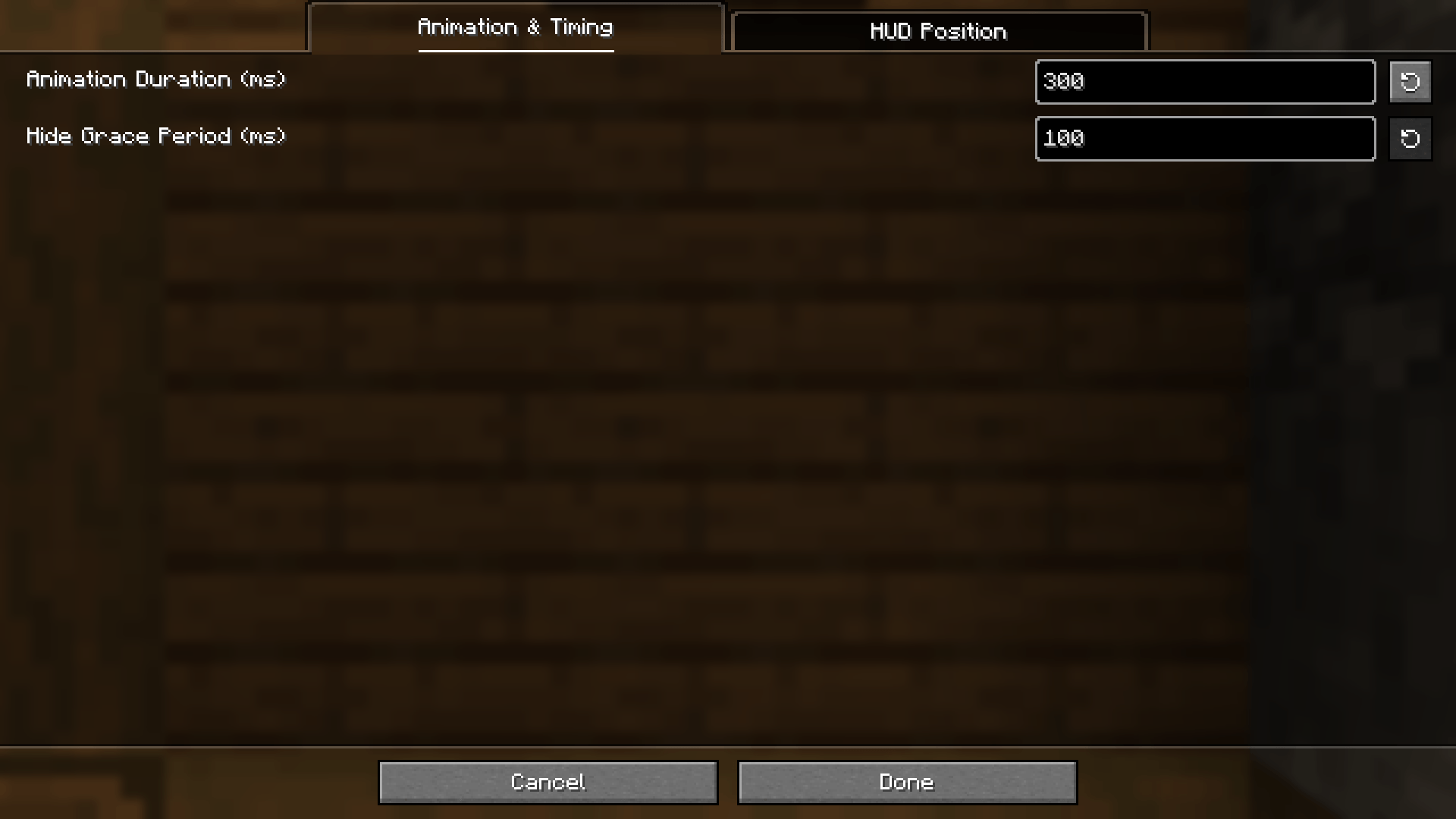
⚙️ Configuration
Customize the HUD to fit your screen and playstyle!
You can configure options in-game using:
- Fabric / Quilt: via Mod Menu
- NeoForge: via the built-in Mods config menu
- Or by editing
config/quickglance.jsondirectly.
| Setting | Default | Description |
|---|---|---|
Animation Duration (animDurationMs) |
150 ms |
Controls how fast the HUD fades in and out. |
Grace Period (gracePeriodMs) |
100 ms |
Delay before hiding the HUD after looking away (prevents annoying flickering). |
Offset X / Offset Y (offsetX, offsetY) |
14 / 22 |
Adjusts HUD position relative to your crosshair for the perfect fit. |
🔌 Compatibility & Installation
- Supported Loaders: Fabric, Quilt, and NeoForge.
- Dependencies: Requires Fabric API on Fabric/Quilt.
- Multiplayer: Install on both client and server for full synchronization.
📖 Adding Modded Containers (Datapacks)
QuickGlance is fully datapack-driven. You can tag any modded container block entity to support QuickGlance layouts:
#quickglance:furnace_like— 3-slot furnace layout.#quickglance:campfire_like— 2×2 campfire layout.#quickglance:row_like— dynamic item row / grid.
Check out DATAPACKS.md on GitHub for full instructions and examples.
QuickGlance
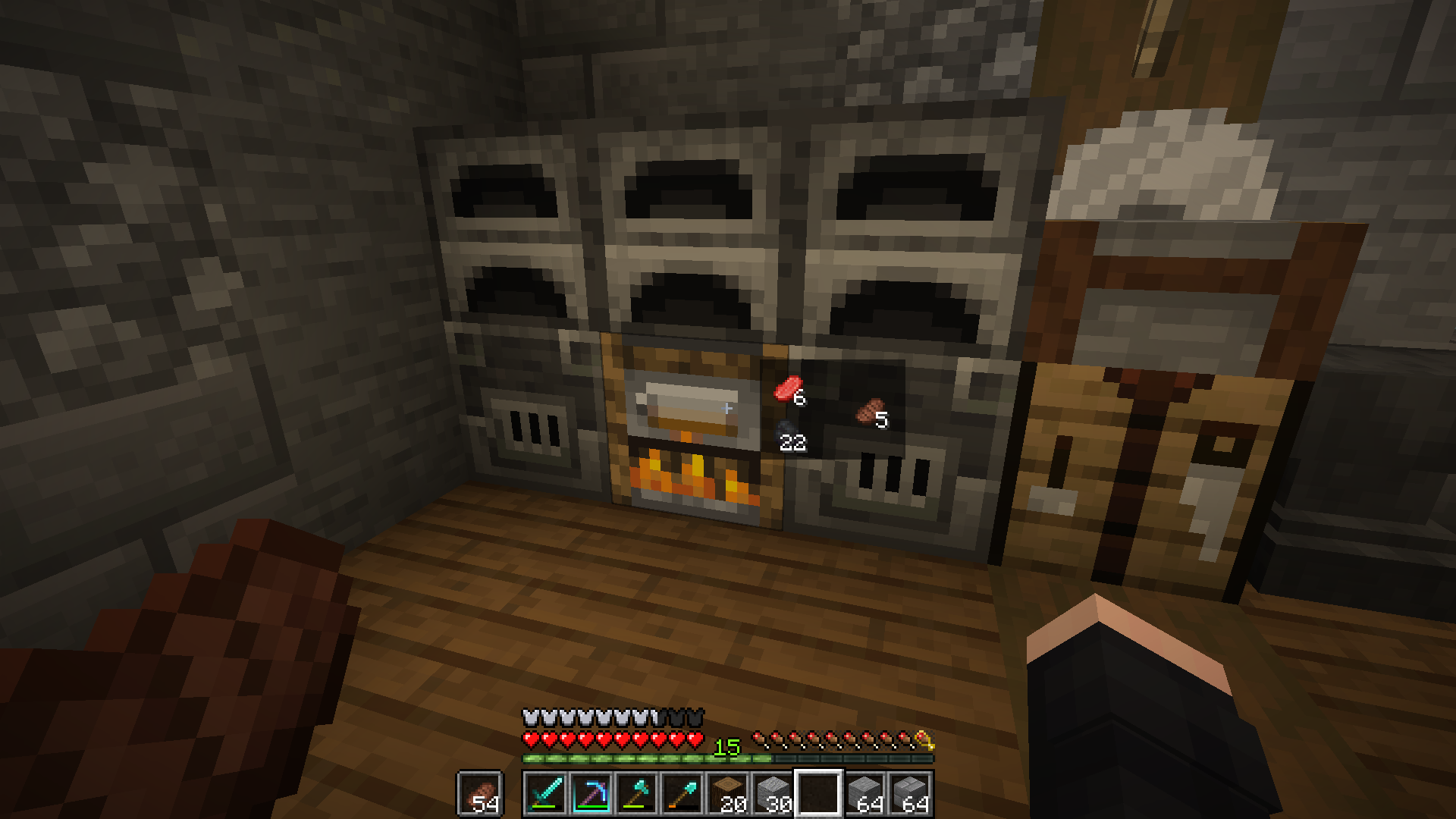
A sleek, minimalist HUD mod that lets you preview container contents in real time just by looking at them — no GUI opening required.
✨ Features
- 👁️ Instant Inspection: Glance at any container to instantly see what's inside without opening it.
- 🌊 Fluid Animations: Smooth cubic ease-out fade-in and fade-out transitions.
- 🛡️ Anti-Flicker (Grace Period): A smart delay prevents the HUD from flashing or jittering when your crosshair quickly sweeps past blocks.
- 📦 Adaptive Container Layouts:
- Furnaces, Blast Furnaces & Smokers: Dedicated slots for fuel, input, and cooking results.
- Campfires & Soul Campfires: Compact 2×2 grid showing all 4 cooking items.
- Chests, Hoppers, Dispensers, Brewing Stands & More: Auto-scaling rows and wrapped grids for any inventory size.
- 🌐 Multiplayer & Server Friendly: Works seamlessly in singleplayer and uses ultra-lightweight packets when installed on servers.
- 🧩 Datapack Extensible: Easily add support or custom layouts for modded containers using simple JSON tags without writing code!
⚙️ Configuration
Customize the HUD to fit your screen and playstyle!
You can configure options in-game using:
- Fabric / Quilt: via Mod Menu
- NeoForge: via the built-in Mods config menu
- Or by editing
config/quickglance.jsondirectly.
| Setting | Default | Description |
|---|---|---|
Animation Duration (animDurationMs) |
150 ms |
Controls how fast the HUD fades in and out. |
Grace Period (gracePeriodMs) |
100 ms |
Delay before hiding the HUD after looking away (prevents annoying flickering). |
Offset X / Offset Y (offsetX, offsetY) |
14 / 22 |
Adjusts HUD position relative to your crosshair for the perfect fit. |
🔌 Compatibility & Installation
- Supported Loaders: Fabric, Quilt, and NeoForge.
- Dependencies: Requires Fabric API on Fabric/Quilt.
- Multiplayer: Install on both client and server for full synchronization.
📖 Adding Modded Containers (Datapacks)
QuickGlance is fully datapack-driven. You can tag any modded container block entity to support QuickGlance layouts:
#quickglance:furnace_like— 3-slot furnace layout.#quickglance:campfire_like— 2×2 campfire layout.#quickglance:row_like— dynamic item row / grid.
Check out DATAPACKS.md on GitHub for full instructions and examples.
Screenshots
Gallery
-
Hud
-
 First settings page
-
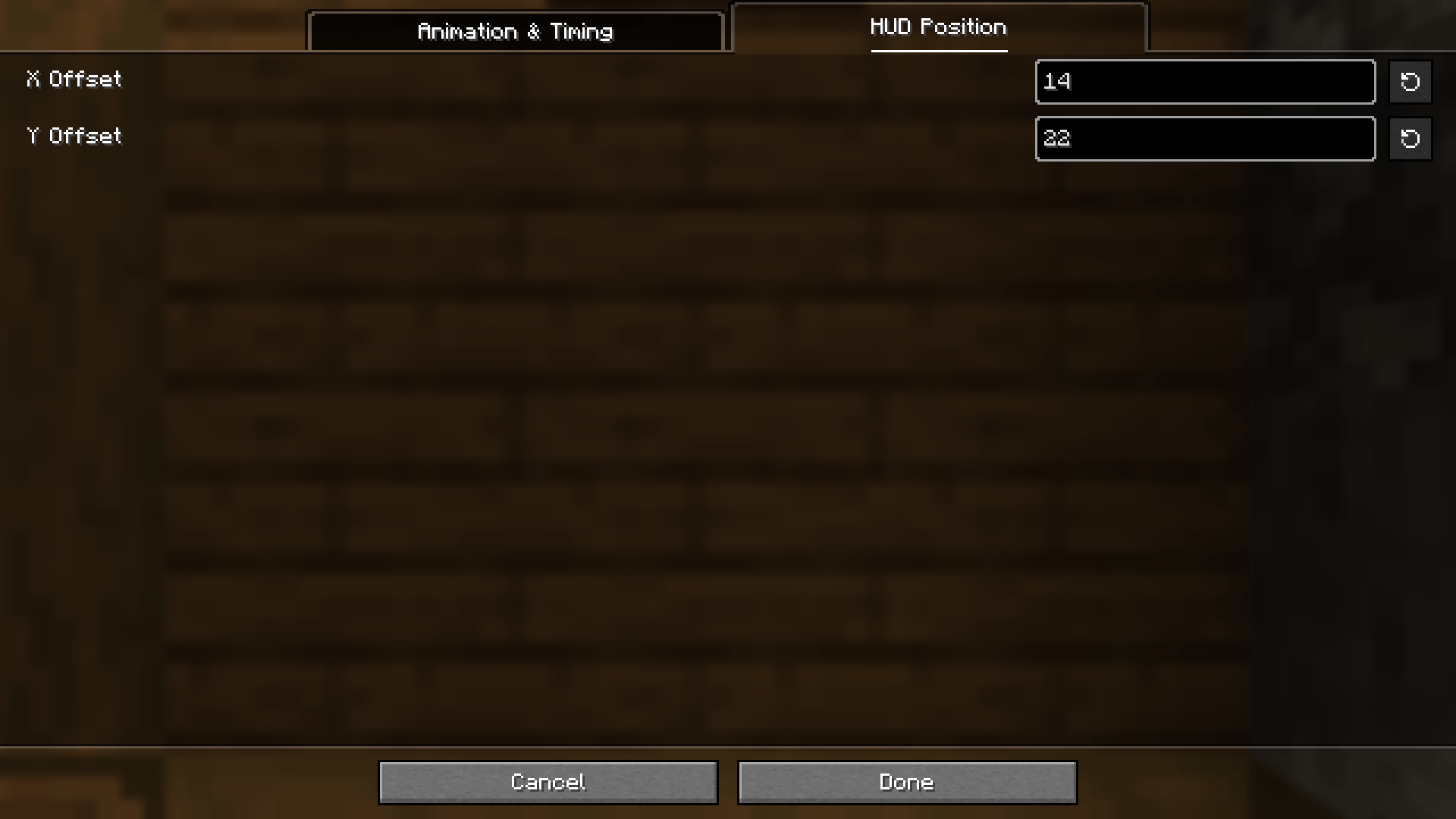 Second settings page
-
 Mod hud It is how look mod hud
-
 Mod preview
-
 First settings page
-
 Second settings page
Versions
Files
Relations
Project Relations
More like this
Similar Mods
Suggestions use data such as tags, dependencies, dependents, descriptions, titles, and more to rank how much they overlap with this mod.
Stats
- Downloads
-
<1,000
 <1,000
 <1,000
- Used in
- 0 modpacks
- Followers
- 0
- In stacks
- 0
- Created
-
- Last synced
-
Nov 19, 2026 1:20 PM UTC
New file updates sync automatically.
When ModDex last fully re-synced this project from CurseForge or Modrinth. A new file release triggers a resync usually within minutes, and every project is also re-synced on a schedule. Edits that don't ship a file, such as a new description or screenshots, are checked every few hours and can appear before this date changes.
How syncing works
External Links

Stats
- Downloads
-
<1,000
<1,000
<1,000
- Used in
- 0 modpacks
- Followers
- 0
- In stacks
- 0
- Created
-
- Last synced
-
Nov 19, 2026 1:20 PM UTC
New file updates sync automatically.
When ModDex last fully re-synced this project from CurseForge or Modrinth. A new file release triggers a resync usually within minutes, and every project is also re-synced on a schedule. Edits that don't ship a file, such as a new description or screenshots, are checked every few hours and can appear before this date changes.
How syncing works