Community listing page, reviews here may not be monitored by the author.
Rainbow Chat


No reviews yet
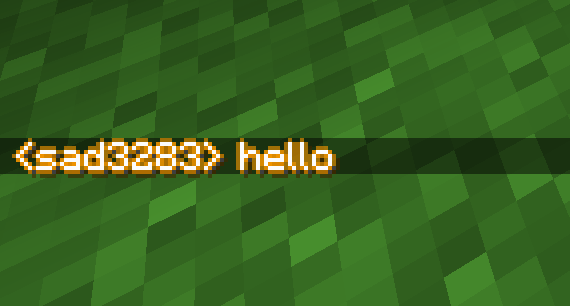
Chat Glow enhances your default Minecraft chat HUD by adding a subtle, dynamic glowing aura to all chat text.
Community voices
Reviews
No reviews yet. Be the first to review this project!
Get it on
Available Platforms
Compatibility
Supported Environments
Runs entirely on the client. Works on vanilla servers.
About
Project Details
For authors
Embed Badge
If you're the author of this project, you can embed a live badge anywhere that supports HTML or Markdown. It updates automatically whenever ratings change.
Use HTML for any page that supports it, or Markdown for README files and Markdown-based descriptions.
Identifiers
Platform IDs
Resources
External Links
About
Description
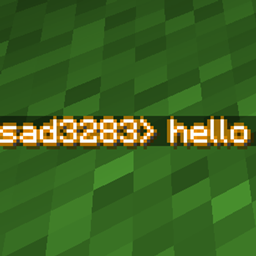
Chat Glow is a lightweight, client-side Fabric mod that upgrades the appearance and readability of your default Minecraft chat. It replaces the flat, static vanilla drop shadow with a beautiful, pulsing neon gold-to-orange glow outline.
What It Does
- Pulsing Glow Outline: Captures all text rendered in your chat HUD and wraps every character in a smooth, ambient glow that gently transitions between a warm neon gold and a vibrant orange.
- Enhanced Readability: The 4-directional outline creates high contrast, making messages incredibly easy to read against bright backgrounds like snow, desert sand, or sky, where default chat text normally washes out.
- Smooth Fading: Fully syncs with Minecraft’s default chat animations. As your chat messages fade away, the glow fades out naturally alongside them.
- Highly Optimized: Built using efficient Sponge Mixins with zero frame drops, meaning you get premium visuals without sacrificing performance.
- Client-Side Only: Runs entirely on your computer. You can safely join any vanilla or modded multiplayer server, and the glowing effect will work perfectly.
How to Use It
- Install Fabric: Ensure you have the Fabric Loader installed for Minecraft 1.21.1 (or compatible 1.21.x version).
- Add the Mod: Download the rainbowchat
mod 1.21.1+.jarfile and place it directly into your Minecraftmodsfolder (located inside your.minecraftdirectory). > or install in curseforge if you have the app - Ensure Dependencies: Make sure you also have the Fabric API mod in your
modsfolder. - Play: Launch Minecraft using your Fabric profile, join any world or multiplayer server, and open your chat window—your messages will immediately start glowing!
(yes description is ai slop)
✨ Chat Glow (Rainbow Chat)
Chat Glow is a lightweight, client-side Fabric mod that upgrades the appearance and readability of your default Minecraft chat. It replaces the flat, static vanilla drop shadow with a beautiful, pulsing neon gold-to-orange glow outline.
📝 What It Does
Pulsing Glow Outline: Captures all text rendered in your chat HUD and wraps every character in a smooth, ambient glow that gently transitions between a warm neon gold and a vibrant orange.
Enhanced Readability: The 4-directional outline creates high contrast, making messages incredibly easy to read against bright backgrounds like snow, desert sand, or sky, where default chat text normally washes out.
Smooth Fading: Fully syncs with Minecraft’s default chat animations. As your chat messages fade away, the glow fades out naturally alongside them.
Highly Optimized: Built using efficient Sponge Mixins with zero frame drops, meaning you get premium visuals without sacrificing performance.
Client-Side Only: Runs entirely on your computer. You can safely join any vanilla or modded multiplayer server, and the glowing effect will work perfectly.
🛠️ How to Use It
Install Fabric: Ensure you have the Fabric Loader installed for Minecraft 1.21.1 (or compatible 1.21.x version)
Add the Mod: Download the modid-1.0.0.jar file and place it directly into your Minecraft mods folder (located inside your .minecraft directory).
Ensure Dependencies: Make sure you also have the Fabric API mod in your mods folder.
Play: Launch Minecraft using your Fabric profile, join any world or multiplayer server, and open your chat window—your messages will immediately start glowing!
(yes description is ai slop)
Screenshots
Gallery
Versions
Files
Relations
Project Relations
More like this
Similar Mods
Suggestions use data such as tags, dependencies, dependents, descriptions, titles, and more to rank how much they overlap with this mod.
On ModDex
Community snapshot
By the numbers
Statistics
Want to reach Minecraft players?
We're looking for a server hosting partner to feature here and other parts of the site. Interested? Send us a message!
Get in touchGet it on
Available Platforms
On ModDex
Community snapshot
By the numbers
Statistics
Resources