
Community listing page, reviews may not be monitored by the author.
LuckPerms GUI & NameTags

No reviews yet
Manage LuckPerms roles with an in-game GUI — and show animated prefixes (rainbow, gradient, pulse, glow) over the head, in the Tab and in chat. Edit groups, prefixes, colors and members visually; works on vanilla clients.

Community voices
Reviews
No reviews yet. Be the first to review this project!
Get it on
Available Platforms
About
Project Details
For authors
Embed Badge
If you're the author of this project, you can embed a live badge anywhere that supports HTML or Markdown. It updates automatically whenever ratings change.
Use HTML for any page that supports it, or Markdown for README files and Markdown-based descriptions.
Identifiers
Platform IDs
Resources
External Links
About
Description
LuckPerms GUI & NameTags
Manage LuckPerms roles with an in-game GUI — and show animated prefixes over the head, in the Tab and in chat.
Forge • Minecraft 1.20.1 • Requires LuckPerms 5.4+ • Server (client optional for animations)
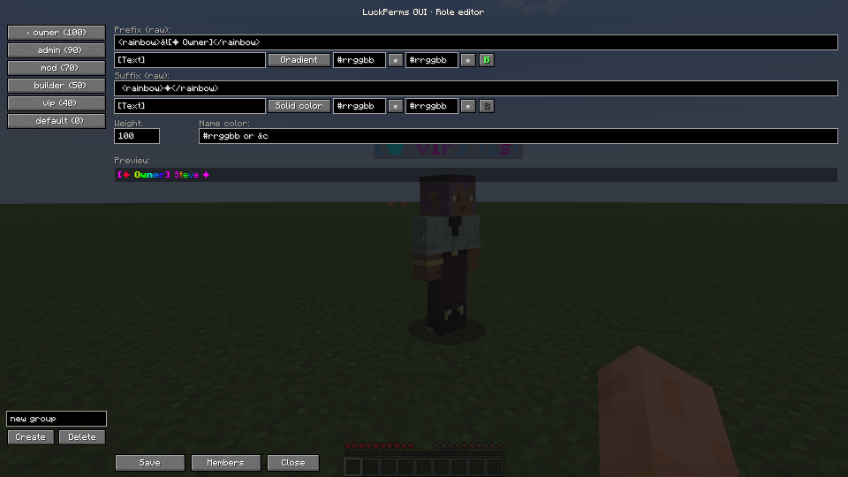
LuckPerms GUI & NameTags gives LuckPerms a visual, in-game admin interface and finally shows the player's role over the head, in the Tab list and in chat — with smooth animations (rainbow, moving gradient, pulse, glow). Create and edit groups, design prefixes/suffixes with a color palette and live preview, and assign players to roles — all without typing a single command.
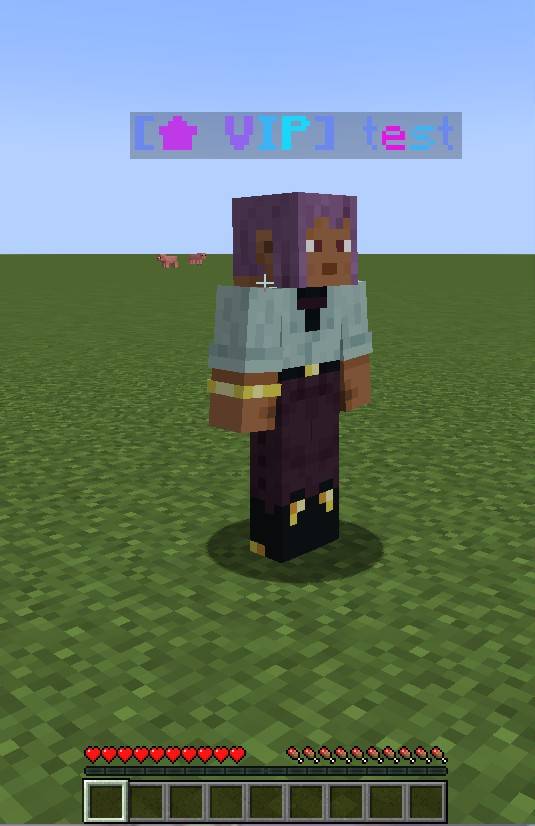
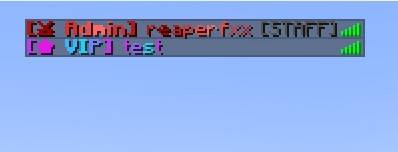
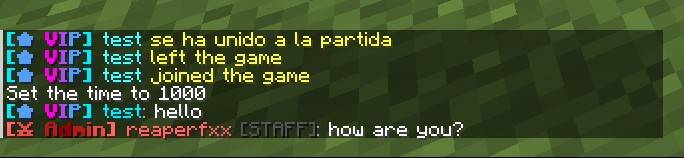
Roles over the head, in the Tab & in chat
Key Features
- In-game admin GUI — manage LuckPerms visually: create / edit / delete groups, set prefix, suffix, weight and name color, and assign players. No commands needed.
- Roles everywhere — the role shows in chat, the Tab list and over the player's head.
- Animations — rainbow, moving gradient, pulse and glow wave, on the head and Tab.
- Live color editor + palette — a guided builder (text + animation + colors) with a clickable color palette and a real-time animated preview, or edit the raw tags directly.
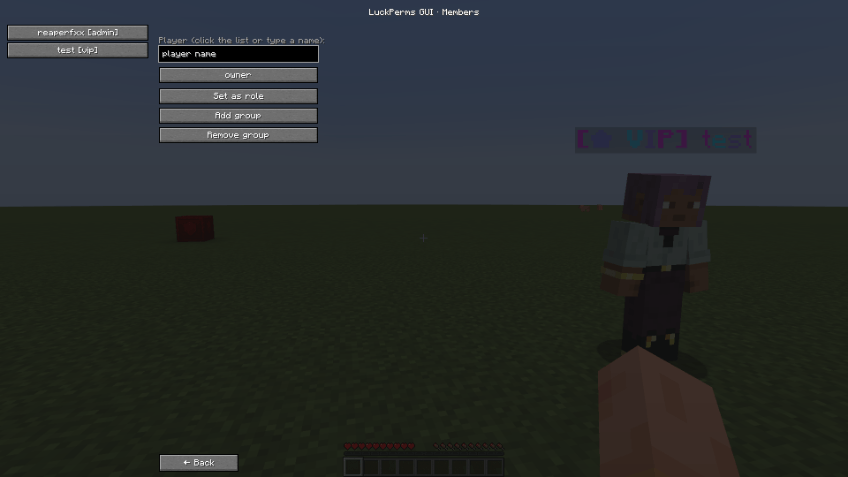
- Member management — set, add or remove a group for any player, online or offline (by name).
- Works on vanilla clients — the server writes the role into vanilla scoreboard teams, so vanilla clients see it (static). Install the mod on the client to see the animations.
- Tab sorted by rank — the Tab list is ordered by the group's weight.
- Live sync — changing a role in LuckPerms updates the nametag instantly, no relog.
- Multilingual — English & Spanish, following the client's language.
- Safe — the GUI is OP-gated and every action is re-validated server-side.
The Admin GUI
Open the editor with /luckpermsgui gui (or /lpgui), a configurable key, or the ⚙ Roles button in the inventory and the Esc menu (OP only). Pick a group on the left and edit its prefix and suffix in two compact blocks: type the text, choose an animation, pick colors from the palette and toggle bold — the preview animates live as you type. Advanced users can edit the raw tag string directly.
Members
In the Members tab, click an online player (or type any username, even offline) and choose a group: Set as role (primary group), Add group or Remove group. Changes are written straight to LuckPerms.
Animations & Colors
Prefixes and suffixes support legacy codes, hex colors, gradients and animated tags. Animated effects move on clients that have the mod; vanilla clients see a static snapshot.
| Effect | Tag / code | Animated |
|---|---|---|
| Legacy / hex color | &c &#ff8800 <#ff8800> | — |
| Gradient (static) | <gradient:#ff0000:#00ff00>...</gradient> | — |
| Rainbow | <rainbow>...</rainbow> | yes |
| Moving gradient | <flow:#00ffff:#ff00ff>...</flow> | yes |
| Pulse | <pulse:#2ecc71:#16a085>...</pulse> | yes |
| Glow wave | <wave:#f1c40f>...</wave> | yes |
Join & leave messages
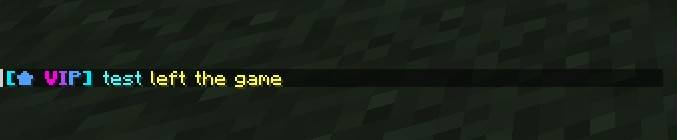
Join and leave messages also show the player's role with its colors.

How it works
- Server — reads LuckPerms meta and writes it to vanilla scoreboard teams (head + Tab, ordered by weight) and formats chat. This is what vanilla clients see.
- Client (with the mod) — redraws the head and Tab every frame so the animations move smoothly — no packet spam, no mixins.
- Chat shows full colors/gradients but does not animate (sent lines are static).
Requirements
- Minecraft 1.20.1
- Minecraft Forge 47+
- LuckPerms (Forge) 5.4+ — required on the server.
- Optional: install this mod on the client to see the animations (vanilla clients see static roles). The client does not need LuckPerms.
Note: if you run another chat-formatting mod, set chat.chatEnabled = false in the config to avoid double chat.
Dependency
LuckPerms (Forge) is required — install it on the server:
🔗 LuckPerms on CurseForge
Screenshots
Gallery
Versions
Files
Relations
Project Relations
More like this
Similar Mods
Suggestions use data such as tags, dependencies, dependents, descriptions, titles, and more to rank how much they overlap with this mod.
On ModDex
Community snapshot
By the numbers
Statistics

Get it on
Available Platforms
On ModDex
Community snapshot
By the numbers
Statistics
Resources