
Community listing page, reviews here may not be monitored by the author.
Real Time Chat Translation Mod

No reviews yet
Translates the Minecaft chat in real-time!

Community voices
Reviews
No reviews yet. Be the first to review this project!
Get it on
Available Platforms
About
Project Details
For authors
Embed Badge
If you're the author of this project, you can embed a live badge anywhere that supports HTML or Markdown. It updates automatically whenever ratings change.
Use HTML for any page that supports it, or Markdown for README files and Markdown-based descriptions.
Identifiers
Platform IDs
About
Description
Do you have players speaking in a language that you don't know? Do you have problems communicating with them? This mod can break the language barrier by translating the Minecraft chat in real time! All translation results are powered by Google.
NOTE: Translation results may not be 100% accurate.
NOTE: This mod is client sided! You can just install this in your client! No server required!
Minecraft forum link: https://www.minecraftforum.net/forums/mapping-and-modding-java-edition/minecraft-mods/2599597-real-time-translation-mod-break-the-language
If you found a bug, please report it in Github issues.
This uses both the Google translator API (Free, kind of) and the Cloud translation API (Paid).
You do not need to configure anything to use the free option.
For the paid option, follow these steps.
- 1. Create a new project in Google Cloud Platform
- 2. Add your payment methods in the billing section
- 3. In "APIs & Services > Library", enable "Cloud Translation API"
- 4. In "APIs & Services > Credentials", create an API key via "create credentials"
- 5. This is your API key. Copy it and keep it secret as this is linked to your payment account.
- 6. Restrict your API key. Click on restrict key on API restrictions and only allow "Cloud Translation API".
- 7. Copy the key to the "API key" section in the mod and save
Installation:
Get forge. Put the .jar to your mods folder of your Minecraft instance.
To get started. Press [Y] in the game. (Key bind can be changed in options > controls > multiplayer > Translator menu)
Check the forum page for more information (Screenshots, development status, blah blah blah).
FAQ:
Please check the forum link for the FAQs. Curseforge's editor sucks so bad that I can't copy and paste.
Development status: (If you want to know what takes so long for updates and please stop asking when will it update)
Due to my busy work schedule, upcoming updates will only be bug fixes. Sorry guys, I don't have time to add any new features but they will be in the backlog.
Legal:
©2019 Ringosham. Licensed under GPL v3
I am not responsible if you got malware by downloading the mod other than from Curse.
Feel free to put this into your modpack, just give me a shoutout.
Online translation services are provided by Google.
Any feedback is appreciated!
Screenshots
Gallery
-
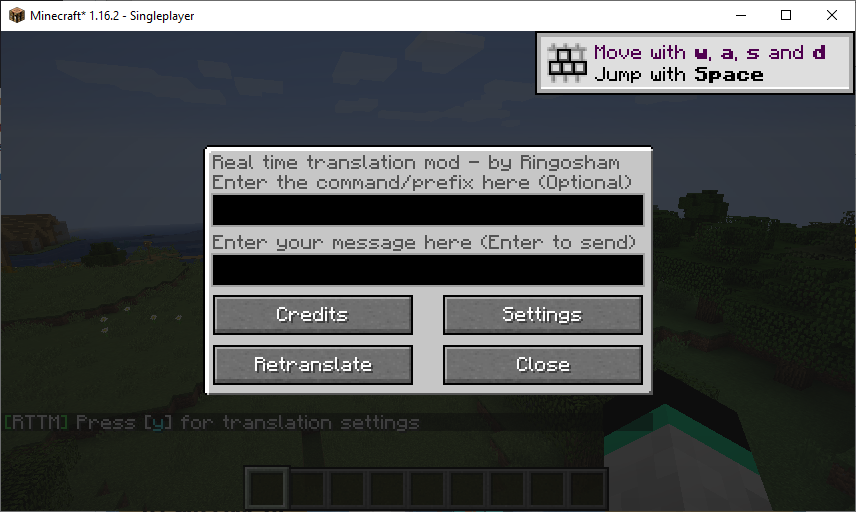 Translation gui
Versions
Files
Relations
Project Relations
More like this
Similar Mods
Suggestions use data such as tags, dependencies, dependents, descriptions, titles, and more to rank how much they overlap with this mod.
On ModDex
Community snapshot
By the numbers
Statistics
 (opens in a new tab)
Get it on
Available Platforms
On ModDex
Community snapshot
By the numbers