Does what it says on the tin
Reputation ranks
Ranks only ever go up; points can drop but your rank stays.
About reputation ranksRealClockHUD displays a real clock on your HUD.
That is what it sets out to do, and that is undeniably what it does. You get a digital clock displaying your current real-life system time as an overlay in your game. If you want it to, it can also display the real-life date, the in-game time and date, and the playtime of the current session.
However, despite the simple premise, there are some small oddities I wish the mod would improve upon.
For instance, while there is a respectable amount of configuration options, they are not compatible with the standard mod menu system of Fabric. The mod can only be configured by manually editing the config file, or using chat commands. This is strange; it is the only mod I have encountered thus far with a config that cannot be edited using the in-game mod options.
Another annoyance is that while the mod supports the 24-hour time format, it does not automatically enable it based on the locale or timezone of your system.
Lastly, while you can set RealClockHUD up to display the in-game and session time, you can not disable the real-time clock display separately to only show the in-game time or session data. This is a strange omission for something so obvious, in my opinion.
For a mod this straightforward, I wish it would have gone the extra… foot, really, to make its configuration a little more sensible.
-
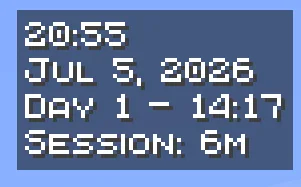 Screenshot of the clock, showing both the time (20:55), the date (Jul 5, 2026), the in-game time (Day 1 – 14:17) and the session timer (Session: 6m)