Community listing page, reviews may not be monitored by the author.
Realistic Knives (HIGH END)

No reviews yet
This client-side mod turns every Minecraft sword into a knife with inspection and hit animations, plus customizable skins you can change with K by default.

Community voices
Reviews
No reviews yet. Be the first to review this project!
Get it on
Available Platforms
About
Project Details
For authors
Embed Badge
If you're the author of this project, you can embed a live badge anywhere that supports HTML or Markdown. It updates automatically whenever ratings change.
Use HTML for any page that supports it, or Markdown for README files and Markdown-based descriptions.
Identifiers
Platform IDs
Resources
External Links
About
Description
Every Sword Is a Knife
Draw a wooden sword and you’re holding a knife. Switch to diamond or netherite and you’re still holding a knife, now with a skin you picked and animations for inspecting it and landing a hit. This client-side Minecraft mod gives the entire sword lineup a new look and puts customization one keypress away.
THIS MOD IS FOR VERY HIGH-END PCs. If you’re choosing mods for a low-end or mid-range setup, this one is designed for a higher hardware tier. Keep that in mind before adding it to your modpack.
An entire inventory of knives
You don’t have to wait until you find diamonds to see the mod. Pick up your first wooden sword and the knife look is already there. The same goes for stone, iron, gold, diamond, and netherite swords. As you move through a survival world and upgrade your gear, the mod keeps applying its knife presentation to the swords you use.
It’s a visual change on your client, so the easiest way to see it is also the most familiar. Equip a sword, look at what you’re holding, and take it into a fight.
Inspect your knife
A skin is easier to appreciate when you can actually look at it. The inspection animation gives you a moment to check out your equipped knife between fights. It’s especially handy right after changing skins, when you want to see how your choice looks in your hand.
If you’re picking a skin for a screenshot or a gameplay clip, try the inspection before you settle on one. A design you like in the customization menu might catch your eye differently when you see the whole blade in motion.
See it in action
Inspection is only half the experience. Knives also have hit animations, so you get to see your choice in action when you land a hit. Take the same knife you just inspected into an encounter and watch how it moves during combat.
That’s also a good way to choose between two skins. Inspect each one for the details, then try it against a mob to see which look you prefer while you’re actually playing.
Pick a skin with K
Press K by default to open knife customization and choose a skin. You can come back to customization whenever you want a different look.
If K is already assigned to something else in your modpack, open Minecraft’s Controls settings and rebind the customization key. Pick a key that’s comfortable to reach, especially if you like switching looks while recording or taking screenshots.
Your first minute with the mod
-
Equip a sword. A basic wooden sword is enough to see the knife appearance.
-
Press K. Open customization and pick a skin that stands out to you.
-
Inspect the knife. Take a closer look at the blade with your chosen skin equipped.
-
Land a hit. Try the knife against a mob to see its hit animation.
-
Try another look. Open customization again and compare your favorites in the same lighting.
Whether you’re starting a fresh survival world, putting together a combat clip, or picking the knife skin that best fits your character, you can see the whole idea in one quick sequence. Equip a sword, choose your skin, inspect the blade, and land your first hit.
Screenshots
Gallery
-
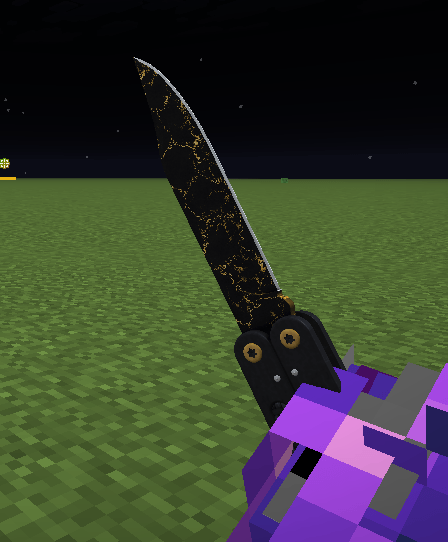 image_2026-11-03_194546375.png image_2026-11-03_194546375.png
-
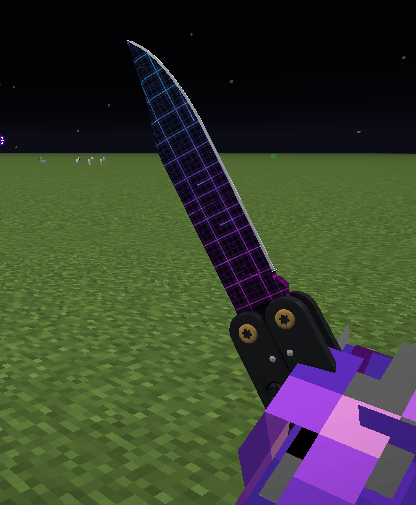 image_2026-11-03_194602991.png image_2026-11-03_194602991.png
-
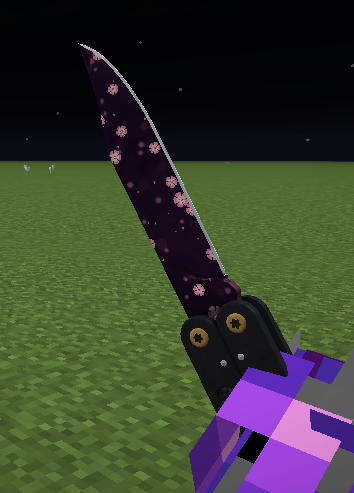 image_2026-11-03_194613421.png image_2026-11-03_194613421.png
Versions
Files
Relations
Project Relations
More like this
Similar Mods
Suggestions use data such as tags, dependencies, dependents, descriptions, titles, and more to rank how much they overlap with this mod.
On ModDex
Community snapshot
By the numbers
Statistics

Get it on
Available Platforms
On ModDex
Community snapshot
By the numbers
Statistics
Resources