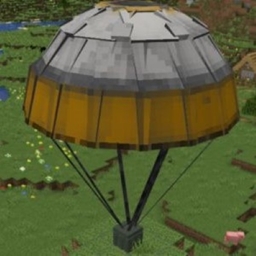
Community listing page, reviews here may not be monitored by the author.
Realistic Airdrop

No reviews yet
A mod characterized by realism and customizability for airdrops.

Community voices
Reviews
No reviews yet. Be the first to review this project!
Get it on
Available Platforms
 CurseForge
Modrinth
CurseForge
Modrinth
About
Project Details
For authors
Embed Badge
If you're the author of this project, you can embed a live badge anywhere that supports HTML or Markdown. It updates automatically whenever ratings change.
Use HTML for any page that supports it, or Markdown for README files and Markdown-based descriptions.
Identifiers
Platform IDs
Resources
External Links
About
Description
About Mods
Realistic Airdrop is a mod characterized by realism and customizability for airdrops.
Inspired by the battle royale genre, this mod aims to replicate the complete airdrop system while ensuring it fits well within the Minecraft environment.
Main Features
This mod primarily includes three elements:
1.Global Airdrop Events
Mimicking the airdrop supply systems of Dying Light and ARK: Survival Evolved, airdrop events are randomly triggered on the map. By default, every 10 in-game days, an airdrop will be deployed within approximately 100 blocks of a player. The loot in the airdrop will change over time. (Players can customize this trigger process through a configuration file).
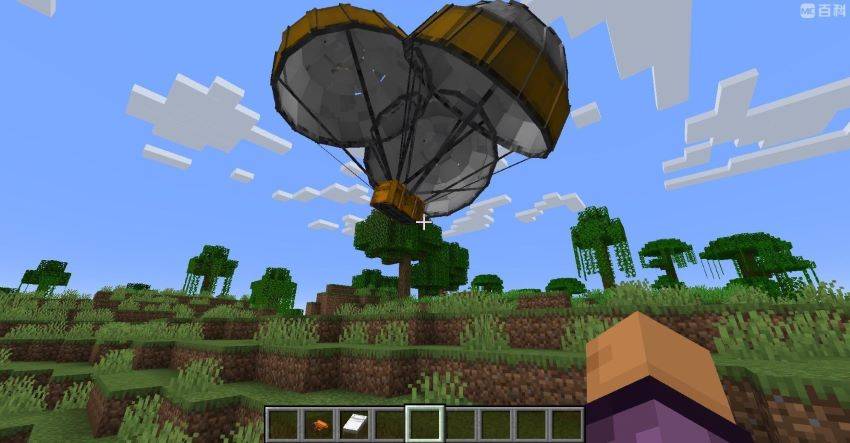
2.Players use a flare gun to summon airdrops.
This replicates the airdrop summoning process from PUBG, allowing players to customize the type of airdrop and its internal loot through resource packs.
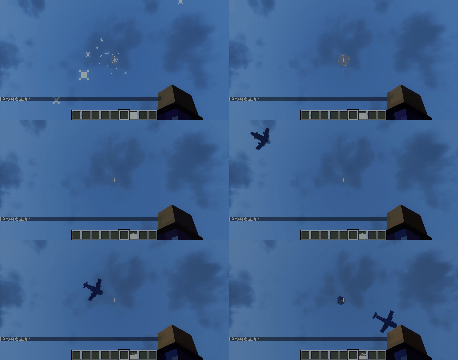
3.Airdrop Theft System
Airdrops may attract hostile mobs. If the airdrop is not found within a timely manner (default is 2 minutes), hostile mobs will spawn near the airdrop. If the airdrop remains unfound for an extended period (default is 5 minutes), it will be stolen.
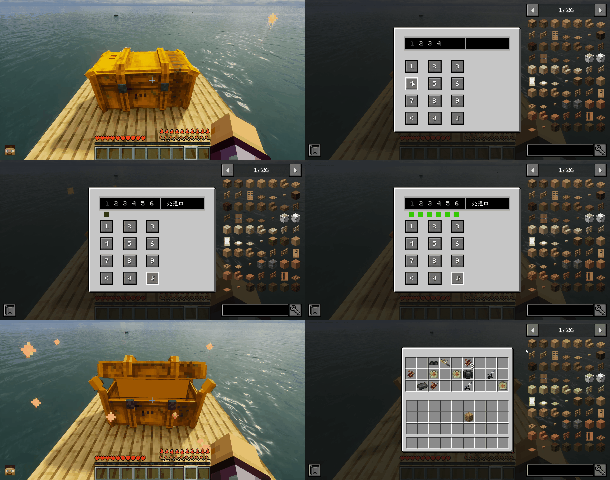
4.Airdrop Password System
This feature is a test implementation inspired by the airdrop system from Cyberpunk 2077, introduced in version 0.9.1. To enable it, the enablelock option must be turned on in the configuration file (default is off). When enabled, players will need to guess and enter the correct password to open the supply crate, which is randomly generated in survival mode. Creative mode players can directly access or change the password.
Mod Configuration
commands
Quick Player Command
/airdrop @s [blockid] [true/false]
This command can generate a specified airdrop near the player.
Parameter explanation:
-
[blockid]: The registry name of the airdrop crate. -
[true/false]: A boolean parameter, indicating whether the airdrop requires a password to unlock.
Example:
/airdrop @s dyairdrop:airdropweapon true
Summons a weapon airdrop with a password for yourself.
Quick World Airdrop Command
/airdrop world
This command can immediately simulate a global airdrop event.
Advanced Commands
Advanced commands allow you to control all parameters of the airdrop process.
They are suitable for modpack creators and server administrators.
1.Random Airdrop Command (Recommended)
/setairdrop random @r [height] [length] [driftmin] [driftmax] [blockid] [loottable] [true/false] |
This command can only be used in the overworld.
- [height]: The flight height of the airdrop plane; recommended to be above 200. A lower height may cause the plane to crash into mountains.
- [length]: The distance the plane will fly. A larger number means the plane will appear from further away. Note that if you disable force loading, this value must be less than the loading distance * 16, otherwise the plane may spawn in unloaded chunks, leading to airdrop failure.
- [drift]: The distance the plane can deviate from the target.
- [blockid]: The registered name of the airdrop box, currently only "dyairdrop" and "dyairdrop" are allowed; otherwise, it will cause animation loading errors.
- [loottable]: The name of the loot table used for the airdrop.
- [true/false]: A logical parameter indicating whether this airdrop requires a password to unlock. This parameter is new in version 0.9.1 and can only be set to true for "dyairdrop"; otherwise, default to false.
Example:
/setairdrop random @r 200 262 50 100 "dyairdrop:airdroplarge" "minecraft:chests/bastion_bridge" false2.Free Airdrop Command
/setairdrop free [x] [z] [height] [length] [blockid] [loottable] [true/false]
- [x]: The expected landing point's x-coordinate; must be a number.
- [z]: The expected landing point's z-coordinate; must be a number.
- [height]: The flight height of the airdrop plane; recommended to be above 200.
- [length]: The distance the plane will fly; larger numbers mean the plane will appear from further away. Note that if you disable force loading, this value must be less than loading distance * 16 to prevent spawning in unloaded chunks.
- [blockid]: The registered name of the airdrop box.
- [loottable]: The name of the loot table used for the airdrop.
- [true/false]: A logical parameter indicating whether this airdrop requires a password to unlock. This parameter is new in version 0.9.1 and can only be set to true for "dyairdrop"; otherwise, default to false
Example:
/setairdrop free 100 100 200 262 "dyairdrop:airdropsmall""minecraft:chests/bastion_bridge" false
This command drops an unlocked small airdrop with a loot table of Bastion Bridge at the coordinates [100, 100], with a plane height of 200 meters and a flight distance of 262 meters.
Performance Related
- Since the airdrop process involves entity events, it’s essential to ensure that all relevant chunks are force-loaded. By default, this mod will force-load the corresponding chunks, but this may occasionally disrupt chunks that have already been force-loaded using /forceload, which generally affects server players (as single-player games do not use force loading). Therefore, when using this mod on a server with established force-loaded chunks, please disable the force-load function in the performance section of the configuration file and ensure that the plane's flight length is strictly within loaded chunks.
- If you are using optimization mods that may reduce entity rendering distances, such as Rubidium, please note that this may make the airdrop invisible and should be turned off.
Author's Note
About Versions and Future Directions:
- The official version 1.0.0 has now been released!
In addition to incremental updates, this version brings major improvements in the richness of configuration files and the convenience of commands. A configuration file tutorial has also been written to address the frequently asked questions raised earlier. - Currently, this mod only supports versions 1.20.1 and 1.19.2, with plans to be ported to higher versions as well as 1.18.2 in the future.
- The mod strongly encourages collaboration and crossovers with other mods, and also welcomes community efforts to port it to versions below 1.18.2.
- Looking ahead, this mod will continue to focus on lightweight design and high realism, bringing more refined processes, more realistic models, and a wider variety of fun airdrops—so stay tuned!
- This mod has already integrated with Zombie Survival Toolkit, and a crossover version with Eternal Gun Workshop: Zero will be released in the near future.
About Mods Realistic Airdrop is a mod characterized by realism and customizability for airdrops.
Inspired by the battle royale genre, this mod aims to replicate the complete airdrop system while ensuring it fits well within the Minecraft environment.
Main Features This mod primarily includes three elements:
1.Global Airdrop Events
Mimicking the airdrop supply systems of Dying Light and ARK: Survival Evolved, airdrop events are randomly triggered on the map. By default, every 10 in-game days, an airdrop will be deployed within approximately 100 blocks of a player. The loot in the airdrop will change over time. (Players can customize this trigger process through a configuration file).
2.Players use a flare gun to summon airdrops. This replicates the airdrop summoning process from PUBG, allowing players to customize the type of airdrop and its internal loot through resource packs.
3.Airdrop Theft System Airdrops may attract hostile mobs. If the airdrop is not found within a timely manner (default is 2 minutes), hostile mobs will spawn near the airdrop. If the airdrop remains unfound for an extended period (default is 5 minutes), it will be stolen.
4.Airdrop Password System This feature is a test implementation inspired by the airdrop system from Cyberpunk 2077, introduced in version 0.9.1. To enable it, the enablelock option must be turned on in the configuration file (default is off). When enabled, players will need to guess and enter the correct password to open the supply crate, which is randomly generated in survival mode. Creative mode players can directly access or change the password.
Mod Configuration commands Quick Player Command
/airdrop @s [blockid] [true/false] This command can generate a specified airdrop near the player.
Parameter explanation:
[blockid]: The registry name of the airdrop crate.
[true/false]: A boolean parameter, indicating whether the airdrop requires a password to unlock.
Example:
/airdrop @s dyairdrop:airdropweapon true Summons a weapon airdrop with a password for yourself.
Quick World Airdrop Command
/airdrop world This command can immediately simulate a global airdrop event.
Advanced Commands Advanced commands allow you to control all parameters of the airdrop process. They are suitable for modpack creators and server administrators.
1.Random Airdrop Command (Recommended)
/setairdrop random @r [height] [length] [driftmin] [driftmax] [blockid] [loottable] [true/false] This command can only be used in the overworld.
[height]: The flight height of the airdrop plane; recommended to be above 200. A lower height may cause the plane to crash into mountains. [length]: The distance the plane will fly. A larger number means the plane will appear from further away. Note that if you disable force loading, this value must be less than the loading distance * 16, otherwise the plane may spawn in unloaded chunks, leading to airdrop failure. [drift]: The distance the plane can deviate from the target. [blockid]: The registered name of the airdrop box, currently only "dyairdrop" and "dyairdrop" are allowed; otherwise, it will cause animation loading errors. [loottable]: The name of the loot table used for the airdrop. [true/false]: A logical parameter indicating whether this airdrop requires a password to unlock. This parameter is new in version 0.9.1 and can only be set to true for "dyairdrop"; otherwise, default to false. Example:
/setairdrop random @r 200 262 50 100 "dyairdrop:airdroplarge" "minecraft:chests/bastion_bridge" false This command randomly releases an unlocked large airdrop with a loot table of Bastion Bridge at a distance of 50-100 blocks from a random player, with a plane height of 200 meters and an initial flight distance of 262 meters. 2.Free Airdrop Command
/setairdrop free [x] [z] [height] [length] [blockid] [loottable] [true/false] [x]: The expected landing point's x-coordinate; must be a number. [z]: The expected landing point's z-coordinate; must be a number. [height]: The flight height of the airdrop plane; recommended to be above 200. [length]: The distance the plane will fly; larger numbers mean the plane will appear from further away. Note that if you disable force loading, this value must be less than loading distance * 16 to prevent spawning in unloaded chunks. [blockid]: The registered name of the airdrop box. [loottable]: The name of the loot table used for the airdrop. [true/false]: A logical parameter indicating whether this airdrop requires a password to unlock. This parameter is new in version 0.9.1 and can only be set to true for "dyairdrop"; otherwise, default to false Example:
/setairdrop free 100 100 200 262 "dyairdrop:airdropsmall""minecraft:chests/bastion_bridge" false This command drops an unlocked small airdrop with a loot table of Bastion Bridge at the coordinates [100, 100], with a plane height of 200 meters and a flight distance of 262 meters.
Performance Related Since the airdrop process involves entity events, it’s essential to ensure that all relevant chunks are force-loaded. By default, this mod will force-load the corresponding chunks, but this may occasionally disrupt chunks that have already been force-loaded using /forceload, which generally affects server players (as single-player games do not use force loading). Therefore, when using this mod on a server with established force-loaded chunks, please disable the force-load function in the performance section of the configuration file and ensure that the plane's flight length is strictly within loaded chunks. If you are using optimization mods that may reduce entity rendering distances, such as Rubidium, please note that this may make the airdrop invisible and should be turned off. Author's Note About Versions and Future Directions:
The official version 1.0.0 has now been released! In addition to incremental updates, this version brings major improvements in the richness of configuration files and the convenience of commands. A configuration file tutorial has also been written to address the frequently asked questions raised earlier. Currently, this mod only supports versions 1.20.1 and 1.19.2, with plans to be ported to higher versions as well as 1.18.2 in the future. The mod strongly encourages collaboration and crossovers with other mods, and also welcomes community efforts to port it to versions below 1.18.2. Looking ahead, this mod will continue to focus on lightweight design and high realism, bringing more refined processes, more realistic models, and a wider variety of fun airdrops—so stay tuned! This mod has already integrated with Zombie Survival Toolkit, and a crossover version with Eternal Gun Workshop: Zero will be released in the near future. The Realistic Airdrop Team
Screenshots
Gallery
-
 image ingame
 -
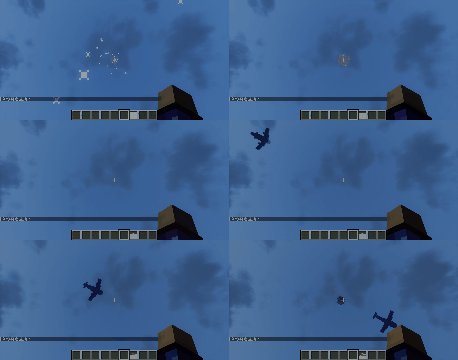 This replicates the airdrop summoning process from PUBG
Versions
Files
Relations
Project Relations
More like this
Similar Mods
Suggestions use data such as tags, dependencies, dependents, descriptions, titles, and more to rank how much they overlap with this mod.
On ModDex
Community snapshot
By the numbers
Statistics
 (opens in a new tab)
Get it on
Available Platforms
CurseForge
Modrinth
On ModDex
Community snapshot
By the numbers
Statistics
Resources