
Community listing page, reviews here may not be monitored by the author.
Recipe Crafter


No reviews yet
Adds a Recipe Crafter block for visually authoring Minecraft recipes that save to an editable json file!
Community voices
Reviews
No reviews yet. Be the first to review this project!
Get it on
Available Platforms
Compatibility
Supported Environments
Must be installed on both the client and the server.
About
Project Details
For authors
Embed Badge
If you're the author of this project, you can embed a live badge anywhere that supports HTML or Markdown. It updates automatically whenever ratings change.
Use HTML for any page that supports it, or Markdown for README files and Markdown-based descriptions.
Identifiers
Platform IDs
About
Description
Recipe Crafter
A mod that lets modpackers and map-makers author Minecraft recipes visually, inside a workbench block — no KubeJS, datapack JSON, or external tools required. Recipes are written to a single hand-editable config file and go live instantly.
Overview
Place a Recipe Crafter block, open it, and build a recipe by dropping items
into a familiar workbench grid. Pick the recipe family from a dropdown, set the
result, fill in an id, and click Save — the recipe is appended to
config/recipecrafter/recipes.json5 and becomes craftable immediately (no
restart). You can also Export the generated JSON to your clipboard for use
in datapacks/KubeJS, or Load and edit recipes that already exist in the game.
The Recipe Crafter Block
- A standalone block + item (
recipecrafter:recipe_crafter) with a custom Blockbench model. - Creative-only: ships with no crafting recipe; appears in the Redstone creative tab, right after the Crafting Table.
- Block entity inventory (13 slots) that persists its contents across open/close and world reloads, and scatters its items like a chest when broken.
Supported Recipe Types
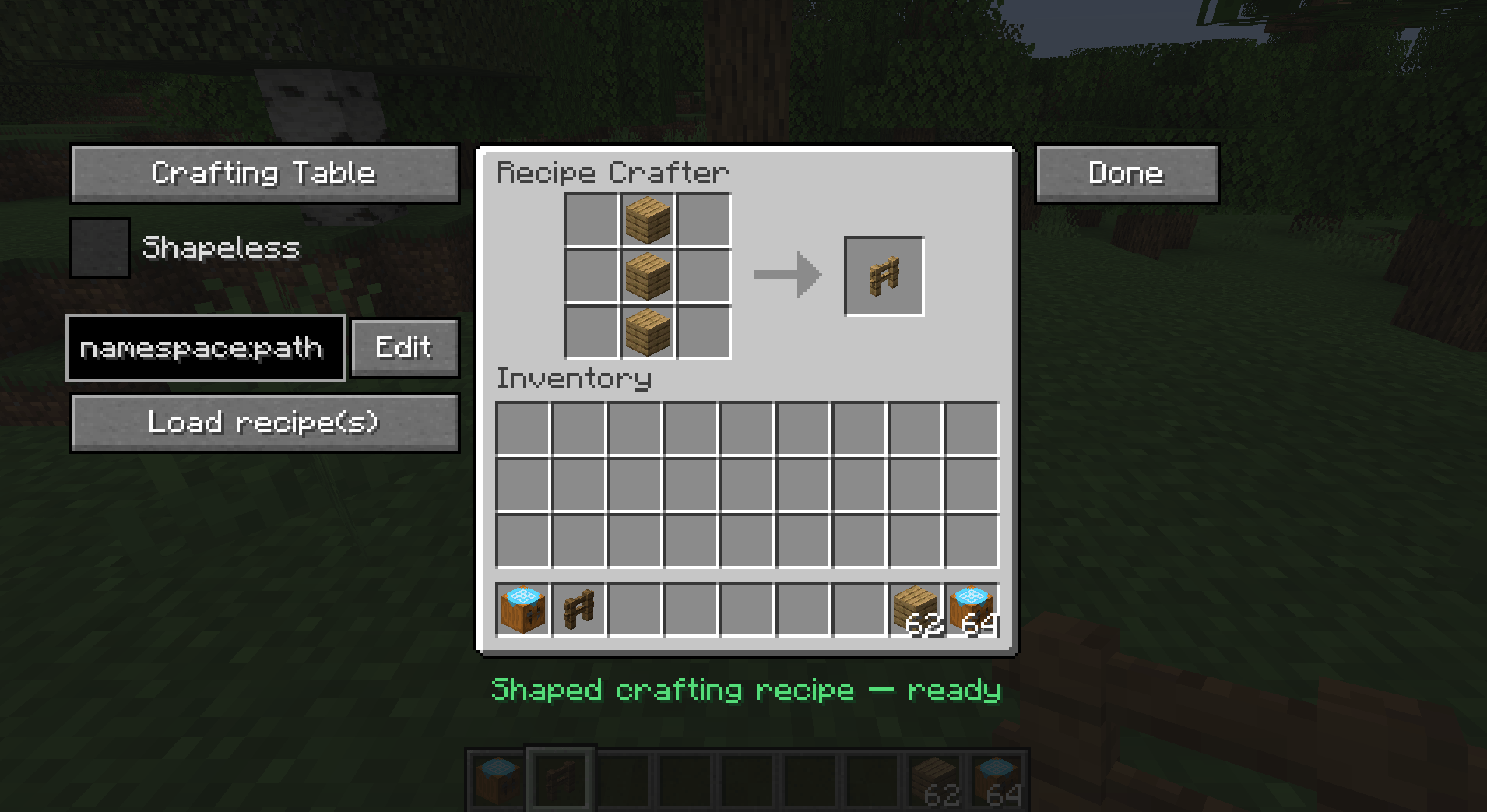
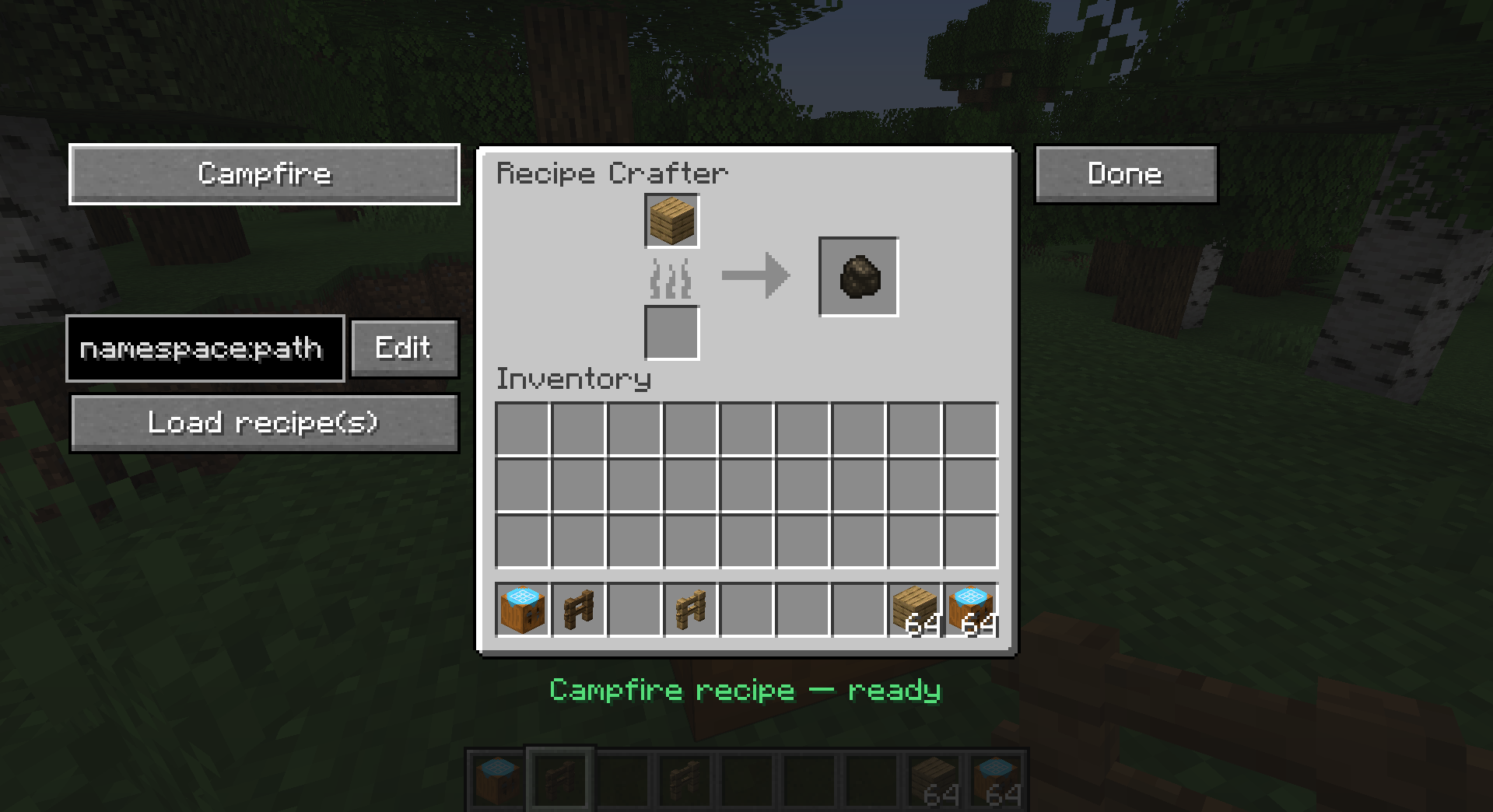
Selected from a dropdown; the GUI swaps to the matching vanilla workbench texture and slot layout for each:
| Type | Vanilla recipe | Layout |
|---|---|---|
| Crafting Table | crafting_shaped / crafting_shapeless |
3×3 grid + result |
| Furnace | smelting |
single input + result |
| Blast Furnace | blasting |
single input + result |
| Smoker | smoking |
single input + result |
| Campfire | campfire_cooking |
single input + result (smoker panel) |
| Stonecutter | stonecutting |
single input + result |
| Smithing Table | smithing_transform |
template + base + addition + result |
- Shapeless toggle is available for crafting recipes (hidden for other types).
- Shaped crafting auto-computes the minimal pattern bounding box and a compact key map (so a 1×1 item in the corner becomes a 1×1 recipe, not 3×3).
- Cooking recipes capture cook time (with sensible per-type defaults: 200 / 100 / 600 ticks) and experience.
- Stonecutting carries the output count.
- Smithing requires all three pieces (template, base, addition).
The Editor GUI
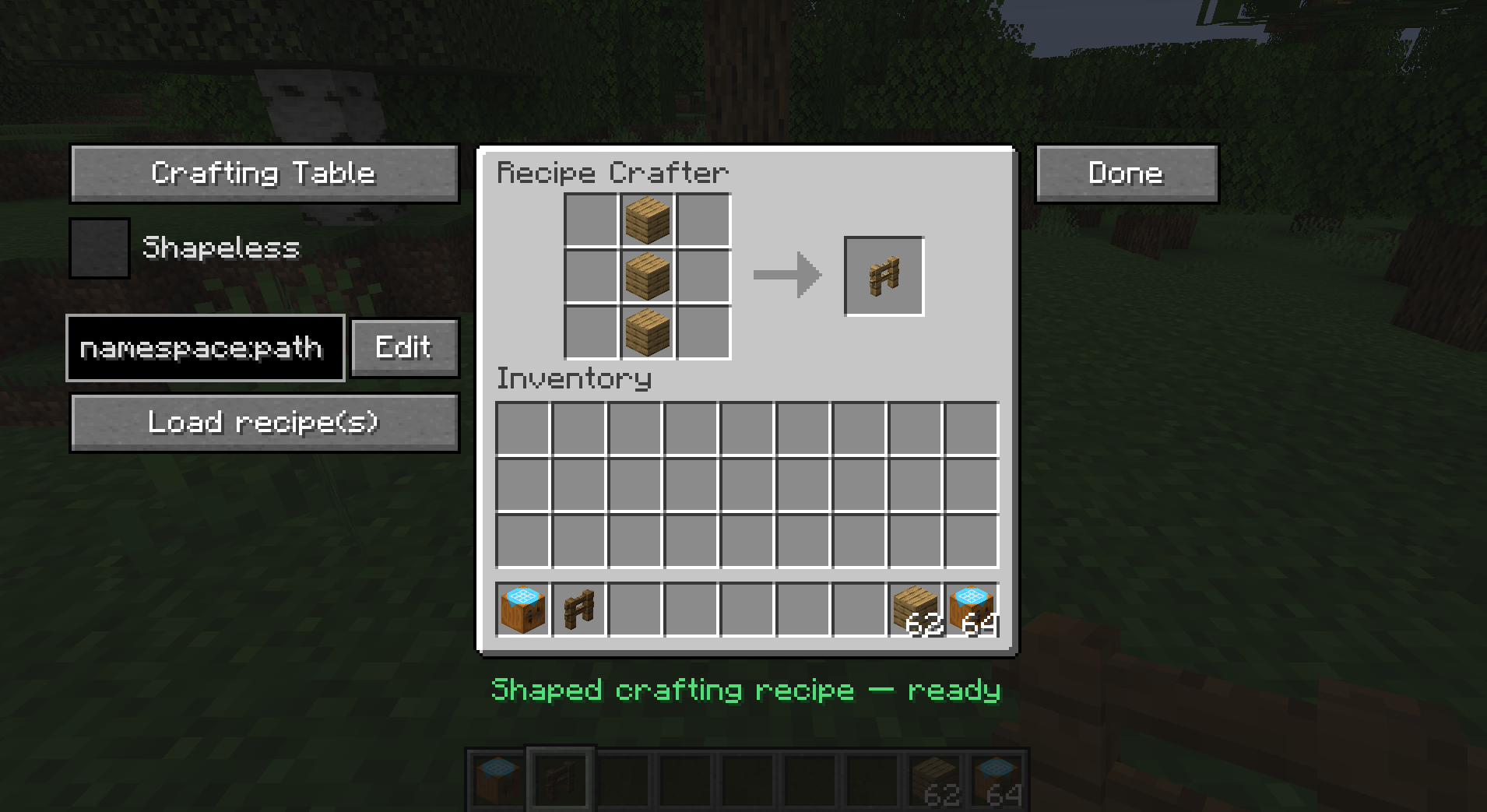
Left panel
- Type dropdown — switch recipe family; the panel texture and slots update live.
- Shapeless checkbox — crafting only.
- Edit field + "Edit" button — type a recipe id (
namespace:path) to load an existing registered recipe back into the grid for modification. - "Load recipe(s)" button — finds recipes that match the current contents.
Center
- The workbench grid / inputs and a result preview slot you drag the output into.
Right
- Done — opens the confirm screen.
Confirm / Save Screen
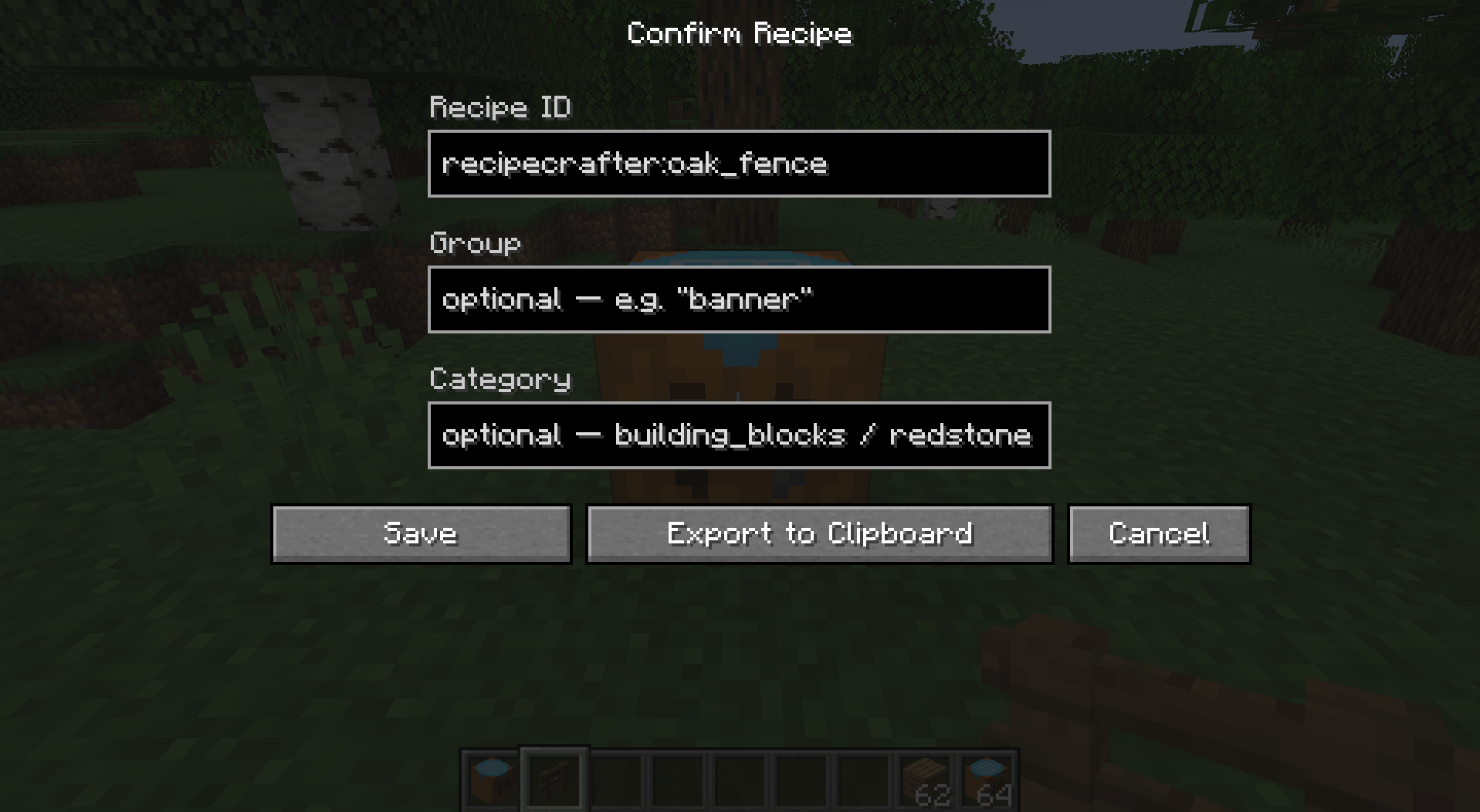
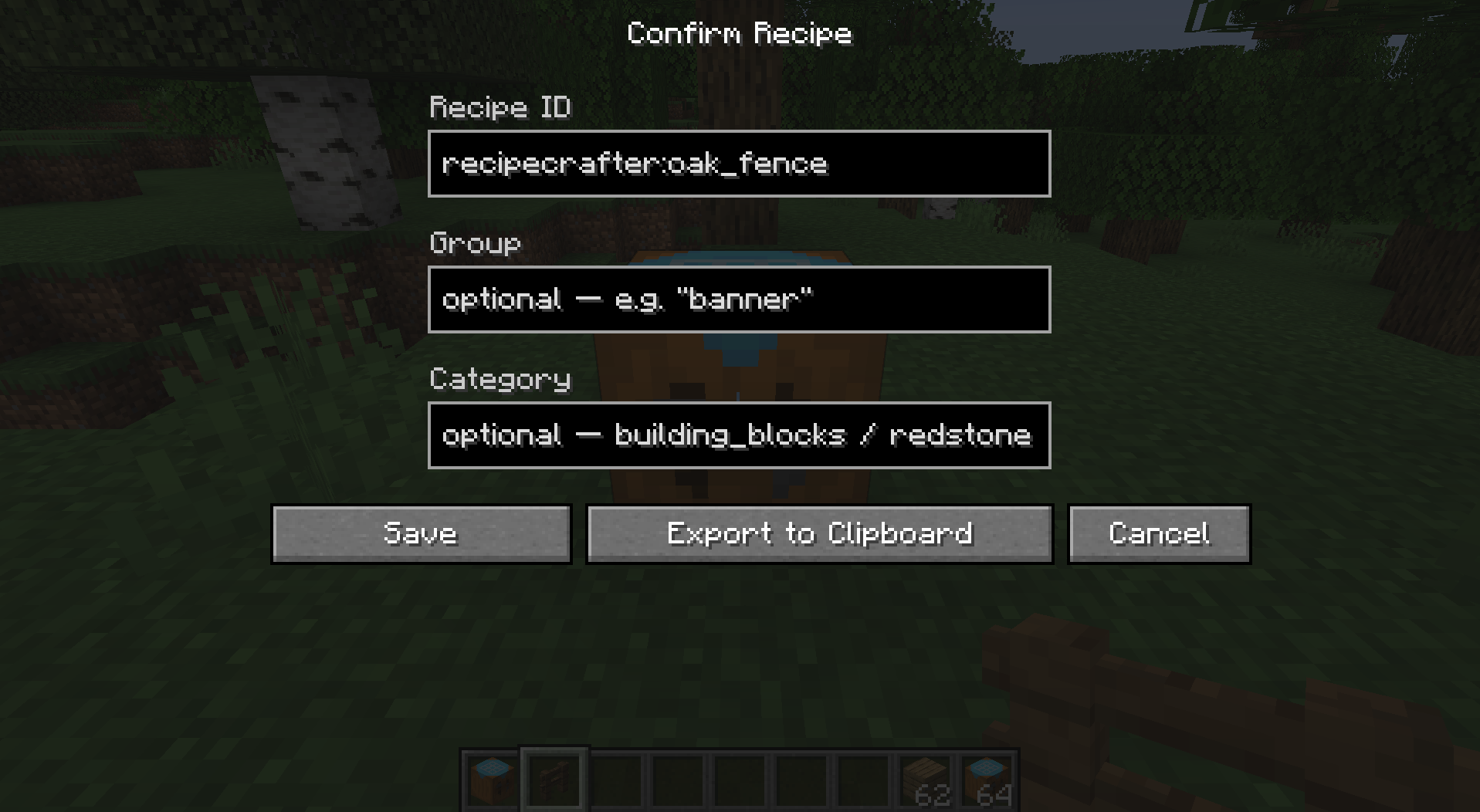
Opened via Done. Fields:
- Recipe ID — prefilled as
recipecrafter:<result item>; editable. - Group — optional; placeholder hints + Tab-to-autofill from groups that already exist in the game.
- Category — shown only for crafting/cooking (the types that use it); offers the valid vanilla categories with Tab-autofill.
- Cook time (ticks) and XP — shown only for cooking recipes.
Actions:
- Save — writes the recipe to
recipes.json5, refreshes recipes, and copies the id to your clipboard. - Export to Clipboard — builds the recipe JSON and copies it (does not save).
- Cancel — returns to the editor with all contents preserved.
After a successful Save or Export, the crafter wipes itself clean (contents returned to you, type reset) so the next recipe starts fresh. Cancel leaves everything untouched.
Quality-of-life: commit buttons are greyed until the id is filled and the recipe is valid, and the screen fields slide and fade in when it opens.
Loading & Looking Up Existing Recipes
- Edit by id decomposes a registered recipe back into the crafter's grid — supports shaped, shapeless, all cooking types, stonecutting, and smithing-transform recipes.
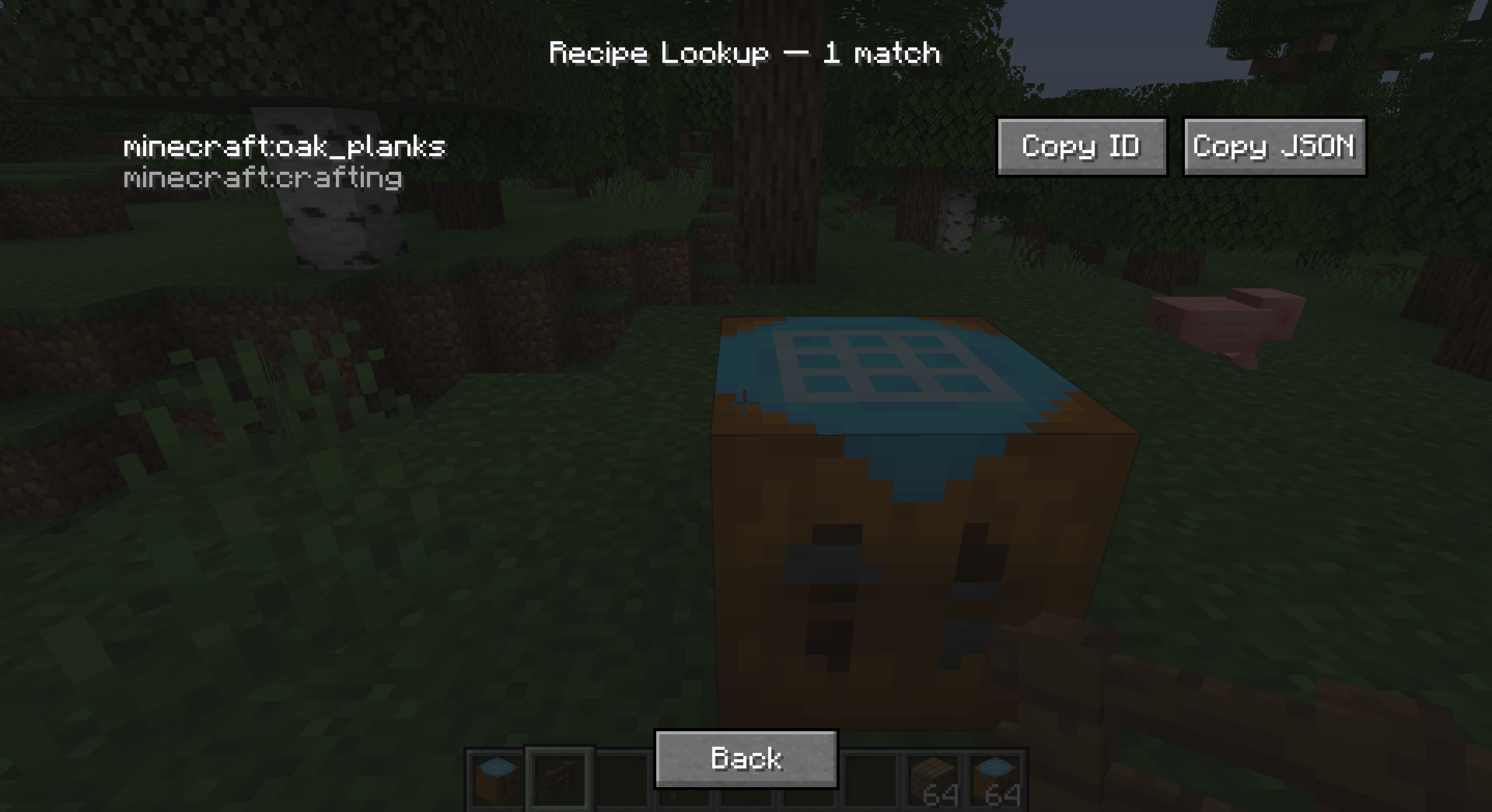
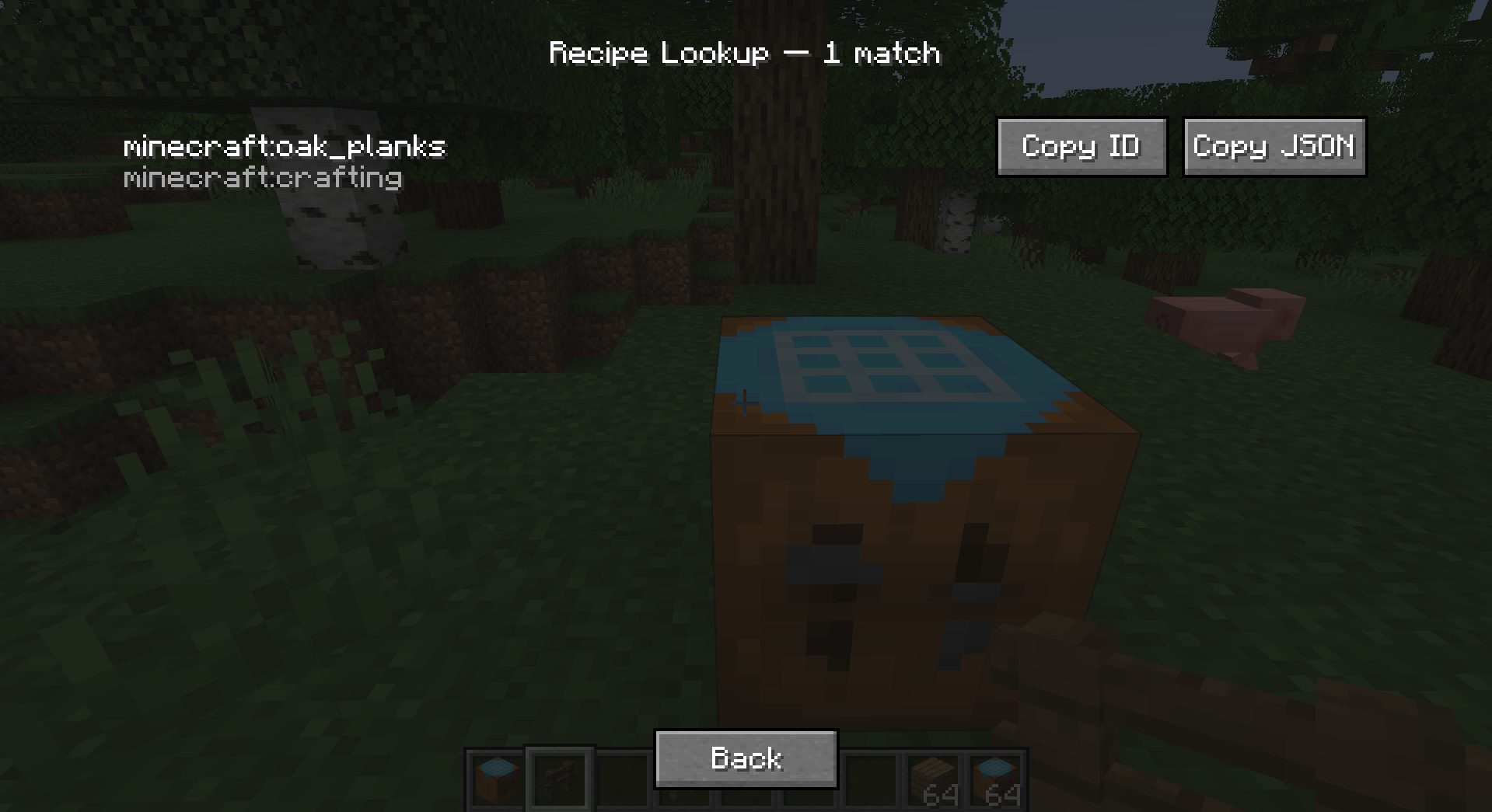
- Lookup searches for recipes matching the current contents:
- If the result slot has an item → every recipe that produces that item.
- Otherwise, if the grid is filled → the first matching crafting recipe.
- Returns up to 20 matches in a scrollable list, each with its id and type and Copy ID / Copy JSON buttons.
Config File: recipes.json5
Located at config/recipecrafter/recipes.json5.
- Hand-editable at any time. Each entry is a normal vanilla recipe JSON
augmented with a unique
"id". - Lenient parsing:
//comments and trailing commas are tolerated. - Comment- and formatting-preserving saves: new recipes are spliced into the array rather than rewriting the file, so your comments and hand-formatting survive every save.
- Edit by hand, then
/recipecrafter reload(or relaunch) to apply.
Example shape:
{
  "recipes": [
    { "id": "recipecrafter:my_recipe", "type": "minecraft:crafting_shaped", ... }
  ]
}
Recipe Crafter
A mod that lets modpackers and map-makers author Minecraft recipes visually, inside a workbench block — no KubeJS, datapack JSON, or external tools required. Recipes are written to a single hand-editable config file and go live instantly.
Overview
Place a Recipe Crafter block, open it, and build a recipe by dropping items
into a familiar workbench grid. Pick the recipe family from a dropdown, set the
result, fill in an id, and click Save — the recipe is appended to
config/recipecrafter/recipes.json5 and becomes craftable immediately (no
restart). You can also Export the generated JSON to your clipboard for use
in datapacks/KubeJS, or Load and edit recipes that already exist in the game.
The Recipe Crafter Block
- A standalone block + item (
recipecrafter:recipe_crafter) with a custom Blockbench model. - Creative-only: ships with no crafting recipe; appears in the Redstone creative tab, right after the Crafting Table.
- Block entity inventory (13 slots) that persists its contents across open/close and world reloads, and scatters its items like a chest when broken.
Supported Recipe Types
Selected from a dropdown; the GUI swaps to the matching vanilla workbench texture and slot layout for each:
| Type | Vanilla recipe | Layout |
|---|---|---|
| Crafting Table | crafting_shaped / crafting_shapeless |
3×3 grid + result |
| Furnace | smelting |
single input + result |
| Blast Furnace | blasting |
single input + result |
| Smoker | smoking |
single input + result |
| Campfire | campfire_cooking |
single input + result (smoker panel) |
| Stonecutter | stonecutting |
single input + result |
| Smithing Table | smithing_transform |
template + base + addition + result |
- Shapeless toggle is available for crafting recipes (hidden for other types).
- Shaped crafting auto-computes the minimal pattern bounding box and a compact key map (so a 1×1 item in the corner becomes a 1×1 recipe, not 3×3).
- Cooking recipes capture cook time (with sensible per-type defaults: 200 / 100 / 600 ticks) and experience.
- Stonecutting carries the output count.
- Smithing requires all three pieces (template, base, addition).
The Editor GUI
Left panel
- Type dropdown — switch recipe family; the panel texture and slots update live.
- Shapeless checkbox — crafting only.
- Edit field + "Edit" button — type a recipe id (
namespace:path) to load an existing registered recipe back into the grid for modification. - "Load recipe(s)" button — finds recipes that match the current contents.
Center
- The workbench grid / inputs and a result preview slot you drag the output into.
Right
- Done — opens the confirm screen.
Confirm / Save Screen
Opened via Done. Fields:
- Recipe ID — prefilled as
recipecrafter:<result item>; editable. - Group — optional; placeholder hints + Tab-to-autofill from groups that already exist in the game.
- Category — shown only for crafting/cooking (the types that use it); offers the valid vanilla categories with Tab-autofill.
- Cook time (ticks) and XP — shown only for cooking recipes.
Actions:
- Save — writes the recipe to
recipes.json5, refreshes recipes, and copies the id to your clipboard. - Export to Clipboard — builds the recipe JSON and copies it (does not save).
- Cancel — returns to the editor with all contents preserved.
After a successful Save or Export, the crafter wipes itself clean (contents returned to you, type reset) so the next recipe starts fresh. Cancel leaves everything untouched.
Quality-of-life: commit buttons are greyed until the id is filled and the recipe is valid, and the screen fields slide and fade in when it opens.
Loading & Looking Up Existing Recipes
- Edit by id decomposes a registered recipe back into the crafter's grid — supports shaped, shapeless, all cooking types, stonecutting, and smithing-transform recipes.
- Lookup searches for recipes matching the current contents:
- If the result slot has an item → every recipe that produces that item.
- Otherwise, if the grid is filled → the first matching crafting recipe.
- Returns up to 20 matches in a scrollable list, each with its id and type and Copy ID / Copy JSON buttons.
Config File: recipes.json5
Located at config/recipecrafter/recipes.json5.
- Hand-editable at any time. Each entry is a normal vanilla recipe JSON
augmented with a unique
"id". - Lenient parsing:
//comments and trailing commas are tolerated. - Comment- and formatting-preserving saves: new recipes are spliced into the array rather than rewriting the file, so your comments and hand-formatting survive every save.
- Edit by hand, then
/recipecrafter reload(or relaunch) to apply.
Example shape:
{
  "recipes": [
    { "id": "recipecrafter:my_recipe", "type": "minecraft:crafting_shaped", ... }
  ]
}
Screenshots
Gallery
-
 Screenshot 2026-06-12 011117.png Screenshot 2026-06-12 011117.png
 -
 Screenshot 2026-06-12 011132.png Screenshot 2026-06-12 011132.png
 -
 Screenshot 2026-06-12 011156.png Screenshot 2026-06-12 011156.png
-
 GUI other
 -
 Confirm Screen
 -
 GUI
GUI -
 Load screen
Versions
Files
Relations
Project Relations
More like this
Similar Mods
Suggestions use data such as tags, dependencies, dependents, descriptions, titles, and more to rank how much they overlap with this mod.
On ModDex
Community snapshot
By the numbers
Statistics
Want to reach Minecraft players?
We're looking for a server hosting partner to feature here and other parts of the site. Interested? Send us a message!
Get in touchGet it on
Available Platforms
On ModDex
Community snapshot
By the numbers